
create-stackforge-cli
v1.3.0
Published
Modern fullstack project scaffolding CLI
Downloads
816

Maintainers
 mkhalfadel
Readme
🚀 StackForge



Demo
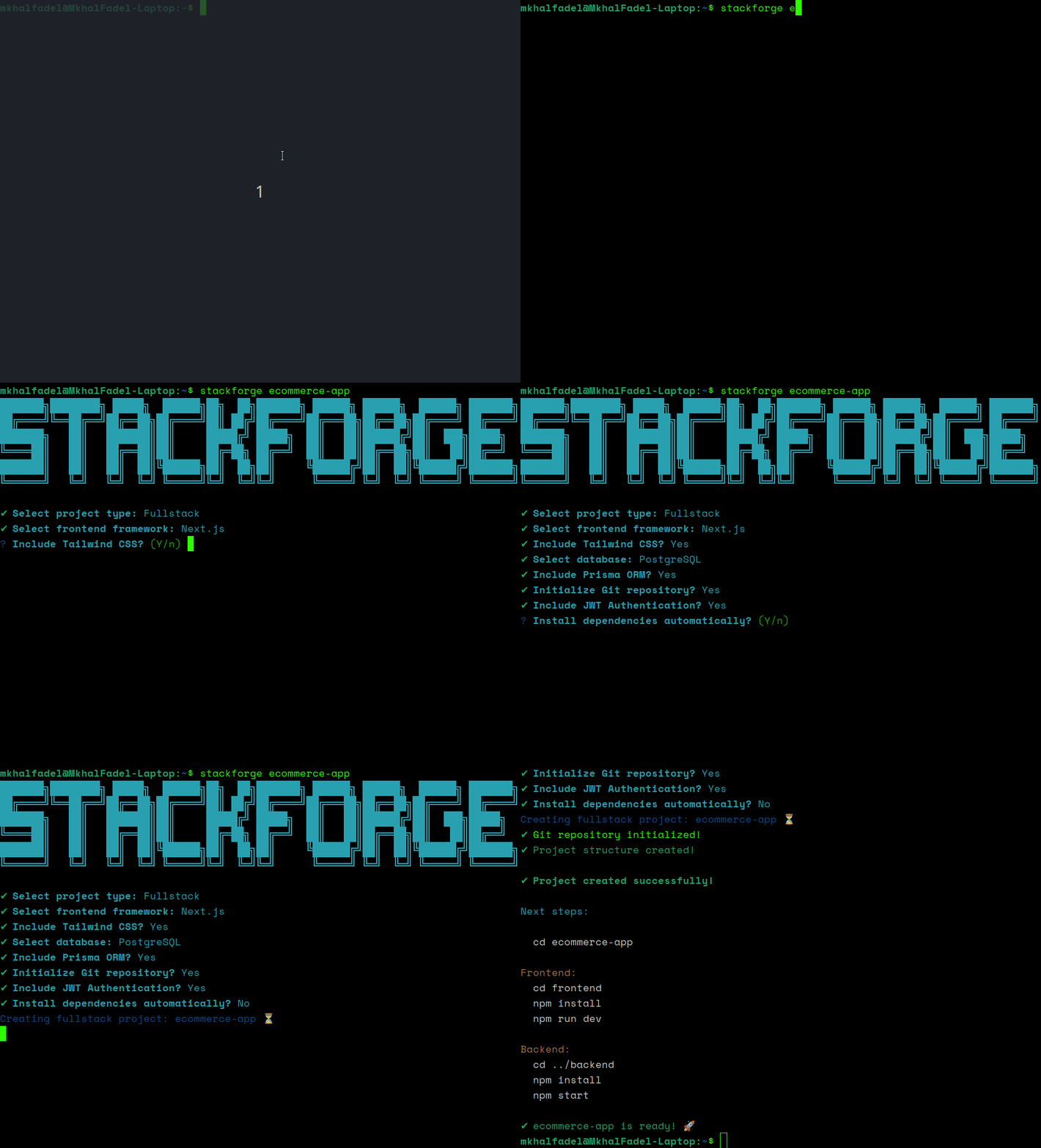
A modern fullstack project scaffolding CLI built with Node.js.
StackForge automates the setup of frontend, backend, and fullstack applications by generating production-ready project structures with optional features like authentication, database support, Tailwind CSS, Prisma ORM, and more.
Designed to improve developer workflow and eliminate repetitive project setup tasks.
✨ Features
Frontend Support
- Vanilla HTML/CSS/JS
- React
- Next.js
Backend Support
- Express.js
- Environment configuration
- Modular architecture
Fullstack Support
Generate:
frontend/
backend/
with independent setups.
⚡ Optional Features
- JWT Authentication
- Prisma ORM
- Swagger/OpenAPI documentation setup for backend and fullstack projects
- MySQL Support
- PostgreSQL Support
- Tailwind CSS
- Git initialization
- ESLint setup
- Prettier setup
- Automatic dependency installation
🧠 Project Architecture
StackForge uses a modular feature-based architecture:
src/
├── config/
├── features/
├── templates/
├── utils/
This makes the project scalable and easy to extend with future integrations.
📦 Installation
Install from npm
npm install -g create-stackforge-cliVerify installation:
stackforge --helpInstall from Source
Clone the repository:
git clone https://github.com/MkhalFadel/stackforge.gitEnter the project directory:
cd stackforgeInstall dependencies:
npm installLink the CLI globally:
npm link🚀 Usage
Run:
stackforge my-appYou will then be prompted to select:
- project type
- frontend framework
- database
- authentication
- Tailwind CSS
- Prisma ORM
- dependency installation
📁 Example Generated Structure
Fullstack Project
my-app/
├── frontend/
│   ├── src/
│   ├── public/
│   └── package.json
│
└── backend/
    ├── controllers/
    ├── routes/
    ├── middleware/
    ├── prisma/
    ├── .env
    └── package.json
🔐 Authentication
When enabled, StackForge automatically generates:
POST /api/auth/register
POST /api/auth/login
GET  /api/auth/profile
using:
- JWT
- bcrypt
- Express middleware
🎨 Tailwind CSS
Tailwind CSS can be automatically configured for:
- React
- Next.js
StackForge installs and configures Tailwind automatically during project generation.
🗄️ Database Support
Supported databases:
- PostgreSQL
- MySQL
Optional Prisma ORM support is also available.
🛠️ Technologies Used
- Node.js
- Express.js
- Inquirer
- Chalk
- Ora
- Execa
- fs-extra
🎯 Goals
StackForge was built to:
- speed up project initialization
- improve developer experience
- reduce repetitive setup work
- provide scalable starter architectures
🚧 Future Plans
Planned features include:
- Docker support
- Swagger integration
- Testing setup
- ESLint/Prettier automation
- Socket.IO integration
- Next.js standalone fullstack mode
- Authentication improvements
- Additional frontend frameworks
🤝 Contributing
Contributions, issues, and feature requests are welcome.
Feel free to fork the project and submit pull requests.
📄 License
This project is licensed under the MIT License. See the LICENSE file for details.
👨💻 Author
Built by Mkhal Fadel. GitHub: https://github.com/MkhalFadel