
crumbjar
v1.0.0
Published
Typed cookies for the browser and the server: read, write and delete with JSON values, readable expiry like '7d', safe defaults, consent checks and change events. Zero dependencies.

Maintainers
 ckgiri
Readme
crumbjar
Read, write and delete cookies in the browser and on the server. Objects and numbers are saved as JSON, and TypeScript types are included.



crumbjar is a small cookie library. You use the same functions in the browser and on the server:
- In the browser, it reads and writes
document.cookie. - On the server (Node.js, Next.js, Express and edge runtimes like Cloudflare Workers), it reads the
Cookieheader. It also builds theSet-Cookieheaders you send back.
Objects and numbers are saved as JSON (a common text format for data). When you read them, they come back with the right type. crumbjar can replace js-cookie, and it can read cookies that js-cookie wrote.
Examples
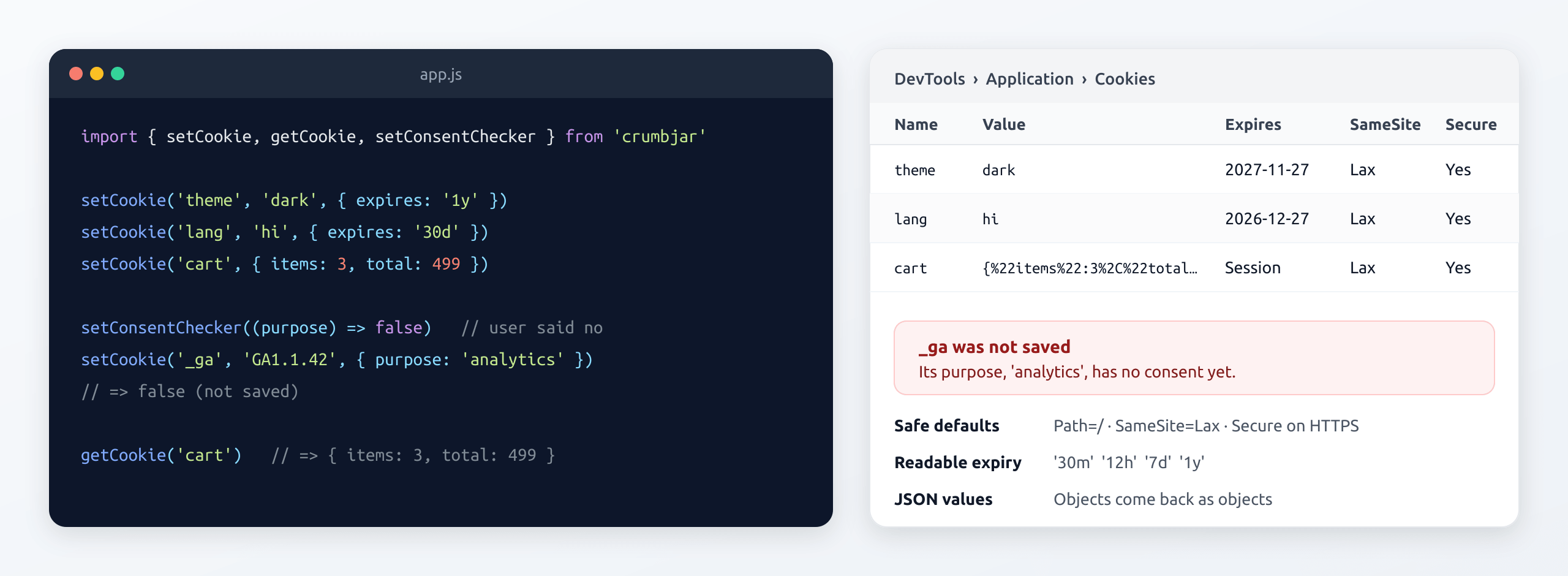
Your code, and the cookies the browser saves. The analytics cookie is not saved, because the user has not agreed to it:
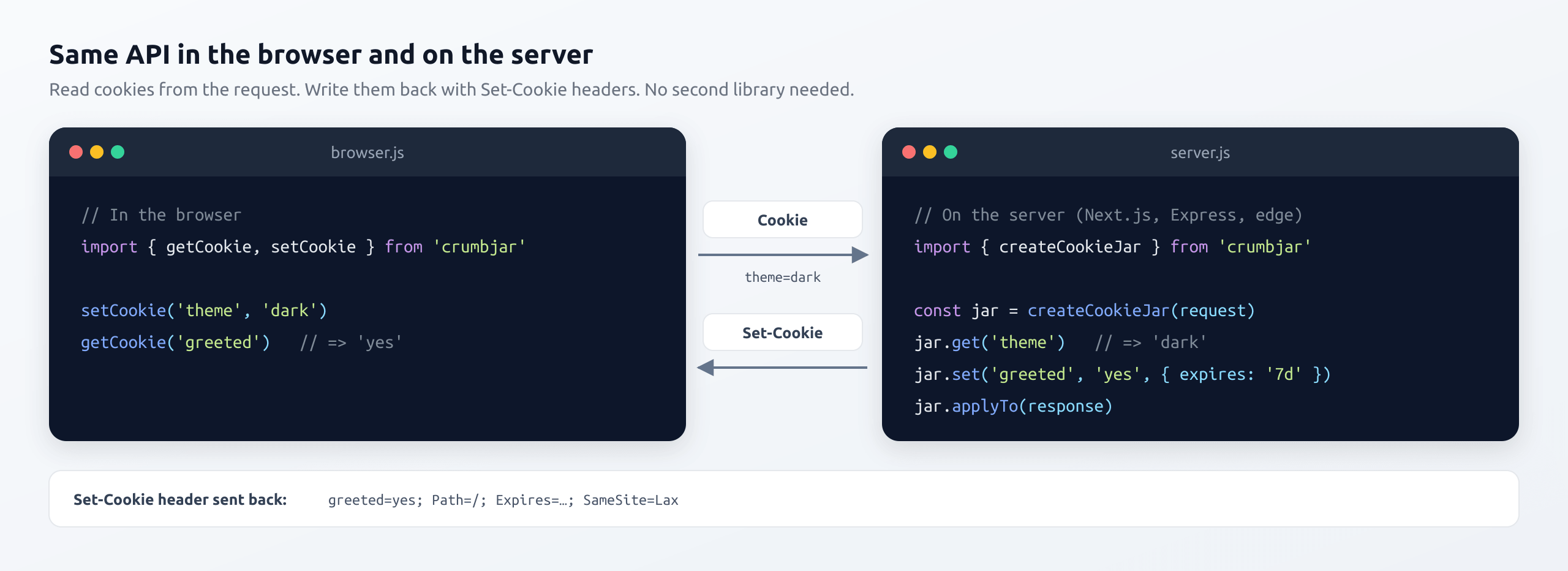
The same API in the browser and on the server:
Features
- Browser and server. Use
getCookie()andsetCookie()in the browser. UsecreateCookieJar(request)on the server. Both have the same methods. - JSON values. Objects, arrays, numbers and booleans are saved as JSON. They come back with the same type. Strings stay strings.
- Typed.
getCookie<User>('user')returnsUser | undefined. Types are built in. - Easy expiry times. Write
expires: '7d','12h','30m','2w'or'1y'. A number of days or aDatealso works. - Safe defaults.
path: '/',sameSite: 'Lax', andsecure: trueon HTTPS pages. - Clear errors. crumbjar throws a
CookieErrorwith acodefor: names that are not allowed, broken__Host-and__Secure-rules,SameSite=NonewithoutSecure, and cookies over 4096 bytes. - Change events.
onCookieChange()tells you when a cookie changes. It uses the browser'scookieStoreAPI if there is one. If not, it checks for changes on a light timer. - Consent checks. Give a cookie a
purpose, like'analytics'. It is saved only when your consent checker says yes. - Safe for server-side rendering (SSR). SSR means building the page on the server. Importing crumbjar never touches
document. - No other packages needed. About 5 KB gzipped (compressed). Works with ESM (
import) and CommonJS (require).
Installation
If your project uses npm:
npm install crumbjarOr with another package manager:
pnpm add crumbjar
yarn add crumbjar
bun add crumbjar
Quick start
Get started in 3 steps
Step 1. Install crumbjar. See Installation.
Step 2. Use it in the browser. Save a cookie, read it, and delete it:
import { setCookie, getCookie, removeCookie } from 'crumbjar'

setCookie('theme', 'dark')                     // => true
getCookie('theme')                             // => 'dark'

setCookie('cart', { items: [1, 2] }, { expires: '7d' })
getCookie('cart')                              // => { items: [1, 2] }

removeCookie('theme')
getCookie('theme')                             // => undefined
Step 3. Use it on the server. Create a cookie jar for each request. A jar holds the cookies from the request, and the cookies you want to send back:
import { createCookieJar } from 'crumbjar'

const jar = createCookieJar('visits=3')        // a Cookie header, Request, Headers or Node request
jar.get('visits')                              // => 3
jar.set('visits', 4)                           // => true
jar.setCookieHeaders()                         // => ['visits=4; Path=/; SameSite=Lax']
That's it. With CommonJS (the require() style), use const { getCookie, setCookie } = require('crumbjar').
Table of contents
Usage
Read and write a cookie
import { setCookie, getCookie, hasCookie, getAllCookies } from 'crumbjar'

setCookie('lang', 'en')
getCookie('lang')          // => 'en'
getCookie('missing')       // => undefined
hasCookie('lang')          // => true
getAllCookies()            // => { lang: 'en' }
Any text works as a value. This includes spaces, ;, =, accents, Chinese characters and emoji. crumbjar encodes only the characters a cookie cannot hold. Encoding turns them into a safe form, like %20 for a space. When you read the cookie, crumbjar decodes them again:
setCookie('note', 'Café; 2 = 北京')
getCookie('note')          // => 'Café; 2 = 北京'
document.cookie            // => 'note=Caf%C3%A9%3B%202%20=%20%E5%8C%97%E4%BA%AC'
Cookie names must follow RFC 6265, the standard that says how cookies work. A name can use letters, digits and ! # $ % & ' * + - . ^ _ ` | ~. Spaces and characters like ;, = or @ throw a CookieError.
Store an object
Objects, arrays, numbers, booleans and null are saved as JSON. They come back with the same type:
setCookie('user', { id: 7, name: 'Ana' })
getCookie('user')          // => { id: 7, name: 'Ana' }

setCookie('visits', 3)
getCookie('visits')        // => 3

setCookie('banner-closed', true)
getCookie('banner-closed') // => true
Strings always stay strings, even when they look like a number:
setCookie('zip', '02134')
getCookie('zip')           // => '02134'

setCookie('code', '42')
getCookie('code')          // => '42'
Set an expiry
If you don't set expires or maxAge, the cookie is a session cookie. The browser deletes it when it closes.
setCookie('a', 'x', { expires: '30m' })    // 30 minutes
setCookie('b', 'x', { expires: '12h' })    // 12 hours
setCookie('c', 'x', { expires: '7d' })     // 7 days
setCookie('d', 'x', { expires: '2w' })     // 2 weeks
setCookie('e', 'x', { expires: '1y' })     // 1 year (365 days)
setCookie('f', 'x', { expires: '1h30m' })  // 1 hour and 30 minutes
setCookie('g', 'x', { expires: 7 })        // a number means days, like js-cookie
setCookie('h', 'x', { expires: new Date('2027-01-01') })
setCookie('i', 'x', { maxAge: 3600 })      // seconds, written as Max-Age
The units are s, m, h, d, w and y. Long names like minutes and days also work. Months are not supported, because months have different lengths. A string crumbjar cannot read throws a CookieError with the code 'INVALID_DURATION'.
parseDuration() turns a duration into milliseconds. You can use it yourself:
import { parseDuration } from 'crumbjar'

parseDuration('30m')       // => 1800000 (milliseconds)
parseDuration('1h30m')     // => 5400000
Choose where the cookie is sent
These options decide which pages and sites get the cookie:
setCookie('id', 'abc', {
  path: '/',               // default: the whole site
  domain: 'example.com',   // also send to subdomains
  sameSite: 'Strict',      // default: 'Lax'
  secure: true,            // default: true on HTTPS pages
  priority: 'High',        // Chromium browsers only
})
sameSite decides if the cookie is sent with requests that start on other sites. 'Strict' never sends it then. 'Lax' sends it when a user follows a link to your site. 'None' always sends it.
Cookies in an iframe from another site. Use sameSite: 'None' and partitioned: true. Partitioned (also called CHIPS) means the browser keeps a separate copy of the cookie for each top-level site. Both options need secure: true. On an HTTPS page, secure is already true:
setCookie('widget', 'x', { sameSite: 'None', partitioned: true })Name prefixes. A cookie name can start with a special prefix. The browser then adds extra rules. crumbjar checks these rules for you:
- A
__Secure-cookie needssecure: true. - A
__Host-cookie needssecure: true,path: '/'and nodomain. This keeps the cookie on one exact host.
On an HTTPS page, setCookie('__Host-id', 'abc') works with the defaults. If a rule is broken, crumbjar throws an error. Without this check, the browser would drop the cookie and not tell you.
Delete a cookie
removeCookie('theme')To delete a cookie, pass the same path and domain you used to write it. The browser needs them to find the cookie:
setCookie('session', 'x', { path: '/app', domain: 'example.com' })
removeCookie('session', { path: '/app', domain: 'example.com' })
Set your own defaults
createCookies() gives you the same functions with your own default options. Options you pass in one call win over the defaults. This works like withAttributes() in js-cookie.
import { createCookies } from 'crumbjar'

const cookies = createCookies({ domain: 'example.com', expires: '1y', sameSite: 'Strict' })

cookies.setCookie('lang', 'en')
cookies.getCookie('lang')                       // => 'en'
cookies.removeCookie('lang')                    // uses the same domain
cookies.setCookie('tmp', 'x', { expires: '1h' })
Use it on the server
On the server there is no document. Instead, create a cookie jar for each request with createCookieJar(). It can read cookies from:
- a
Cookieheader string, - a
Headersobject, - a Fetch
Request(Next.js route handlers, Remix, Hono'sc.req.raw, Bun, Deno, Cloudflare Workers), - a Node.js
IncomingMessage(Express, Fastify'srequest.raw, Nodehttp).
Writing cookies on the server takes two steps:
- Call
jar.set()orjar.remove(). This does not send anything yet. It only collectsSet-Cookieheaders. - Add the headers to your response with
jar.applyTo(response). Or read them withjar.setCookieHeaders().
On the server you can also use httpOnly: true. An httpOnly cookie is sent to your server, but scripts on the page cannot read it.
Next.js route handler, or any Fetch API server:
import { createCookieJar } from 'crumbjar'

export async function GET(request) {
  const jar = createCookieJar(request)
  const visits = (jar.get('visits') ?? 0) + 1

  jar.set('visits', visits, { expires: '1y' })
  jar.set('session', 'abc123', { httpOnly: true, maxAge: 3600 })

  return jar.applyTo(Response.json({ visits }))
}
For a request to https://example.com/ with Cookie: visits=2, the response has these headers:
Set-Cookie: visits=3; Path=/; Expires=<one year from now>; Secure; SameSite=Lax
Set-Cookie: session=abc123; Path=/; Max-Age=3600; HttpOnly; Secure; SameSite=Lax
Secure was added because the request used HTTPS. crumbjar finds HTTPS in three ways: the request URL, an encrypted socket, or the X-Forwarded-Proto: https header. You can also set secure yourself.
In Next.js server components and server actions, pass the headers: createCookieJar(await headers()). To write cookies there, use the Next.js cookies() API.
Express:
import express from 'express'
import { createCookieJar } from 'crumbjar'

const app = express()

app.get('/', (req, res) => {
  const jar = createCookieJar(req)
  jar.set('theme', req.query.theme ?? 'light')
  jar.applyTo(res)
  res.send(`Your theme is ${jar.get('theme')}`)
})
applyTo() keeps any Set-Cookie headers that are already on the response.
Write headers yourself:
import { parseCookies, serializeCookie } from 'crumbjar'

parseCookies('theme=dark; lang=en')
// => { theme: 'dark', lang: 'en' }

serializeCookie('theme', 'dark', { maxAge: 3600, httpOnly: true })
// => 'theme=dark; Path=/; Max-Age=3600; HttpOnly; SameSite=Lax'
parseCookies() returns strings. It does not parse JSON. serializeCookie() cannot know if the site uses HTTPS. So secure is false unless you pass secure: true.
Listen for changes
import { onCookieChange, setCookie, removeCookie } from 'crumbjar'

const stop = onCookieChange((event) => {
  console.log(event.name, event.value, event.removed)
})

setCookie('theme', 'dark')    // logs: theme dark false
removeCookie('theme')         // logs: theme undefined true

stop()                        // stop listening
To listen to one cookie only, pass its name:
onCookieChange((event) => console.log(event.value), { name: 'theme' })How it works:
- If the browser has the
cookieStoreAPI, crumbjar listens to itschangeevent. - If not, it checks
document.cookieevery second. Change this with theintervaloption, in milliseconds. The timer runs only while at least one listener is active. - Changes made with crumbjar's own
setCookie()andremoveCookie()are reported right away, in both cases, and only once.
Respect user consent
Give each cookie that is not essential a purpose. Then add a consent checker. This is a function that returns true when the user agreed to a purpose. Usually it asks your consent banner:
import { setConsentChecker, setCookie } from 'crumbjar'

const allowed = new Set(['functional'])     // what the user agreed to
setConsentChecker((purpose) => allowed.has(purpose))

setCookie('_ga', 'GA1.1.123', { purpose: 'analytics' })   // => false (not written)
setCookie('font-size', 'large', { purpose: 'functional' }) // => true
setCookie('session', 'abc')                                // => true (no purpose)
setCookie('csrf', 'xyz', { purpose: 'essential' })         // => true (always written)

allowed.add('analytics')                    // the user agreed later
setCookie('_ga', 'GA1.1.123', { purpose: 'analytics' })   // => true
The rules:
- With no checker, every cookie is written.
- Cookies with no
purpose, or with the purpose'essential', are always written. - For other purposes, the cookie is written only when the checker returns
true. If a cookie is skipped,setCookie()returnsfalse.
You can use any purpose name. The types suggest 'essential', 'functional', 'analytics' and 'marketing'.
On the server, give each jar its own checker, so requests do not share one: createCookieJar(request, { consentChecker }).
Read raw values
By default, crumbjar decodes values and parses JSON. Two options turn this off. raw: true gives the text exactly as stored. json: false decodes it but skips JSON:
setCookie('greeting', 'hello world')
setCookie('count', 5)

getCookie('greeting', { raw: true })     // => 'hello%20world' (exactly as stored)
getCookie('greeting', { json: false })   // => 'hello world' (decoded, no JSON)
getCookie('count', { json: false })      // => '5'
To write a value with no JSON and no encoding, use raw: true. The value must use only characters that a cookie allows:
setCookie('token', 'abc.def-123', { raw: true })Handle errors
When something is wrong, crumbjar throws a CookieError. error.code tells you what went wrong. error.message explains it:
import { setCookie, CookieError } from 'crumbjar'

try {
  setCookie('my cookie', 'x')
} catch (error) {
  error instanceof CookieError   // => true
  error.code                     // => 'INVALID_NAME'
}
All codes are listed under CookieError.
crumbjar never throws because of cookies written by other code. If a saved value has broken encoding, getCookie() returns the text as it is.
For values over 4096 bytes, you can get a warning instead of an error:
setCookie('big', bigValue, { oversize: 'warn' }) // logs a warning, writes the cookieOn the server, browser functions like getCookie() throw a CookieError with the code 'NO_DOCUMENT'. The message tells you to use createCookieJar().
Use TypeScript types
import { getCookie, setCookie, type CookieOptions } from 'crumbjar'

interface Prefs {
  theme: 'light' | 'dark'
  fontSize: number
}

setCookie('prefs', { theme: 'dark', fontSize: 16 })

const prefs = getCookie<Prefs>('prefs')         // Prefs | undefined
const raw = getCookie('prefs', { raw: true })   // string | undefined
const value = getCookie('prefs')                // unknown

const longLived: CookieOptions = { expires: '1y', sameSite: 'Strict' }
Without a type argument, getCookie() returns unknown. This is because another script could have changed the cookie. The type argument does not check the value while your code runs.
API
getCookie(name, options?)
function getCookie<T = unknown>(name: string, options?: GetCookieOptions): T | undefined
function getCookie(name: string, options: { raw: true } | { json: false }): string | undefined
Reads a cookie in the browser. Returns undefined if the cookie does not exist. JSON values are parsed, and strings stay strings. It never throws for a broken cookie.
| Option | Type | Default | What it does |
|---|---|---|---|
| raw | boolean | false | Returns the saved text as it is. No decoding, no JSON. |
| json | boolean | true | Set to false to decode the value but skip JSON. |
setCookie(name, value, options?)
function setCookie(name: string, value: CookieValue, options?: CookieOptions): booleanWrites a cookie in the browser. Returns true when the cookie is written. Returns false when a consent checker blocks the cookie's purpose. value can be a string, number, boolean, null, object or array. Throws a CookieError for a wrong name, value or option.
| Option | Type | Default | What it does |
|---|---|---|---|
| expires | Date \| number \| string | session cookie | When the cookie expires. A Date, a number of days, or a duration like '30m', '12h', '7d', '2w', '1y'. |
| maxAge | number | none | How many seconds the cookie lives. Written as Max-Age. |
| path | string | '/' | Pages that can see the cookie. '' leaves the attribute out. |
| domain | string | current host | Domain that can see the cookie, including subdomains. |
| secure | boolean | true on HTTPS pages | Sends the cookie only over HTTPS. |
| sameSite | 'Strict' \| 'Lax' \| 'None' \| false | 'Lax' | Whether the cookie is sent with requests from other sites. 'None' needs secure. false leaves the attribute out. Lowercase also works. |
| partitioned | boolean | false | Keeps a separate copy per top-level site (CHIPS). Needs secure. |
| priority | 'Low' \| 'Medium' \| 'High' | none | The Priority attribute. Only Chromium browsers use it. Lowercase also works. |
| httpOnly | boolean | false | Server only. Throws in the browser, because browsers do not let page scripts set HttpOnly cookies. |
| raw | boolean | false | Writes a string exactly as given. No JSON, no encoding. |
| purpose | string | none | Why the cookie is saved, such as 'analytics'. See Respect user consent. |
| oversize | 'throw' \| 'warn' \| 'ignore' | 'throw' | What to do when the name and encoded value are over 4096 bytes. |
removeCookie(name, options?)
function removeCookie(name: string, options?: RemoveCookieOptions): voidDeletes a cookie. It writes the cookie again with a date in the past. Pass the same path and domain you used to write it.
| Option | Type | Default | What it does |
|---|---|---|---|
| path | string | '/' | The path the cookie was written with. |
| domain | string | current host | The domain the cookie was written with. |
| secure | boolean | true on HTTPS pages | Needed to delete __Secure- and __Host- cookies. |
| sameSite | 'Strict' \| 'Lax' \| 'None' \| false | 'Lax' | Same as for setCookie(). |
| partitioned | boolean | false | Set to true to delete a partitioned cookie. |
hasCookie(name)
function hasCookie(name: string): booleanReturns true if the page can see a cookie with this name, even if its value is empty.
getAllCookies(options?)
function getAllCookies(options?: GetCookieOptions): Record<string, unknown>Returns every cookie the page can see, as a plain object. Takes the same options as getCookie(). With raw: true or json: false, the type is Record<string, string>.
createCookies(defaults?)
function createCookies(defaults?: CookieOptions): CookiesApiReturns { getCookie, setCookie, removeCookie, hasCookie, getAllCookies, onCookieChange, defaults }. setCookie() and removeCookie() use your default options. Options you pass in a call win over them. defaults is a frozen (read-only) copy of the options you passed.
onCookieChange(callback, options?)
function onCookieChange(callback: (event: CookieChangeEvent) => void, options?: CookieChangeOptions): () => voidCalls callback when a cookie is added, changed or removed. Returns a function that stops listening. The event is { name, value, removed }. value is read the same way getCookie() reads it. It is undefined when the cookie was removed.
| Option | Type | Default | What it does |
|---|---|---|---|
| name | string | all cookies | Reports changes to this cookie only. |
| interval | number | 1000 | How often to check, in milliseconds, when the browser has no cookieStore API. |
If a callback throws, the error is logged with console.error. The other callbacks still run.
setConsentChecker(checker)
function setConsentChecker(checker: ((purpose: string) => boolean) | null): voidSets the function that decides if a cookie with a purpose may be written in the browser. Pass null to remove it. Only a return value of true allows the cookie.
createCookieJar(source?, options?)
function createCookieJar(source?: CookieSource, options?: CookieJarOptions): CookieJarCreates a cookie jar for one server request. source can be a Cookie header string, a Headers object, a Fetch Request, or a Node.js IncomingMessage. null or nothing gives an empty jar. Any other value throws a CookieError with the code 'INVALID_SOURCE'.
options takes every setCookie() option as a default for jar.set() and jar.remove(). It also takes:
| Option | Type | Default | What it does |
|---|---|---|---|
| consentChecker | (purpose: string) => boolean | none | Like setConsentChecker(), but only for this jar. |
| secure | boolean | true for HTTPS requests | HTTPS is found from the request URL, an encrypted socket, or X-Forwarded-Proto: https. |
The jar has these methods:
| Method | Returns | What it does |
|---|---|---|
| jar.get(name, options?) | T \| undefined | Reads a cookie, like getCookie(). Also sees values set with jar.set(). |
| jar.set(name, value, options?) | boolean | Queues a Set-Cookie header, like setCookie(). httpOnly is allowed. |
| jar.remove(name, options?) | void | Queues a Set-Cookie header that deletes the cookie. |
| jar.has(name) | boolean | true if the cookie exists. |
| jar.getAll(options?) | Record<string, unknown> | Every cookie, like getAllCookies(). |
| jar.setCookieHeaders() | string[] | The queued Set-Cookie header values. For each name, path and domain, only the last write is kept. |
| jar.applyTo(target) | the target | Adds the queued headers to a Response, a Headers object, or a Node.js ServerResponse (Express res). Keeps existing Set-Cookie headers. Call it once per response. |
parseCookies(cookieHeader)
function parseCookies(cookieHeader: string | null | undefined): Record<string, string>Turns a Cookie header into an object of decoded strings. Quotes around values are removed. Parts without = are skipped. If a name appears twice, the first value wins. Never throws.
serializeCookie(name, value, options?)
function serializeCookie(name: string, value: CookieValue, options?: CookieOptions): stringReturns a Set-Cookie header value. Takes the same options and checks the same rules as setCookie(). secure is false by default, and httpOnly is allowed.
parseDuration(text)
function parseDuration(text: string): numberReturns the number of milliseconds in a duration like '30m', '7d' or '1h30m'. For anything else, it throws a CookieError with the code 'INVALID_DURATION'.
isValidCookieName(name)
function isValidCookieName(name: unknown): name is stringReturns true if name is a valid cookie name under RFC 6265.
MAX_COOKIE_SIZE
The size limit for the oversize check: 4096 bytes for the name and the encoded value together.
CookieError
class CookieError extends Error {
  readonly code: CookieErrorCode
}
| Code | When |
|---|---|
| NO_DOCUMENT | A browser function was called where there is no document. Use createCookieJar() on the server. |
| INVALID_NAME | The cookie name breaks the RFC 6265 rules. |
| INVALID_VALUE | The value cannot be saved: undefined, a function, NaN, a bigint, an object that refers to itself, or a raw value with characters that need encoding. |
| INVALID_OPTION | An option has a wrong type or value. |
| INVALID_DURATION | An expires string could not be read. |
| PREFIX_RULE | A __Secure- or __Host- cookie breaks its rules. |
| SECURE_REQUIRED | sameSite: 'None' or partitioned: true was used without secure. |
| HTTP_ONLY_IN_BROWSER | httpOnly: true was used in the browser. |
| TOO_LARGE | The name and encoded value are over 4096 bytes. |
| INVALID_SOURCE | createCookieJar() got a source it cannot read. |
| INVALID_TARGET | jar.applyTo() got a target it cannot write to. |
Types
All types are exported: CookieOptions, RemoveCookieOptions, GetCookieOptions, StringGetOptions, CookieValue, CookiePurpose, ConsentChecker, CookieChangeEvent, CookieChangeOptions, CookiesApi, CookieJar, CookieJarOptions, CookieSource, CookieTarget, HeadersLike, RequestLike, IncomingMessageLike, SameSite, Priority, OversizeAction and CookieErrorCode.
Comparison
| | js-cookie | universal-cookie | typescript-cookie | crumbjar |
|---|---|---|---|---|
| TypeScript types included | No | Yes | Yes | Yes |
| Reads cookies on the server | No | Yes | No | Yes |
| Builds Set-Cookie headers on the server | No | No | No | Yes |
| Saves objects as JSON for you | No | Yes | No | Yes |
| Expiry written like '7d' | No | No | No | Yes |
| SameSite=Lax by default | No | No | No | Yes |
| Secure by default on HTTPS pages | No | No | No | Yes |
| Checks __Host- and __Secure- rules | No | No | No | Yes |
| Tells you when a cookie changes | No | Yes | No | Yes |
| Consent checks | No | No | No | Yes |
| Works with CommonJS require() | Yes | Yes | No | Yes |
| No other packages needed to run | Yes | No | Yes | Yes |
Checked against js-cookie 3.0.8, universal-cookie 8.1.2 and typescript-cookie 1.0.6.
Migrating from js-cookie
Before:
import Cookies from 'js-cookie'

Cookies.set('theme', 'dark', { expires: 7 })
Cookies.get('theme')                     // 'dark'
Cookies.get()                            // { theme: 'dark' }
Cookies.remove('theme')

Cookies.set('user', JSON.stringify({ id: 7 }))
JSON.parse(Cookies.get('user'))          // { id: 7 }

const api = Cookies.withAttributes({ path: '/', domain: 'example.com' })
api.set('lang', 'en')
After:
import { setCookie, getCookie, getAllCookies, removeCookie, createCookies } from 'crumbjar'

setCookie('theme', 'dark', { expires: 7 })   // or { expires: '7d' }
getCookie('theme')                       // => 'dark'
getAllCookies()                          // => { theme: 'dark' }
removeCookie('theme')

setCookie('user', { id: 7 })
getCookie('user')                        // => { id: 7 }

const api = createCookies({ path: '/', domain: 'example.com' })
api.setCookie('lang', 'en')
What is different:
- crumbjar encodes values the same way as js-cookie. So it reads cookies that js-cookie wrote, including encoded names.
- crumbjar parses JSON when it reads. A value that js-cookie saved as the text
42comes back as the number42. To always get a string, usegetCookie(name, { json: false }). - crumbjar adds
SameSite=Laxby default, andSecureon HTTPS pages. setCookie()returnstrueorfalse, not the cookie string.- On the server, js-cookie does nothing. crumbjar throws a
CookieErrorthere, so you notice. UsecreateCookieJar()on the server. - js-cookie encodes names that are not allowed. crumbjar throws for them, because other tools may not read encoded names.
withConverter()has no direct replacement. Useraw: trueto read and write the saved text, and convert it yourself.
Notes and limitations
HttpOnlycookies cannot be read or set in the browser.document.cookiedoes not show them. Browsers ignore them when a page script writes them. Set them on the server withcreateCookieJar()orserializeCookie().- The browser shows only names and values. You cannot read a cookie's expiry, path or domain from
document.cookie. - Same name, different paths. If two cookies have the same name, the browser lists the one with the longest path first. crumbjar returns that one.
- Deleting needs the same
pathanddomainthat were used to write the cookie. - Values from other code are parsed as JSON when possible. A cookie with the text
truereads astrue. Number text is parsed only if no digits would change. So'007'and long IDs stay strings. Usejson: falseto always get strings. - Dates are saved as text. A
Dateinside a value comes back as an ISO date string. - The size limit counts encoded bytes. Accents, emoji, spaces and the commas in JSON arrays take 3 or more bytes each once encoded. Browsers also limit how many cookies a site can have.
- Changes from other code can be reported late. Without the
cookieStoreAPI, changes made by other scripts or by the server are found at the next check (every second by default). - The consent checker is not legal advice. It only controls cookies written through crumbjar. It does not delete cookies that already exist. It does not stop other scripts from writing cookies. Check what your local laws require.
- One jar per request. On the server, do not share a cookie jar between requests.
partitionedandprioritydepend on the browser. Browsers that do not know them ignore them.
Requirements
- Node.js 20 or newer for server use. Also works in Bun, Deno, edge runtimes and all modern browsers.
- ESM and CommonJS.
- TypeScript types included.
- No other packages needed.
License
MIT