
cruncheevos-playtest
v0.1.0
Published
Playtest RetroAchievements achievements: record emulator memory as Test Scenarios, replay them against cruncheevos achievement logic in tests, and inspect every frame in a viewer

Maintainers
 adrianusk
Readme
cruncheevos-playtest
Test framework for cruncheevos - record emulator memory as test scenarios and write test for your achievements to check when exactly they should pop (or not)!
Features:
- Lua scripts for recording test scenarios (relevant memory + screenshots) in BizHawk
- Test scenario viewer to walk through scenarios and set marker frames (anchors for writing tests)
- JS API for writing tests & validation (based on rcheevos trigger runtime):
describe('Finish the first level', () => {
    test('pops exactly when the next level is unlocked at the save screen', () => {
        const s = scenario('level1-finish-regular');
        expect(runAchievement(cheevo, s).triggeredFrame).toBe(s.marker('save-screen'));
    });

    test('does not pop when the level is finished via the skip-level cheat', () => {
        const s = scenario('level1-cheat-level-skip');
        expect(runAchievement(cheevo, s).triggered).toBe(false);
    });
});
Getting started
In your personal cruncheevos scripts repo:
npm install --save-dev cruncheevos-playtest vitest
npx cruncheevos-playtest init my-game
This scaffolds a game folder with a recommended layout:
my-game/
├── my-game.js             your cruncheevos achievements
├── <gameid>-Notes.json    code notes export (from RAIntegration)
├── recorder-config.lua    per-session recorder settings (name, console, ...)
├── record-scenario.lua    BizHawk recorder (don't edit - updated by init)
├── watchlist.lua          generated - what the recorder captures
├── scenarios/             recordings
└── tests/                 vitest scenario tests
1. Add & sync code notes
npx cruncheevos-playtest sync my-gameAfter adding <gameid>-Notes.json, run sync to generate the watchlist.lua, so the BizHawk/Lua knows what addresses
to record.
2. Record a Test Scenario with BizHawk
To record a test scenario, edit recorder-config.lua to add a name (and change console if needed), then open
BizHawk and choose Tools > Lua Console, and open record-scenario.lua.
Important: Make sure recorder-config.lua (scenario config), record-scenario.lua (recorder script) and
watchlist.lua (which addresses to watch, generated from your Code notes) are all in the same place.
Get to the point where you want to start the recording (play through the game, or load a save state), then choose " Toggle Script" to start, which can take some seconds to initialize. Play through a relevant part of the game, then stop the script.
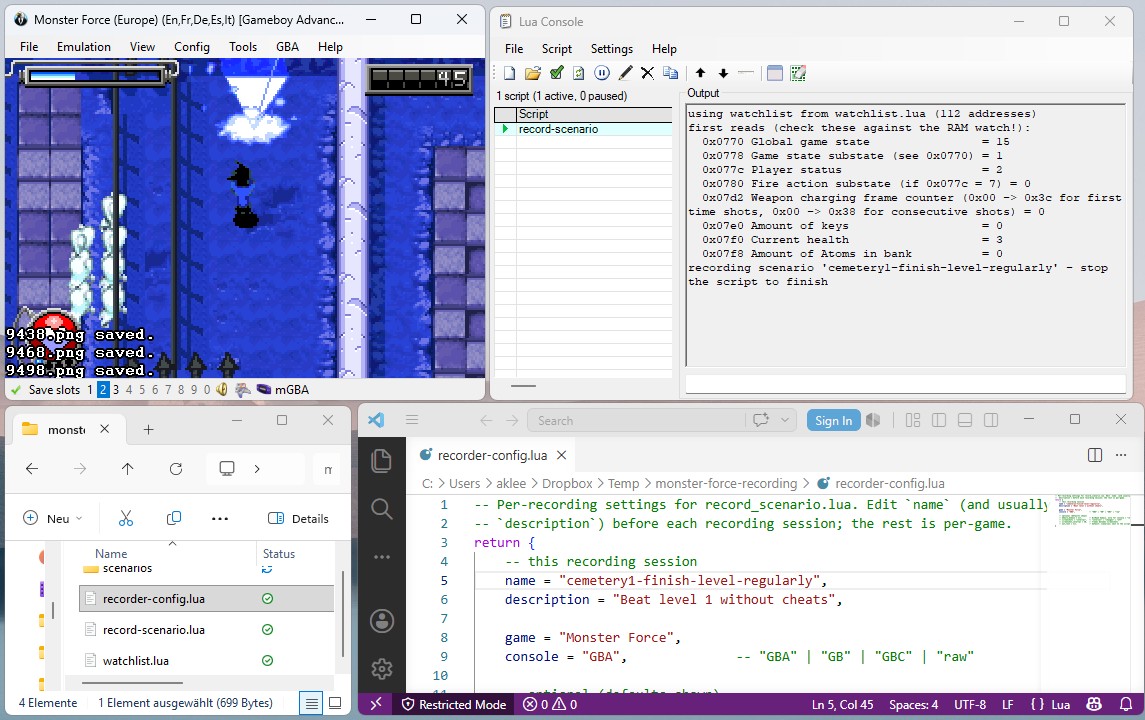
Recordings are sparse and cheap (~10 kB/minute): A new row is written only when a watched value changes. It is better to record generously (with a bit of margin before and after), so the scenarios can be re-used even if the exact trigger point changes, so they can be used as regression tests. Screenshots are also recorded, but only used for visual debugging, not for the actual tests themselves.
Output example (saved as recording.txt, in the scenario folder):
frame,0x0770:u8,0x0778:u8,0x077c:u8,0x359c:u16,0x360c:u8
9311,0x0770=15,0x0778=1,0x077c=2,0x360c=0
9312,0x359c=4489
9313,0x359c=4490
9342,0x0770=16,0x0778=0,0x359c=4491,0x360c=8
Note: Successfully tested with GBA, due to the different memory mapping of RA there it might not work yet with other consoles. Please let me know if you encounter problems for other platforms!
3. Set markers in the Scenario Viewer
npx cruncheevos-playtest viewerRun the above, then open http://localhost:8123 to open the viewer.
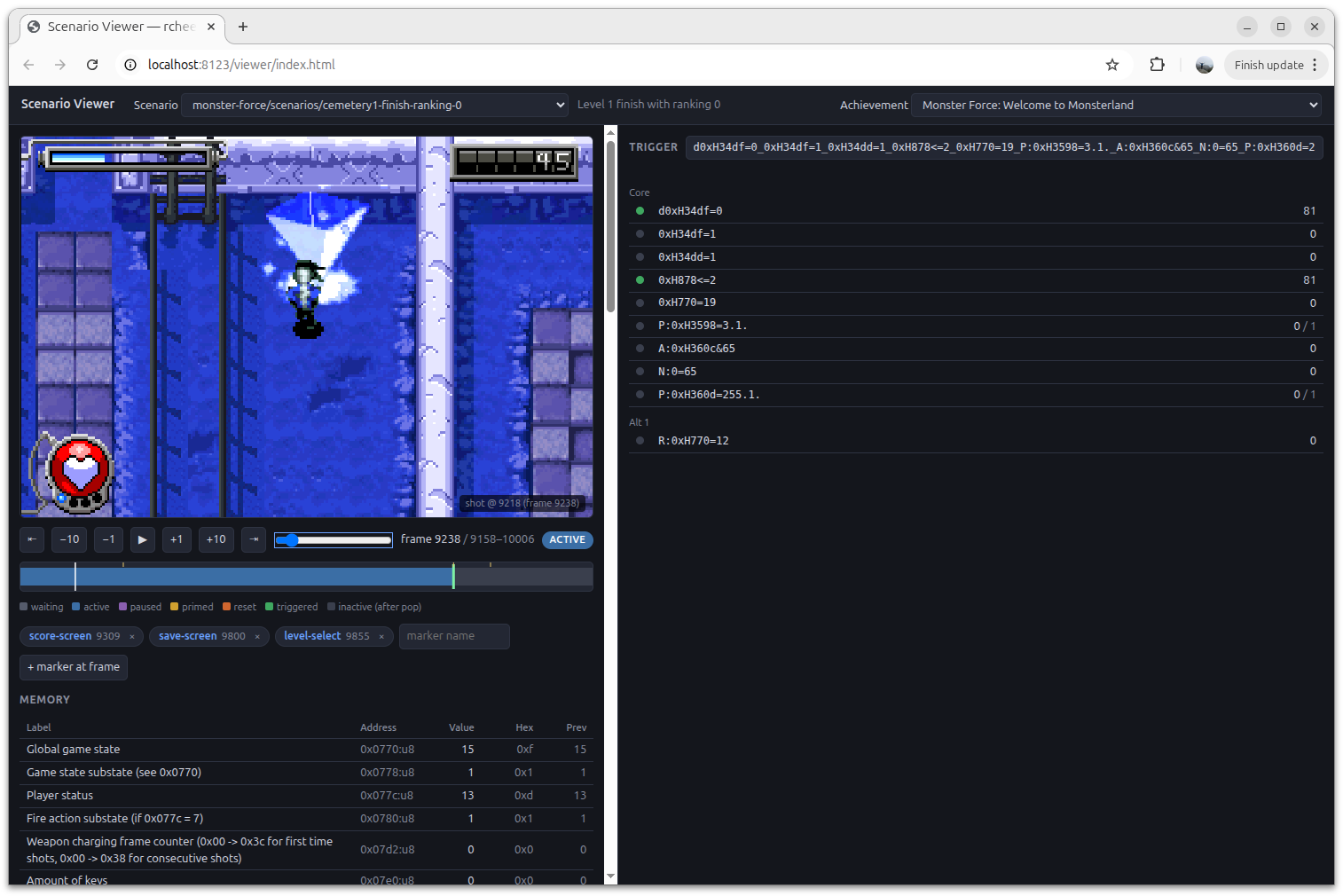
Step through frames with left/right (shift=10 frames, ctrl=60 frames, space=play) and the screenshots & watched addresses will change according to the recording.
There are per-condition truth dots and hit counts for every frame, which help indicate when a condition is true.
Name the important frames with markers ("save-screen", "boss-dead", etc.) when the achievements should pop, so you can use those in your tests.
4. Write tests
This is an example of a test for a progression achievement, which should unlock on reaching the next level, but not if the player used a cheat.
// monster-force/tests/progression.test.js
import {describe, test, expect} from 'vitest';
import {loadScenario, runAchievement} from 'cruncheevos-playtest/testing';
import set from '../monster-force.js';

const getAchievement = (title) => Object.values(set.achievements).find((a) => a.title === title);
const scenario = (name) => loadScenario(new URL(`../scenarios/${name}`, import.meta.url));

describe('Level 1 progression achievement', () => {
    const cheevo = getAchievement('Welcome to Monsterland');

    test('pops when the next level is unlocked', () => {
        const s = scenario('level1-finish');
        const result = runAchievement(cheevo, s);

        expect(result.triggered).toBe(true);
        expect(result.triggeredFrame).toBe(s.marker('save-screen'));
    });

    test('locks with pause when invincibility cheat is enabled and doesnt pop achievement', () => {
        const s = scenario('level1-finish-cheat-invincibility');
        const result = runAchievement(cheevo, s);

        expect(result.triggered).toBe(false);
        expect(result.stateAt(s.marker('cheat-on'))).toBe('paused');
    });
});
The test setup and assertions are plain vitest.
Scenarios can be loaded with the loadScenario helper, and runAchievement will run an achievement through a scenario
so the outcome can be checked against an expectation.
(Like a real emulator, triggers start in the waiting state and cannot pop on a recording's first frame.)
runAchievement(cheevo, scenario) returns a result with:
triggeredtriggeredFramestateAt(frame)measuredAt(frame)framesInState(state)wasEver(state)
Scenarios offer:
marker(name)valueAt(frame, address)slice(fromFrame, toFrame)
JS API
import {
    parseTrigger, runTrigger, TriggerRunner, Scenario,
    parseRecording, bytesFromValues
} from 'cruncheevos-playtest';
import {loadScenario, runAchievement, hasScenario} from 'cruncheevos-playtest/testing';
The low-level engine works without scenarios or cruncheevos — feed
parseTrigger('0xH0001=16S...') any trigger string and drive it with a
peek(address, numBytes) function or per-frame byte maps. See
achievement-trigger-model.md for the
trigger model itself (groups, flags, hit counts, Delta/Prior).
Achievement trigger evaluation
The bundled engine is a port of the evaluation core of rcheevos (develop branch at 2026-07-04), ported to JavaScript by Claude Fable.
The unit test suite from rcheevos and a differential fuzzer (tools/difftest/) were used to compare
inputs/outputs per-frame state, measured value and every hit count against the compiled C library on
randomly generated triggers.
Package layout
src/engine/       the rcheevos port
src/              scenario format, discovery, watchlist, test helpers
bin/cli.js        init, viewer, sync
lua/              BizHawk recorder template
scaffold/         files copied into game folders by `init`
viewer/           Scenario viewer (assets + server)
test/             engine + format tests (repo only, not published)
tools/difftest/   fuzzer vs the C library (repo only, not published)
License
MIT