csom-node
v0.1.8
Published
SharePoint Client Object Model (CSOM) API for Node.Js
Downloads
347


Readme
SharePoint Client Object Model (CSOM) API for Node.js
The library provides a SharePoint Client Object Model (CSOM) API for Node.js applications.
The current version supports SharePoint Online CSOM library (v 16) The remote authentication is performed via Claims-Based Authentication.

Installation
$ npm install csom-node
API
CSOM API - currently only Core object library for JavaScript is supported plus some additional packages listed below
AuthenticationContext- represents an object that provides credentials to access SharePoint Online resources.
The list of supported CSOM API packages
policy
Usage
Authentication
Authenticate with user credentials
var csomapi = require('csom-node');

var settings = {
    url: "https://contoso.sharepoint.com/",
    username: "[email protected]",
    password: "password"
};

csomapi.setLoaderOptions({url: settings.url});  //set CSOM library settings

var authCtx = new AuthenticationContext(settings.url);
authCtx.acquireTokenForUser(settings.username, settings.password, function (err, data) {

    var ctx = new SP.ClientContext("/");  //set root web
    authCtx.setAuthenticationCookie(ctx);  //authenticate

    //retrieve SP.Web client object
    var web = ctx.get_web();
    ctx.load(web);
    ctx.executeQueryAsync(function () {
        console.log(web.get_title());
    },
    function (sender, args) {
        console.log('An error occured: ' + args.get_message());
    });

});
Authenticate with app principal credentials (client id & client secret)
var csomapi = require("csom-node");

var settings = {
    url: "https://contoso.sharepoint.com/",
    clientId: "YOUR-GUID-GOES-HERE",
    clientSecret: "YOUR-CLIENT-SECRET-GOES-HERE"
};

csomapi.setLoaderOptions({url: settings.url});  //set CSOM library settings

var authCtx = new AuthenticationContext(settings.url);
authCtx.acquireTokenForApp(settings.clientId, settings.clientSecret, function (err, data) {

    var ctx = new SP.ClientContext("/");  //set root web
    authCtx.setAuthenticationCookie(ctx);  //authenticate

    //retrieve SP.Web client object
    var web = ctx.get_web();
    ctx.load(web);
    ctx.executeQueryAsync(function () {
        console.log(web.get_title());
    },
    function (sender, args) {
        console.log('An error occured: ' + args.get_message());
    });

});
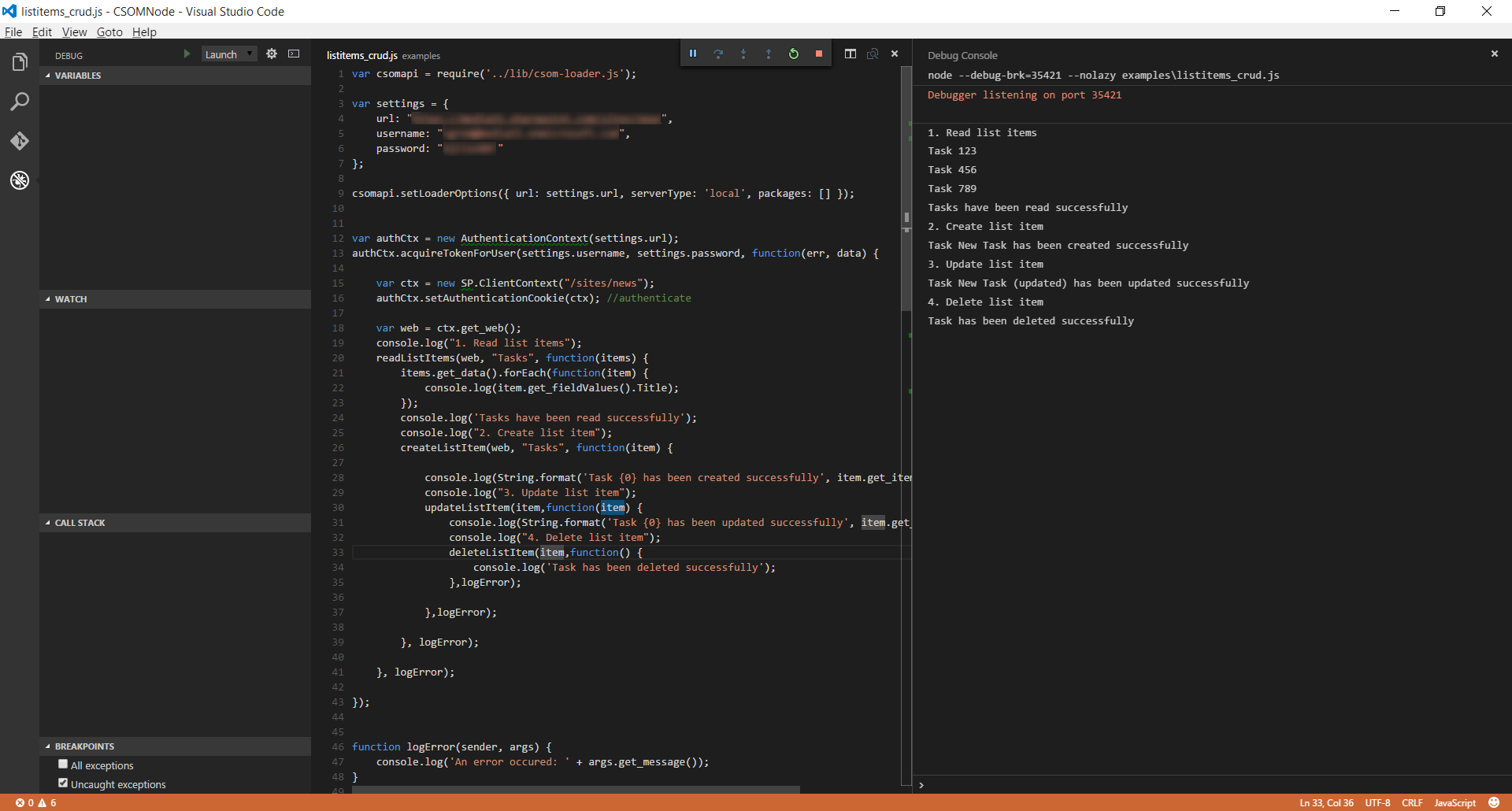
Working with List Items
The following example demonstrates how to perform CRUD operations against list items:
var csomapi = require('csom-node');

var settings = {
    url: "https://contoso.sharepoint.com/",
    username: "[email protected]",
    password: "password"
};

csomapi.setLoaderOptions({ url: settings.url, serverType: 'local', packages: [] });


var authCtx = new AuthenticationContext(settings.url);
authCtx.acquireTokenForUser(settings.username, settings.password, function(err, data) {

    var ctx = new SP.ClientContext("/");
    authCtx.setAuthenticationCookie(ctx); //authenticate

    var web = ctx.get_web();
    console.log("1. Read list items");
    readListItems(web, "Tasks", function(items) {
        items.get_data().forEach(function(item) {
            console.log(item.get_fieldValues().Title);
        });
        console.log('Tasks have been read successfully');
        console.log("2. Create list item");
        createListItem(web, "Tasks", function(item) {

            console.log(String.format('Task {0} has been created successfully', item.get_item('Title')));
            console.log("3. Update list item");
            updateListItem(item,function(item) {
                console.log(String.format('Task {0} has been updated successfully', item.get_item('Title')));
                console.log("4. Delete list item");
                deleteListItem(item,function() {
                    console.log('Task has been deleted successfully');
                },logError);

            },logError);

        }, logError);

    }, logError);

});


function logError(sender, args) {
    console.log('An error occured: ' + args.get_message());
}


function readListItems(web, listTitle, success, error) {
    var ctx = web.get_context();
    var list = web.get_lists().getByTitle(listTitle);
    var items = list.getItems(SP.CamlQuery.createAllItemsQuery());
    ctx.load(items);
    ctx.executeQueryAsync(function() {
            success(items);
        },
        error);
}

function createListItem(web, listTitle,success,error) {
    var ctx = web.get_context();
    var list = web.get_lists().getByTitle(listTitle);
    var creationInfo = new SP.ListItemCreationInformation();
    var listItem = list.addItem(creationInfo);
    listItem.set_item('Title', 'New Task');
    listItem.update();
    ctx.load(listItem);
    ctx.executeQueryAsync(function () {
            success(listItem);
        },
    error);
}


function updateListItem(listItem,success,error) {
    var ctx = listItem.get_context();
    listItem.set_item('Title', 'New Task (updated)');
    listItem.update();
    ctx.load(listItem);
    ctx.executeQueryAsync(function () {
        success(listItem);
    },
    error);
}

function deleteListItem(listItem, success, error) {
    var ctx = listItem.get_context();
    listItem.deleteObject();
    ctx.executeQueryAsync(function () {
        success();
    },
    error);
}
Visual Studio Code screenshot