
css-color-extract-plugin
v1.0.2
Published
css-color-extract
Downloads
123


Readme
css-color-extract-plugin
Install
npm install css-color-extract-plugin
yarn add css-color-extract-plugin
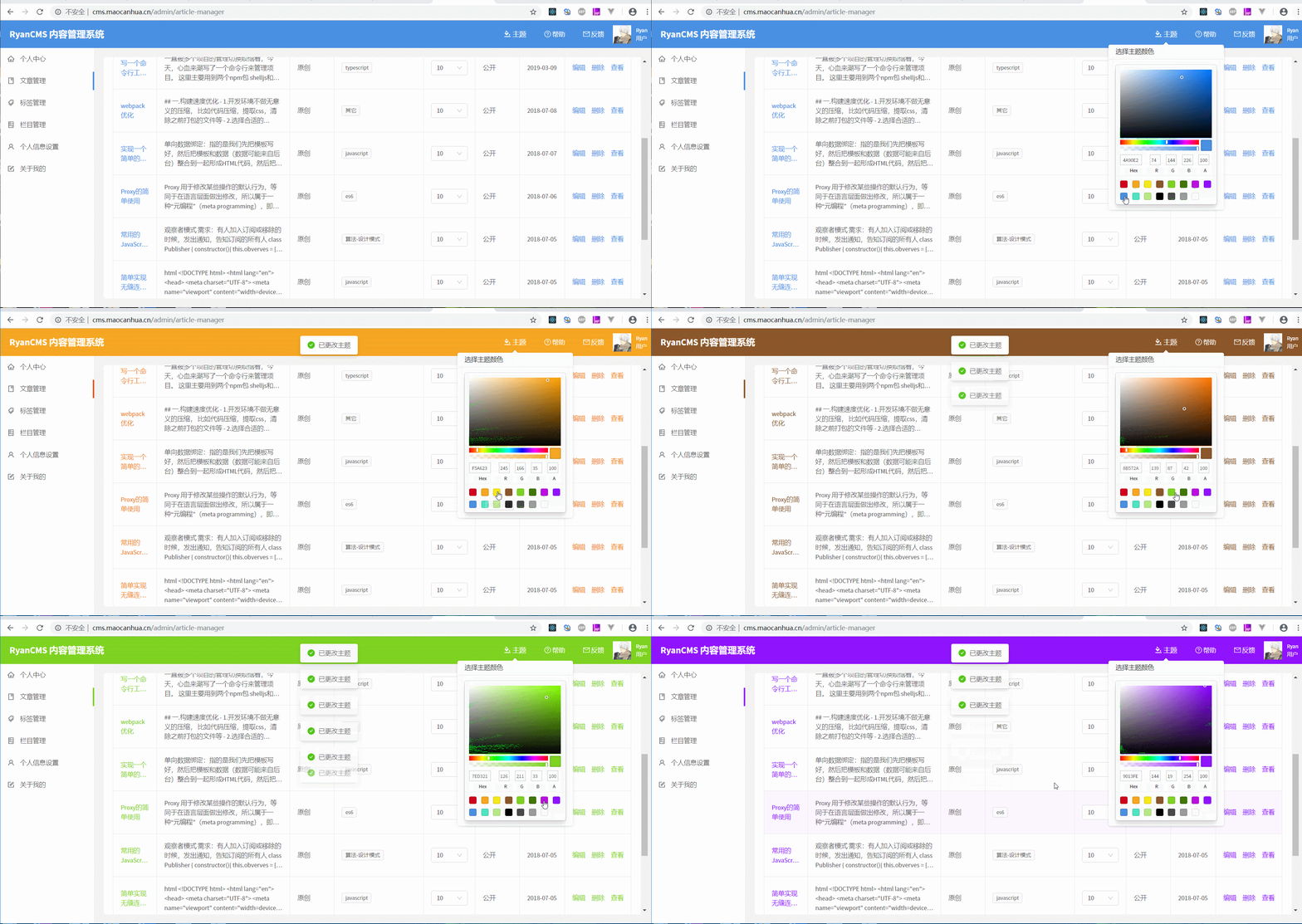
- 该插件主要用于提取主题颜色
- 提取到的css数据会挂载到window下
- 通过颜色替换再插入到,可达到动态修改主题的目的
Usage
// webpack.config.js
const CssColorExtractPlugin = require('css-color-extract-plugin').default;
const PRIMARY_COLOR = '#1890ff';
module.exports = {
    ...
    module: {
        rules: [
          {
            test: /\.css$/,
            exclude: '/\.module\.css$/',
            use: [
                "style-loader",
                "css-loader",
                {
                  loader: CssColorExtractPlugin.loader,
                  options: {
                    colors: [ PRIMARY_COLOR ]
                  }
              },
           ]
        },
        {
            test:  /\.module\.css$/,
            use: [
                "style-loader",
                 {
                   loader: "css-loader",
                   options: {
                     modules: true,
                     localIdentName: '[path][name]__[local]',
                   }
								},
                {
                    loader: CssColorExtractPlugin.loader,
                    options: {
                    colors: [ PRIMARY_COLOR ],
                    modules: true,
                    localIdentName: '[path][name]__[local]',
                  }
               },
            ]
        }
      ]
    }
   ...
   	plugins: [
      ...
      new CssColorExtractPlugin({ fileName: 'theme' }),
     ]
};
编译后会在html中插入theme.js,其内容类似以下
window.CSS_EXTRACT_COLOR_PLUGIN = [
  {"source":".src-App-module__example {  background: #1890ff;}","fileName":"App.module.scss","matchColors":["#1890ff"]},
  {"source":".src-controller-blog-components-Header-Header-module__theme {  color: #067785;}.src-controller-blog-components-Header-Header-module__pc_header {  background: #1890ff;}.src-controller-blog-components-Header-Header-module__mb_header {  background: #1890ff;}.src-controller-blog-components-Header-Header-module__mb_header .src-controller-blog-components-Header-Header-module__mb_nav {  background: #1890ff;}","fileName":"Header.module.scss","matchColors":["#1890ff"]}
];
接着只要使用简单的正则即可替换主题色
import React, { Component } from 'react';
import styles from './App.module.scss';
import { SketchPicker } from 'react-color';

function replaceColor(source, color, replaceColor) {
	return source.replace(new RegExp(`(:.*?\\s*)(${color})(\\b.*?)(?=})`, 'mig'), (group) => {
		return group.replace(new RegExp(`${color}`, 'mig'), replaceColor);
	});
}

const PRIMARY_COLOR = '#1890ff';

class App extends Component {

	async setColor(color) {
		const styleData = window.CSS_EXTRACT_COLOR_PLUGIN || [];
		const cssText = styleData.map((item) => item.source).join('');
		const styleText = replaceColor(cssText, PRIMARY_COLOR, color);
		const style = document.createElement('style');
		style.innerHTML = styleText;
		document.body.appendChild(style);
	}
	render() {
		return (
			<div className={styles['example']}>
				<SketchPicker onChangeComplete={(colorResult) => this.setColor(colorResult.hex)} />
			</div>
		);
	}
}

export default App;
loader Options
 {
	colors: string[]; // 匹配的颜色数组,如果出现颜色层次错误覆盖的情况,需要选上被覆盖的颜色,可通过该选项在不同的文件提取不同的颜色
	only?: boolean = true; // 仅提取选中颜色规则,否则会将整个文件提取进去
	modules?: boolean = false;
	localIdentName?: string = '';
}
plugin Options
  {
    fileName?: string; // 提取颜色的文件名,不提供则直接嵌在 script标签中
    json?: boolean = false; // 提起到json
	  variableName?: string = 'CSS_EXTRACT_COLOR_PLUGIN'; // 挂载到window的变量名, 默认 CSS_EXTRACT_COLOR_PLUGIN
}