
csv-import-service
v0.2.0
Published
import-service

Maintainers
 minhduc140583
Readme
import-service
A lightweight, streaming, extensible TypeScript data-import-library for building data import pipelines.
Unlike traditional CSV libraries that only parse files, Import Service provides a complete import pipeline:
  Reader
     │
     ▼
Transformer
     │
     ▼
 Validator (optional)
     │
     ▼
   Writer
     │
     ▼
 Destination
It is designed for importing data from CSV, fixed-length files, delimited text, Excel, databases, queues, or any custom data source.
Detailed Flow

Features
- Streaming import using
AsyncIterable - Generic type-safe pipeline
- CSV transformer
- Fixed-length record transformer
- Custom delimiter support
- Optional validation
- Pluggable writers
- Configurable exception handling
- Configurable validation error handling
- Automatic type conversion
- Customizable primitive parsers
- Large file friendly
- Zero framework dependency
Installation
npm install import-serviceor
yarn add import-serviceArchitecture
                AsyncIterable
                      │
                      ▼
                ImportService
                      │
         ┌────────────┼────────────┐
         ▼            ▼            ▼
   Transformer     Validator     Writer
         │            │            │
         └────────────┴────────────┘
                      │
                 Error Handler
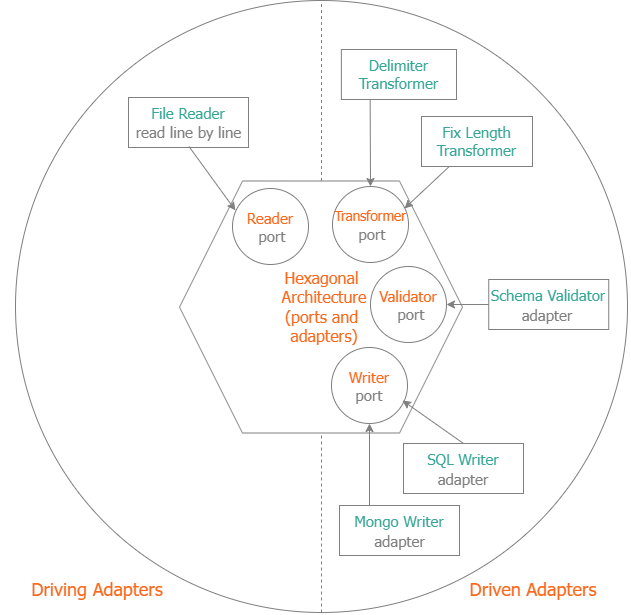
Every component is independent.
Ports and adapters architecture
Quick Example
const reader = await createReader("customers.csv")

const importer = new Importer(
    1,
    "customers.csv",
    reader,
    transformer.transform,
    writer.write
)

const result = await importer.import()

console.log(result)
Examples:
- import-sample: import a fix-length file to MySql.
- import-csv-sample: import a CSV file to MySql.
Using ImportService
ImportService follows an object-oriented style similar to Java dependency injection.
const service = new ImportService(
    1,
    "customers.csv",
    reader,
    transformer,
    writer,
    exceptionHandler,
    validator,
    errorHandler
)

await service.import()
Using Importer
Importer is a lightweight functional API inspired by JavaScript and Go.
const importer = new Importer(
    1,
    filename,
    reader,
    transformer.transform,
    writer.write,
    writer.flush,
    handleException,
    validate,
    handleError
)

await importer.import()
Choose the API that best matches your programming style.
CSV Transformer
Define a schema.
const attributes = {
    id: {
        type: "number"
    },
    name: {
        type: "string"
    },
    birthday: {
        type: "date"
    },
    active: {
        type: "boolean"
    }
}
Create a transformer.
const transformer = new CSVTransformer<Customer>(attributes)Each row becomes
{
    id: 1,
    name: "John",
    birthday: Date,
    active: true
}
Fixed-Length Files
000001John Smith 19880101YDefine field lengths.
const attrs = {
    id: {
        type: "number",
        length: 6
    },
    name: {
        type: "string",
        length: 20
    },
    birthday: {
        type: "date",
        length: 8
    },
    active: {
        type: "boolean",
        length: 1
    }
}
Then
const transformer = new FixedLengthTransformer<Customer>(attrs)Validation
Validation is optional.
class CustomerValidator implements Validator<Customer> {
    async validate(customer) {
        const errors = []
        if (!customer.name) {
            errors.push({
                field: "name",
                code: "required"
            })
        }
        return errors
    }

}
Writer
class CustomerWriter implements Writer<Customer> {
    async write(customer) {
        await repository.save(customer)
        return 1
    }
}
Exception Handling
class ImportExceptionHandler implements ExHandler<string[]> {
    handleException(data, err) {
        console.error(err)
    }
}
Exceptions are separated from validation errors.
Validation Error Handling
class ValidationHandler implements ErrHandler<Customer> {
    handleError(customer, errors) {
        console.log(errors)
    }
}
Custom Primitive Parsers
The framework provides default parsers for:
- number
- date
- boolean
These parsers are replaceable.
Boolean
Default values:
1
Y
T
become
trueYou can replace the parser globally.
resources.parseBool = (res, key, value) => {
    res[key] = value === "true" || value === "TRUE"
}
Number
resources.parseNumber = (res, key, value) => {
    res[key] = Number(value.replace(",", "."))
}
Date
resources.parseDate = (res, key, value) => {
    res[key] = dayjs(value, "DD/MM/YYYY").toDate()
}
No framework modification is required.
Reading Files
const reader = await createReader("customers.csv")The reader returns an AsyncIterable, allowing the framework to process very large files without loading them entirely into memory.
Logging
The library provides
LogWriterfor efficient buffered log writing.
const writer =
    new LogWriter(
        "error.log",
        "./logs"
    )
Built-in Utilities
The library also includes helper functions for:
- File readers
- Date formatting
- ISO date conversion
- Filename checking
- Nullable handling
- File discovery
- Directory creation
Why Import Service?
Most Node.js libraries only parse CSV files.
CSV
 │
 ▼
Object
Import Service handles the complete import workflow.
File
 │
 ▼
Reader
 │
 ▼
Transformer
 │
 ▼
Validator
 │
 ▼
Writer
 │
 ▼
Database
It separates responsibilities, making every stage reusable and independently testable.
Design Goals
- Streaming first
- Generic
- Type-safe
- Framework independent
- High performance
- Easily testable
- Extensible
- Familiar to both Java and JavaScript developers
License
MIT License.