
cubyz-discord-relay
v2.6.2
Published
Bot that relays messages between a Cubyz server and a Discord channel.


Readme
Cubyz Discord Relay
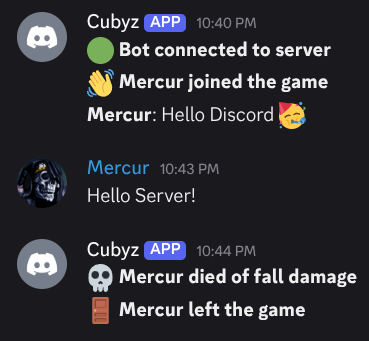
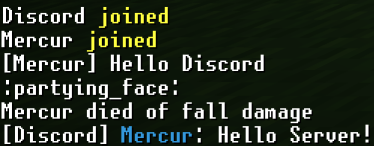
cubyz-discord-relay is an application that relays Cubyz game server chat events to Discord and forwards Discord chat back to the server.
Features
- Connects to the Cubyz server using game protocol over UDP as a bot player
- Relays join, leave, death, and chat events to Discord with presence updates
- Forwards Discord channel messages back into Cubyz, keeping role colors in-game
- Supports Discord message replies with context and emoji reactions relayed back to the server
- Provides a
/listDiscord command to show the players currently online - Cleans Cubyz markdown-style usernames and censors configurable words
- Automatic reconnection with exponential backoff and retry limits
- Optional integration advertises your server on servers.ashframe.net
Prerequisites
- Node.js 18 or newer
- Discord bot token with permission to read and post in the target channel (Message Content intent enabled)
Installation
Install via npm:
npm install -g cubyz-discord-relay

# Start the relay (defaults to ./config.json)
cubyz-discord-relay

# Provide a custom config path
cubyz-discord-relay /path/to/config.json
You can also run once without a global install via npx cubyz-discord-relay.
Discord Bot Setup
Your Discord bot requires these permissions:
- View Channels – Access the target channel
- Send Messages – Post Cubyz events and status updates
Additionally, enable the Message Content Intent for your bot in the Discord Developer Portal so it can read user messages to forward them to Cubyz.
Generate an invite link in the Discord Developer Portal that grants these permissions before running the relay.
Development
Setup
npm installConfiguration
- Copy
config.example.jsontoconfig.json(or run the application once to generate it automatically). - Update the sections:
logLevel: global log verbosity for the relay (error,debug,info,warn,silent)cubyz.host/cubyz.port: address of the Cubyz UDP servercubyz.botName: in-game name the relay uses when joining the servercubyz.version: client version string to present during the Cubyz handshakediscord.enabled: enable/disable Discord relay functionalitydiscord.token: Discord bot tokendiscord.channelId: target channel IDdiscord.allowedMentions: array of mention types (roles,users,everyone) to allow in Discord messages; defaults to an empty array to suppress mentionsdiscord.enableReactions: enable/disable relaying Discord reactions back to Cubyz; defaults totruediscord.enableReplies: enable/disable relaying Discord message replies with context back to Cubyz; defaults totrueevents: subset ofjoin,leave,death,chatto relaycensorlist: words to censor in chat messagesstartupMessages: array of messages to send to Cubyz server on each connection (e.g., login commands)startupMessageDelay: delay in milliseconds applied before each message instartupMessages(including the first); defaults to0excludeBotFromCount: omit the relay bot from the player count whentrueexcludedUsernames: array of usernames to exclude from the player count (case-insensitive)connection.reconnect: enable/disable automatic reconnect attemptsconnection.maxRetries: maximum reconnect attempts (0= infinite)connection.retryDelayMs: initial delay before retrying (milliseconds)
First run convenience: if
config.jsonis missing, the application writes a fresh template in your working directory and exits so you can fill it in before retrying.
CubyzListSite Integration
integration.cubyzlistSite.enabled: toggle advertising to the community server listintegration.cubyzlistSite.serverName: required display name shown on servers.ashframe.net, must be unique; if missing while enabled, the integration logs a warning and stays disabledintegration.cubyzlistSite.serverIp: required public hostname or IP that players should connect to; if missing while enabled, the integration logs a warning and stays disabledintegration.cubyzlistSite.description: optional short description shown on servers.ashframe.netintegration.cubyzlistSite.serverPort: optional public port exposed for playersintegration.cubyzlistSite.iconUrl: optional URL for the list thumbnailintegration.cubyzlistSite.discordServer: optional Discord invite or server URLintegration.cubyzlistSite.customClientDownloadUrl: optional link to a custom client build
Usage
npm run dev            # Compile and run with tsx
npm run build          # Compile TypeScript to dist/
npm start              # Run compiled output (after build)
During execution press q or Ctrl+C to exit gracefully.
Troubleshooting
- Bot not posting: verify the Discord bot token, channel ID, and permissions
- Bot stuck reconnecting: ensure the Cubyz server is reachable and the configured version/name are allowed
- Presence count wrong: confirm
excludeBotFromCountandexcludedUsernamesare set appropriately and the bot remains connected - No events forwarded: check that the bot successfully joins the server (look for the "Bot connected" Discord message)
Limitations
- Requires player slot: The relay consumes one in-game player slot while connected.
Compatibility
| cubyz-discord-relay version | Required Cubyz version | | --------------------------- | ---------------------- | | 2.5.0+ | 0.2.0+ | | 2.4.3 | 0.0.0+ |