
curlit
v2.0.9
Published
Stop documenting your API manually. cUrlit is an Express middleware that intercepts every request and generates a ready-to-run cURL command — complete with a live browser dashboard. Copy, replay, and export your entire API as a Postman collection in one c
Downloads
45

Maintainers
 daggieblanqx
Readme
cUrlit — watch your Postman collection build itself
Article: https://medium.com/@daggieblanqx/youve-been-documenting-apis-wrong-this-entire-time-d26b5c74f73f



cUrlit sits between your client and server, captures every request, and gives you a Postman Collection.
No config. No account. No API key. No AI.
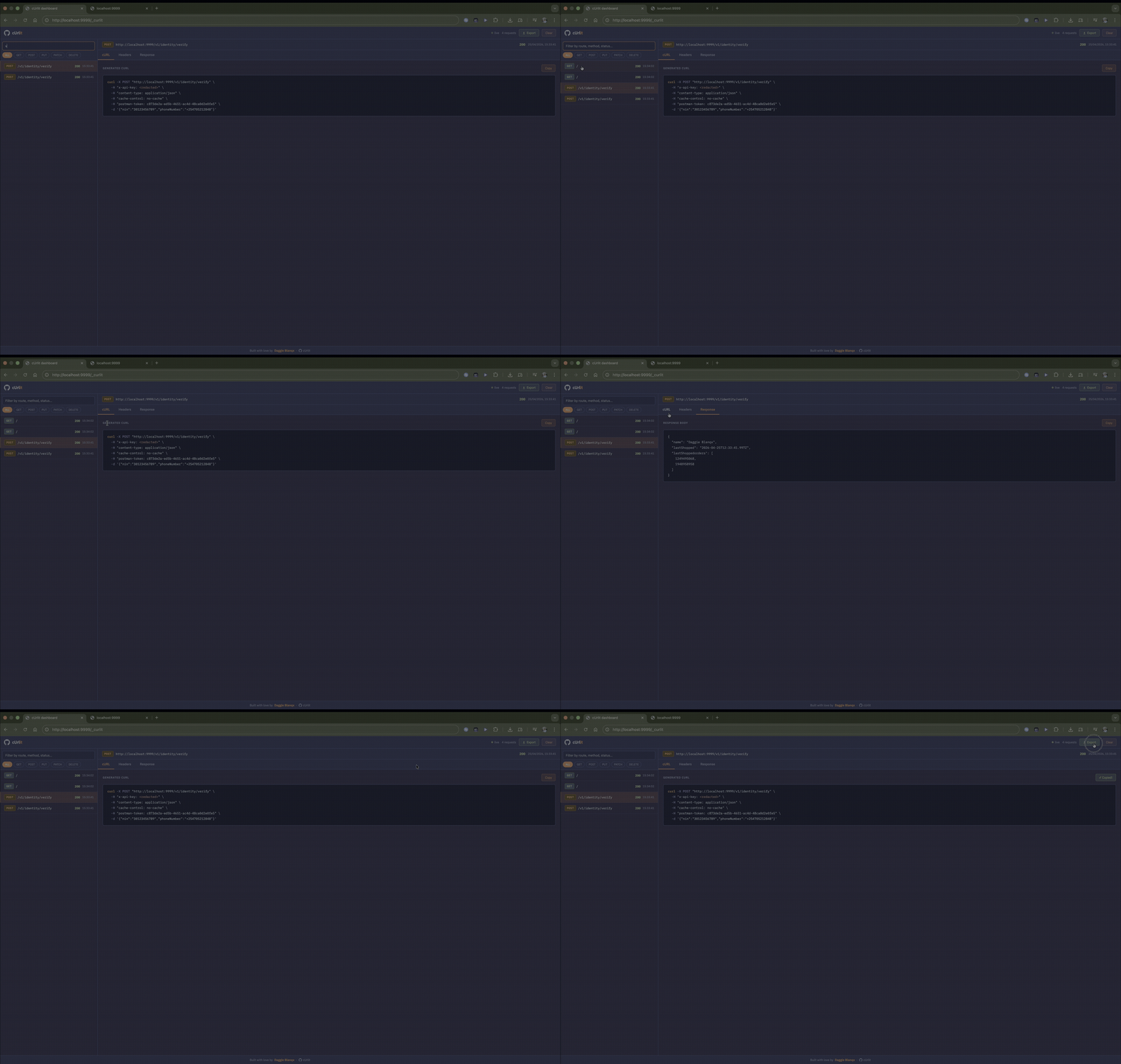
Table of contents
- Pick your setup
- How it works
- Why cUrlit
- Use cases
- What you can do with it
- Live dashboard
- Configuration
- Recipes
- Help & community
Pick your setup
cUrlit works in two modes. Pick the one that fits your stack:
🔌 Mode 1 — Express middleware
Your API server exists as an Express.js app
npm install curlitimport curlit from "curlit";
app.use(curlit());Open http://localhost:3000/_curlit — your live dashboard is ready.
🌍 Mode 2 — Standalone proxy
Your API server is in PHP, Django, Rails, Kotlin, Go, or anything else
npm install -g curlit
curlit-proxy --target http://localhost:8080 --port 3000
Your client → http://localhost:3000 (cUrlit) → http://localhost:8080 (your server)Open http://localhost:3000/_curlit — your live dashboard is ready.
Every request is captured. Your server never knows the difference.
Works with every stack
curlit-proxy --target http://localhost:8080   # PHP / Laravel / Kotlin / Spring
curlit-proxy --target http://localhost:8000   # Django / FastAPI
curlit-proxy --target http://localhost:9000 --port 3000  # Rails
curlit-proxy --target http://localhost:9090   # Go
curlit-proxy --target https://staging.myapp.com  # Remote staging
How it works
In both modes, cUrlit does the same thing:
Incoming request
      ↓
cUrlit (middleware or proxy)
      ↓
Builds cURL command → logs to console → pushes to dashboard via SSE
      ↓
Your server handles the request normally
      ↓
Response captured → ring buffer updated → dashboard updated live
As requests hit your endpoints, your Postman collection gradually builds itself. Once satisfied, click Export to download it.
Why cUrlit?
| | cUrlit | Manual logging | Postman Interceptor | | -------------------------- | ------ | -------------- | ------------------- | | Zero config | ✅ | ❌ | ❌ | | Live browser dashboard | ✅ | ❌ | ✅ | | One-click Postman export | ✅ | ❌ | ✅ | | Works with Express | ✅ | ✅ | ❌ | | Works with ANY backend | ✅ | ❌ | ❌ | | Sensitive header redaction | ✅ | ❌ | ❌ | | Open source | ✅ | ✅ | ❌ | | One line to install | ✅ | ❌ | ❌ |
Use cases
🗂️ Building a Postman collection from scratch
Your API is running but your Postman collection isn't. Hit your endpoints while testing and export the entire session in one click. What used to take hours takes seconds.
🐛 Reproducing bugs
A client reports an issue. Instead of asking them to describe the request, capture the exact cURL command from the live session and replay it locally — no guessing, no back and forth.
🚀 Onboarding new developers
A new engineer joins the team. Instead of hand-writing API docs, they run the server, hit the endpoints, and walk away with a working Postman collection in their first hour.
🧪 QA and test case generation
Every request captured by cUrlit is a test case waiting to happen. Export to Postman, add assertions, run as a collection. Regression testing from real traffic, not fabricated payloads.
🏚️ Documenting legacy systems
Old codebases nobody wants to touch. Drop the proxy in front, capture all the undocumented endpoints, and finally build documentation from real traffic without modifying a single line of code.
🔗 Debugging third-party integrations
A webhook provider is sending malformed requests. Proxy their calls through cUrlit to see exactly what's arriving — headers, body, method — before it hits your handler.
🔐 Security auditing
Inspect every request and response flowing through your API in real time — spot missing auth headers, accidental PII leakage in responses, and unexpected data being sent by third-party SDKs. Before a pen test, export the full session as a Postman collection so testers can go straight to probing instead of spending half the engagement mapping your API surface.
🌍 Any backend, any language
PHP shop. Django team. Rails project. Go microservice. None of them have a tool like this that works without touching their codebase. Drop the proxy in front and get the full dashboard instantly.
🏫 Teaching REST APIs
Running a workshop or tutorial? Run cUrlit so students can see every request they make in real time, with the cURL command ready to copy, study, and replay.
What you can do with it
- 🔍 Debug — inspect every request and response in real time, no console diving
- 📊 Monitor — watch live traffic through a gorgeous browser dashboard
- 📦 Export — turn a live session into a full Postman collection in one click
- ▶️ Replay — copy any captured request and run it directly from your terminal
- 🌍 Proxy — drop in front of any backend, any language, zero code changes
- 🔒 Redact — sensitive headers like
AuthorizationandCookieare hidden automatically
Live dashboard
cUrlit serves a live SSE dashboard at /_curlit the moment your server starts. No setup.
Features
- Live feed — new requests stream in instantly via SSE, no polling, no refresh
- cURL tab — full generated command with syntax highlighting and one-click copy
- Headers tab — all request headers, sensitive values auto-redacted
- Response tab — response body, auto pretty-printed if JSON
- Export button — one click downloads a complete Postman Collection v2.1 JSON
- Filter bar — search by route, method, or status code
- Method chips — instantly narrow to GET, POST, PUT, PATCH, or DELETE
- Clear button — wipe history without restarting the server
Enable / disable (Express only)
// Disable the dashboard
app.use(curlit({ dashboard: false }));

// Custom path
app.use(curlit({ dashboardPath: "/_debug" }));
The dashboard never mounts in production unless you explicitly pass
enabledEnvs: null. It is a development tool.
What the console output looks like
curl -X POST "http://localhost:9000/api/transactions" \
  -H "x-api-key: <redacted>" \
  -H "content-type: application/json" \
  -d '{"amount": 100.5, "currency": "USD"}'
{
"success": true,
"records": [
{
"id": 123456789,
"status": "Completed",
"amount": 100.5,
"currency": "USD",
"channel": "Credit Card",
"paidAt": "2024-02-20T15:30:00Z"
}
],
"total": 100.5,
"page": 1,
"pageSize": 1
}File structure
.
├── README.md
├── assets
│   └── demo.gif
├── index.js                    — root re-export shim
├── package-lock.json
├── package.json
└── src
    ├── index.js                — middleware factory, request wiring
    ├── defaults.js             — DEFAULT_OPTIONS, DEFAULT_REDACTED_HEADERS, DEFAULT_AUTO_HEADERS
    ├── helpers.js              — pure functions: curl building, escaping, body formatting
    ├── ring-buffer.js          — fixed-size in-memory buffer with pub/sub for SSE
    ├── dashboard
    │   ├── dashboard.js        — SSE router, clear endpoint, HTML serving
    │   └── dashboard.html      — dashboard UI (Tailwind + IBM Plex, no build step)
    └── proxy
        ├── cli.js              — curlit-proxy CLI entrypoint
        └── proxy.js            — http-proxy-middleware wrapper
Configuration (Express middleware)
All options are optional. curlit() with no arguments uses sensible defaults.
app.use(
  curlit({
    enabledEnvs: ["development", "test"], // environments where logging is active
    maxBodyLength: 4096, // truncate response bodies larger than this (bytes)
    logResponseBody: true, // set to false to only log the curl command
    dashboard: true, // serve the live dashboard
    dashboardPath: "/_curlit", // URL the dashboard is mounted at
    bufferSize: 200, // max requests kept in memory for the dashboard
    redactedHeaders: new Set([
      // values replaced with <redacted>
      "authorization",
      "cookie",
      "set-cookie",
      "x-api-key",
      "x-auth-token",
      "proxy-authorization",
    ]),
    autoHeaders: new Set([
      // noise headers stripped from curl output
      "host",
      "user-agent",
      "accept",
      "accept-encoding",
      "connection",
      "content-length",
      "transfer-encoding",
    ]),
    logger: console.log, // swap in pino, winston, etc.
  }),
);
Configuration (Proxy CLI)
curlit-proxy --target http://localhost:8080   # required: target server
             --port 3000                      # proxy port (default: 3000)
             --dashboard-path /_curlit        # dashboard path (default: /_curlit)
             --no-dashboard                   # disable dashboard
             --env development                # override NODE_ENV
Recipes
Zero config
app.use(curlit());Dashboard only, silent console
app.use(curlit({ logger: () => {} }));Force on in all environments
app.use(curlit({ enabledEnvs: null }));Warning: this logs all request bodies and URLs. Only use for short-lived debugging sessions.
Custom sensitive headers
import curlit, { DEFAULT_REDACTED_HEADERS } from "curlit";

app.use(
  curlit({
    redactedHeaders: new Set([...DEFAULT_REDACTED_HEADERS, "x-tenant-id"]),
  }),
);
Custom auto-stripped headers
import curlit, { DEFAULT_AUTO_HEADERS } from "curlit";

app.use(
  curlit({
    autoHeaders: new Set([...DEFAULT_AUTO_HEADERS, "x-forwarded-for"]),
  }),
);
Route-scoped
const curlLogger = curlit({ logResponseBody: false });
app.post("/webhooks", curlLogger, (req, res) => res.sendStatus(200));
Custom logger (Pino)
import pino from "pino";
const logger = pino();
app.use(curlit({ logger: (msg) => logger.debug({ msg }, "curlit") }));
Built something with cUrlit?
Tag @daggieblanqx on Twitter — I'll retweet it.
⭐ If cUrlit saves you time, star the repo — it helps other developers find it.
License
MIT © Daggie Blanqx
Help & community
- Questions → GitHub Discussions
- Bugs → open an issue
- Features → create a pull request
Reach out
- Twitter: @daggieblanqx
- LinkedIn: @daggieblanqx
- Blog: Logrocket/@Daggieblanqx