
cursor-better-feedback
v0.2.0
Published
MCP feedback tool with interactive UI for Cursor

Maintainers
 corn-321
Readme
cursor-better-feedback
English | 中文
MCP feedback tool with interactive UI for Cursor. Replaces the built-in AskQuestion with a more robust feedback mechanism using MCP Apps.
| Waiting for feedback | After submission |
|:---:|:---:|
| 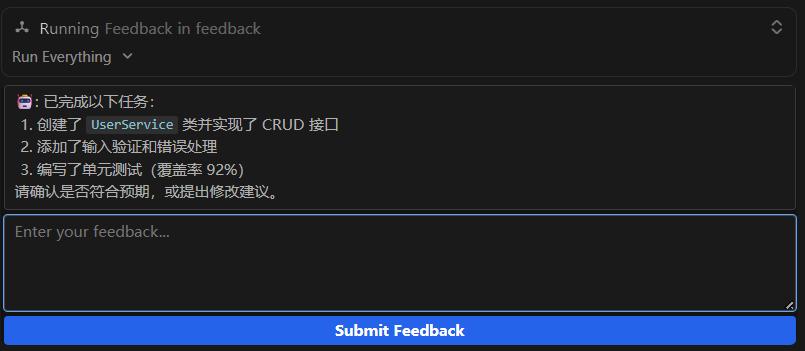 |
| 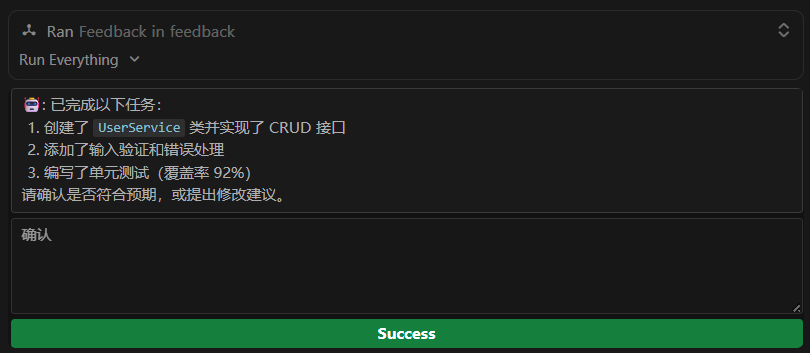 |
|
Features
- Interactive feedback UI rendered directly in the Cursor chat panel (via MCP Apps iframe)
- Image paste:
Ctrl+Vto attach screenshots (PNG/JPEG/WebP/GIF, up to 5 images, 5MB each) - Markdown rendering in message area (raw HTML stripped for security)
- Configurable timeout and font size via environment variables
- Host theme/style adaptation
- Keyboard shortcut:
Ctrl+Enter/Cmd+Enterto submit - Dual transport: stdio (default, for Cursor) + HTTP (development only)
Installation
Add to your Cursor MCP configuration (.cursor/mcp.json):
{
  "mcpServers": {
    "feedback": {
      "command": "npx",
      "args": ["cursor-better-feedback"],
      "env": {
        "FEEDBACK_TIMEOUT": "1200",
        "FEEDBACK_FONT_SIZE": "12px"
      }
    }
  }
}
Or use a local path:
{
  "mcpServers": {
    "feedback": {
      "command": "node",
      "args": ["/path/to/cursor-better-feedback/dist/main.js"]
    }
  }
}
Configuration
| Variable | Default | Description |
|----------|---------|-------------|
| FEEDBACK_TIMEOUT | 1200 | Default timeout in seconds (60-3600) |
| FEEDBACK_FONT_SIZE | 12px | UI font size (e.g. 12px, 0.875rem) |
How It Works
- The LLM calls
feedback(message="...")when it needs user input - Cursor renders the feedback UI in an iframe (MCP Apps)
- User types feedback, optionally pastes images with
Ctrl+V - User clicks Submit (or presses
Ctrl+Enter) - The UI calls
submit_feedbackto resolve the pending tool call - The LLM receives the feedback text (and any attached images) and continues
Recommended Cursor Rule
Add this rule to .cursor/rules/feedback.mdc to enforce feedback-driven interaction with automatic retry:
---
description: "Feedback MCP interaction protocol with resilience"
globs:
alwaysApply: true
---

# Feedback Interaction Protocol

## Interaction Rules (Mandatory)

- **MUST** use `feedback` tool for confirmations/choices — never use plain text questions
- During discussion: natural language only, no large code blocks (pseudocode/minimal snippets OK)
- When information is unclear or missing: ask the user immediately, never assume

## End of Turn (Mandatory)

After every response, **MUST** call `feedback`: "还有其他需要吗?你也可以直接输入下一个指令。"
- If user says "end" / "done" / "no more" → end conversation
- Otherwise → treat response as next instruction
- **Only exception**: user already explicitly ended this turn

## Resilience

1. Always call `feedback` tool first
2. If `Tool not found` or connection error:
   - Sleep 5 seconds, retry up to **3 times**
3. All retries failed → fall back to built-in `AskQuestion`

Network fluctuations may cause Cursor to temporarily disconnect MCP servers.
The feedback server (stdio) itself is unaffected; Cursor auto-reconnects after recovery.
Limitations
- Only one pending feedback session at a time. A new
feedbackcall cancels any previous pending session. Multi-agent concurrent feedback is not supported. - The upper/lower padding in the UI is controlled by Cursor's iframe container and cannot be adjusted from within the app.
Requirements
- Cursor v2.6+ (MCP Apps support required)
- Node.js >= 18
Transport Modes
- stdio (default): Used for Cursor integration. The server communicates via stdin/stdout.
- HTTP (
--httpflag): Development/testing only. Binds to127.0.0.1:3001. Not intended for production use.
Local Development
npm install
npm run build
npm run serve          # stdio mode (default)
npm run serve:http     # HTTP mode (localhost only, for testing)
npm run dev            # Development mode (watch + HTTP)
Testing with basic-host
# Terminal 1: Start the server in HTTP mode
npm run build && npm run serve:http

# Terminal 2: Start the basic-host test harness
cd /tmp/mcp-ext-apps/examples/basic-host
npm install
SERVERS='["http://localhost:3001/mcp"]' npm start

# Open http://localhost:8080 in your browser