
cursor-toolbox
v0.1.0
Published
Cross-platform CLI utilities for Cursor IDE maintenance

Maintainers
 numanaral
Readme
cursor-toolbox
Cross-platform CLI utilities for Cursor IDE maintenance tasks that aren't exposed in the settings UI.
npx cursor-toolboxNo global install needed — npx downloads and runs the latest version.
Commands
reset-dont-ask
Reset "Don't Ask Again" preferences that Cursor stores outside its normal settings reset.
npx cursor-toolbox reset-dont-ask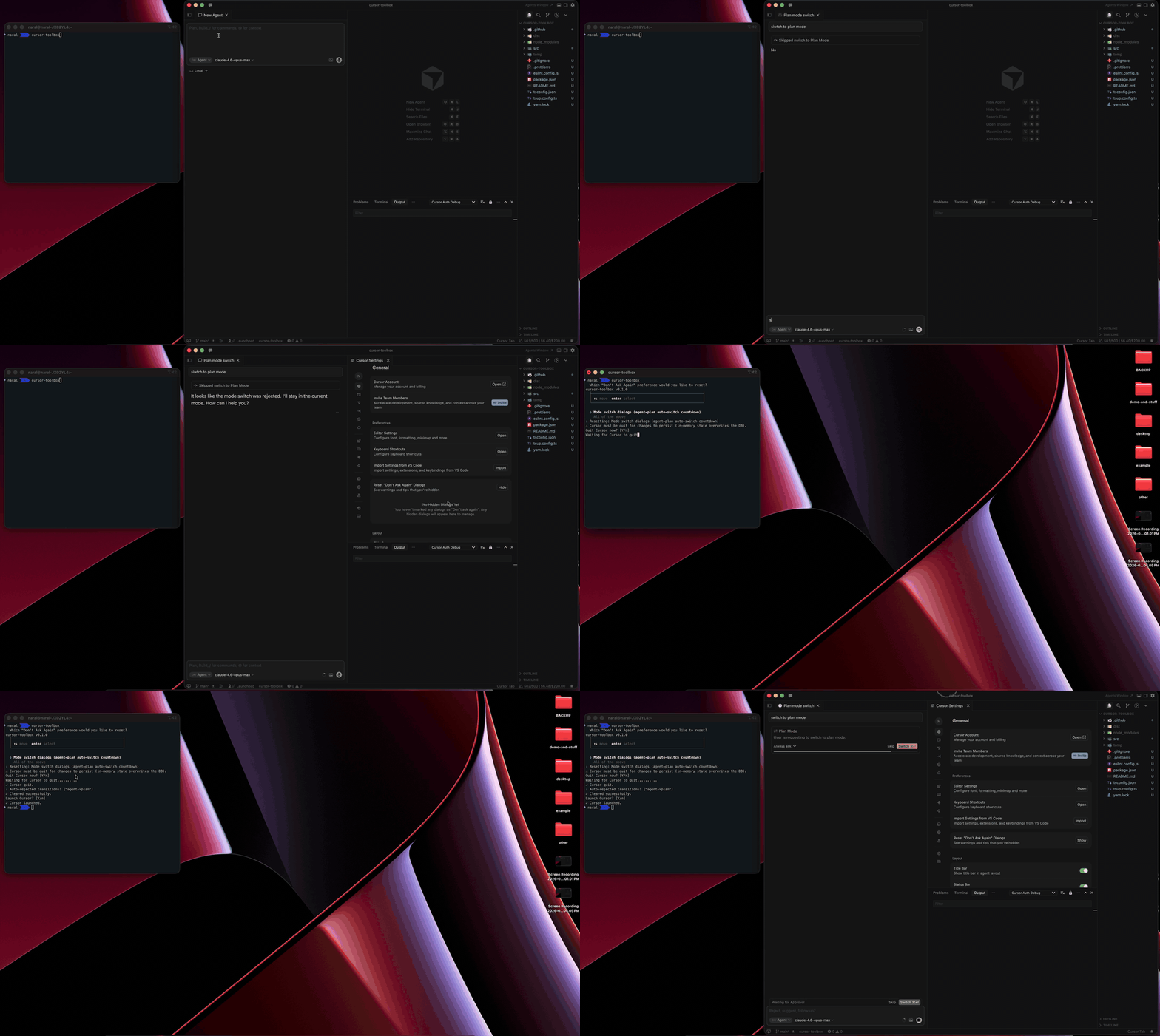
Currently resets:
- Mode switch dialogs — the auto-switch countdown (e.g. agent → plan). When you click "Don't Ask Again" → "Reject", Cursor silently blocks all future mode-switch requests. The "Reset Don't Ask Again Dialogs" button in Settings does not clear this. This command does.
The interactive wizard will:
- Detect if Cursor is running and offer to quit it (required — Cursor overwrites DB changes from memory on exit)
- Clear the stored preferences from the SQLite database
- Offer to relaunch Cursor
CLI flags (non-interactive)
npx cursor-toolbox reset-dont-ask --id <id|all> [--no-quit] [--no-relaunch]| Flag | Description |
|---|---|
| --id <id\|all> | Preference to reset. Options: mode-transitions, all |
| --no-quit | Skip the "quit Cursor?" prompt (assumes Cursor is already quit) |
| --no-relaunch | Skip the "relaunch Cursor?" prompt |
Examples:
# Reset all preferences, fully non-interactive
npx cursor-toolbox reset-dont-ask --id all --no-quit --no-relaunch

# Reset mode-switch dialogs, handle quit/relaunch yourself
npx cursor-toolbox reset-dont-ask --id mode-transitions --no-quit --no-relaunch
move-agent-chats
Interactive wizard to list, copy, or move agent chat history between workspaces.
npx cursor-toolbox move-agent-chats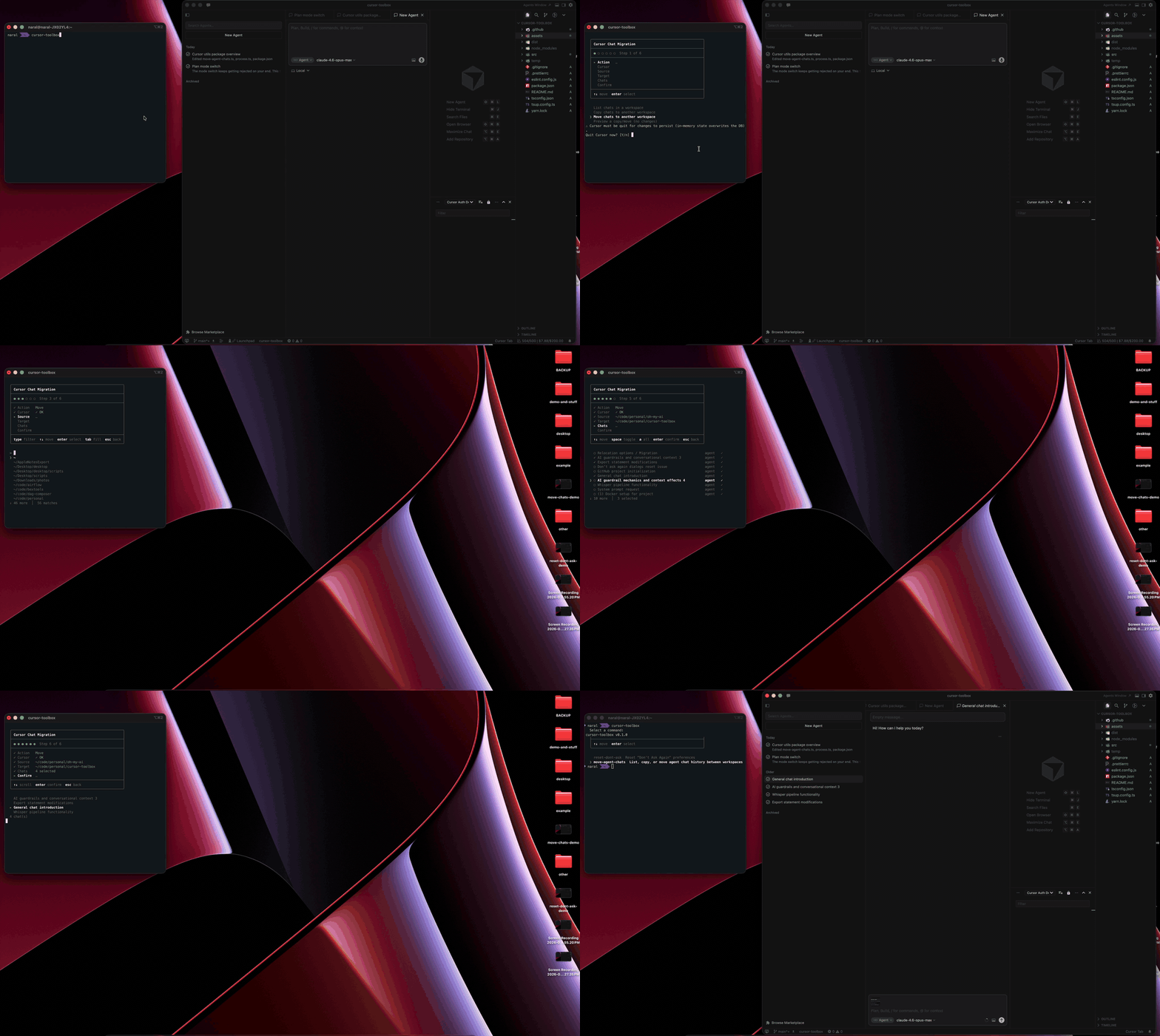
| Action | Description | |---|---| | List | See all chats in a workspace with mode and transcript status | | Copy | Duplicate chats to another workspace | | Move | Transfer chats (removes from source) | | Dry run | Preview what would happen without making changes |
Features:
- Type-to-filter workspace picker
- Multi-select chat picker with select all / deselect all
- Review step before executing
- Full esc-to-go-back navigation through every step
- Supports both old and new Cursor chat storage formats
CLI flags (non-interactive)
npx cursor-toolbox move-agent-chats --action <action> --source <path> [--target <path>] [--chats <ids|all>] [--dry-run] [--no-quit] [--no-relaunch]| Flag | Description |
|---|---|
| --action <action> | Action to perform: list, copy, or move |
| --source <path> | Absolute path to the source workspace folder |
| --target <path> | Absolute path to the target workspace folder (required for copy/move) |
| --chats <ids\|all> | Comma-separated composer IDs, or all (required for copy/move) |
| --dry-run | Preview changes without applying them |
| --no-quit | Skip the "quit Cursor?" prompt |
| --no-relaunch | Skip the "relaunch Cursor?" prompt |
Path format: Use absolute paths. On macOS/Linux use forward slashes. On Windows use either forward or backslashes. Use ~ for home directory expansion in your shell, or provide the full path.
Examples:
# List all chats in a workspace
npx cursor-toolbox move-agent-chats --action list --source ~/code/my-project

# Copy all chats from one workspace to another
npx cursor-toolbox move-agent-chats --action copy --source ~/code/src-project --target ~/code/dst-project --chats all --no-quit --no-relaunch

# Move specific chats by composer ID (use --action list first to find IDs)
npx cursor-toolbox move-agent-chats --action move --source ~/code/old-project --target ~/code/new-project --chats abc123,def456 --no-quit --no-relaunch

# Dry run to preview what would happen
npx cursor-toolbox move-agent-chats --action copy --source ~/code/src --target ~/code/dst --chats all --dry-run

# Windows paths
npx cursor-toolbox move-agent-chats --action list --source "C:\Users\me\code\my-project"
Why This Exists
Cursor stores certain preferences and chat data in SQLite databases (state.vscdb) that aren't accessible through the UI:
- "Don't Ask Again" for mode switches lives in reactive storage, separate from the "Reset Don't Ask Again Dialogs" button in Settings. There's no way to undo it without editing the database directly.
- Chat history is split across workspace-specific databases, a global header index, and transcript files — with no built-in way to move or copy chats between workspaces.
Platform Support
| | macOS | Linux | Windows | |---|---|---|---| | DB paths | ✅ | ✅ | ✅ | | Process detection | ✅ | ✅ | ✅ | | Quit / relaunch | ✅ | ✅ | ✅ |
Requirements
- Node.js >= 18
- Cursor IDE installed
Development
git clone https://github.com/numanaral/cursor-toolbox.git
cd cursor-toolbox
yarn install
yarn build
node dist/cli.cjs
License
MIT — Copyright (c) 2026 Numan Aral
Created by Numan Aral