
custom-element-qr-code-image
v1.2.1
Published
A custom element of QR code image with cover image feature.

Maintainers
 ekykwan
Readme
custom-element-qr-code-image
This is a custom element of QR code image extended from HTMLImageElement with "cover image" feature.
It depends on node-qrcode and some polyfills until Custom Elements v1's Customized built-in elements is shipped in all major browsers.
Installation
npm install custom-element-qr-code-imageor
yarn add custom-element-qr-code-imagePolyfills
Until Nov 2018, Only Chrome and Firefox 63+ (released Oct 23, 2018) support Customized built-in elements. You may check the status on Can I use - Custom Elements v1.
You will need polyfills bundled in dist/polyfills.js, it included:
@babel/polyfilldocument-register-element@ungap/custom-elements-builtin- Use
test/es5/min.jsif you need to support IE (IE, not Edge)
- Use
Usage
Basic
HTML
<img
	is="qr-code-image"
	data="https://github.com/eky/custom-element-qr-code-image"
/>
<script src="path/to/polyfills.js"></script>
<script src="path/to/custom-element-qr-code-image.js"></script>
<!-- or import the .js in somewhere if you use bundler -->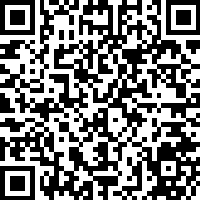
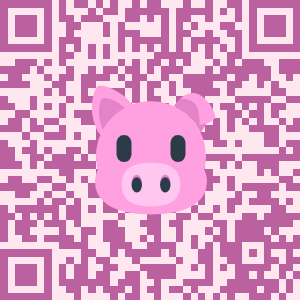
Fancy QR code with options
HTML
<img
	is="qr-code-image"
	src="[You can use src as a fallback image]"
	alt="[and use alt as normal <img> element do]"
	data="https://github.com/eky/custom-element-qr-code-image"
	size="300"
	colordark="#bb61a0ff"
	colorlight="#ffe7efff"
	errorcorrectionlevel="H"
	cover="pig.png"
	coversize="150"
/>
Attributes
data
The data of QR code, no default value.
size
node-qrcode width option, default as 200.
margin
node-qrcode margin option, default as 0.
scale
node-qrcode scale option, default as 4.
colordark
node-qrcode color.dark option, default as #000000ff.
colorlight
node-qrcode color.light option, default as #ffffffff.
errorcorrectionlevel
node-qrcode errorCorrectionLevel option, default as M.
cover
The URL of image cover on the QR code, no default value. Strongly recommend to set errorcorrectionlevel as H or Q when there is a cover on QR code.
coversize
The larger size of width and height, default as size * 0.4.
Event
generated
A CustomEvent will be dispatched after QR code has been generated.
example
document.querySelector('[is="qr-code-image"]')
	.addEventListener('generated', event => {
		console.log(`QR code is ${event.type}.`);
	});
License
The word "QR Code" is registered trademark of: DENSO WAVE INCORPORATED