
customlog
v1.0.2
Published
Really simple custom logging.


Readme
customlog 
This is a simple logging module. It can be used to generate pretty/colorized logs or plain text logs suitable for a syslog environment.
Usage
Creating a custom logger is straightforward. There are a few configuration options that can be passed to a logger. By default, there is no prefix and colorize defaults to true.
var CustomLogger = require('customlog'),
    log = new CustomLogger({
      prefix: 'Test Server'
    }),
    log2 = new CustomLogger({
      colorize: false
    });

log.log('Basic text.');
log.info('Important information.');
log.warn('Watch out!');
log.error('Uh oh! Something is awry.');

console.log('\n===========================\n');

log2.log('Basic text.');
log2.info('Important information.');
log2.warn('Watch out!');
log2.error('Uh oh! Something is awry.');
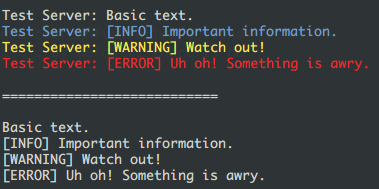
The code above produces:
Installation
Download node at nodejs.org and install it, if you haven't already.
npm install bewdemo --saveConfiguration Options
prefix: Stringwill prepend the supplied string to every log message.postfix: Stringwill append the supplied string to every log message.colorize: Booleanwill use a standard set of colors for prettier output.transform: Functionis a method that receives a single argument (the log message) and returns a string. This can be used to inspect a message and modify the text of a log message before it is written.after: Functionis a method that is run after a message is logged. This can be useful when a message needs to be sent to a remote logging system. Two arguments are passed to this method. The first is the log type (log, info, warn, error). The second is the final log message.
Tests
NOTICE: You must git clone https://github.com/coreybutler/customlog.git this module to obtain tests.
npm install
npm test
Dependencies
- chalk: Terminal string styling done right. Much color.
Dev Dependencies
- mocha: simple, flexible, fun test framework
License
MIT
Generated by package-json-to-readme