
cxreset
v0.2.1
Published
Unofficial CLI to display Codex CLI usage reset time for statusline
Downloads
74

Maintainers
 beagleworks
Readme
cxreset
An unofficial CLI tool to display Codex CLI usage reset time. Ideal for statusline display. Can also be used as a display component for ccstatusline.
Unofficial project. Not affiliated with, endorsed by, or supported by OpenAI.
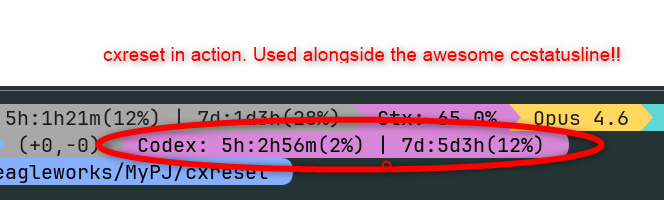
Red circle: cxreset in action. Used alongside the awesome ccstatusline
Installation
# Recommended: run without global install
bunx cxreset

# or with npx
npx cxreset

# or with pnpm
pnpm dlx cxreset
Optional: Global install
bun add -g cxreset
# or
npm install -g cxreset
Usage
Package execution
bunx cxreset
# or
npx cxreset
# or
pnpm dlx cxreset
Local execution (from source)
npm install
npm run build
node dist/cli.js
Output
Codex: 5h:2h30m(5%) | 7d:3d12h(11%)| Field | Description |
|-------|-------------|
| Codex: | Prefix (distinguishes from ccreset) |
| 5h: | 5-hour reset window |
| 2h30m | Time remaining until reset |
| (5%) | Current usage |
| 7d: | 7-day (weekly) reset window |
| 3d12h | Time remaining until reset |
| (11%) | Current usage |
When the secondary window is not available, only the 5-hour window is shown:
Codex: 5h:2h30m(5%)Claude Code Statusline
Add the following to ~/.claude/settings.json.
Bun runtime
{
  "statusLine": {
    "type": "command",
    "command": "bunx cxreset"
  }
}
Node.js-only runtime
{
  "statusLine": {
    "type": "command",
    "command": "npx cxreset"
  }
}
With ccstatusline
When using cxreset as a ccstatusline addon, it is recommended to set the timeout to 2000ms. cxreset communicates with the Codex app-server via JSON-RPC, which may take longer than typical HTTP requests.
Requirements
How it works
Launches the locally installed Codex CLI's app-server and communicates via JSON-RPC to fetch usage information.
Compatibility Notes
- cxreset depends on the app-server interface exposed by your installed Codex CLI
codex app-serveris currently marked experimental in Codex CLI help output- Future Codex CLI updates may change the protocol or response fields and break compatibility
Releasing
Release instructions have been moved to RELEASING.md.
License
MIT
GitHub Pages
The landing page (docs/) is deployed by .github/workflows/pages.yml. In GitHub Settings > Pages, set Source to GitHub Actions.