
cypress-pipedream-plugin
v1.3.0
Published
Cypress Plugin | Enhances Cypress testing capabilities by providing convenient commands for retrieving received SMS history from Pipedream. Simplify your end-to-end testing workflow by effortlessly integrating SMS history verification into your Cypress te


Readme
Retrieve SMS history from Pipedream
This npm library enhances Cypress testing capabilities by providing convenient commands for retrieving received SMS history from Pipedream.
Simplify your end-to-end testing workflow by effortlessly integrating SMS history verification into your Cypress tests.
Install
$ npm install cypress-pipedream-plugin --save-devAlternatively, you can install it as a global module:
$ npm install -g cypress-pipedream-pluginPrerequisites
A Pipedream source: https://pipedream.com/sources/new.
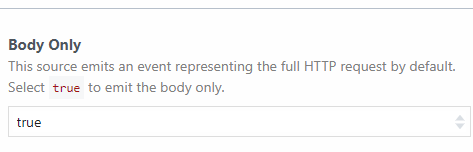
Pay attention to set the Body Only option to true when creating the source, if you haven't and you have already created the Pipedream-Source enables it here: https://pipedream.com/sources/{your-source}/configuration
Added commands
| Commands | Notes |
| ----------------------------------- | -------------------------------------------------------------------------------------------------------------------------------------------------------- |
| cy.getNewestMessage(deleteAfter) | Retrieves the last (NEWEST) SMS for a specific Pipedream Source History within a specified time limit. Optional: set deleteAfter=true to auto-delete. |
| cy.getOldestMessage(deleteAfter) | Retrieves the first (OLDEST) SMS for a specific Pipedream Source History within a specified time limit. Optional: set deleteAfter=true to auto-delete. |
| cy.getArrayMessage() | Retrieves all SMS messages as an array of objects with {id, message} structure. Returns full message list with IDs for selective deletion. |
| cy.deleteSpecificMessage(messageId) | Deletes a specific message by its ID. Use after getArrayMessage() to selectively remove individual messages. |
| cy.clearMessagesHistory() | Clears the entire SMS history for a specific Pipedream Source. |
| cy.clearHistorySendSmsAndGetSMS() | This command simplifies the usage by executing the following commands in sequence: |
cy.clearMessagesHistory() //
cy.get('[data-cy="send-sms"]', { timeout: 120000 }).click() // Command to send the SMS from the frontend
cy.getNewestMessage()
According to cypress documentation adding the data-cy tag to your frontend, is the best way to keep your test updated and maintainable.
Configuration
Inside cypress/support/e2e.js
At the top of your support file (usually cypress/support/e2e.js for e2e testing type):
import "cypress-pipedream-plugin"Inside your environment file
You MUST set these environment variables to make this plugin working
| Parameter | Mandatory | Notes | Default |
| ------------------- | --------- | -------------------------------------------------------------------------------------- | ------------------------------- |
| pipedreamBearer | TRUE | Bearer used for Pipedream Auth | \ |
| pipedreamSourceID | TRUE | Your Pipedream Source ID | \ |
| pipedreamMaxRetries | Optional | Maximum wait time (in minutes) for cy.getOldestMessage() and cy.getNewestMessage() | 1 |
| pipedreamFolderPath | FALSE | Folder where the SMS body will be saved | 'cypress/fixtures/sms-response' |
| pipedreamFileName | FALSE | File name in which the message will be written | 'message.json' |
To set these variables dynamically in a multi environment cypress-test, you can use the following plugin: cypress-env
Considerations
Auto-delete messages after retrieval
You can automatically delete a message after reading it by passing true to the deleteAfter parameter:
// Get newest message and delete it automatically
cy.getNewestMessage(true)

// Get oldest message and delete it automatically
cy.getOldestMessage(true)
Working with message arrays and selective deletion
Use getArrayMessage() to retrieve all messages with their IDs, then selectively delete specific ones:
// Get all messages with IDs
cy.getArrayMessage()

// Read the saved array and delete a specific message
cy.readFile("cypress/fixtures/sms_response/message.json").then((messages) => {
  // messages = [{ id: "1762787731250-0", message: "Your SMS text here" }, ...]

  // Delete the first message
  cy.deleteSpecificMessage(messages[0].id)

  // Or delete a message based on content
  const messageToDelete = messages.find((msg) => msg.message.includes("verification code"))
  if (messageToDelete) {
    cy.deleteSpecificMessage(messageToDelete.id)
  }
})
Reading message contents
To check the file contents, you can use the following command:
cy.readFile('cypress/fixtures/sms_response/message.json', {
	timeout: 60000,
	retries: 3,
}).then((message) {
  ... // do something with the saved message
})
Missing configuration error:
────────────────────────────────────────────────────────────────────────────────────────────────────

  Running:  myFirstTest.cy.js                                                               (1 of 1)

    An uncaught error was detected outside of a test (Attempt 1 of 2)
    Error: The following error originated from your test code, not from Cypress.
  1) An uncaught error was detected outside of a test

  0 passing (1s)
  1 failing

  1) An uncaught error was detected outside of a test:
     Error: The following error originated from your test code, not from Cypress.

  > CYPRESS-PIPEDREAM-PLUGIN | Missing environment variables: env('pipedreamBearer') & env('pipedreamSourceID') needed

────────────────────────────────────────────────────────────────────────────────────────────────────
THE JOB IS DONE!
Happy testing to everyone!
ALEC-JS