
dashboard-match
v0.1.0
Published
Find matching dashboard for natural language query


Readme
Looker Recommended Dashboards with AI
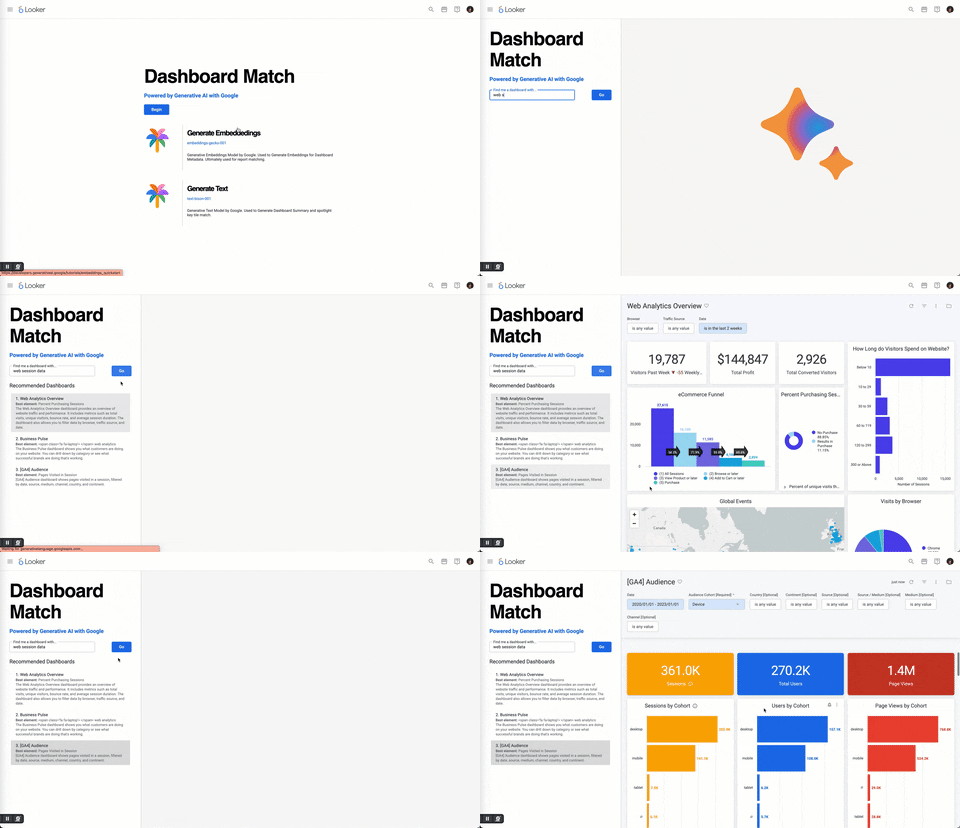
This app demonstrates how you could use a language model and embeddings to get recommended dashboards for a natural language query.
Huge Shoutout to Hugo and Meredith for their initial work in getting this use case built out for Looker Hack Week.
It uses
Getting Started for Development
Clone or download a copy of this repository to your development machine.
# cd ~/ Optional. your user directory is usually a good place to git clone to.
git clone [email protected]:looker-open-source/extension-examples.git
Navigate (
cd) to the template directory on your systemcd dashboard_demoInstall the dependencies with NPM.
npm installYou may need to update your Node version or use a Node version manager to change your Node version.
Start the development server
npm startGreat! Your extension is now running and serving the JavaScript at https://localhost:8080/bundle.js.
Now log in to Looker and create a new project.
This is found under Develop => Manage LookML Projects => New LookML Project.
You'll want to select "Blank Project" as your "Starting Point". You'll now have a new project with no files.
- In your copy of the extension project you have a
manifest.lkmlfile.
You can either drag & upload this file into your Looker project, or create a
manifest.lkmlwith the same content. Change theid,label, orurlas needed.application: dashboard_match { label: "Dashboard Match" url: "https://localhost:8080/bundle.js" entitlements: { core_api_methods: ["all_dashboards", "dashboard", "update_dashboard", "dashboard_dashboard_elements"] navigation: yes use_embeds: yes local_storage: yes external_api_urls: ["https://generativelanguage.googleapis.com"] } }- In your copy of the extension project you have a
Create a
modelLookML file in your project. The name doesn't matter. The model and connection won't be used, and in the future this step may be eliminated.- Add a connection in this model. It can be any connection, it doesn't matter which.
- Configure the model you created so that it has access to some connection.
Connect your new project to Git. You can do this multiple ways:
- Create a new repository on GitHub or a similar service, and follow the instructions to connect your project to Git
- A simpler but less powerful approach is to set up git with the "Bare" repository option which does not require connecting to an external Git Service.
Commit your changes and deploy your them to production through the Project UI.
Reload the page and click the
Browsedropdown menu. You should see your extension in the list.- The extension will load the JavaScript from the
urlprovided in theapplicationdefinition. By default, this is https://localhost:8080/bundle.js. If you change the port your server runs on in the package.json, you will need to also update it in the manifest.lkml.
- The extension will load the JavaScript from the
- Refreshing the extension page will bring in any new code changes from the extension template, although some changes will hot reload.
- Use with an access key requires a bit more setup. First, create a .env file in the
dashboard_matchdirectory with the following entries. Use a password generator to create the values. These values should be set prior to starting the development and data servers. Do NOT store the .env file in your source code repository.
GOOGLE_API_KEY='[your service key for generativelanguage.googleapis.com here]'Deployment
The process above requires your local development server to be running to load the extension code. To allow other people to use the extension, a production build of the extension needs to be run. As the kitchensink uses code splitting to reduce the size of the initially loaded bundle, multiple JavaScript files are generated.
- In your extension project directory on your development machine, build the extension by running the command
yarn build. - Drag and drop ALL of the generated JavaScript files contained in the
distdirectory into the Looker project interface. - Modify your
manifest.lkmlto usefileinstead ofurland point it at thebundle.jsfile.
Note that the additional JavaScript files generated during the production build process do not have to be mentioned in the manifest. These files will be loaded dynamically by the extension as and when they are needed. Note that to utilize code splitting, the Looker server must be at version 7.21 or above.