
datagen-framework
v0.1.6
Published
A TypeScript framework for defining, generating, and cleaning up test data across multiple runners — Web UI, CLI, and Cypress — from a single set of data packs.


Readme
datagen-framework
A TypeScript framework for defining, generating, and cleaning up test data across multiple runners — Web UI, CLI, and Cypress — from a single set of data packs.
Author: Omprakash Selvaraj
License: MIT
Table of Contents
- Overview
- How It Works
- Project Structure
- Quick Start — Web UI
- Pack Contract
- Defining a Data Pack
- Registering Packs
- Using the Adapters
- Scaffolding a New Pack
- Building
Architecture
Data Lifecycle
Pack Contract
Overview
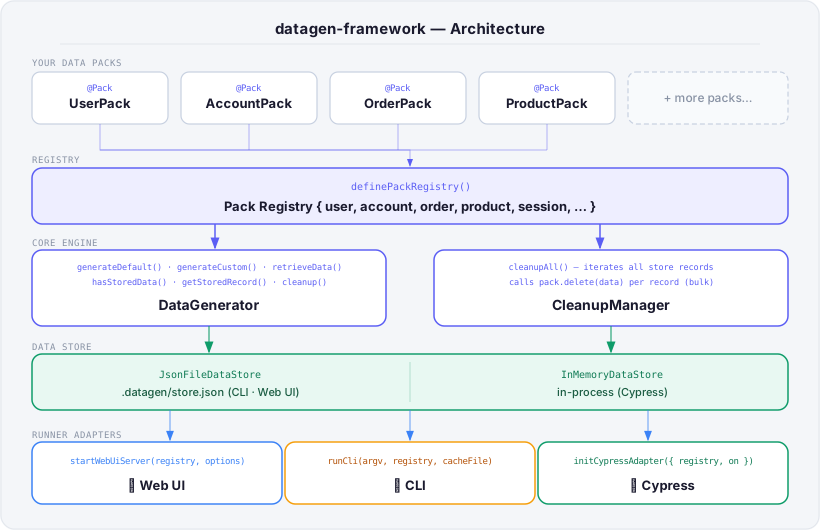
Test data setup is repetitive and fragile. This framework centralises it into data packs — small, typed classes that know how to create and delete a specific entity (a user, an order, an account, etc.). A pack is written once and can then be driven from any runner:
| Runner | Use case |
|----------|-------------------------------------------------------|
| Web UI | Manually seed data before exploratory or demo testing |
| CLI | CI scripts, one-off seeding, pipeline hooks |
| Cypress | Per-test setup and automatic teardown via after:run |
How It Works
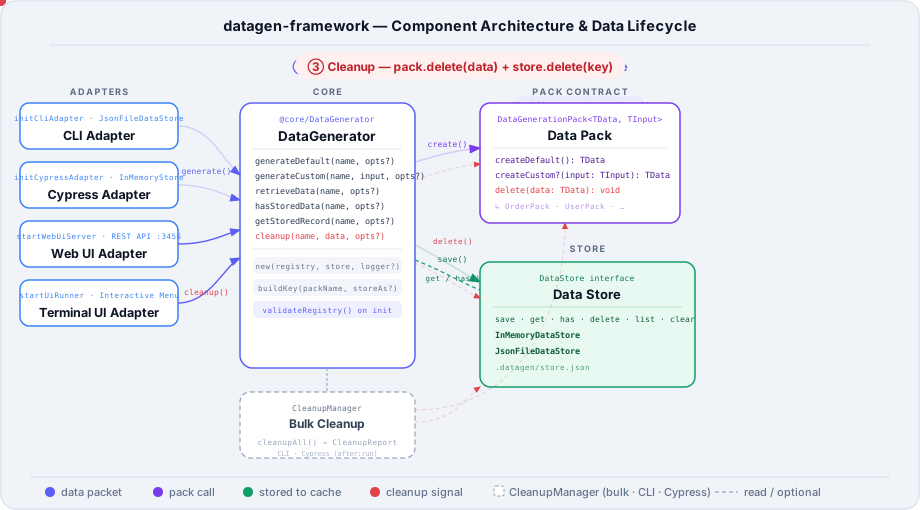
Pack Registry
  └── DataGenerator          — calls createDefault() / createCustom()
  └── CleanupManager         — calls delete() on stored records
        │
        ├── JsonFileDataStore  (CLI, Web UI — persists across runs)
        └── InMemoryDataStore  (Cypress — scoped to a test session)
Each adapter wires up a registry, a store, and a generator. The pack implementation stays the same regardless of which adapter drives it.
Project Structure
src/
├── framework/                   Core engine + runner adapters
│   ├── core/
│   │   ├── generator/           DataGenerator — generates & stores data
│   │   ├── cleanup/             CleanupManager — runs pack.delete()
│   │   ├── store/               JsonFileDataStore / InMemoryDataStore
│   │   ├── registry/            definePackRegistry helper
│   │   └── types/               DataGenerationPack<TData, TInput> interface
│   └── adapters/
│       ├── web-ui/              HTTP server + browser UI
│       ├── cli/                 Node.js CLI runner
│       └── cypress/             cy.task bridge + custom commands
│
└── data-generation-example/     Sample packs (user, account, order, …)
    ├── models/                  TypeScript interfaces
    ├── packs/                   Pack implementations
    ├── helpers/                 API helpers called by packs
    └── registry/
        └── packRegistry.ts      Registry of all example packs
Quick Start — Web UI
The fastest way to see the framework in action is to run the sample web UI, which lets you generate and inspect data for every registered pack from a browser.
1. Install dependencies
npm install2. Start the web UI
npm run web-uiThis builds the TypeScript and starts a local HTTP server.
3. Open the browser
http://localhost:3456You will see a card for every registered pack. Click Generate Default to create data, Download JSON to export it, or Cleanup to delete the stored record.
Generated data is cached at .datagen/store.json between runs so you can inspect or reuse it.
Defining a Data Pack
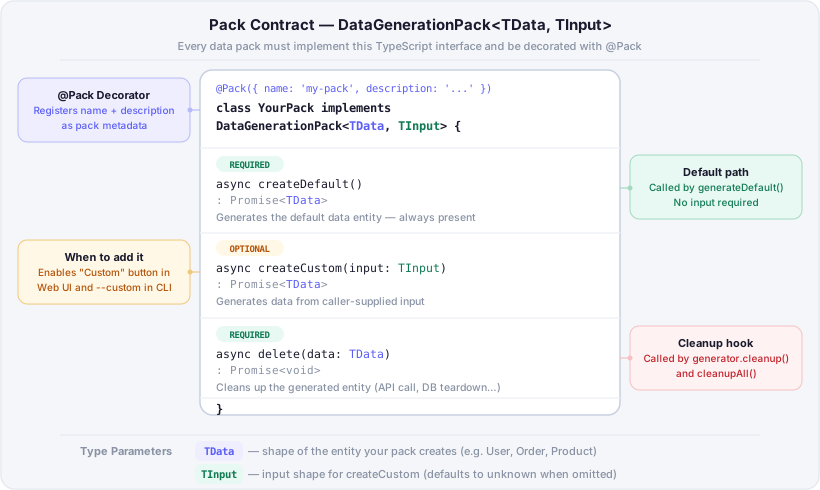
A pack is a class decorated with @Pack that implements DataGenerationPack<TData, TInput>.
import { Pack, type DataGenerationPack } from '../framework/core/index.js';
import type { User } from '../models/user.js';

// Minimal pack — default generation only
@Pack({ name: 'user', description: 'Generates default users' })
export class UserPack implements DataGenerationPack<User> {
  async createDefault(): Promise<User> {
    // Call your API, seed your DB, or return hardcoded data
    return { id: 'user-1', email: '[email protected]' };
  }

  async delete(data: User): Promise<void> {
    // Called automatically during cleanup
    await fetch(`/api/users/${data.id}`, { method: 'DELETE' });
  }
}
To also support custom generation, add a createCustom method and a second type parameter:
import type { Account, AccountInput } from '../models/account.js';

@Pack({ name: 'account', description: 'Generates default or custom accounts' })
export class AccountPack implements DataGenerationPack<Account, AccountInput> {
  async createDefault(): Promise<Account> {
    return this.helper.createAccount({ role: 'basic' });
  }

  // Shown as "Custom" in the Web UI; available as --custom in the CLI
  async createCustom(input: AccountInput): Promise<Account> {
    return this.helper.createAccount(input);
  }

  async delete(data: Account): Promise<void> {
    await this.helper.deleteAccount(data.id);
  }
}
Registering Packs
All packs are collected into a registry — a typed object that maps a string key to a pack class. Pass this registry to whichever adapter you use.
// src/data-generation-example/registry/packRegistry.ts
import { definePackRegistry } from '../../framework/core/index.js';
import { UserPack }    from '../packs/UserPack.js';
import { AccountPack } from '../packs/AccountPack.js';
import { OrderPack }   from '../packs/OrderPack.js';

export const packRegistry = definePackRegistry({
  user:    UserPack,
  account: AccountPack,
  order:   OrderPack,
});
The registry key (e.g. "user") is how every adapter refers to a pack at runtime.
Using the Adapters
Web UI Adapter
Serves a browser UI for manually generating and inspecting data. Data is persisted to a JSON file.
// src/data-generation-example/run-web-ui.ts
import { startWebUiServer } from '../framework/adapters/web-ui/index.js';
import { packRegistry }     from './registry/packRegistry.js';

await startWebUiServer(packRegistry, {
  cacheFile: '.datagen/store.json',
  port: 3456,
});
npm run web-ui
# → http://localhost:3456CLI Adapter
Run from the terminal or a CI pipeline. Data is persisted to a JSON file.
// src/data-generation-example/run-cli.ts
import { runCli }       from '../framework/adapters/cli/index.js';
import { packRegistry } from './registry/packRegistry.js';

await runCli(process.argv.slice(2), packRegistry, '.datagen/store.json');
Available commands:
# List all registered packs
node dist/data-generation-example/run-cli.js list

# Generate default data for a pack
node dist/data-generation-example/run-cli.js generate --pack=user

# Generate custom data (pack must implement createCustom)
node dist/data-generation-example/run-cli.js generate --pack=account --custom --input='{"role":"admin"}'

# Store result under a specific key
node dist/data-generation-example/run-cli.js generate --pack=user --store-as=adminUser

# Clean up all stored data (calls delete() on each pack)
node dist/data-generation-example/run-cli.js cleanup
Cypress Adapter
Integrates with Cypress via cy.task. Data is held in memory and cleaned up automatically after the test run ends.
cypress/support/e2e.ts — register custom commands once:
import { initCypressAdapter } from 'datagen-framework';
import { packRegistry }       from '../../src/data-generation-example/registry/packRegistry.js';

// Called in cypress.config.ts setupNodeEvents, not here — see below
export {};
cypress.config.ts — wire up the adapter in setupNodeEvents:
import { defineConfig }        from 'cypress';
import { initCypressAdapter }  from 'datagen-framework';
import { packRegistry }        from './src/data-generation-example/registry/packRegistry.js';

export default defineConfig({
  e2e: {
    setupNodeEvents(on, config) {
      initCypressAdapter({ registry: packRegistry, on, CypressRef: Cypress });
      return config;
    },
  },
});
In a test:
// Generate default data
cy.generateDefault('user').then((user) => {
  cy.log('Created user:', user.id);
});

// Generate custom data (pack must implement createCustom)
cy.generateCustom('account', { role: 'admin' }).then((account) => {
  cy.log('Created admin account:', account.id);
});

// Retrieve previously stored data by key
cy.retrieveData('adminUser').then((data) => {
  cy.log('Retrieved:', data);
});
Cleanup runs automatically after the full Cypress run via the after:run hook registered by initCypressAdapter.
Scaffolding a New Pack
The create-pack script scaffolds the model file, pack file, and updates the index barrels and registry automatically.
npm run create-packYou will be prompted for:
| Prompt | Example |
|--------|---------|
| Source folder | src/data-generation-example |
| Pack key | payment |
| Pack class name | PaymentPack |
| Description | Generates payment test data |
| Subdirectory within packs/ | ecommerce (optional) |
| Supports custom generation? | y / N |
The script creates:
models/payment.ts— TypeScript interfacepacks/[subdir/]PaymentPack.ts— pack implementation stub- Updates
models/index.ts,packs/index.ts, andregistry/packRegistry.ts
Then run npm run build to verify everything compiles.
Building
npm run buildCompiled output goes to dist/. The prepublishOnly script runs this automatically before npm publish.