
datavor
v3.5.0
Published
AI-native database sync and pipeline MCP server

Maintainers
 datavor
Readme
Datavor
The AI-Native Database Sync & Pipeline MCP
Sync, transform, schedule, and monitor your data pipelines using natural language through Claude.
No SQL. No complex UIs. No data engineers. Just ask.







🌟 What is Datavor?
Datavor is an MCP (Model Context Protocol) server that turns Claude into a complete database pipeline tool. Connect your databases, describe what you want in plain English, and Datavor handles the sync, transformation, scheduling, monitoring — and a local web UI that visualises everything it has learned about your data.
Built for the AI era — while traditional tools like Fivetran cost $12,000+/year and require a dedicated data engineer, Datavor works through natural language and is free during launch week (every Pro feature included).
❌  Old way:  Write SQL → configure ETL → build schedules → debug errors → repeat
✅  Datavor:  "Sync my orders table every night and alert me if it fails"  →  Done
🚀 Pro Free for personal projects, learning, and open-source contributors.
Datavor v3.5 is Free for non-commerical use. Download now and spread the words for us.
✨ What's New in v3.5 — Warehouse & Reach
BigQuery and Redshift join the connector lineup alongside Snowflake, live replication (CDC) now reaches both, a new verify_sync tool catches sync problems before they become data-quality incidents, and Datavor is packaged for the agent ecosystem — Codex CLI, OpenClaw, and any other MCP-compatible framework.
🗄️ BigQuery + Redshift Connectors
connect_bigquery (service-account key or Application Default Credentials, cost-safe metadata row counts — never a billed SELECT COUNT(*) scan) and connect_redshift (PostgreSQL wire protocol, S3-staged COPY for bulk writes). Completes the "big three" cloud warehouse story alongside Snowflake — 7 databases now supported.
⚡ Live Replication to Both Warehouses
start_cdc now streams correctly into BigQuery and Redshift, not just Snowflake. BigQuery gets a real MERGE-based batch writer (staged via a load job, so nothing lags a streaming buffer); Redshift gets a temp-table-staging + transactional upsert writer. Both carry the source's primary-key metadata through to the target — the thing that makes a correct upsert possible on warehouses with no enforced primary key of their own.
✅ verify_sync — Data Reconciliation
Compares source and target after any sync: row counts, an order-independent checksum, and (with method=full) exactly which rows are missing, extra, or duplicated. Learns each table's normal row-count range over time and flags anomalies automatically — "this table is usually 40–50K rows, but now it's 12K" surfaces on its own, no dashboard-watching required.
You: "Did the BigQuery sync actually work?"
Claude: ✅ Verification match — 45,230 rows on both sides, checksums agree.

You: "Something feels off with the Redshift copy — check it properly"
Claude: ❌ Verification mismatch
        3 row(s) present in source are missing from target — check dashboard_failures.
🔀 Sync Into a Differently-Named Target
sync_table, sync_table_partial, and sync_table_incremental all take an optional target_table now — read a bare MySQL table name and write it into a differently-named (or dataset-qualified) warehouse table in the same call, without forcing source and target onto identical naming conventions.
🤖 Built for the Agent Ecosystem
Datavor already worked with any MCP client — now it's packaged for the ones AI agents actually run in. A ready-to-publish OpenClaw skill, verified Codex CLI compatibility (stdio and Streamable HTTP + bearer-token registration both confirmed against a real install), and a generic integration guide covering PydanticAI, LangChain/LangGraph, and any other MCP-compatible framework — see 🔌 MCP Client Compatibility below.
🛠️ 3 New MCP Tools
connect_bigquery, connect_redshift, verify_sync — bringing the total to 50.
✨ What's New in v3.2 — Monetisation Foundation
Stripe Checkout (USD) and Circle Agents (USDC) integration. Online license verification.
⭐ Registration & Activation
Two customer tracks, both end at the same Pro tier:
- Human: email →
POST /api/license/register→ activation code (DVPRO-XXXX-XXXX-XXXX-XXXX) →POST /api/license/activate→ signed license file at~/.datavor/license. Also available asregister_pro+activate_proMCP tools so users can finish activation in their Claude conversation without opening the browser. - AI Agent: wallet address →
POST /api/license/register-agent→ instantdvpro_agent_*API key. Auth viaAuthorization: Bearer dvpro_agent_...header. No email, no human interaction — ready for Circle USDC + automated agent workflows.
🛡️ Security by Design
- Activation codes and API keys never stored raw — only SHA-256 hashes in
~/.datavor/license.db - Every comparison uses
crypto.timingSafeEqual - The active license file is HMAC-SHA256 signed against
DATAVOR_LICENSE_SECRET; tampering with any field invalidates it - Admin panel fails closed —
DATAVOR_ADMIN_TOKENmust be set and ≥16 chars or/adminreturns 503
🎛️ ENFORCE_PRO_GATE Master Switch
One env var controls whether the gate enforces or just observes. During launch week it stays false and every paid feature is functionally free for every user. Flip to true when payment rails go live — no code changes, no redeploy logic.
📧 EMAIL_MODE=console for Local Dev
Activation codes print to stderr as a banner block instead of going through SMTP. Test the full register → activate loop on a fresh laptop without configuring an email provider. Switch to EMAIL_MODE=smtp with the standard SMTP_HOST/PORT/USER/PASS quartet when you're ready to send real emails.
🔒 Local Admin Panel at /admin
View registration stats, paginated user list, revoke users, export to CSV — all token-gated, all local. Lives outside the main sidebar (URL-only access). Token is held in sessionStorage and cleared on tab close.

🛠️ 2 New MCP Tools
register_pro, activate_pro — bringing the total to 47.
✨ What's New in v3.0 — Visibility
🖥️ Local Admin Panel (Web UI)
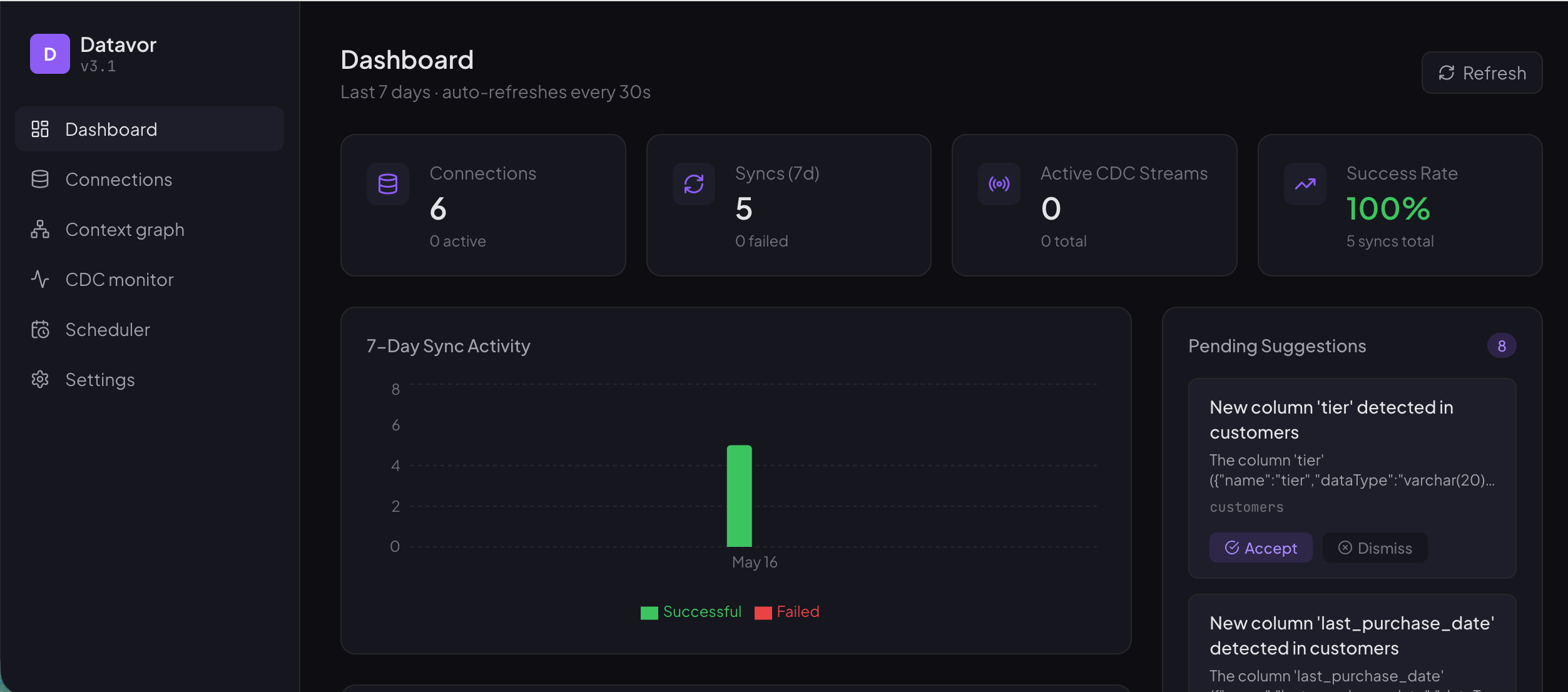
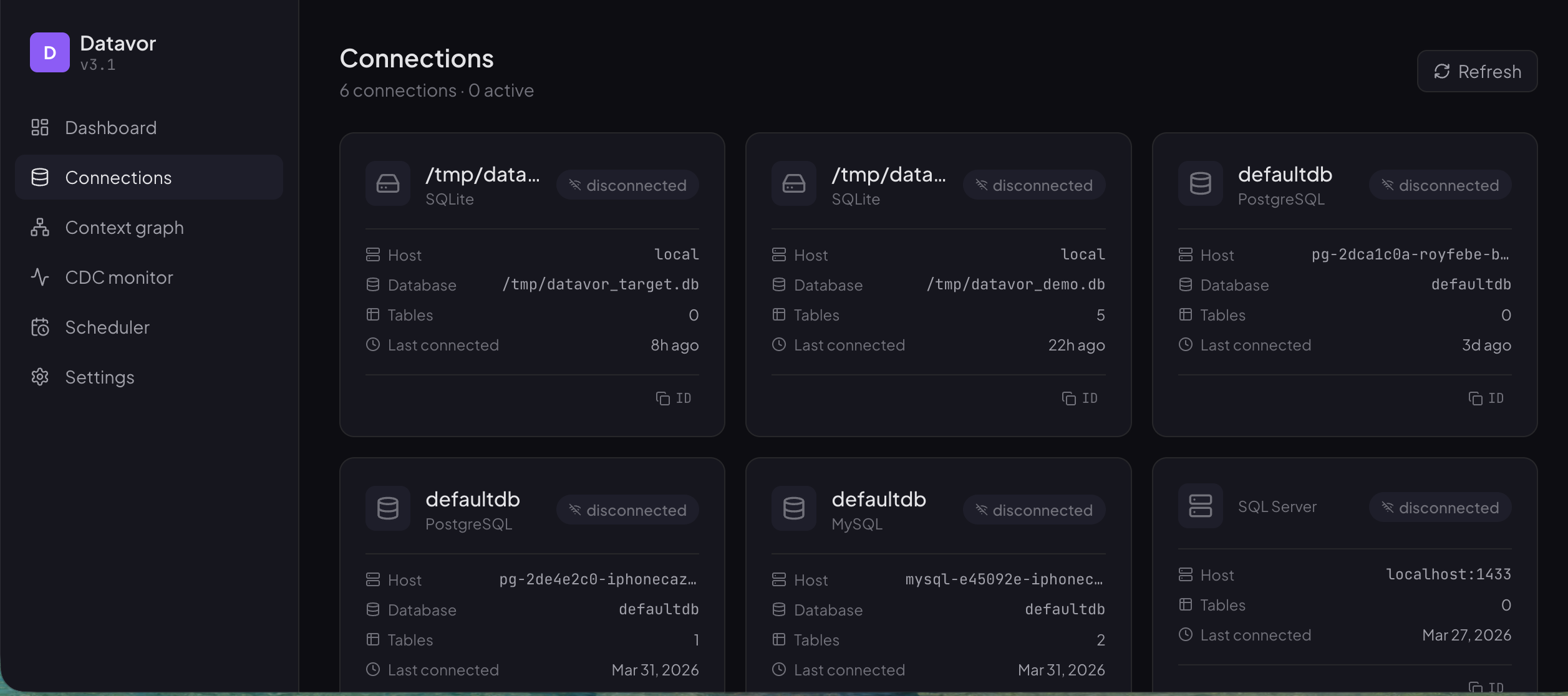
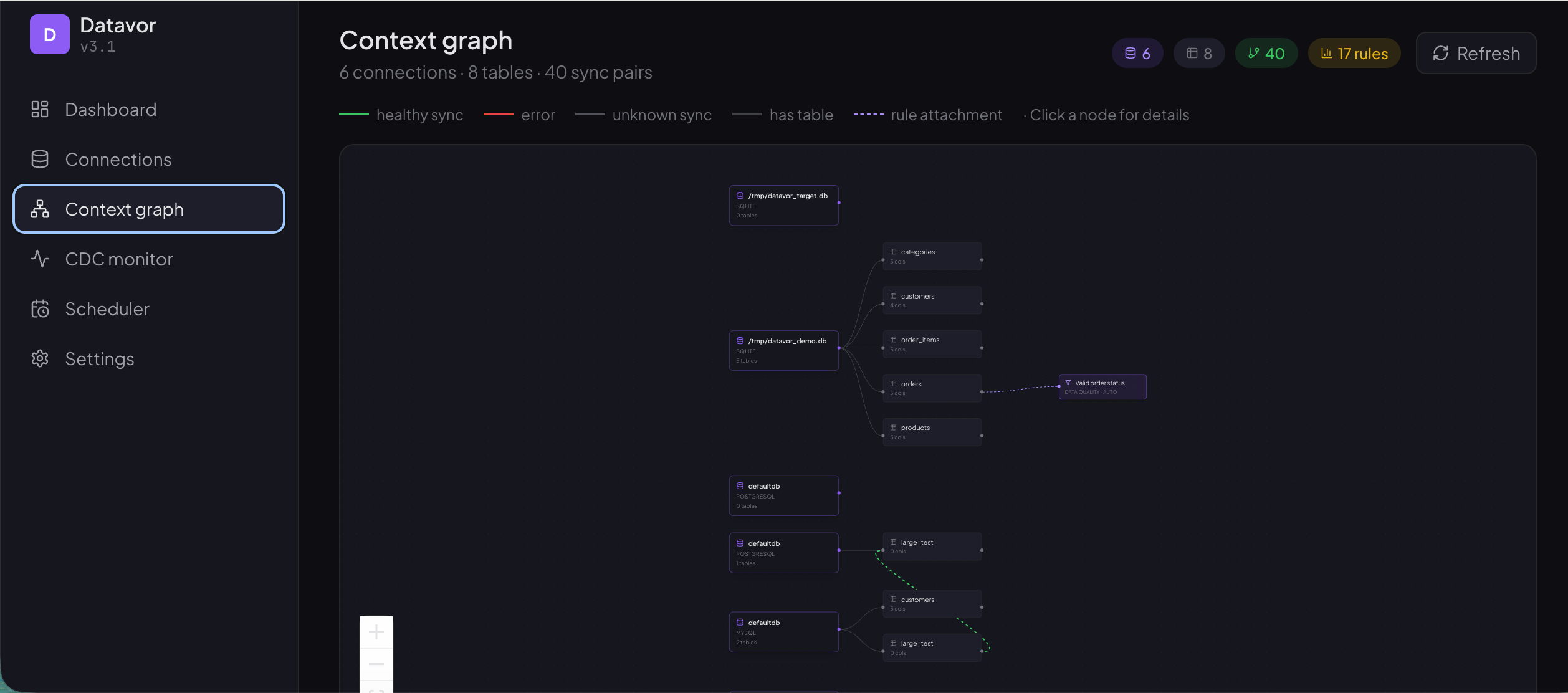
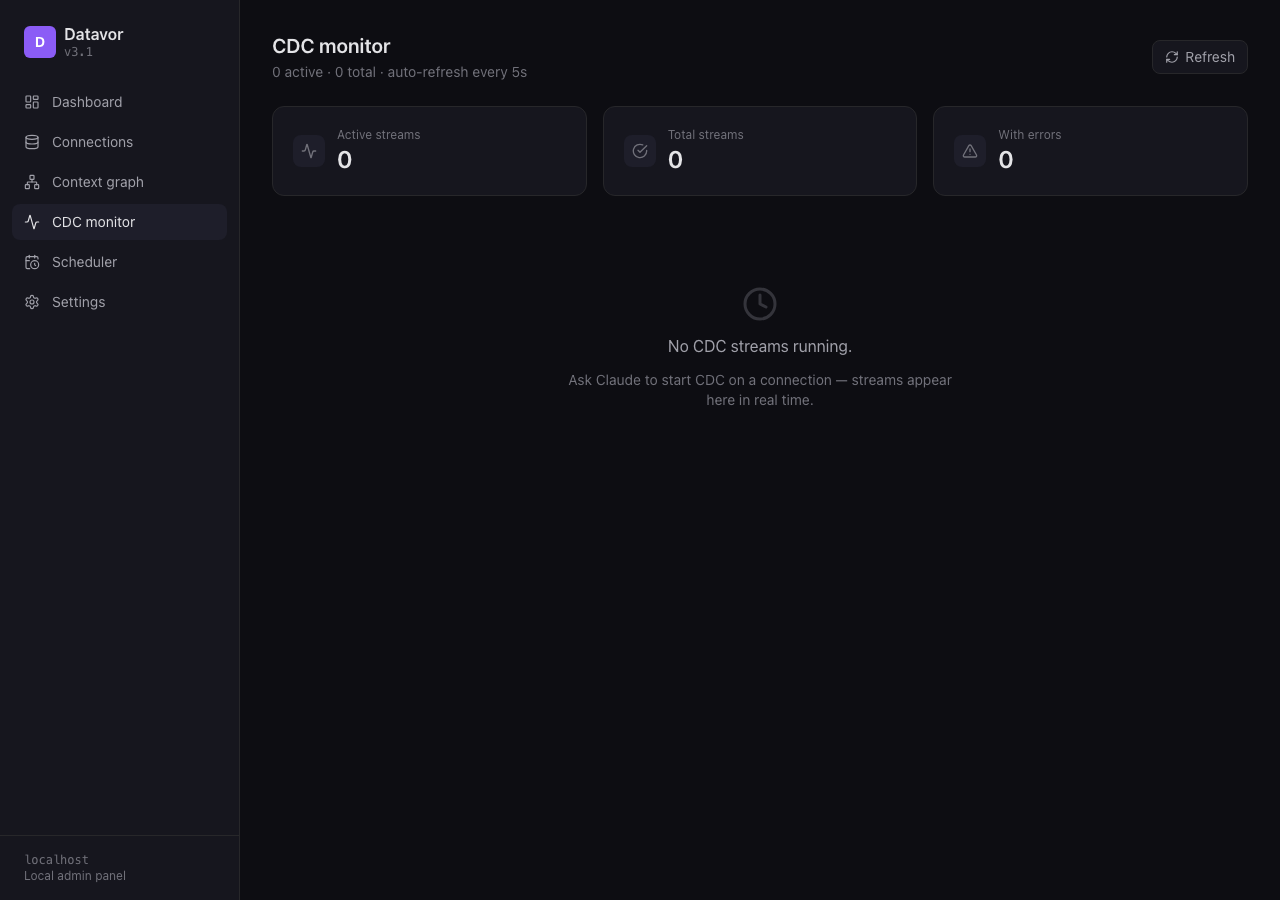
Datavor now ships a local React admin panel that runs alongside the MCP server. Point your browser at http://localhost:3000 to see everything Datavor knows about your data:
- Dashboard — sync activity over the last 24 h, top tables, pending suggestions
- Connections — every active database with status badges
- Context Graph — interactive knowledge graph of connections, tables, and sync pairs (React Flow)
- CDC Monitor — per-stream metrics, phase, lag, last event (auto-refresh every 5 s)
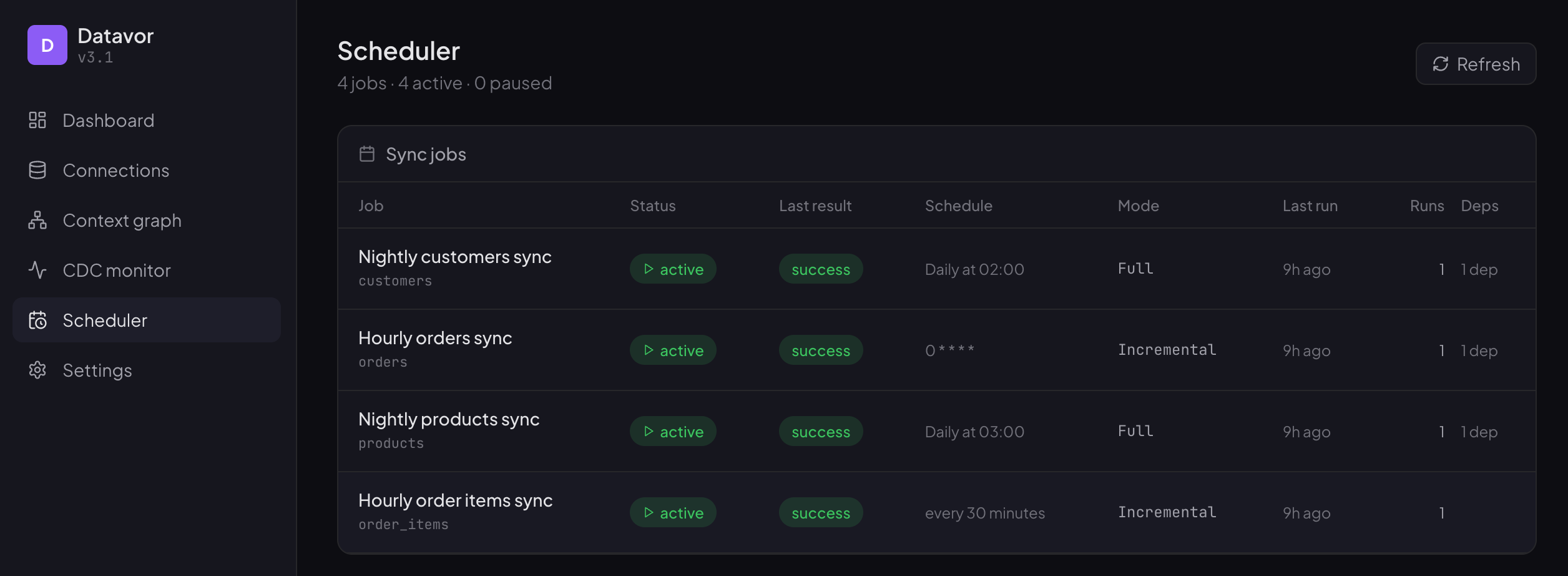
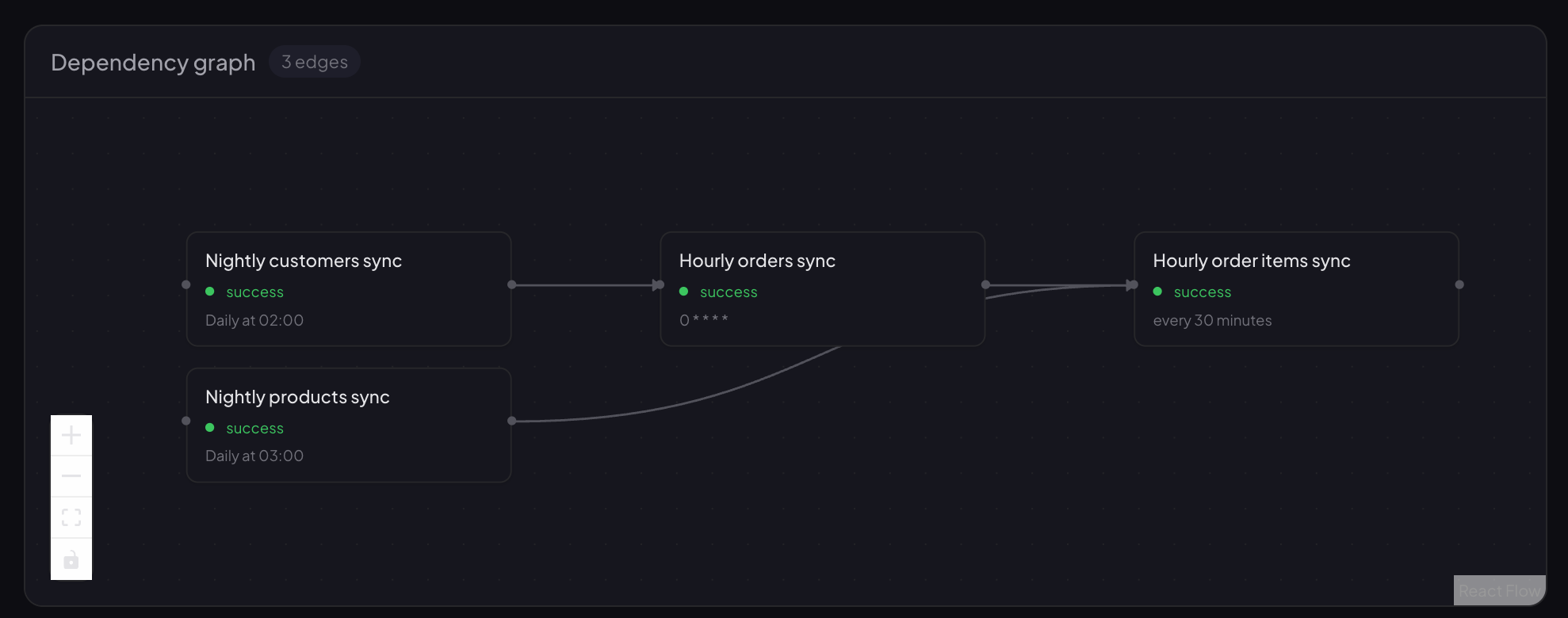
- Scheduler — job list + dependency DAG visualisation
Job List:
 Dependency DAG visualisation:
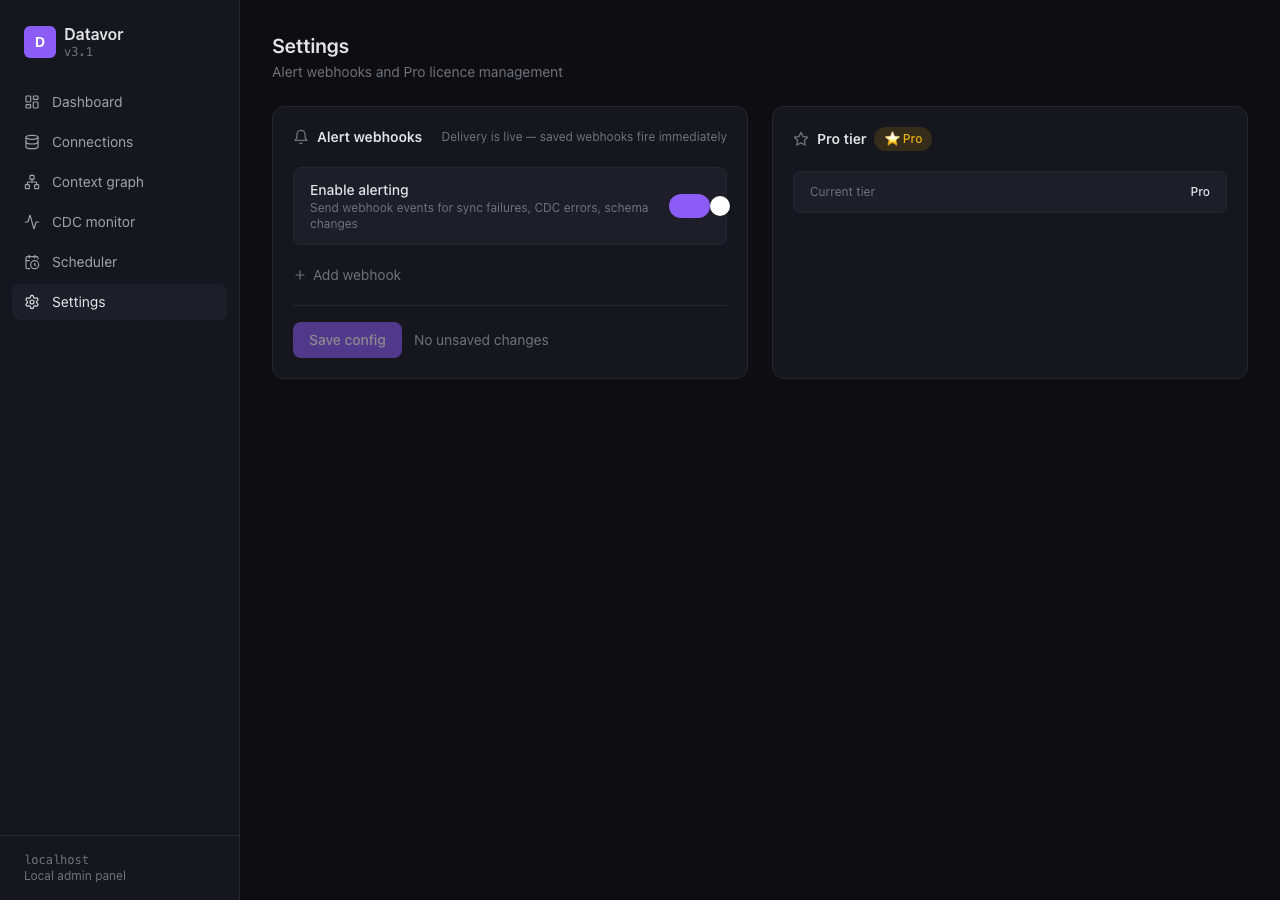
- Settings — alert webhooks + Pro registration & activation
The web UI is read-only — Claude still drives DDL and pipeline definition via MCP. Disable with DATAVOR_WEB=false; change port with DATAVOR_PORT=3030.
🗄️ SQL Server CDC
Polling-based CDC source against SQL Server's native change tables. Captures INSERT/UPDATE/DELETE, pairs SQL Server's split operation 3/4 update rows, and resumes from the last LSN after a restart. Requires SQL Server Agent + sp_cdc_enable_db + sp_cdc_enable_table on each watched table.
❄️ CDC-to-Snowflake Batch Writer
Replaces the per-event apply path with batched MERGE INTO + staged loads. Above 100 rows per flush, Datavor writes a local CSV and uses Snowflake's PUT + COPY INTO for bulk ingest. 1 000-row CDC batches now finish in well under 30 seconds against typical Snowflake warehouses.
🔔 External Alerting
Webhook + Slack delivery for sync_failure, cdc_error, cdc_stopped, schema_change, suggestion_new, and job_failure events. Slack URLs get Block Kit formatting and per-URL serial throttling so bursts don't blow Slack's 1 msg/s cap. Generic webhooks receive a stable JSON envelope. Configure on the Settings page.
⭐ Pro Tier Foundation
Local feature gating with launch-week mode (ENFORCE_PRO_GATE=false). When enforcement is on, Free tier covers basic dashboard, schema tracking, fault tolerance, recipes, and CDC up to 2 tables per stream / 5 active connections. Pro unlocks the knowledge graph, alerting, dependency scheduling, unlimited CDC tables/connections, and the full Context Engine (recipes, error learning, suggestions). v3.1 added the registration + activation flow on top — see above.
✨ What's New in v2.5
⚡ Change Data Capture (CDC)
Real-time replication for PostgreSQL (logical WAL) and MySQL (binary log). Stream INSERT/UPDATE/DELETE events into your destination as they happen — no polling, no missed rows. CDC checkpoints (LSN / binlog position) are persisted in the Context Engine, so streams resume cleanly after a restart.
🛡️ Per-Record Fault Tolerance
A bad row no longer kills the pipeline. Failing rows are isolated, the rest of the batch commits, and every failure is recorded with its error type. Each sync response now reports Rows synced / Rows failed and points at dashboard_failures when there's something to investigate.
🧠 The Context Engine Got Smarter
- Recipes — save any transform configuration as a named recipe (
save_recipe), list them (list_recipes), and re-apply with a single command (apply_recipe). Frequently-used transforms get auto-captured from sync runs. - Error Learner — recurring error patterns are detected, counted, and surfaced as suggestions. Once you record a resolution, it's remembered.
- Proactive Suggestions —
get_suggestionssurfaces actionable items: new columns on synced tables, recurring errors, and slow full-replace syncs that would benefit from incremental or CDC. - Auto-schema propagation — when a column appears on a table that's actively syncing, Datavor suggests adding it to the destination. It never auto-runs DDL.
🔗 Dependency-Aware Scheduling
Express job dependencies as a DAG: scheduler_add_dependency says "job B waits for job A," scheduler_show_graph renders the topology. Cycles are rejected at definition time. The job runner skips children whose parents haven't completed and retries failed jobs with exponential backoff.
🛠️ 11 New MCP Tools
start_cdc, stop_cdc, cdc_status, save_recipe, list_recipes, apply_recipe, get_suggestions, accept_suggestion, dismiss_suggestion, scheduler_add_dependency, scheduler_show_graph — bringing the total to 45.
✨ What's New in v2.0
🗄️ Three New Database Connectors
Datavor now connects to SQL Server, SQLite, and Snowflake — in addition to MySQL and PostgreSQL. Sync between any combination of all five engines.
🧠 Data Context Engine — Datavor Gets Smarter Over Time
The most important feature in v2.0. Datavor now builds a **persistent local knowledge brain that silently learns from every interaction:
- Remembers your schema and detects changes automatically
- Learns your business rules from sync patterns (e.g. "always filter test data")
- Tracks relationships between tables across databases
- Records sync history and surfaces error patterns
- Surfaces this knowledge on demand with
get_contextandexplain_database
🔗 Universal Type Engine
A canonical type system (O(n) complexity) replaces the old per-pair O(n²) mappings. Every connector maps to/from a shared intermediate layer — adding a new database only requires one mapping file, not N.
⚡ How It Works
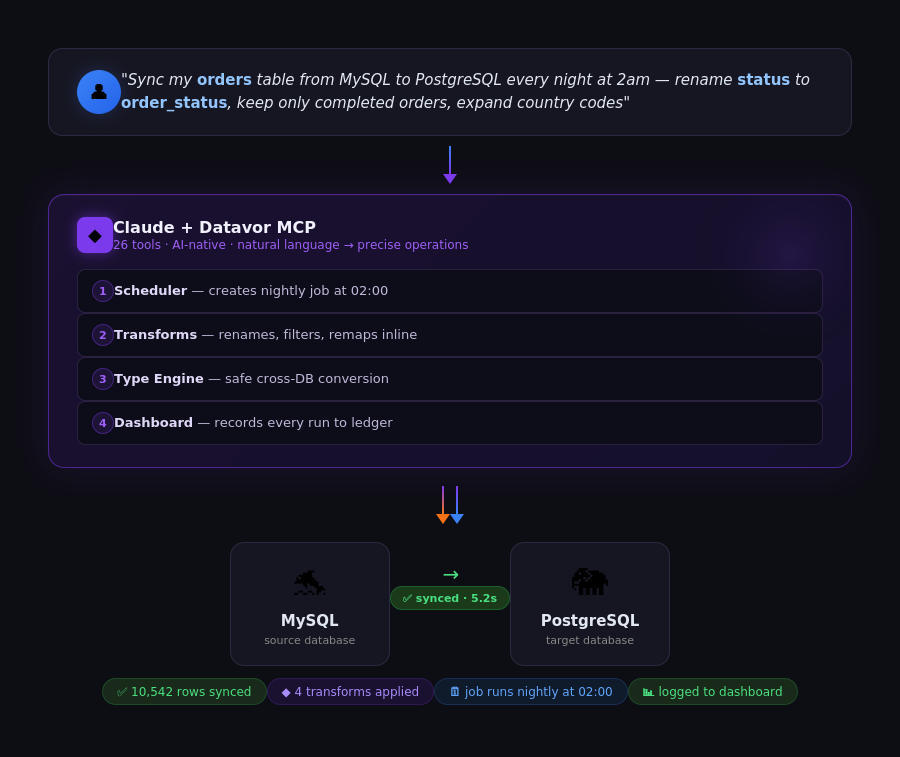
🚀 Quick Start
Prerequisites
- macOS, Linux (Ubuntu 22.04+), or Windows 10/11
- Node.js 18+ and npm
- One or more supported databases: MySQL, PostgreSQL, SQL Server, SQLite, Snowflake, BigQuery, Redshift
- Claude Desktop (free)
Installation
Option 1: From npm (Recommended)
npm install -g datavorOption 2: From source
cd ~/Projects/datavor
npm install
npm run build
Native module note:
better-sqlite3is compiled from source automatically duringnpm install. If you seeinvalid ELF header,invalid PE header, orMODULE_NOT_FOUNDerrors, run:npm rebuild better-sqlite3
Configure Claude Desktop
Open your Claude Desktop config file:
- macOS:
~/Library/Application Support/Claude/claude_desktop_config.json - Windows:
%APPDATA%\Claude\claude_desktop_config.json - Linux:
~/.config/Claude/claude_desktop_config.json
If installed via npm:
{
  "mcpServers": {
    "datavor": {
      "command": "datavor"
    }
  }
}
If installed from source:
{
  "mcpServers": {
    "datavor": {
      "command": "node",
      "args": ["/path/to/datavor/build/index.js"]
    }
  }
}
Restart Claude Desktop completely (Cmd+Q, then reopen), then look for the 🔨 icon near the text input to confirm Datavor loaded.
🌐 Connect via Claude.ai (HTTP transport — no config files)
Don't want to edit claude_desktop_config.json? Datavor ships a Streamable HTTP MCP transport so you can paste a URL into Claude.ai → Settings → Connectors and skip the config-file step entirely.
Start the server
npx datavor@latest serveYou'll see a banner like this:
Datavor MCP server

  URL    http://localhost:4747/mcp
  Token  dtv_a3f8c2e1b4d7f09a8b3c5d6e7f8a9b0c1d2e3f4a5b6c7d8e9f0a1b2c3d4

  Paste the URL into Claude → Settings → Connectors.
  Use the token when prompted.

[2026-05-09T10:00:01.000Z] Ready. Waiting for connections...
The token is auto-generated on first run and persisted to ~/.datavor/serve.json, so subsequent datavor serve invocations reuse the same value — you only paste it into Claude once.
Connect from Claude
Open Claude → Settings → Connectors → Add connector, paste http://localhost:4747/mcp, name it "Datavor", and click Connect. When Claude prompts for a token, paste the dtv_… value from the terminal.
Datavor will stay running in the foreground. Ctrl-C to stop. Your databases remain entirely local — no data leaves your machine.
datavor serve options
| Flag | Default | Notes |
|---|---|---|
| --port <number> | 4747 | Port to listen on. |
| --host <string> | 127.0.0.1 | Bind address. Pass 0.0.0.0 to expose on the LAN — requires a token. |
| --token <string> | auto-generated | Override the bearer token (won't be persisted). |
| --no-token | off | Disable auth. Loopback bind only — refused on 0.0.0.0. |
| --cors | off | Enable CORS for browser-based MCP clients. |
| --rotate | off | Generate a fresh token and overwrite ~/.datavor/serve.json. |
| --config <path> | — | Reserved for a future external config file. |
| -h, --help | — | Print help and exit. |
Verify it's up (manual smoke test)
# Terminal 1
npx datavor@latest serve

# Terminal 2 — replace dtv_… with the token from Terminal 1's banner
curl -X POST http://localhost:4747/mcp \
  -H "Content-Type: application/json" \
  -H "Authorization: Bearer dtv_YOUR_TOKEN" \
  -d '{"jsonrpc":"2.0","id":1,"method":"initialize","params":{"protocolVersion":"2024-11-05","capabilities":{},"clientInfo":{"name":"curl","version":"1.0"}}}'
You should see a JSON response with serverInfo: { name: "datavor", version: "3.5.0" } and a Mcp-Session-Id response header.
Stdio is unchanged
The HTTP server is opt-in via the serve subcommand. If you have an existing claude_desktop_config.json setup, it keeps working without any modification — running datavor with no arguments still starts the stdio MCP server, exactly as in v2.0.
🔌 MCP Client Compatibility
Datavor works with any MCP-compatible client. All the clients below have been tested and confirmed:
| Client | Config file | Status |
|---|---|---|
| Claude Desktop | claude_desktop_config.json (see paths above) | ✅ Confirmed |
| Claude.ai (web) | Streamable HTTP — see Connect via Claude.ai above | ✅ Confirmed |
| Cursor | .cursor/mcp.json in your project root | ✅ Confirmed |
| Cline (VS Code) | cline_mcp_settings.json (VS Code: Cline > MCP Servers > Configure) | ✅ Confirmed |
| Codex CLI | codex mcp add datavor -- npx -y datavor (stdio) or --url ... --bearer-token-env-var (Streamable HTTP + agent billing) | ✅ Confirmed against a real Codex CLI install — see packaging/codex-setup/ |
| OpenClaw | mcp.servers block in openclaw.json — install the skill from packaging/openclaw-skill/ for setup + example trigger phrases | ✅ Skill package ready to publish to ClawHub |
The same config block works for the desktop/IDE clients:
{
  "mcpServers": {
    "datavor": {
      "command": "datavor"
    }
  }
}
🤖 Any other agent framework
Datavor is a standard MCP server (stdio or Streamable HTTP) — no Datavor-specific SDK required. packaging/AGENT_INTEGRATION.md covers PydanticAI, LangChain/LangGraph, and any other MCP-compatible framework, including:
- Local stdio (a human owns the licence) vs. Streamable HTTP with an agent key (autonomous/pay-per-call use,
Authorization: Bearer dvpro_agent_*) - Every tool response stays under 5KB — built for token-efficient agent consumption, not human-scale table dumps
get_contextas the fast path to orient a fresh agent session on a database it's never seen before
💡 Usage Examples
Connect Your Databases
Every session starts with a connection. Supported engines:
"Connect to my MySQL database at 127.0.0.1, user root, password mypass"
"Connect to PostgreSQL at localhost, user postgres, password pgpass"
"Connect to SQL Server at localhost, user sa, password Pass123!"
"Connect to my SQLite file at /path/to/mydata.db"
"Connect to Snowflake, account myorg.us-east-1, user myuser, password mypass, warehouse COMPUTE_WH"
"Connect to BigQuery, project acme-prod, dataset analytics"
"Connect to Redshift at my-cluster.abc123.us-east-1.redshift-serverless.amazonaws.com, database dev, user admin, password mypass, with S3 staging on bucket my-etl-staging"
MySQL on macOS: Always use
127.0.0.1instead oflocalhost— macOS routeslocalhostthrough a Unix socket that the mysql2 driver doesn't use.BigQuery: omit a key entirely to use Application Default Credentials (
gcloud auth application-default login), or pass a service-account key file.Redshift: bulk writes (>100 rows) and CDC need an S3 staging bucket + IAM role — pass them at connect time or you'll get a clear error the first time you try to sync more than a handful of rows.
Core Sync
Full sync — copies everything, replaces target:
You: "Sync the customers table from MySQL to PostgreSQL"
Claude: ✅ Synced 10,542 rows in 5.2s
Partial sync — filter what you move:
You: "Sync only active US customers from MySQL to PostgreSQL"
Claude: ✅ Synced 3,241 rows (WHERE country='US' AND active=1)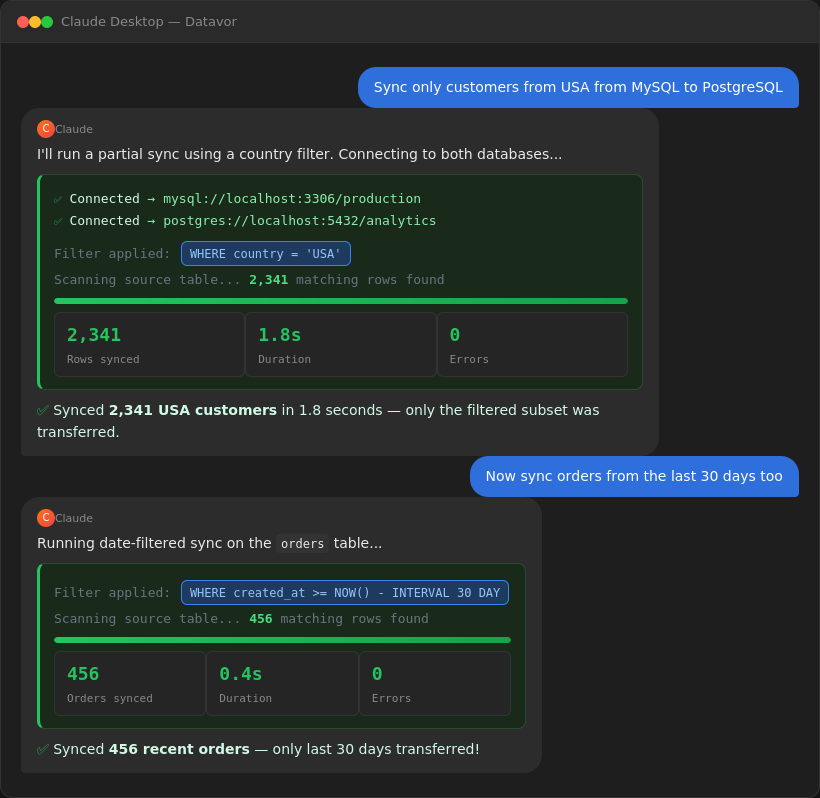
Incremental sync — only what changed since last run:
You: "Sync new orders incrementally using the updated_at column"
Claude: ✅ Synced 47 new/updated rows (from 2025-03-10 onwards) in 0.3s
        💡 Next incremental sync will automatically start from: 2025-03-11 09:15:00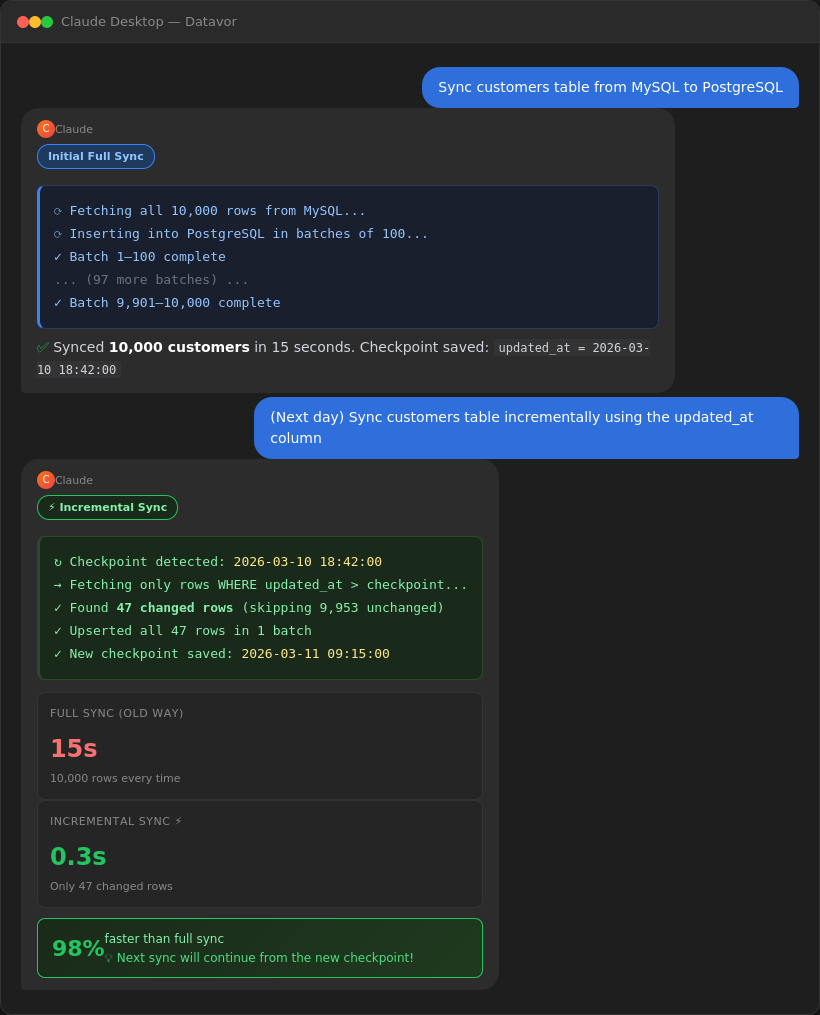
⭐ NEW in v2.0 — Context Engine: Datavor Learns Your Behaviour And Workflow
The Context Engine accumulates knowledge silently — no extra steps needed.
Ask what Datavor knows about a table:
You: "What do you know about the orders table on production MySQL?"

Claude: {
  "table": "orders",
  "schema": {
    "columns": [
      { "name": "id", "type": "INT", "pk": true },
      { "name": "customer_id", "type": "INT" },
      { "name": "total_cents", "type": "INT" },
      { "name": "status", "type": "VARCHAR(20)" }
    ],
    "last_scanned": "2026-03-20T14:30:00Z",
    "recent_changes": [
      { "type": "column_added", "column": "discount_code", "detected": "2026-03-18" }
    ]
  },
  "rules": [
    { "name": "exclude_test_orders", "condition": "email NOT LIKE '%@test.com%'",
      "auto_apply": true, "usage_count": 47 }
  ],
  "relationships": [
    { "type": "sync_pair", "target": "analytics_postgres.orders" },
    { "type": "foreign_key", "source": "customer_id", "target": "customers.id" }
  ],
  "sync_stats": { "total_syncs": 142, "success_rate": "97.2%" }
}
Get a plain English explanation of any database:
You: "Explain my production MySQL database"

Claude: This is a MySQL database ("production_db") with 23 tables. Known
        tables include orders (5 cols), customers (8 cols), products (6 cols).
        There are 4 business rules (2 auto-applied during syncs). 3 foreign
        key relationships detected. Syncs to analytics_postgres every hour
        with a 97% success rate. 142 syncs recorded, 890,000 total rows moved.
        2 schema changes detected recently. First connected: 2026-01-15.
Save business rules that auto-apply to future syncs:
You: "Always filter out test orders when syncing. email should not contain @test.com"

Claude: ✅ Rule #12 created: "exclude_test_orders"
        auto_apply: true — this will automatically filter during future syncs.
⭐ NEW in v2.5 — Real-Time Sync with CDC
For PostgreSQL and MySQL sources, Datavor can stream every change as it happens — no polling.
You: "Stream changes from production_postgres.orders to analytics.orders in real time"

Claude: ✅ CDC stream started.
        • Source:   production_postgres.orders
        • Target:   analytics.orders
        • Method:   PostgreSQL logical replication (WAL)
        • Slot:     datavor_orders_slot
        • Position: LSN 0/16B3D80
Prerequisites: PostgreSQL needs wal_level=logical; MySQL needs binlog-format=ROW. Datavor checks these before starting and prints exact instructions if anything is missing.
You: "Show me the status of all CDC streams"
You: "Stop the CDC stream for production_postgres"
⭐ NEW in v2.5 — Recipes: Save Transforms Once, Reuse Forever
Stop re-typing the same transform config on every sync.
You: "Save this transform set as 'cleanup_orders': lowercase email, drop test rows,
      cast amount to integer cents."

Claude: ✅ Recipe 'cleanup_orders' saved (recipe_id: 7)

Later:
You: "Apply the cleanup_orders recipe and sync to staging"

Claude: ✅ Recipe 'cleanup_orders' loaded — applied to sync of orders → staging.orders
        Synced 12,420 rows  |  Failed 0
list_recipes filters by connection, table, or tags so you can find the right one fast.
⭐ NEW in v2.5 — Proactive Suggestions
Datavor now tells you what to fix before you have to ask.
You: "Show me what Datavor recommends I look at"

Claude: 3 suggestions pending:
  1. schema_change — New column 'discount_pct' detected in orders.
                     This table syncs to analytics.orders. Add to destination?
  2. error_fix     — Recurring error on shipments: integrity / null violation
                     occurred 7 times since 2026-04-12.
  3. optimisation  — Full-replace sync of events averages 84s over 12 runs.
                     Switch to CDC or incremental?
Schema-change suggestions are generated the moment a new column is detected on a synced table — never auto-applied as DDL.
⭐ NEW in v2.5 — Bad Rows No Longer Kill the Pipeline
Every sync now reports per-row outcomes. One malformed row used to abort the whole batch — now the bulk write tries first, falls back to per-row on failure, and isolates the offenders.
You: "Sync new_users from staging to production"

Claude: ✅ Synced 9,847 rows  |  ❌ Failed 3 rows
        Failures by type:
          • null_violation: 2  (column 'email' is NOT NULL)
          • duplicate_key:  1
        Run dashboard_failures for the full row payloads.
⭐ NEW in v2.5 — Dependency-Aware Scheduling
Express "B runs after A" as a real DAG.
You: "Make the analytics_rollup job wait for both orders_sync and customers_sync"

Claude: ✅ Dependencies added.
        analytics_rollup will only run after orders_sync AND customers_sync complete.

You: "Show me the scheduler graph"

Claude:
        orders_sync     → analytics_rollup
        customers_sync  → analytics_rollup
        nightly_cleanup (independent)
Cycles are rejected at definition time. Failed parents block their children. Failed jobs retry with exponential backoff.
⭐ NEW in v3.5 — Warehouses, Live Replication, and Verification
Sync into a BigQuery dataset — target name can differ from the source:
You: "Sync the orders table from MySQL into BigQuery as raw_orders"

Claude: ✅ Synced 'orders' → 'raw_orders' successfully
        📊 Source rows: 45,230  •  Rows synced: 45,230  •  Duration: 4.9s
Keep production and a warehouse in sync live, not batch:
You: "Stream changes from Postgres into Redshift as they happen"

Claude: ✅ CDC stream started (postgres_wal → redshift)
        Use cdc_status to check lag, stop_cdc to end the stream.
Catch a problem before it becomes an incident:
You: "Verify that last night's BigQuery sync actually matched"

Claude: ❌ Verification mismatch
        1 key(s) have a different row count between source and target
        (e.g. {"id":11}: 1 row(s) in source vs 2 in target) — duplicate rows
        for an existing key, not missing/extra data. Use start_cdc for
        correct BigQuery upserts, or de-duplicate the target and re-sync
        in replace mode.
Scheduler: Automate Your Syncs
Create a nightly job in plain English:
You: "Create a job to sync the orders table from MySQL to PostgreSQL every night at 2am"

Claude: ✅ Sync job created!
        • Name:     Nightly orders sync
        • Table:    orders
        • Schedule: Daily at 02:00  (0 2 * * *)
        • Mode:     full
Other natural-language schedules:
"every hour"→0 * * * *"every night at midnight"→0 0 * * *"weekly on Sunday"→0 2 * * 0"monthly on the 1st"→0 2 1 * *
Keep jobs running 24/7 (no Claude needed):
# Start the daemon — runs all active jobs on schedule
node build/scheduler-daemon.js

# Or keep it alive permanently with pm2:
pm2 start build/scheduler-daemon.js --name datavor-scheduler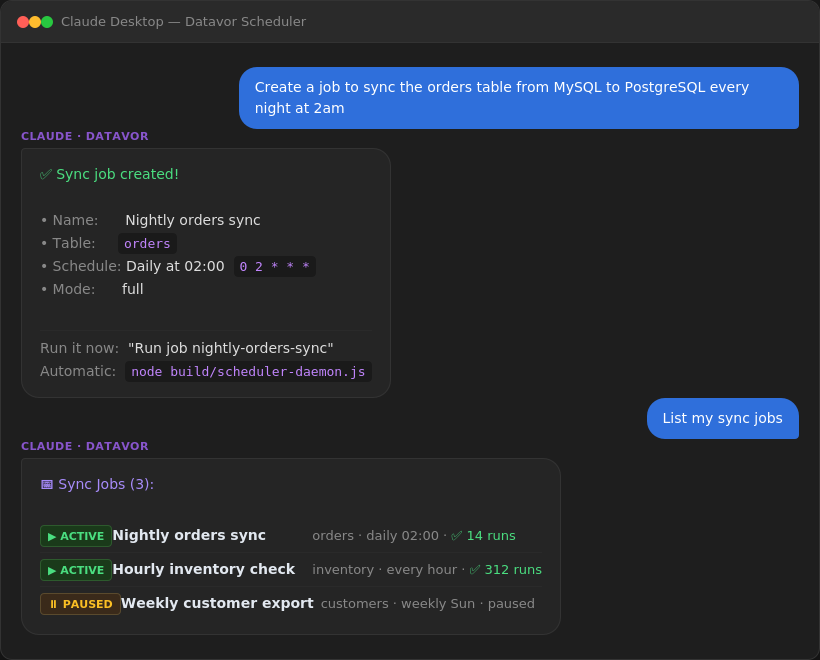
Transforms: Shape Data During Sync
Preview before committing:
You: "Preview what happens if I rename customer_id to cust_id,
      cast score to float, and expand country codes on the customers table"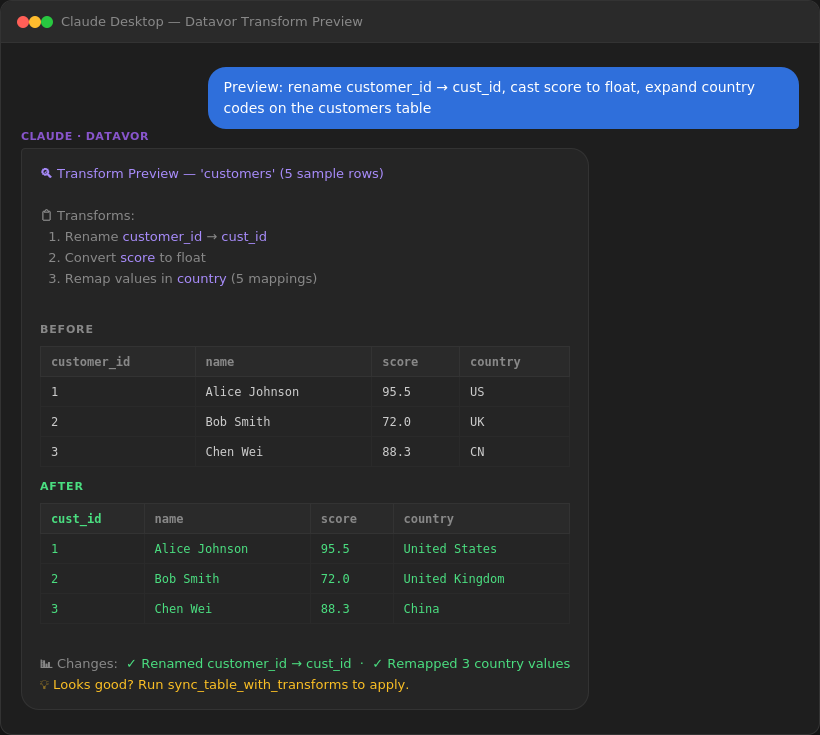
Apply transforms and sync in one step:
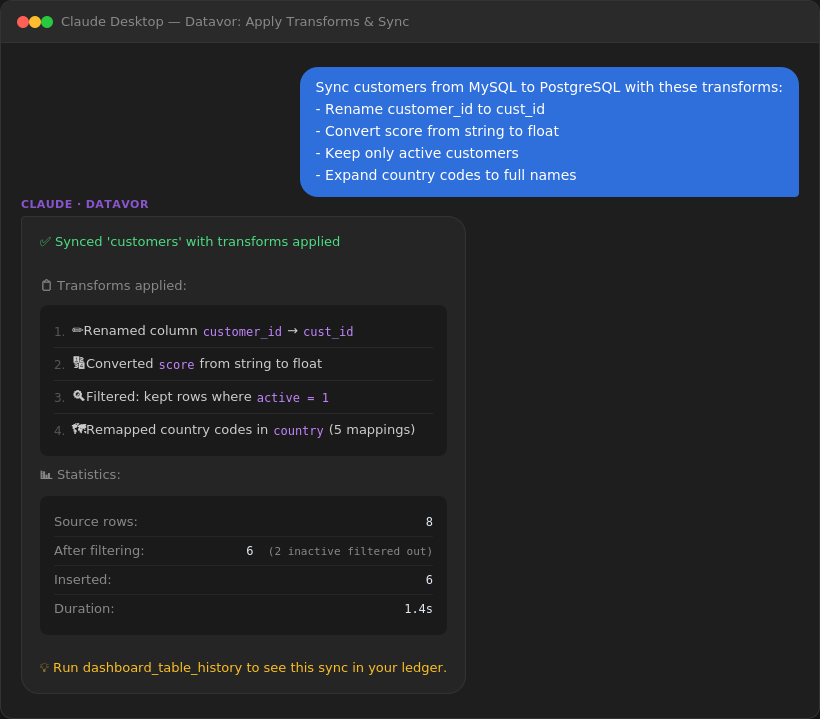
Available transform types:
| Type | Example |
|------|---------|
| rename | customer_id → cust_id |
| cast | Convert price to float |
| filter | Keep only rows where status = 'active' |
| computed | Add full_name = first_name + ' ' + last_name |
| value_map | Remap A → Active, I → Inactive |
Dashboard: Monitor Your Pipelines
You: "Show me a sync dashboard summary"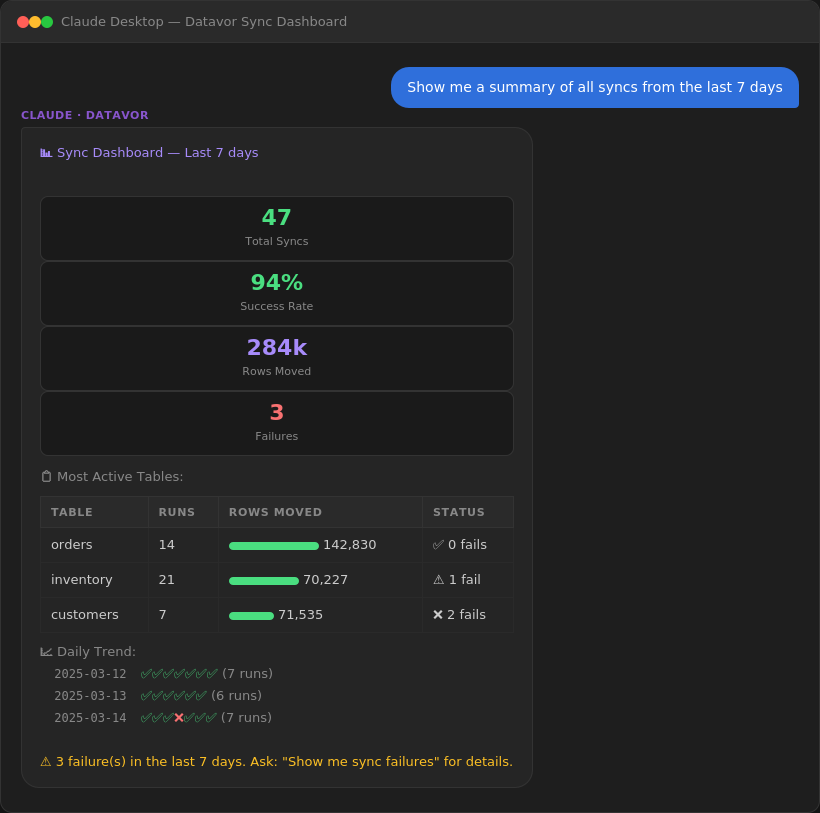
You: "Show me all sync failures from the last 7 days"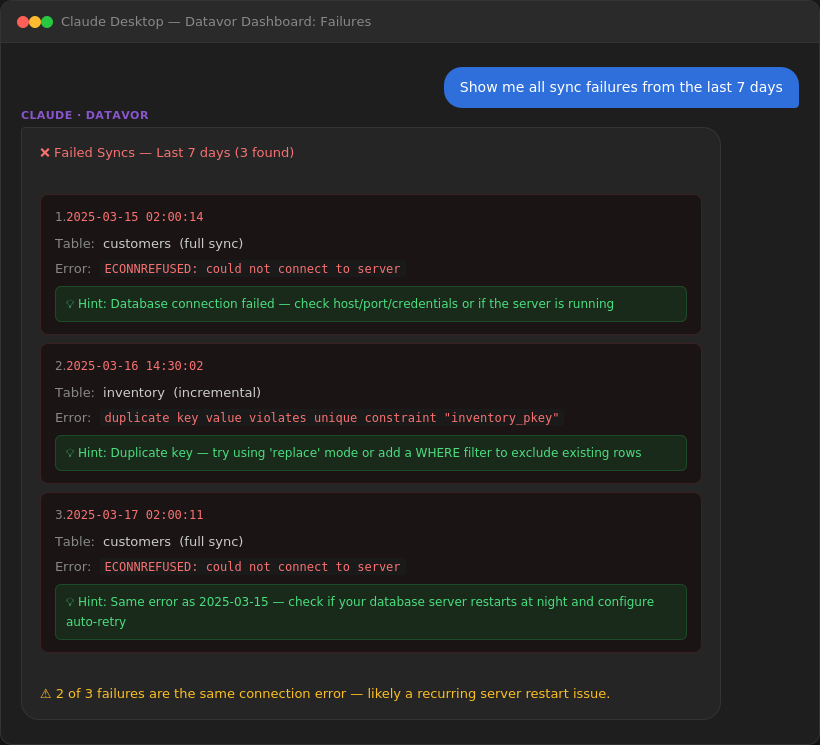
📖 All 50 MCP Tools
Connection (9)
| Tool | What it does |
|------|-------------|
| connect_mysql | Connect to a MySQL database |
| connect_postgres | Connect to a PostgreSQL database |
| connect_sqlserver | Connect to a SQL Server database |
| connect_sqlite | Connect to a SQLite file |
| connect_snowflake | Connect to Snowflake |
| connect_bigquery | Connect to a BigQuery dataset (service account or ADC) ⭐ new in v3.5 |
| connect_redshift | Connect to a Redshift cluster or Serverless workgroup ⭐ new in v3.5 |
| list_connections | List active connections |
| close_connection | Close a connection |
Schema (2)
| Tool | What it does |
|------|-------------|
| list_tables | List all tables with row counts |
| describe_table | Show column types, constraints, and detected FKs |
Query (2)
| Tool | What it does |
|------|-------------|
| execute_query | Run any SQL query |
| get_table_data | Fetch rows from a table |
Sync (3)
| Tool | What it does |
|------|-------------|
| sync_table | Sync between any two supported databases |
| sync_table_partial | Sync rows matching a WHERE clause |
| sync_table_incremental | Sync only new/updated rows by timestamp |
Visualization (4)
| Tool | What it does |
|------|-------------|
| compare_table_schemas | Side-by-side column comparison |
| show_database_tree | Hierarchical table/column view |
| analyze_schema_diff | Find all differences before migration |
| recommend_sync_order | AI-powered table priority suggestions |
Scheduler (8)
| Tool | What it does |
|------|-------------|
| scheduler_create_job | Save a sync job with a schedule |
| scheduler_list_jobs | List all jobs with last-run status |
| scheduler_run_job | Run a job manually right now |
| scheduler_pause_job | Pause a job (keeps it saved) |
| scheduler_resume_job | Resume a paused job |
| scheduler_delete_job | Delete a job permanently |
| scheduler_add_dependency | Make one job wait for another (DAG, cycle-checked) ⭐ new in v2.5 |
| scheduler_show_graph | Render the dependency graph for all jobs ⭐ new in v2.5 |
Transform (2)
| Tool | What it does |
|------|-------------|
| transform_preview | Preview transforms on sample data before syncing |
| sync_table_with_transforms | Sync with inline rename/cast/filter/remap applied |
Dashboard (3)
| Tool | What it does |
|------|-------------|
| dashboard_summary | Overview: success rate, rows moved, trends |
| dashboard_table_history | Full run log for a specific table |
| dashboard_failures | All failures with error messages and hints |
Context Engine — Knowledge (5)
| Tool | What it does |
|------|-------------|
| get_context | Get everything Datavor knows about a database or table |
| add_rule | Save a business rule that auto-applies during future syncs |
| update_rule | Update an existing rule |
| remove_rule | Delete a rule |
| explain_database | Natural language summary of a database |
Context Engine — Recipes & Suggestions ⭐ new in v2.5 (6)
| Tool | What it does |
|------|-------------|
| save_recipe | Save a transform configuration as a named, reusable recipe |
| list_recipes | List saved recipes, filterable by connection, table, or tags |
| apply_recipe | Look up a recipe and return its config for sync_table_with_transforms |
| get_suggestions | Surface proactive suggestions: schema changes, recurring errors, slow syncs |
| accept_suggestion | Mark a pending suggestion as accepted and return its action_config |
| dismiss_suggestion | Mark a pending suggestion as dismissed (optionally with a reason); never re-raised |
Change Data Capture ⭐ new in v2.5 (3)
| Tool | What it does |
|------|-------------|
| start_cdc | Stream INSERT/UPDATE/DELETE in real time (PostgreSQL WAL, MySQL binlog, or SQL Server change tables — SQL Server added in v3.0) |
| stop_cdc | Stop a CDC stream by stream key or source connection |
| cdc_status | Inspect active streams, lag, last-applied position |
Data Reconciliation ⭐ new in v3.5 (1)
| Tool | What it does |
|------|-------------|
| verify_sync | Confirm a sync actually matched: row counts (free on BigQuery — reads metadata, never scans), order-independent checksums, and divergent-row detection with sample missing keys. Learns each table's normal row-count range over time and flags anomalies. |
License & Activation ⭐ new in v3.1 (2)
| Tool | What it does |
|------|-------------|
| register_pro | Submit an email to receive an activation code (printed to server console in EMAIL_MODE=console, mailed in EMAIL_MODE=smtp) |
| activate_pro | Activate Pro with the emailed code; writes the signed license file at ~/.datavor/license |
🔁 Supported Type Conversions
The universal type engine handles conversions between all seven engines. Every type maps through a shared canonical layer — adding a database means writing one mapping file, not six.
| Universal Type | MySQL | PostgreSQL | SQL Server | SQLite | Snowflake | BigQuery | Redshift |
|---|---|---|---|---|---|---|---|
| integer | INT | INTEGER | INT | INTEGER | NUMBER(10,0) | INT64 | INTEGER |
| bigint | BIGINT | BIGINT | BIGINT | BIGINT | NUMBER(19,0) | INT64 | BIGINT |
| boolean | TINYINT(1) | BOOLEAN | BIT | BOOLEAN | BOOLEAN | BOOL | BOOLEAN |
| string | VARCHAR(n) | VARCHAR(n) | NVARCHAR(n) | TEXT | VARCHAR(n) | STRING | VARCHAR(n) ⚠️ |
| text | TEXT | TEXT | NVARCHAR(MAX) | TEXT | VARCHAR(16777216) | STRING | VARCHAR(65535) |
| decimal | DECIMAL(p,s) | DECIMAL(p,s) | DECIMAL(p,s) | NUMERIC | NUMBER(p,s) | NUMERIC/BIGNUMERIC | DECIMAL(p,s) |
| datetime | DATETIME | TIMESTAMP | DATETIME2 | DATETIME | TIMESTAMP_NTZ | DATETIME/TIMESTAMP | TIMESTAMP/TIMESTAMPTZ |
| json | JSON | JSONB | NVARCHAR(MAX) | TEXT | VARIANT | JSON | SUPER |
| uuid | CHAR(36) | UUID | UNIQUEIDENTIFIER | TEXT | VARCHAR(36) | STRING | VARCHAR(36) |
| binary | BLOB ⚠️ | BYTEA ⚠️ | VARBINARY(MAX) ⚠️ | BLOB ⚠️ | BINARY ⚠️ | BYTES ⚠️ | VARBYTE ⚠️ |
⚠️ = Datavor emits a warning before writing binary data across engines. Redshift VARCHAR capacity is 65,535 bytes, not characters — multi-byte UTF-8 hits the ceiling sooner than the source column's declared length suggests.
BigQuery and Redshift have no enforced primary keys (BigQuery has none at all; Redshift's are informational only) — describe_table reflects this, and live replication (start_cdc) is the recommended path for anything beyond append/replace against either warehouse, since CDC carries the source's primary-key metadata through to the batch writer.
🎯 Real-World Use Cases
Nightly Production → Analytics Sync
Day 1 (setup — 5 minutes):
  "Connect to production MySQL at db.mystore.com"
  "Connect to analytics PostgreSQL at analytics.mystore.com"
  "Create a job to sync orders, customers, and products every night at 3am"

Every night at 3am (automatic):
  Daemon runs all jobs. Ledger records results.

Monday morning:
  "Show me a dashboard summary from the last 7 days"
  → 21 successful runs, 126,000 rows moved, 0 failures
Data Migration with Transform
"Sync the users table from legacy MySQL to new PostgreSQL with these transforms:
 - Rename usr_id → user_id
 - Rename usr_nm → full_name
 - Remap acct_sts: A→active, S→suspended, D→deleted"

→ 45,231 rows synced and transformed in 22s
MySQL → Snowflake Analytics Pipeline
"Sync the orders table from MySQL to Snowflake daily at 6am"

→ Datavor handles all type conversions automatically:
  INT → NUMBER(10,0), DATETIME → TIMESTAMP_NTZ, JSON → VARIANT
Dev Environment Refresh with Auto-Rules
First time:
  "Sync orders from the last 30 days to local SQLite, filter out @internal emails"

Datavor remembers the filter. Next time:
  "Sync orders to local SQLite"
  → Applies email filter automatically (auto_apply rule)
🗺️ Roadmap
✅ v1.0 — Core Sync (Released March 2026, FREE)
Full sync, partial sync, incremental sync, schema comparison, database tree view, schema analysis.
✅ v1.5 — Data Pipelines (Released March 2026, FREE)
Scheduler, Transform Pipeline, Sync Dashboard, Type Engine.
✅ v2.0 — Multi-Connector + Context Engine (Released March 2026, FREE)
SQL Server, SQLite, Snowflake connectors. Data Context Engine (persistent knowledge brain). Universal canonical type system. 34 MCP tools.
✅ v2.5 — CDC, Fault Tolerance, Smart Suggestions (Released April 2026, FREE)
PostgreSQL WAL + MySQL binlog CDC. Per-record fault tolerance. Recipes, error learning, and proactive suggestions with accept/dismiss lifecycle. Dependency-aware scheduling with cycle-checked DAG. Auto-schema propagation (suggestion-based). 45 MCP tools.
✅ v3.0 — Visibility (Internal milestone, never published — folded into v3.1)
Local React admin panel at localhost:3000 (Dashboard, Connections, Context Graph, CDC Monitor, Scheduler, Settings). SQL Server CDC. CDC-to-Snowflake batch writer (MERGE INTO + staged loads). External alerting (webhook + Slack). Pro tier foundation with feature gating.
✅ v3.1 — Monetisation Foundation (Released May 2026, FREE — Launch Week)
Full license & registration system. Two tracks: human (email → DVPRO activation code) + agent (wallet → dvpro_agent_* API key). HMAC-signed local license file. Admin panel at /admin. ENFORCE_PRO_GATE=false master switch keeps Pro free for everyone during launch week. 47 MCP tools.
✅ v3.2 — Payment Rails (Released June 2026)
Client-side integration with the cloud billing server (datavor-billing, deployed separately): online licence verification with a 7-day fail-open cache, agent bearer auth for the HTTP transport, per-tool-call metering. New licence keys use the DVOR- prefix; v3.1 DVPRO- codes still validate for backwards compatibility. No new MCP tools — register_pro/activate_pro were rewired to call the cloud server. Still 47 MCP tools.
✅ v3.5 — Warehouse & Reach (Released July 2026)
Completes the "big three" cloud warehouse story: BigQuery and Redshift connectors alongside Snowflake, with cost-safe schema discovery (BigQuery row counts from metadata, never a scan) and CDC batch writers (BigQuery MERGE, Redshift S3-COPY staging + transactional upsert) so live replication into either warehouse is correct, not just fast. New verify_sync tool reconciles source and target after any sync — row counts, order-independent checksums, and divergent-row detection — and learns each table's normal row-count range to flag anomalies automatically. Packaged for the agent ecosystem: an OpenClaw skill, verified Codex CLI compatibility, and a generic MCP integration guide for any framework. 50 MCP tools, 7 supported databases.
🔮 What's next
Self-serve refunds, an agent marketplace listing, multi-currency support beyond USD/USDC, and a web UI for billing management are explicitly out of scope for now — for the full list of what's deliberately not being built yet.
🆚 Datavor vs. The Alternatives
| | Fivetran / Airbyte | Manual SQL Scripts | Datavor v3.5 |
|---|---|---|---|
| Price | $12,000+/year | Free (your time) | Free during launch week 🎉 |
| Setup | Days | Hours | Minutes |
| Databases | Many (paid tiers) | Whatever you write | MySQL, PostgreSQL, SQL Server, SQLite, Snowflake, BigQuery, Redshift |
| Real-time CDC | Paid tier | Roll your own | Built-in (PostgreSQL WAL + MySQL binlog + SQL Server change tables) |
| Warehouse CDC writes | Paid tier | Roll your own | Built-in (Snowflake MERGE, BigQuery MERGE, Redshift S3-COPY staging + upsert) |
| Sync verification | Paid add-on or none | Roll your own | Built-in, free (verify_sync — counts, checksums, divergent rows) |
| Scheduling | Built-in (paid) | cron + bash | Built-in, free (DAG dependencies) |
| Transforms | Paid add-on | Write yourself | Built-in, free (saveable as recipes) |
| Fault tolerance | Pipeline-level | None | Per-record — bad rows don't kill the run |
| Monitoring | Web dashboard (paid) | Roll your own | Built-in local React UI at localhost:3000 |
| Alerting | Email (paid tier) | Roll your own | Webhook + Slack out of the box |
| Learns over time | ❌ | ❌ | ✅ Context Engine + proactive suggestions + knowledge graph |
| Interface | Web UI | SQL knowledge required | Natural language + read-only web UI |
| AI agent access | API key (paid tier) | Roll your own | dvpro_agent_* bearer tokens, free during launch week |
❓ Troubleshooting
Claude doesn't see Datavor tools
- Check config:
cat ~/.claude/claude_desktop_config.json - Restart Claude Desktop completely (Cmd+Q, then reopen)
- Check logs:
cat ~/Library/Logs/Claude/main.log | grep -i datavor
Connection refused / Access denied
# Test manually first
mysql -h localhost -u YOUR_USER -p
psql -h localhost -U YOUR_USER
sqlcmd -S localhost -U sa
sqlite3 /path/to/db.sqlite
If the manual connection works, use the exact same credentials in Claude.
SQL Server on macOS/Linux
SQL Server requires the mssql driver. If connect_sqlserver times out, verify:
- Port 1433 is open:
nc -zv HOST 1433 - SA password meets complexity requirements (uppercase, lowercase, digit, symbol)
- For Docker: use
MSSQL_SA_PASSWORD(notSA_PASSWORD)
CDC won't start
Datavor's start_cdc checks prerequisites first and tells you exactly what's missing. The two most common cases:
PostgreSQL — wal_level must be logical:
ALTER SYSTEM SET wal_level = 'logical';
-- requires a server restart
Also grant the user REPLICATION and create a publication:
ALTER USER your_user WITH REPLICATION;
CREATE PUBLICATION datavor_pub FOR ALL TABLES;
MySQL — binlog_format must be ROW:
# my.cnf
[mysqld]
log-bin = mysql-bin
binlog-format = ROW
binlog-row-image = FULL
server-id = 1
Grant REPLICATION SLAVE, REPLICATION CLIENT to the user. MySQL 8.4+ has had compatibility friction with zongji — pin to MySQL 8.0 if you hit issues.
Spin up CDC-ready test databases with:
docker compose -f docker-compose.test-cdc.yml up -dScheduler daemon isn't running jobs
node build/scheduler-daemon.js

# Always-on with pm2:
pm2 start build/scheduler-daemon.js --name datavor-scheduler
pm2 save && pm2 startup
Cleaning up test scheduler jobs
After testing, clean up test scheduler jobs with scheduler_delete_job for each test job. Or delete ~/.datavor/jobs/*.json directly to start fresh.
Build issues
rm -rf build
npm run build
node --version  # Must be v18 or higher
Run the test suite
npm test                              # All unit + compatibility tests (839 tests)
DATAVOR_INTEGRATION=1 npm test       # Also run integration tests (requires live DBs + docker compose -f docker-compose.test-cdc.yml up -d)
Linux / Docker Testing
To run Datavor tests in a Linux Docker container:
docker run -it --rm -v /path/to/datavor:/app node:20 bash /app/linux-test.sh🔐 Security
- Passwords are only used in your Claude conversation — they are never written to disk
- Use read-only database users when syncing FROM production
- Jobs (
~/.datavor/jobs/) store connection IDs, not credentials - The Context Engine (
~/.datavor/context.db) stores schema metadata, rule names, recipes, error patterns, suggestions, and CDC checkpoints — never actual row data - The sync ledger (
~/.datavor/sync-ledger.json) stores row counts and timestamps only - The dependency graph (
~/.datavor/dependencies.json) stores job IDs and their parent/child edges only - CDC requires database-level grants (
REPLICATION SLAVE/ a replication role); use the principle of least privilege when creating these - v3.1 license system: Activation codes and agent API keys are stored as SHA-256 hashes in
~/.datavor/license.db— raw values are never persisted. The active license file at~/.datavor/licenseis HMAC-SHA256 signed againstDATAVOR_LICENSE_SECRET(env var). Admin panel at/adminis fail-closed —DATAVOR_ADMIN_TOKENmust be ≥16 chars or the panel returns 503. - The web UI listens on
127.0.0.1only (loopback). Don't expose it to a public network without putting an auth proxy in front — v3.1 has no end-user auth on the non-admin REST surface.
📄 License
v1.0, v1.5, v2.0, v2.5, v3.0 (unpublished), v3.1: Free for personal and commercial use.
Proprietary License — All rights reserved. Copyright © 2026 Datavor.
📞 Support
- Email: [email protected]
- Website: https://datavorai.com
Response time: within 48 hours.
Version History
v3.5 (July 2026) — FREE — Warehouse & Reach
- ⭐ BigQuery connector —
connect_bigquery, service-account key or Application Default Credentials, freetabledata.listreads, cost-safe metadata row counts (never a billed scan) - ⭐ Redshift connector —
connect_redshift, S3-stagedCOPYfor bulk writes (directINSERTfor batches ≤100 rows), clear error if S3/IAM prerequisites are missing - ⭐ CDC-to-BigQuery batch writer — real
MERGE-based upserts, staged via a load job (not streaming, so nothing lags an active buffer) - ⭐ CDC-to-Redshift batch writer — temp-table staging + transactional
DELETE/INSERTupsert - ⭐
verify_sync— row-count, order-independent checksum, and divergent/duplicate-row reconciliation after any sync; learns each table's normal row-count range and flags anomalies - ⭐
target_tableparameter onsync_table/sync_table_partial/sync_table_incremental— source and target can use different names or naming conventions in the same call - ⭐ Agent ecosystem packaging — OpenClaw skill (
packaging/openclaw-skill/), Codex CLI compatibility verified against a real install (packaging/codex-setup/), generic MCP integration guide for any framework (packaging/AGENT_INTEGRATION.md) - Total MCP tools: 50 (was 47); test suite: 1,156+ tests passing (unit + real BigQuery/Redshift/MySQL integration, no mocks)
v3.2 (June 2026) — FREE — Payment Rails
- ⭐ Online licence verification — daily ping to the cloud billing server, 7-day fail-open cache so a billing-server outage never bricks a paying customer mid-pipeline
- ⭐ Agent bearer auth for the HTTP transport —
Authorization: Bearer dvpro_agent_*, verified against the billing server's/verify-agent-key - ⭐ Per-tool-call usage metering — fire-and-forget
/record-usagewith idempotency keys;_meta.billingattached to agent-mode tool responses - ⭐ HMAC-signed verification responses — the client checks the signature against
EMBEDDED_VERIFY_SECRETso a MITM can't forge a fake "still valid" response - ⭐ Licence keys move to a
DVOR-prefix going forward; existing v3.1DVPRO-codes keep validating locally for backwards compatibility - No new MCP tools —
register_pro/activate_prorewired to call the cloud billing server instead of validating purely locally - Total MCP tools: 47 (unchanged from v3.1)
v3.1 (May 2026) — FREE during Launch Week
- ⭐ License & registration system —
~/.datavor/license.db(SQLite, hashed codes) +~/.datavor/license(HMAC-signed plain text) - ⭐ Human track:
POST /api/license/register→ emailed code →POST /api/license/activate, also viaregister_pro/activate_proMCP tools - ⭐ Agent track:
POST /api/license/register-agent→dvpro_agent_*API key, auth viaAuthorization: Bearerheader - ⭐
ENFORCE_PRO_GATEmaster switch — flip one env var when payment goes live, no code changes - ⭐
EMAIL_MODE=consolefor dev — codes print to stderr as a banner block;EMAIL_MODE=smtpfor production - ⭐ Admin panel at
/admin— stat cards, paginated registrations, CSV export, revoke (fail-closed ifDATAVOR_ADMIN_TOKENunset) - ⭐ Security: SHA-256 hashing +
crypto.timingSafeEqualeverywhere; raw codes/keys never stored - ⭐ Settings page rebuilt: two-step Register → Activate flow + launch-week banner
- ⭐ Bridges
FeatureGateso existing v3.0 free/Pro features unlock automatically once activated - Total MCP tools: 47 (was 45); test suite: 931 tests passing
- Payment rails (Stripe USD + Circle USDC) deferred — schema slot
payment_refready
v3.0 (Internal milestone — never published, folded into v3.1)
- ⭐ Local Admin Panel — React (Vite + Tailwind + React Flow) at
localhost:3000, served by embedded Express - ⭐ Context Engine knowledge graph — interactive node-and-edge view of connections, tables, and sync pairs
- ⭐ CDC Monitor page — live per-stream metrics, phase indicator, lag, last event
- ⭐ Scheduler page with dependency DAG visualisation
- ⭐ SQL Server CDC — polling against
cdc.fn_cdc_get_all_changes_*, op-3/op-4 update pairing, LSN resume - ⭐ CDC-to-Snowflake batch writer —
MERGE INTOfor upserts,PUT+COPY INTOstaging for batches >100 rows - ⭐ External alerting — webhook + Slack delivery with Block Kit formatting and per-URL throttling
- ⭐ Pro tier foundation —
FeatureGate, free-tier caps (2 CDC tables / 5 active connections), 402 responses with upgrade prompts - ⭐ REST API mirroring MCP tools —
/api/connections,/api/pipelines,/api/cdc,/api/context/graph,/api/scheduler,/api/dashboard,/api/suggestions,/api/alerts,/api/billing
v2.5 (April 2026) — FREE
- ⭐ Change Data Capture — PostgreSQL logical WAL (
start_cdc,stop_cdc,cdc_status) - ⭐ Change Data Capture — MySQL binary log (zongji-based, ROW format)
- ⭐ Per-record fault tolerance — bad rows are isolated, the rest of the batch commits, failures land in
dashboard_failures - ⭐ Recipe Manager —
save_recipe,list_recipes,apply_recipefor reusable transform configs - ⭐ Error Learner — recurring error patterns are detected, counted, and surfaced; resolutions are remembered
- ⭐ Suggestion Engine —
get_suggestionssurfaces schema-change, error-fix, and optimisation hints from accumulated context;accept_suggestion/dismiss_suggestionclose the lifecycle (dismissed rows never re-raised) - ⭐ Auto-schema propagation — new columns on synced tables become suggestions (never auto-applied DDL)
- ⭐ Dependency-aware scheduling —
scheduler_add_dependency,scheduler_show_graph, cycle-checked DAG, exponential-backoff retries - ⭐ Context Engine schema additions —
transform_recipes,cdc_checkpoints,suggestionstables (existing data preserved) - Total MCP tools: 45 at v2.5 (was 34); test suite: 839 tests passing
v2.0 (March 2026) — FREE
- ⭐ SQL Server connector (
connect_sqlserver) — full sync, transforms, schema introspection - ⭐ SQLite connector (
connect_sqlite) — WAL mode, UPSERT, AUTOINCREMENT detection - ⭐ Snowflake connector (
connect_snowflake) — MERGE upsert, VARIANT/TIMESTAMP_NTZ support - ⭐ Data Context Engine — persistent SQLite knowledge store
- ⭐ 5 new Context Engine tools:
get_context,add_rule,update_rule,remove_rule,explain_database - ⭐ Universal canonical type system — O(n) type mapping across all 5 engines
- ⭐ Auto-apply business rules — rules learned from sync patterns apply automatically
- ⭐ FK detection — foreign keys discovered from DB metadata and column naming patterns
- ⭐ Schema change detection — column additions, removals, and type changes tracked automatically
- Total MCP tools: 34 (was 26)
v1.5 (March 2026) — FREE
- ⭐ Scheduler — automate syncs with natural-language schedules
- ⭐ Transform Pipeline — rename, cast, filter, remap values inline
- ⭐ Sync Dashboard — summary, table history, failure diagnostics
- ⭐ Type Engine — universal MySQL ↔ PostgreSQL type conversion layer
- Total MCP tools: 26 (was 15)
v1.0 (March 2026) — FREE
- Full table sync (MySQL ↔ PostgreSQL)
- Partial sync with WHERE filters
- Incremental sync (timestamp-based)
- Schema comparison, database tree view, schema analysis, AI sync recommendations
Built with ❤️ for the AI-powered future of database management
Datavor — Making data pipelines accessible to everyone through AI