
db-gateway
v1.0.4
Published
MCP server that lets AI agents query and operate 8 databases (MySQL, PostgreSQL, Redshift, MongoDB, Redis, DynamoDB, Elasticsearch, Kafka) with 145+ tools
Downloads
1,021

Maintainers
 kimsijun
Readme
DB Gateway MCP Server




English | 한국어
An MCP server that gives AI agents direct access to your databases — 145+ tools across 8 engines.
The point is that the agent reads your schema itself instead of you pasting DDL into a prompt:
You: "Find users who signed up last month and never placed an order"

  1. mysql_get_all_schemas          → reads every table definition
  2. mysql_get_table_relationships  → finds the users ↔ orders foreign key
  3. mysql_execute_query            → runs the LEFT JOIN
Why db-gateway?
Most database MCP servers cover one engine, or a handful of relational ones. If your stack is MySQL for the app, Redshift for analytics, Redis for cache, and Kafka for events, that means four servers with four different config styles.
This is one server, one config block:
| | Engines | Tools | | :--- | :--- | ---: | | Relational | MySQL, PostgreSQL, Redshift | 59 | | NoSQL | MongoDB, Redis, DynamoDB | 48 | | Search | Elasticsearch | 19 | | Streaming | Kafka | 19 |
DBS decides which of them are enabled — only those tools get registered, so a MySQL-only setup stays a MySQL-only tool list.
See It Work
Every screenshot below is one real session against a development MySQL database holding 249 rows — unedited output, not mock data. The agent calls a single tool, mysql_execute_query, and never sees a host, port, or password: those stay in the client config, and the agent only ever names the alias.
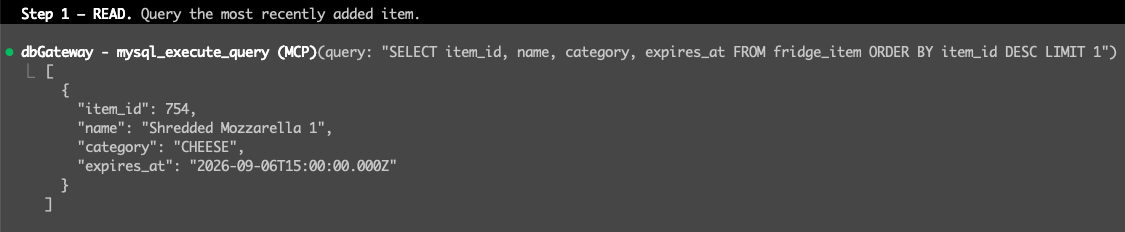

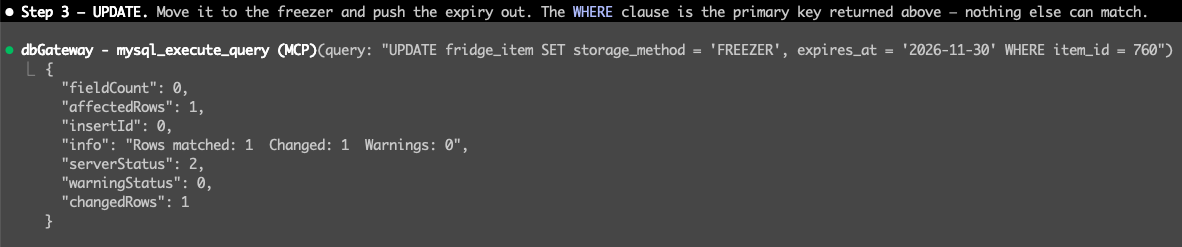
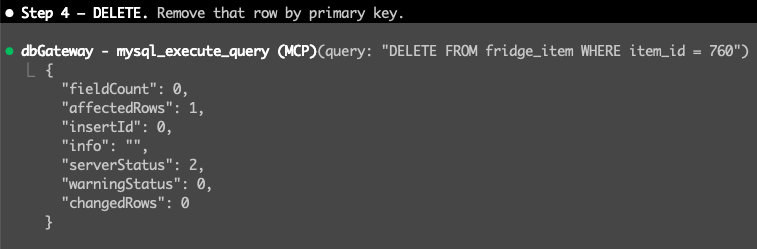
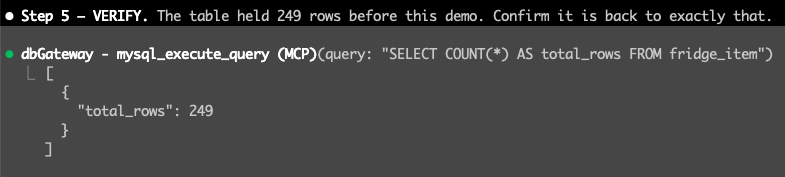
Point the same server at production with READ_ONLY=true and steps 2 through 4 simply do not exist — the write tools are never registered, so the agent cannot see them to call them.
Quick Start
Requires Node.js 18+. Register it with your MCP client — no install step:
{
  "mcpServers": {
    "db-gateway": {
      "command": "npx",
      "args": ["-y", "db-gateway"],
      "env": {
        "DBS": "mysql,redis",
        "MYSQL": "mysql://<user>:<password>@<host>:3306/<database>?alias=dev&default=true",
        "REDIS": "redis://:@<host>:6379/0?alias=dev&default=true"
      }
    }
  }
}
DBS decides which engines are enabled — only those tools get registered.
Connection strings
One string per engine. Semicolons separate multiple instances.
| Variable | Format |
| :--- | :--- |
| MYSQL | mysql://<user>:<password>@<host>:<port>/<db>?alias=name |
| POSTGRESQL | postgresql://<user>:<password>@<host>:<port>/<db>?alias=name&ssl=true |
| REDIS | redis://:<password>@<host>:<port>/<db-index>?alias=name |
| MONGODB | mongodb://<user>:<password>@<host>:<port>/<db>?alias=name |
| REDSHIFT | redshift://<user>:<password>@<host>:<port>/<db>?alias=name&ssl=true |
| ELASTICSEARCH | elasticsearch://<user>:<password>@<host>:<port>?alias=name, or http(s)://<host>:<port>?alias=name |
| KAFKA | kafka://<user>:<password>@<broker>:<port>,<broker2>:<port>?alias=name&mechanism=plain |
aliasis required. It is how tools address a specific instance — omit it and that engine fails to connect.
Several instances of the same engine — separate their connection strings with a semicolon. The agent picks one by passing an alias argument to any tool; default=true marks the one used when no alias is given:
MYSQL="mysql://<user>:<password>@<dev-host>:3306/<db>?alias=dev&default=true;mysql://<user>:<password>@<prod-host>:3306/<db>?alias=prod"DynamoDB is the exception — it takes DYNAMODB_REGION, DYNAMODB_ACCESS_KEY_ID, and DYNAMODB_SECRET_ACCESS_KEY instead. See .env.example for every option.
Read-Only Mode
READ_ONLY=true hides write tools from the tool list entirely and restricts *_execute_query to SELECT-style statements.
Register production as a second MCP server with this flag on. The agent then cannot modify production data — the write tools do not exist as far as it can see.
"db-gateway-prod": {
  "command": "npx",
  "args": ["-y", "db-gateway"],
  "env": { "READ_ONLY": "true", "DBS": "mysql", "MYSQL": "..." }
}
Documentation
- Tool Reference — all 145+ tools, by engine
- Connection Management — pooling, health checks, and why
connectionLimitmultiplies per session - Deployment — SSE mode, Nginx, PM2, sharing one gateway across a team
License
MIT