
dbfeazy
v1.0.6
Published
A small and light object oriented database

Maintainers
 kursion
Readme
DBFeazy



What if a database was as cheap as a variable?
DBFeazy allows you to have a single, simple and small DB.
TODO
- [ ] Async version with promise
Install and simple example
Installation: npm install dbfeazy
Example
npm start
Here is a small example of how to open, restore, add, get and save the new database state.
const DBFeazy = require("dbfeazy");

const db = new DBFeazy("users"); // Opens user.dbf and user.dbo files
db.Restore(); // Restores previous state

// Adding some values
db.Add("kursion.age", 27);
db.Add("kursion.lang", "en");

// Adding an object
const nellyInfo = { age: 29, lang: "fr" };
db.Add("nelly", nellyInfo);

// Deleting something
db.Add("kursion.sex", "small");
db.Del("kursion.sex");

// Updating a value if its key exists
if (db.Exists("kursion.age")) {
  db.Add("kursion.age", 18);
}

// Getting a value
db.Get("nelly"); // {age: 45, lang: 'fr'}
db.Get("kursion.sex"); // undefined (since we deleted it)
db.Get("kursion.age"); // 27
db.Get("olivier.age"); // 45

/**
 * Save the DB
 * NOTE: until now every operations are stored in the the operations file (check
 * futher for more information) and the memory.
 *
 * Since we finished to work on this database we can store the current state of
 * the database and clean the operation file.
 */
db.Save();

/**
 * Now the operations file (users.dbo) should be cleaned and the database object
 * should be stored into the database file (users.dbf) as a stringified JSON.
 */
What is it ?
DBFeazy uses two distinguish files that are using different mechanisms:
- the operations file or oplog file (extension
.dbo) - the database object file (extension
.dbf
This section will present both of them.
The operations file
Operations are stored into an oplog (operations log) or operations file (both terms are the same). An operation of the oplog file is called an opline. Here is a sample of an operations file after the following few operations:
- adding keys with their values:
db.Add('kursion.age', 18)db.Add('kursion.sex', 'm')
- deleting a key:
db.Del('kursion.age')
- updating an existing key and value
db.Add('kursion.age', 27)
And the users.op operations file:
...
+:kursion.age:18
+:kursion.sex:"m"
-:kursion.age
+:kursion.age:27
...
The database object
The database object is a simple JavaScript object, a
hashmap. This object is stored into the DBF which stands for
"database file" (eg: ./users.dbf). Its content is a
stringified JSON object.
The state of the database can be manipulate through those functions:
- Restore()
- Save()
The database object can be manipulate with these operations:
- Add(key, value)
- Del(key)
- Get(key)
- Exists(key)
Keys and values
The key is a string, eg:
db.Get('kursion') # 'kursion' being a keyAnd it handles multiple string keys separated by a dot, eg:
db.Get('kursion.age') # 'kursion.age' being a multikeyIt can store all JavaScript types as value:
- strings
- arrays
- numbers
- objects
Why ?
I wanted to have a simple DB module that is very easy to use and has no dependencies. The performance will, for sure, not be great. This DB is not for production. It was created for fast prototyping.
Operations
Example using operations
The constructor new DBFeazy(...) will automatically create
the .dbf and .dbo files if the don't exist.
DBFeazy = require("dbfeazy")
db = new DBFeazy("user")
db.Restore()
... check below ...
db.Save()
Restore
Restore the DB (from the .dbf and .dbo files).
db.Restore()Save
Saves the current state of the database.
This will write the database object into the .dbf file and will
clean the operation log file (.dbo).
db.Save()Add
Adds or updates a key-value pair to the database object
db.Add(key, value)Delete
Delete a key from the database object
db.Del(key)Get
Get a key
db.Get(key)Exists
Returns true if the key exists, or false if it doesn't exist.
db.Exists(key)Terms
multikey: is a key that can have sub-keys separated by a dot. Eg:users.cool.kursionrepresents the sub-part of an object:
obj = {
  users: {
    cool: {
      kursion: { ... }
    }
  }
}op: is an operation (that can be+ add,- delete)
Performances
tests/test-massive.coffee: this test is looping every 1ms to db.Add() something in the DB. Each 10sec the DB is saved.
Here are the results for 10mio of add operations:
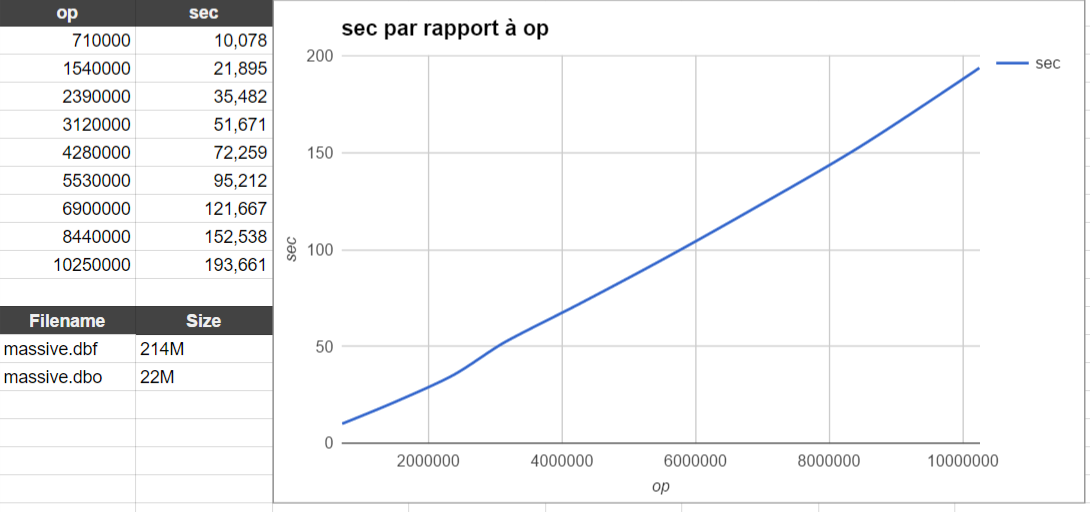
(i7, 16 GB, Surface Pro 4, Windows 10 / also tested on Archlinux)
NOTES
- NodeJS
- CoffeeScript