
ddduck
v0.4.1
Published
An opinionated DDD framework for authoring, validating, and visualizing machine-readable product-spec models.

Maintainers
 diego.marino
Readme
ddduck
ddduck defines a small, machine-readable product-spec format. The framework keeps schemas, validators, policies, and generators separate from each consumer product.
Start with the getting-started guide for a working first product. For an unsettled product question or a proposed change, use the optional definition-to-planning workflow and reuse your existing brief. Then use the model guide, the model reference, the CLI reference, and the architecture guide as needed.
Model graph
Every product renders to a verified graph of its model — the ownership spine
(Model → Domain → members), reference edges, and a legend decoding shapes and
line styles. ddduck generate produces it as a deterministic SVG. This
framework's own model:
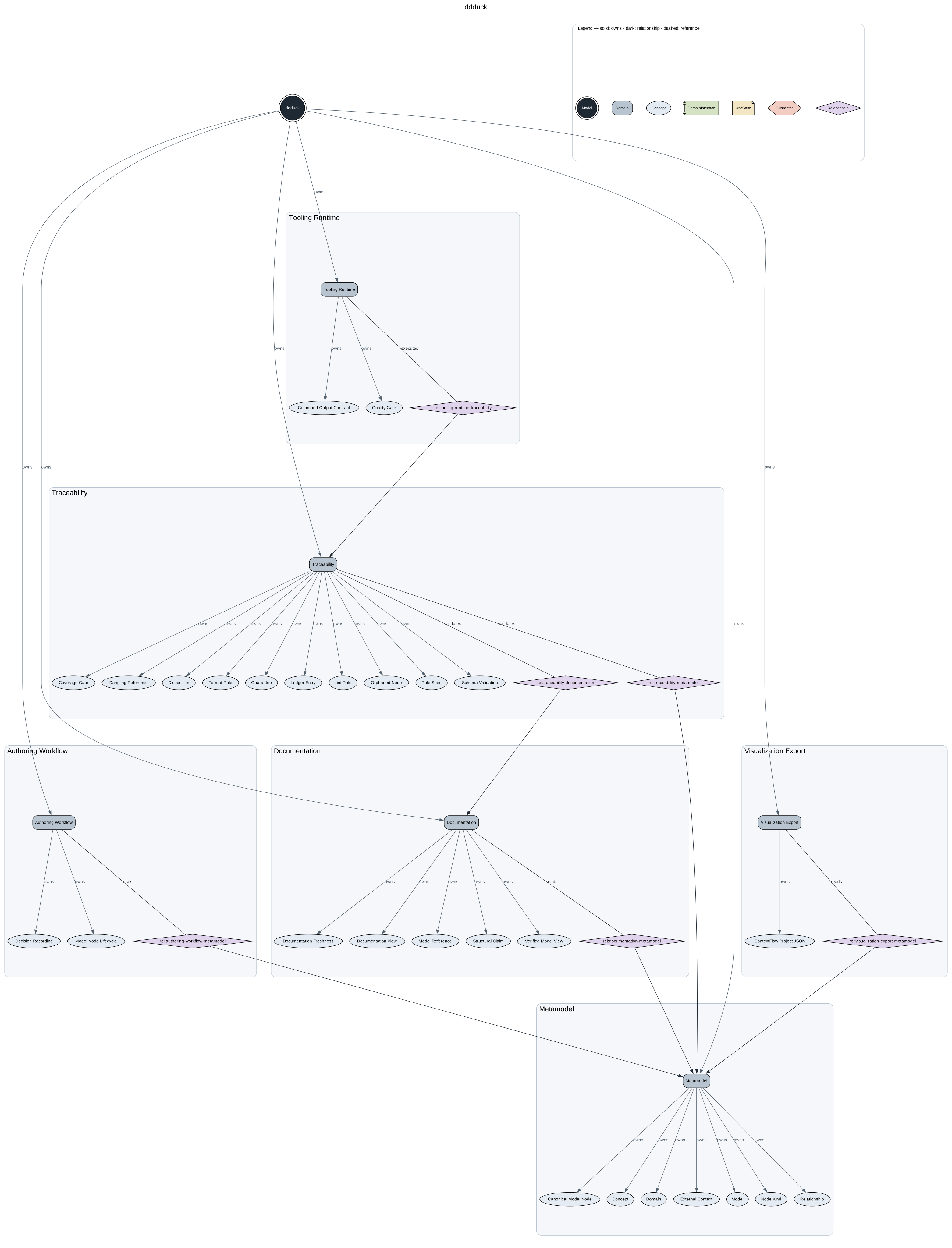
Explore the model atlas for a grouped
complete view, Model/sublevel diagrams and individual Domain views with the
Archify viewer. GitHub Pages rebuilds this atlas from canonical source on pushes
to main.
Product layout
A consumer product owns one product root. Documentation-centric repositories can use docs/ddd/;
small or dedicated product repositories can use ddd/:
docs/ddd/
  product.yaml
  model/
    domains/
    concepts/
    relationships/
    use-cases/
    interfaces/
    guarantees/
  decisions/
  generated/
    docs/
    graph/
product.yaml and files under model/ are canonical source. generated/ is derived
output: never edit it by hand.
Repository-local ddduck tool metadata lives outside the product root in .ddduck/ at the
enclosing repository root; without one, ddduck init writes it inside the new product root
instead (see the CLI reference). For example,
this framework repository stores its own model in docs/ddd/ and records that selection in:
{
  "schemaVersion": "1",
  "productRoot": "docs/ddd",
  "ignore": ["vendor", "target", "build", "dist", "__pycache__"]
}
ignore lists directory names the scanners skip on top of the always-ignored
dot-directories and node_modules; it is written pre-filled by ddduck init
and fully editable (see the CLI reference).
Authoring
Install the CLI from npm (requires Node.js 22 or newer):
npm install -g ddduckFor a global npm installation, ddduck update shows the installed and latest stable
versions and confirms the exact npm command before updating. Use ddduck update --yes
to skip confirmation. Local dependencies and linked checkouts use their package manager
or Git instead; see the update contract.
Or run it from a local checkout for contributing (npm install, then npm link or
node <checkout>/scripts/ddduck.mjs — see
Install ddduck). Create a product root with:
ddduck initinit presents editable defaults for the product name, Model ID, and product directory.
Press Enter to accept a value or Ctrl+C to cancel without creating files. Product files go
inside ddd/ by default; inside Git, repository configuration goes in .ddduck/config.json.
For scripts, use ddduck init ddd --id model:<product-id> --yes; --yes accepts defaults
without prompting and never overwrites a non-empty destination.
--root <path> is always the explicit override; without it, ddduck resolves the enclosing
product root, then .ddduck/config.json, then a unique repository candidate (see
the CLI reference for the full order, including the
example-candidate fallback), and fails with a diagnostic when the choice is ambiguous. The mutation surface is deliberately narrow —
generate, domain/concept/use-case creation, and the create/move/split/retire Guarantee lifecycle commands — and every
successful source mutation regenerates the derived views. The canonical resolution rules and
command contracts live in the CLI reference.
YAML remains the normal human-authored source format, with ddduck check as the deterministic
safety net.
Agent skill
Install the evidence-backed model maintenance skill in a consumer repository:
ddduck install skill--repo defaults to the nearest Git repository root, or the current directory outside Git. ddduck installs nothing itself: it prints the exact
npx --yes '--package=skills@^1.7.0' -- skills add <ddduck-package>/skills --skill '*' -y
command it will run, asks [y/n], and
delegates the installation to the skills CLI, which
supports 79 agent hosts. Pass --yes to skip the confirmation in CI or when an agent runs the
command. See the CLI reference for the delegated flags,
exit statuses, host invocation, and plan-only behavior.
Product queries
The bounded read API — ddduck query node|neighbors|impact|anchors|spec|context — emits JSON
only (--json is optional and a no-op) and never writes source or generated output. Default
queries expose only active Guarantees; pass --history to read a retired or split Guarantee's
historical record instead of its lifecycle redirect. The full query table and response contract
live in the CLI reference.
Bounded context packs
ddduck query context is the agent-facing bounded read for an explicit selection: full
canonical records for the selected IDs, every direct edge that touches them, one-hop perimeter
summaries, and a SHA-256 sourceDigest identifying the source snapshot — authoritative only
for reads that did not race a mutation. Its boundaries and refusal rules are documented in
the CLI reference; responses conform to
schemas/context-pack.schema.json.
Agent-readiness evals
Maintainer surface: see Agent-readiness evals in the development guide.
Revision-scoped FR-to-code audits
Maintainer surface: see Revision-scoped FR-to-code audits in the development guide.
Framework contracts
Global PolicySpec declarations live in policies/, outside any product graph: see
Framework contracts in the development guide.