
dedalus-react
v0.1.2
Published
React hooks and utilities for building chat interfaces with Dedalus

Maintainers
 colbygilbert95
Readme
dedalus-react
React hooks for building chat interfaces with Dedalus.
Installation
pnpm add dedalus-react dedalus-labsQuick Start
Client (React)
import { useChat } from "dedalus-react";

function Chat() {
  const { messages, sendMessage, status, stop } = useChat({
    transport: { api: "/api/chat" },
  });

  return (
    <div>
      {messages.map((msg, i) => (
        <div key={i}>
          <strong>{msg.role}:</strong> {msg.content}
        </div>
      ))}

      <button onClick={() => sendMessage("Hello!")}>Send</button>

      {status === "streaming" && <button onClick={stop}>Stop</button>}
    </div>
  );
}
Server (Express)
Use streamToNodeResponse for Node.js HTTP frameworks like Express, Fastify, or the built-in http module.
import express from "express";
import Dedalus, { DedalusRunner } from "dedalus-labs";
import { streamToNodeResponse } from "dedalus-react/server";

const app = express();
const client = new Dedalus();
const runner = new DedalusRunner(client);

app.post("/api/chat", async (req, res) => {
  const { messages } = req.body;

  const stream = await runner.run({
    messages,
    model: "openai/gpt-4o-mini",
    stream: true,
  });

  await streamToNodeResponse(stream, res);
});
Server (Next.js App Router)
Use streamToWebResponse for environments using the Web Fetch API, including Next.js App Router, Cloudflare Workers, Deno, and Bun.
import Dedalus, { DedalusRunner } from "dedalus-labs";
import { streamToWebResponse } from "dedalus-react/server";

const client = new Dedalus();
const runner = new DedalusRunner(client);

export async function POST(req: Request) {
  const { messages } = await req.json();

  const stream = await runner.run({
    messages,
    model: "openai/gpt-4o-mini",
    stream: true,
  });

  return streamToWebResponse(stream);
}
API
useChat(options) Params
| Option | Type | Description |
| --- | --- | --- |
| transport | TransportConfig | Required. Transport configuration (see below) |
| id | string | Chat session ID |
| messages | Message[] | Initial messages |
| generateId | () => string | Custom ID generator (defaults to crypto.randomUUID) |
| onError | (error: Error) => void | Error callback |
| onFinish | (opts: OnFinishOptions) => void | Completion callback |
| onToolCall | (opts: OnToolCallOptions) => void \| Promise<void> | Tool call callback |
| sendAutomaticallyWhen | (opts) => boolean \| Promise<boolean> | Auto-send condition for agentic flows |
Returns
| Property | Type | Description |
| --- | --- | --- |
| id | string | Chat session ID |
| messages | Message[] | Current messages |
| status | string | ready, submitted, streaming, or error |
| error | Error \| undefined | Current error (if any) |
| sendMessage | (message: Message \| string, options?: ChatRequestOptions) => Promise<void> | Send a message |
| setMessages | (messages: Message[] \| (prev: Message[]) => Message[]) => void | Update messages |
| stop | () => void | Stop streaming |
| addToolResult | (opts: AddToolResultOptions) => void | Add a tool result to the conversation |
TransportConfig
| Property | Type | Description |
| --- | --- | --- |
| api | string \| () => string | Required. API endpoint |
| headers | object \| Headers \| () => object | Additional request headers |
| credentials | RequestCredentials \| () => RequestCredentials | Fetch credentials mode |
| body | object \| () => object | Additional body properties merged into requests |
| fetch | typeof fetch | Custom fetch function |
| prepareRequestBody | (opts) => object | Transform the request body before sending |
OnFinishOptions
| Property | Type | Description |
| --- | --- | --- |
| message | Message | The final assistant message |
| messages | Message[] | All messages in the conversation including the final assistant message |
| isAbort | boolean | True if the request was aborted by the user |
| isDisconnect | boolean | True if a network error caused disconnection |
| isError | boolean | True if an error occurred during streaming |
OnToolCallOptions
| Property | Type | Description |
| --- | --- | --- |
| toolCall | ToolCall | The tool call received from the assistant |
ToolCall
| Property | Type | Description |
| --- | --- | --- |
| id | string | Unique identifier for this tool call |
| type | "function" | The type of tool call |
| function | { name: string; arguments: string } | The function name and JSON-encoded arguments |
SendAutomaticallyWhenOptions
| Property | Type | Description |
| --- | --- | --- |
| messages | Message[] | Current messages in the conversation |
Examples
The example/ directory contains working examples for different setups:
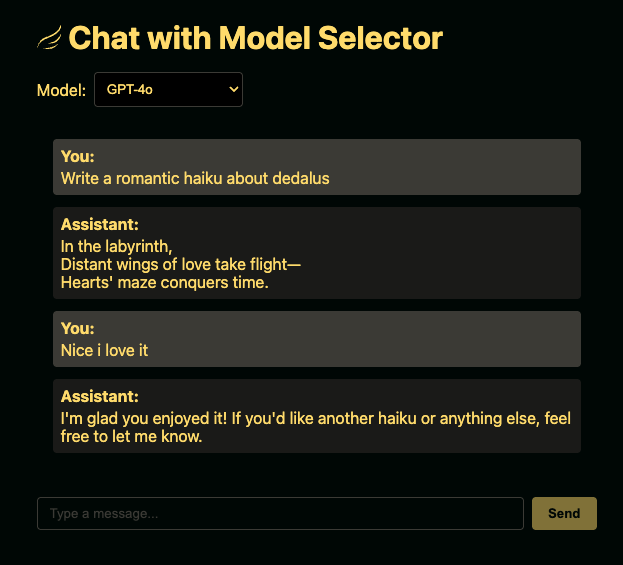
| Example | Description | | ------- | ----------- | | next-simple | Minimal Next.js App Router example | | next-model-select | Next.js with dynamic model selection | | react-express-simple | Minimal React + Express example | | react-express-model-select | React + Express with model selection |
Running an Example
cd example/next-simple  # or any other example
pnpm install
cp .env.example .env.local  # use .env for Express examples
# Add your DEDALUS_API_KEY to the env file
pnpm dev  # or pnpm start for Express examples
License
MIT