
deepmonkey
v0.2.4
Published
WebGPU-first rendering, shader, scene, and compatibility foundations for Deep Monkey Studio

Maintainers
 fatasia
Readme
DeepMonkey
From Vibe Coding to Vibe World. An AI-native, programmable 3D world: a TypeScript/WebGPU SDK and the DeepMonkey Studio editor.
从 Vibe Coding 到 Vibe World:AI 原生的可编程三维世界。 面向数字孪生、元宇宙、Science 和世界模型开发;可以直接打开编辑器,也可以把引擎嵌入自己的项目。
Live demo · GitHub · AI development · Releases
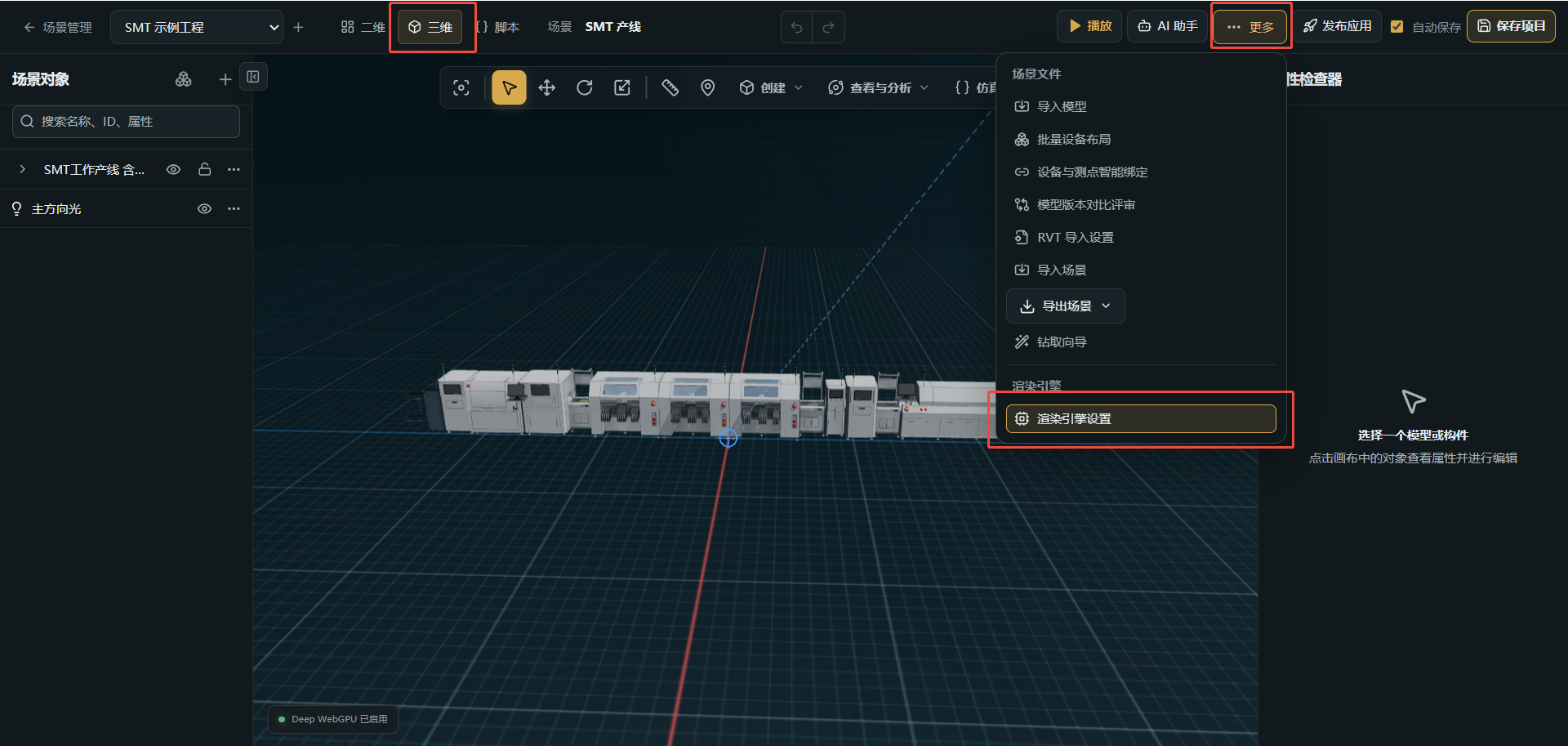
- Run the editor:
npx deepmonkeystarts the Web editor and local API. - Build your own app:
npm i deepmonkeyprovides typed SDK exports for rendering, scenes, materials, animation and physics. - Start with AI: eight scene templates with Codex and Claude Code Skills.
- Edit through MCP: connect an AI client to Studio, read the scene and submit editor transactions.
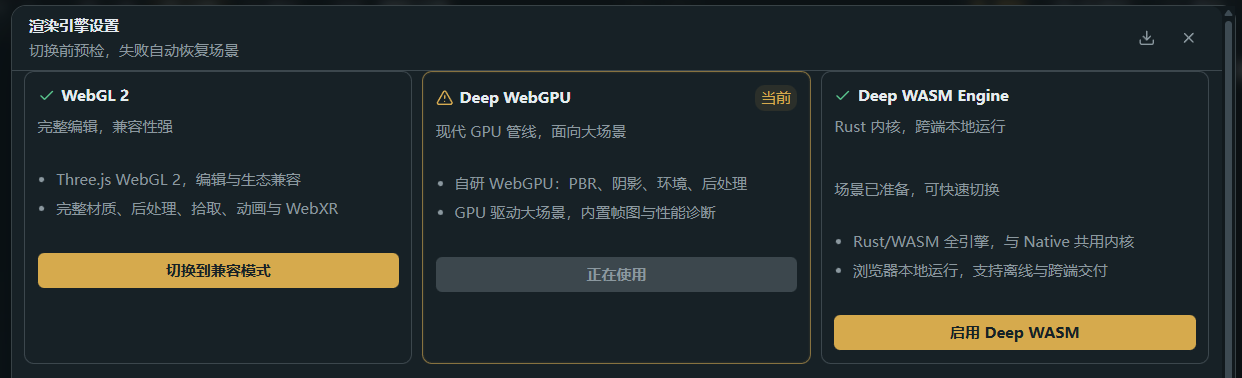
- Choose your renderer: Studio includes Three.js WebGL, Deep WebGPU and Deep WASM modes.
Choose your starting point
| What you want to do | Command |
| --- | --- |
| Open the complete Studio editor and local API | npx deepmonkey |
| Add the TypeScript SDK to your project | npm i deepmonkey |
| Generate an editable 3D app with AI Skills | npx create-deepmonkey my-world |
The npm SDK archive is about 3.2 MB. Starting Studio installs its Web/API runtime (111 MB) and, on Windows x64, native tools and dependencies (151 MB) plus the client exporter (13 MB) through your configured npm registry. SDK-only installation does not download Studio.
Start Studio
Requires Node.js 24+. No repository checkout or Rust build is needed for the Web editor.
npx deepmonkeyThe first run installs SHA-256-verified runtime components through npm, using your configured registry or mirror. Windows x64 includes server dependencies; other platforms install them on first launch. Studio opens http://localhost:4100 (or the next available port). Later runs reuse the cached runtime. Projects remain in a separate local data directory across upgrades.
The administrator account is admin. The terminal prints the path of the generated credential file; read its adminPassword field to sign in.
npx deepmonkey --port 4200 --data-dir ./studio-data --no-open--prepare-only prepares the runtime without starting it; --cache-dir selects its cache location. Stop the server with Ctrl+C. npx deepmonkey-studio provides the same editor through a smaller launcher-only package.
Switch rendering engines
Open a scene in 3D → More → Render engine settings (三维 → 更多 → 渲染引擎设置), then choose WebGL 2, Deep WebGPU or Deep WASM. Availability depends on your browser and GPU.
AI providers, industrial connections and remote render workers are configured in Studio or through its server environment. They require your own provider credentials or services. Deployment guide.
Build a 3D app
npx create-deepmonkey my-worldThis generates a project, installs dependencies and starts its WebGPU preview. Edit scene.ts; restart with npm run dev and build a static site with npm run build.
npx create-deepmonkey my-world --template 06-logisticsChoose from starter, factory floor, equipment monitoring, robot cell, pipeline, logistics, energy and structural templates. Generated projects contain TypeScript sources, a render loop, responsive canvas sizing and both AI Skills. Use --no-start to finish after installation.
For an existing project:
npm i deepmonkeyimport { DeepApp, PbrRendererPlugin } from 'deepmonkey/app';
import type { RenderPacket } from 'deepmonkey';
if (!navigator.gpu) throw new Error('WebGPU is required');
const app = await DeepApp.create({
state: null,
plugins: [new PbrRendererPlugin({ canvas, gpu: navigator.gpu, packet, view: () => view })],
});
await app.advance(0);
// Release resources when the page or scene closes:
await app.dispose();canvas, packet and view come from your application. Browser SDK rendering requires WebGPU on HTTPS or localhost. API reference and templates.
| SDK entry | Use |
| --- | --- |
| deepmonkey/app | Application lifecycle and renderer plugins |
| deepmonkey/scene | Scene representation and conversion |
| deepmonkey/geometry | Geometry utilities |
| deepmonkey/shader and shader subpaths | Shader authoring, graphs and packages |
| deepmonkey/physics | Physics integration |
Use AI
Generated projects include .agents/skills/deep-engine-3d/ and .claude/skills/deep-engine-3d/. Start Codex or Claude Code in the project:
Codex: $deep-engine-3d build a workshop with status lights and camera animation.
Claude Code: /deep-engine-3d build a workshop with status lights and camera animation.
For editing a Studio scene, configure its authenticated MCP endpoint at http://127.0.0.1:4100/api/mcp, keep the target editor online and ask the AI to use editor.scene-transaction. MCP authentication and setup.
Example request:
Read the active editor session and scene. Add a floor and six machines in two production lines, set their materials and camera, submit the scene transaction, then read back the result.
Use Skills + SDK to develop your own application; use MCP to operate an open Studio scene. Save the project after reviewing the changes in the editor.
Native Rust
The browser SDK works independently of Rust. Rust 1.93+ users can install the native player or add the standalone 2D library:
cargo install deepmonkey-native --version 0.2.0 --locked
cargo add deepmonkey-2d
deepmonkey-native plays exported native scene packages. deepmonkey-2d provides standalone display lists, flex layout, paths, atlases and a wgpu painter. deepmonkey-geometry compiles and verifies offline meshlet-DAG assets.
Documentation
Installation and runtime options · SDK, Skill and MCP guide · Docker deployment · Changelog · Report an issue
License
See the included LICENSE, LICENSE.zh-CN.md and THIRD_PARTY_NOTICES.md for project terms and third-party notices.
中文:npx deepmonkey 一键启动完整 Studio;npm i deepmonkey 安装独立 SDK;npx create-deepmonkey my-world 创建带 Skill 的三维应用。中文教程。