
dendrite-wiki
v1.0.12
Published
Local-first MCP server that gives AI coding agents a living, browser-viewable project wiki and a project-local memory store, so the agent stays oriented and the human stays in control.

Maintainers
 mfillalan
Readme
Dendrite Wiki



The memory layer that becomes your wiki.
Give AI coding agents project memory you can inspect, edit, and keep.
Dendrite Wiki is a local-first MCP server for AI coding agents. It gives your agent a living docs/wiki/ knowledge base, a project-local memory store, and lightweight rituals that keep lessons, decisions, and handoffs from disappearing between sessions.
Stable 1.0.12. Nothing leaves your machine unless you explicitly opt in.
What's New
- Default capsule profile - fresh installs now expose only three MCP tools:
dendrite_prepare,dendrite_read, anddendrite_execute. The full Dendrite catalog is still available behind compact execution. - Big token reduction - capsule startup is about 542 rough tokens, down from about 5,301 for the full 45-tool surface. Common workflow results are compact by default, reducing a representative result set from about 29,087 to 15,932 tokens.
- Grok Build CLI support - guided install writes project-local
.grok/config, skills, ritual hooks, launch wrappers, and trust repair helpers, including Windows-friendlynpx.cmdandHOMEhandling. - One-command setup - run
npx -y dendrite-wiki, choose Install in the TUI, pick your agent environment, and follow the guided setup. - Opt-in benchmark telemetry - users can share sanitized aggregate counters with the Dendrite-hosted cohort destination. No wiki text, source code, prompts, file names, or secrets are uploaded.
Install
From your project root, run:
npx -y dendrite-wikiThat opens the Dendrite Wiki TUI. Choose Install, pick your environment, review the files Dendrite will write, and confirm.
The installer sets up Dendrite for your chosen client, including MCP config, starter docs/wiki/ files, and the agent guidance/hooks that help the agent use the wiki and memory layer correctly.
After installation, the TUI prints next steps for your exact environment, such as restarting or reloading your IDE, approving the MCP server if prompted, and starting your first Dendrite-backed agent session.
Supported install targets include Claude Code, Codex, Cursor, GitHub Copilot in VS Code, Continue, Grok Build CLI, Windsurf, Antigravity, and a broad workspace-local all profile.
Full setup details: MCP Server Installation.
What You Get
- Living wiki - normal markdown under
docs/wiki/, rendered by VitePress, readable by humans and agents. - Project memory - durable lessons tied to files, pages, decisions, and previous sessions.
- Explainable recall - every recalled memory includes reasons, so you can see why it surfaced.
- Agent rituals - install guidance and hooks nudge the agent to brief itself, update the wiki, remember lessons, and leave handoffs.
- Maintenance board - review stale pages, promotion candidates, memory hygiene, drift findings, and approved cleanup actions in the browser.
- Local benchmark report - track whether recall quality improves as the project wiki and memory layer mature.
- API docs generator - generate wiki API pages for TypeScript, Python, Rust, Go, Java, Ruby, C/C++, PHP, C#, Swift, Lua, Scala, Elixir, OCaml, Kotlin, and Bash.
The uninstall test: remove Dendrite tomorrow and your docs/wiki/ is still a plain markdown knowledge base.
Daily Workflow
After the TUI finishes:
- Restart or reload your agent client using the environment-specific instructions the installer prints.
- Open your project in that client.
- Ask the agent to start a real task and use Dendrite for project context.
In the default capsule profile, the agent should:
- Call
dendrite_preparefor a task briefing. - Call
dendrite_readfor returnedwiki:,memory:,skill:,tool:, orartifact:refs. - Use
dendrite_executeto write wiki updates, project-log entries, memories, and handoffs.
The practical version: the agent reads your project wiki before doing meaningful work, records durable lessons as it learns them, and leaves a handoff when work is unfinished.
Privacy
Dendrite is local-first:
- No account required.
- No upload by default.
- Wiki content and source code stay on your machine.
- Telemetry is opt-in via
dendrite-wiki telemetry opt-in. - Opt-in telemetry uploads only sanitized aggregate counters and keeps a local audit trail.
Exact contract: Privacy & Telemetry.
Useful Commands
npx -y dendrite-wiki
npx -y dendrite-wiki install
npx -y dendrite-wiki install --client grok --yes
npx -y dendrite-wiki init --verify
npx -y dendrite-wiki verify-install
npx -y dendrite-wiki grok doctor --repair
npx -y dendrite-wiki docs:api
npx -y dendrite-wiki benchmark:snapshot
npx -y dendrite-wiki telemetry status
Development checks:
npm run check
npm run test:fresh-install
npm run check:mcp-token-budgets
Docs
- MCP Server Installation
- Token Efficiency Roadmap
- Token Efficiency Full Rework
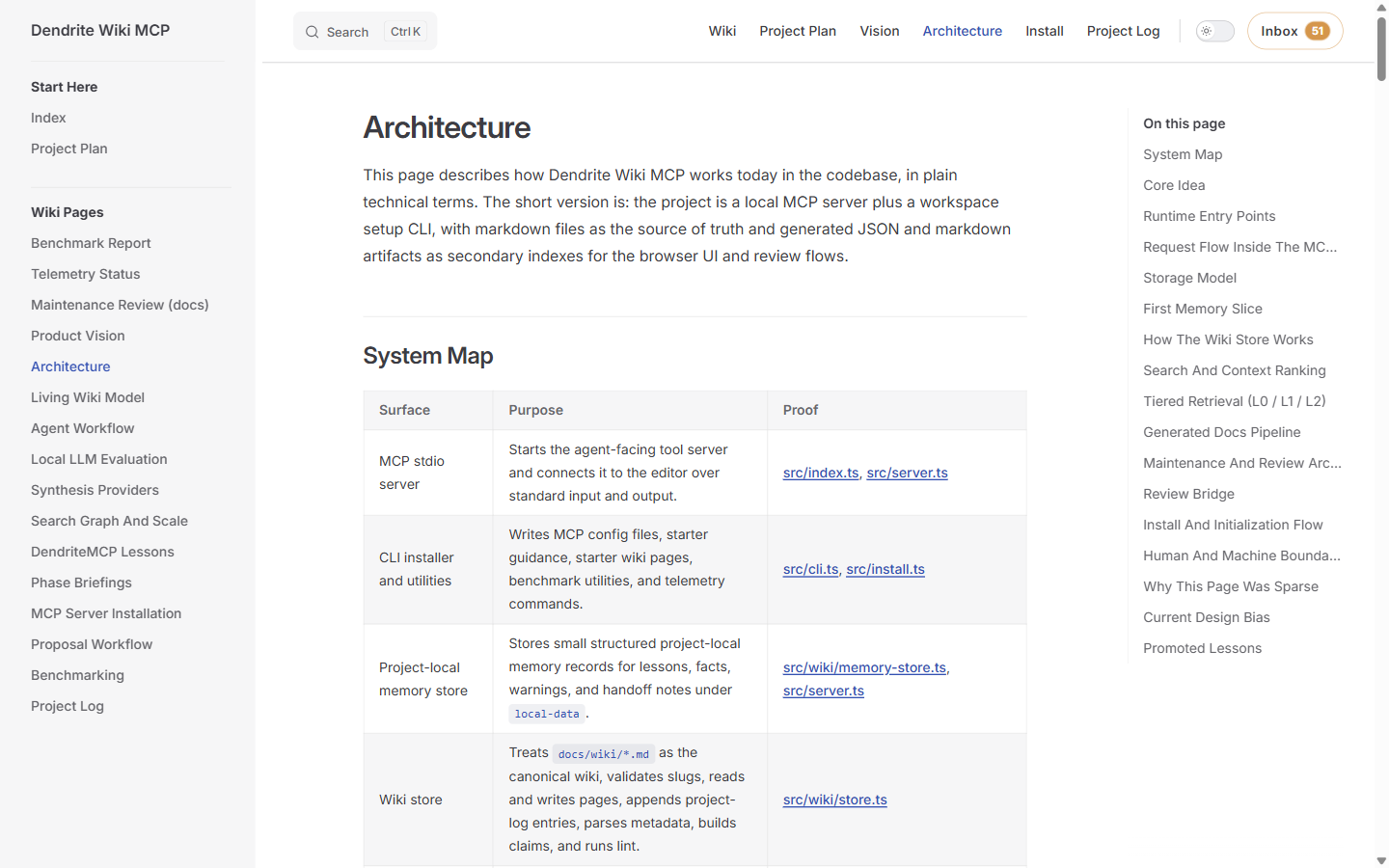
- Architecture
- Creator Guide
- Benchmarking
- Aggregate Learnings
- CHANGELOG
Why This Exists
AI coding agents forget the project between sessions. They re-derive architecture, miss local conventions, and repeat mistakes unless the project gives them a durable place to learn.
Dendrite turns that learning into project-owned files: markdown pages, source-backed claims, local memories, and reviewable maintenance actions.
Contributing
Issues and PRs are welcome at github.com/mfillalan/dendrite-wiki-mcp. The main MCP entry is src/index.ts; the CLI is src/cli.ts; the full validation command is:
npm run checkLicense
Apache-2.0. Third-party tree-sitter grammar attributions are listed in NOTICE.