
depguard-scan
v0.2.0
Published
AI-assisted dependency, bundle and supply-chain guardrails for JavaScript projects.

Maintainers
 guillaume-da
Readme
DepGuard Scan
A dependency policy gate for JavaScript projects. It reads your package.json, your package-lock.json and your build output, applies the budgets and rules you configure, and exits non-zero when one is broken — so a pull request that doubles your bundle, pulls in a copyleft transitive package or adds an install-scripting dependency fails in CI instead of in production.
Ships with a local dashboard, and can send results to Slack or Teams. Zero runtime dependencies. Node.js 20.10+.
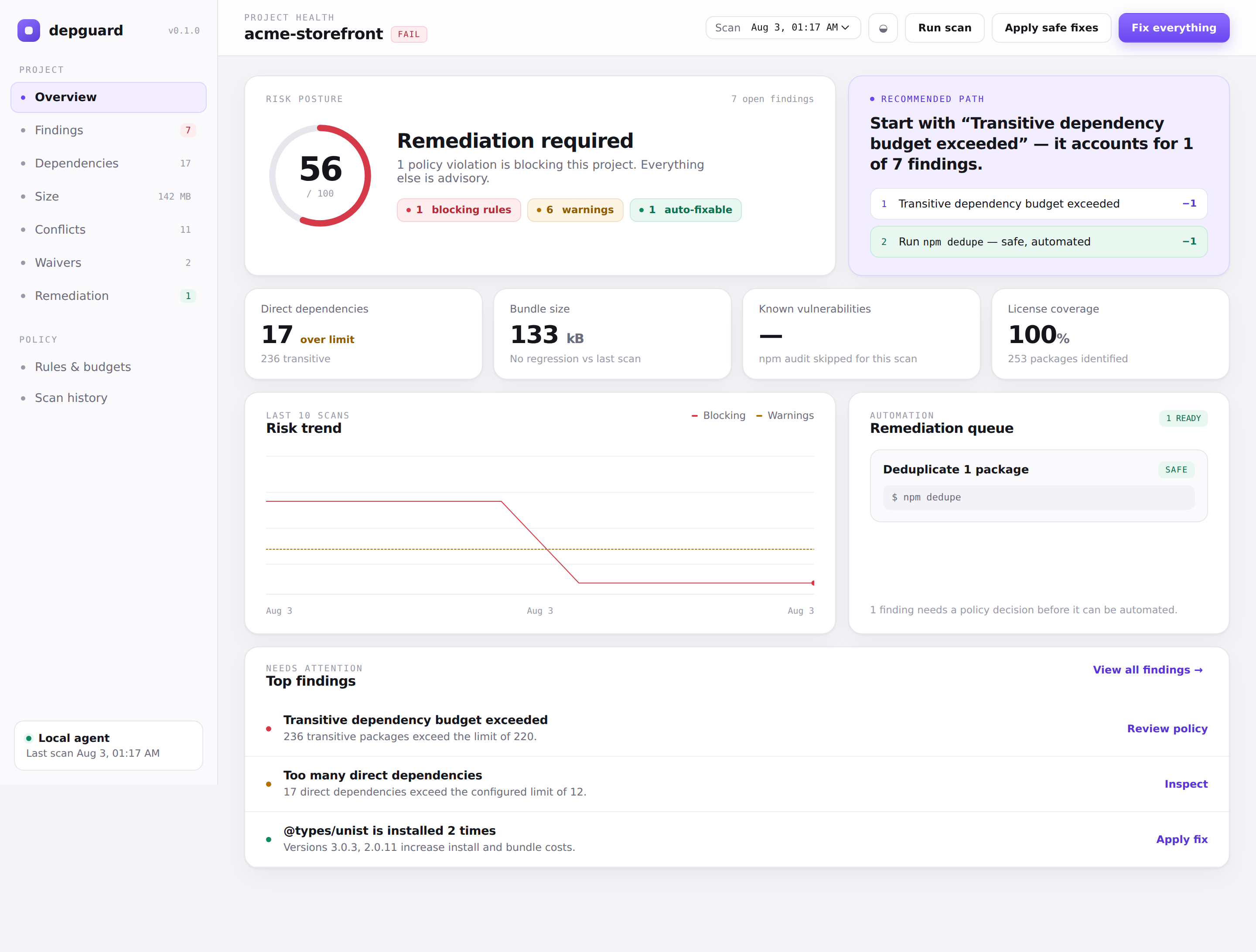
Contents — Install · Your first scan · What it checks · Fixing things · Conflicts and waivers · Who added this · Dashboard · Commands and flags · Configuration · CI · Slack and Teams · AI reviewer · Sandbox verification · Programmatic API · Report format · Security model · What it does not do · Development
Install
npm install --save-dev depguard-scan
npx depguard-scan scan          # or run it once, without installing
DepGuard needs a package.json and, for dependency analysis, a package-lock.json. Without a lockfile it still checks bundle budgets, but every dependency, licence and duplicate check reports zero, because that data comes from the lockfile.
Your first scan
npx depguard init   # writes depguard.config.mjs and .github/workflows/depguard.yml
npx depguard scan
Real output, on a sample project with a deniedLicenses: ["MPL-2.0"] policy:
DepGuard BLOCKED acme-storefront
13 blocking · 18 findings · 1 fixes
Bundle 133 kB gzip · 16 direct · 236 transitive

✖ Transitive dependency budget exceeded
  236 transitive packages exceed the limit of 220.
✖ Denied license: MPL-2.0 · lightningcss
  [email protected] uses a license denied by project policy.
…
! @types/unist is installed 2 times
  Versions 3.0.3, 2.0.11 increase install and bundle costs.
  Fix: Run npm dedupe and align parent dependency ranges.
✖ is blocking and sets exit code 1. ! is advisory and leaves exit code 0. Every scan is written to .depguard/reports/, which the dashboard and the bundle-regression check read. Add .depguard/ to your .gitignore unless you want reports in version control — they contain the absolute path of the scanned project.
What it actually checks
Each finding carries a category — the value the dashboard groups by and the report exposes.
| Category | What triggers it | Blocking by default |
| --- | --- | --- |
| deps | More direct dependencies than maxDirect | no |
| deps | More installed packages than maxTransitive | yes |
| deps | A package resolved to more distinct versions than maxVersionsPerPackage | no |
| conflicts | A package's peer dependency is not installed anywhere it can reach | yes |
| conflicts | A peer dependency is installed at a version outside the required range | yes |
| conflicts | One package is installed at two or more incompatible majors | no |
| maintenance | The lockfile or the registry marks a package deprecated | yes for direct deps and registry-level deprecations |
| supplyChain | A package declares a pre/post-install script | no |
| license | A package licence matches deniedLicenses | yes |
| license | A package declares no licence, and warnOnUnknownLicense is on | no |
| bundle | Gzipped build output exceeds maxTotal | yes |
| bundle | Gzipped output grew more than maxIncrease versus the baseline | yes |
| bundle | A single file exceeds maxFile | no |
| security | npm audit reports an advisory at a severity in blockingSeverities | yes for high/critical |
Licence matching compares whole SPDX identifiers: denying GPL-3.0 blocks GPL-3.0, GPL-3.0-only, GPL-3.0-or-later and GPL-3.0+, and does not block LGPL-3.0, a different licence with different obligations.
Conflicts are resolved from the lockfile the way Node resolves at runtime — walking node_modules outwards — so a peer satisfied by a nested copy is not reported. Range syntax outside plain semver (workspace:, git URLs, npm: aliases) is treated as unknown, never as a violation.
Fixing things
npx depguard fix                     # print the plan, change nothing
npx depguard fix --apply             # run every mechanical fix
npx depguard fix --apply --waive     # …and accept what has no mechanical fix
npx depguard fix --all               # the one-click path: both, warnings included
Two kinds of finding, and the difference matters.
Mechanical — a command repairs them: npm audit fix for advisories, npm dedupe for duplicates, a version bump for a peer conflict or a deprecated package. DepGuard reads the range it must satisfy, asks the registry which versions exist, picks the highest match, and classifies the move: same major is safe and applied, a major bump is breaking and needs both fixes.allowBreaking and --force.
Decisions — no command repairs them: a denied licence, a dependency budget, a bundle over budget. Something has to change, or someone has to accept the risk.
Waivers
Accepting a risk writes it to depguard.waivers.json:
{
  "schemaVersion": 1,
  "waivers": [
    {
      "id": "waiver-2026-08-03-1k2j",
      "scope": "rule",
      "category": "license",
      "title": "Denied license: MPL-2.0",
      "packages": ["lightningcss", "lightningcss-darwin-arm64", "…"],
      "severity": "high",
      "wasBlocking": true,
      "reason": "Build-time binaries, not redistributed in the shipped bundle.",
      "createdBy": "dashboard",
      "createdAt": "2026-08-03T00:01:12.402Z",
      "expiresAt": "2026-11-01T00:01:12.402Z"
    }
  ]
}
That file belongs in version control. It is the record of what your team chose to live with, it shows up in review as a diff, and a waiver expires — by default after 90 days, so an accepted risk comes back for a second look instead of being silenced forever. One waiver covers one rule, so twelve lightningcss packages sharing a licence violation are one decision, not twelve.
A waived finding stays in the report under waived, keeps its original severity, and is counted separately in summary.waived. The terminal and the dashboard both say so. A scan that only passes because of waivers is never presented as clean.
What --all does
--all applies every mechanical fix first — so nothing gets waived that could have been repaired — then records everything left, warnings included, as accepted risk. It will take a failing scan to green.
Be clear about what that means: the second half does not fix anything, it writes down that you accepted the findings. Pass --reason to say why; without one the waiver records a bulk acceptance, worth exactly as much as it sounds.
Conflicts and waivers
Version resolution
The Conflicts view answers who asked for a package, at what range, and what npm actually gave them:
| Requested by | Range | Gets | |
| --- | --- | --- | --- |
| react-markdown | ^3.0.0 | 3.0.3 | ✓ |
| unified | ^3.0.0 | 3.0.3 | ✓ |
| remark-parse | ^2.0.0 | 2.0.11 | ✓ |
Each requester is resolved the way Node resolves at runtime, so a parent with its own nested copy is shown getting that copy, not the hoisted one. A package every requester agrees on, with no peer contract to honour, is not listed — otherwise the three that matter are buried under sixty that do not.
Approval
With waivers: { requireApproval: true }, a waiver is a request: recorded, silencing nothing, pending until somebody else approves it.
npx depguard waivers                                  # list, with state and days left
npx depguard waivers --approve <id> --as alex         # approve someone else's request
The requester cannot approve their own — DepGuard error: lea-fontaine requested this waiver and cannot also approve it. That is the difference between a control somebody agreed to switch off and one person switching it off alone. Without requireApproval, waivers take effect immediately and the requester is recorded as the approver.
The policy applies to every route into a waiver. "Accept this risk" in the dashboard files a request under the same rules and says so, rather than quietly producing an active waiver because it took a different code path.
Who added this, and what does it reach
npx depguard explain lightningcsslightningcss (transitive)
Who added it @Guillaume-da on 2026-07-04 (3dca9c44) "feat: initial Findy release"
Imported by no file imports it directly
Reached via @tailwindcss/vite, vite, @vitejs/plugin-react
Dependency paths
(project) > @tailwindcss/vite > @tailwindcss/node > lightningcss
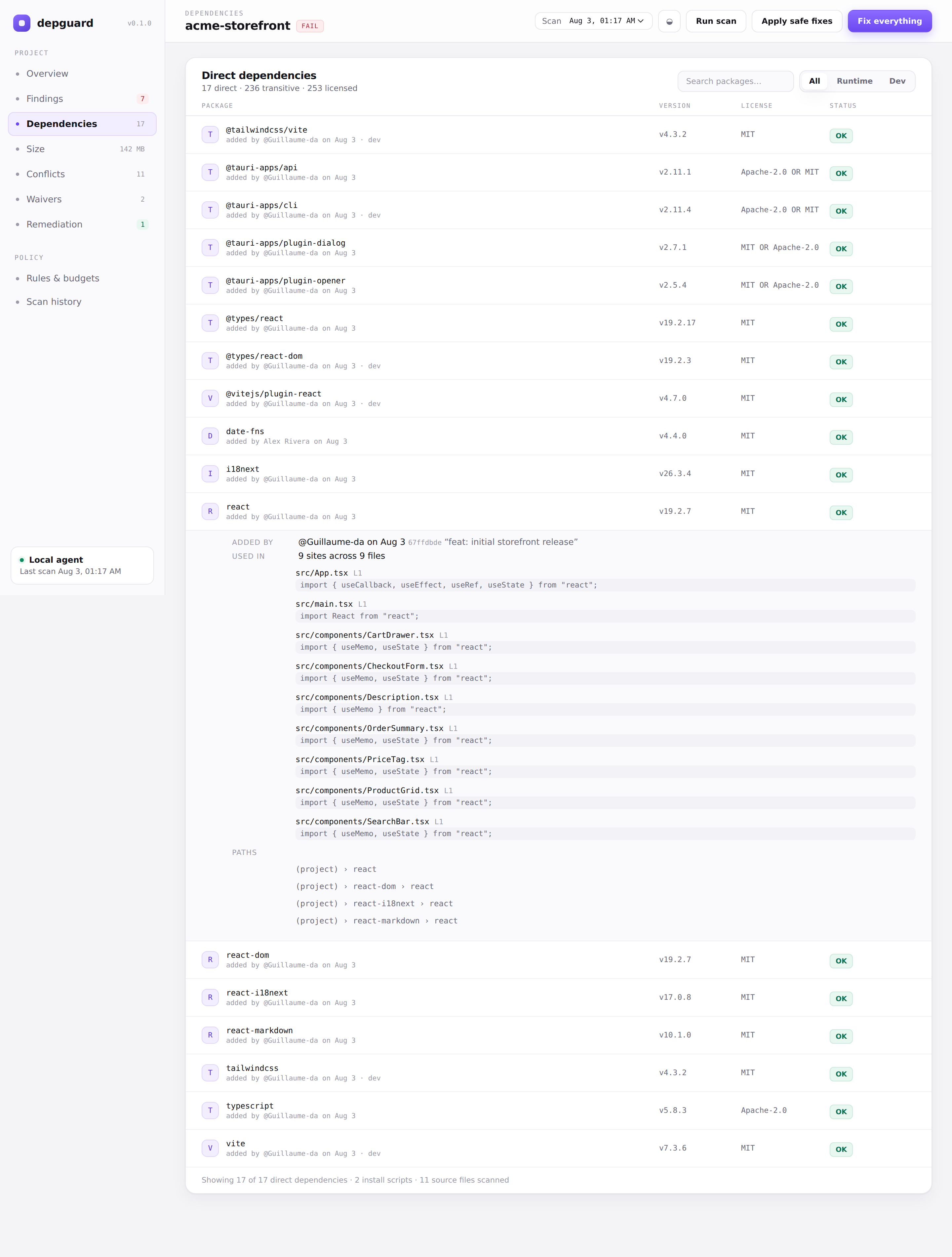
(project) > vite > lightningcssThe same data appears on every row of the Dependencies view, which expands to show it.
Who added it
Read from git history, not from git blame: adding a dependency appends a comma to the line above it, so blame credits the previous entry to whoever added the next one. DepGuard walks the diffs of package.json and keeps the earliest commit that introduced each key — accurate, and still a single git invocation. package.json answers who chose to depend on this; package-lock.json answers whose install first brought it into the tree, the only answer available for a transitive package.
A commit becomes a GitHub identity offline when the author used a github.com no-reply address ([email protected] or [email protected] both give @octocat). For any other address the login cannot be derived locally and the display name is shown instead; attribution.resolveViaGithub: true plus a token in DEPGUARD_GITHUB_TOKEN resolves the rest through the commits API. Off by default, it only runs for commits still unresolved, and sends nothing but commit SHAs of your own repository.
Reports carry the login, the display name and the email domain — never the full address. A report is a file people paste into tickets and chat.
What it reaches
Source files are scanned for import, require, dynamic import() and CSS @import/@use, each hit recorded as {file, line, code} with the source line truncated at 120 characters. A package no file names is traced through the lockfile instead, back to the direct dependencies that pull it in. A package that no file imports and no dependency path explains is reported as unreferenced.
This reads specifiers; it does not resolve them. A file listed here names the package in an import — that is the question being asked, not proof the code path executes. Directories come from usage.directories, ["src", "app", "lib", "pages", "components"] by default.
What it costs on disk
npx depguard scan --sizeInstall footprint 142 MB across 175 packages · 36 MB runtime tree · 107 MB build-time only
· 77 lockfile entries not installed on this platformEach package directory is measured excluding its own nested node_modules, so the same bytes are never charged twice, and skipping symlinks so a workspace or pnpm link does not double-count its target. The gap between lockfile and disk is reported rather than hidden: optional platform binaries — every @esbuild/* and lightningcss-* build for another operating system — are in every lockfile and installed on none of the other platforms.
Runtime versus build-time is decided by walking the production dependency graph, not by reading the lockfile's dev flag. npm omits that flag for anything reachable from both graphs, so typescript — declared only in devDependencies — comes back unflagged and would otherwise be billed to the runtime tree. On the sample project that correction moves 23 MB from "runtime" to "build-time only".
There is no "what ships to users" figure. Deciding which bytes survive bundling requires a bundler. The runtime tree on disk and the measured gzip bundle are reported separately, each labelled for what it is. Off by default: on a 252-entry tree the walk adds about 0.4s to a 0.7s scan.
The dashboard
npx depguard dashboardServes http://127.0.0.1:4178 — loopback only, no external assets, no telemetry. It follows your system light/dark preference, can be overridden with the toggle in the top bar, and is usable down to phone widths.
The command prints a URL ending in #token=…. Open that exact URL: the fragment carries the session token, the page reads it and immediately clears it from the address bar, and every /api/ request needs it. A browser never sends a fragment upstream, so the token stays out of logs and Referer headers — and any other process on the machine that finds the port gets a 403. Binding to a loopback address stops a browser from reaching the dashboard; only the token stops everything else.
Findings
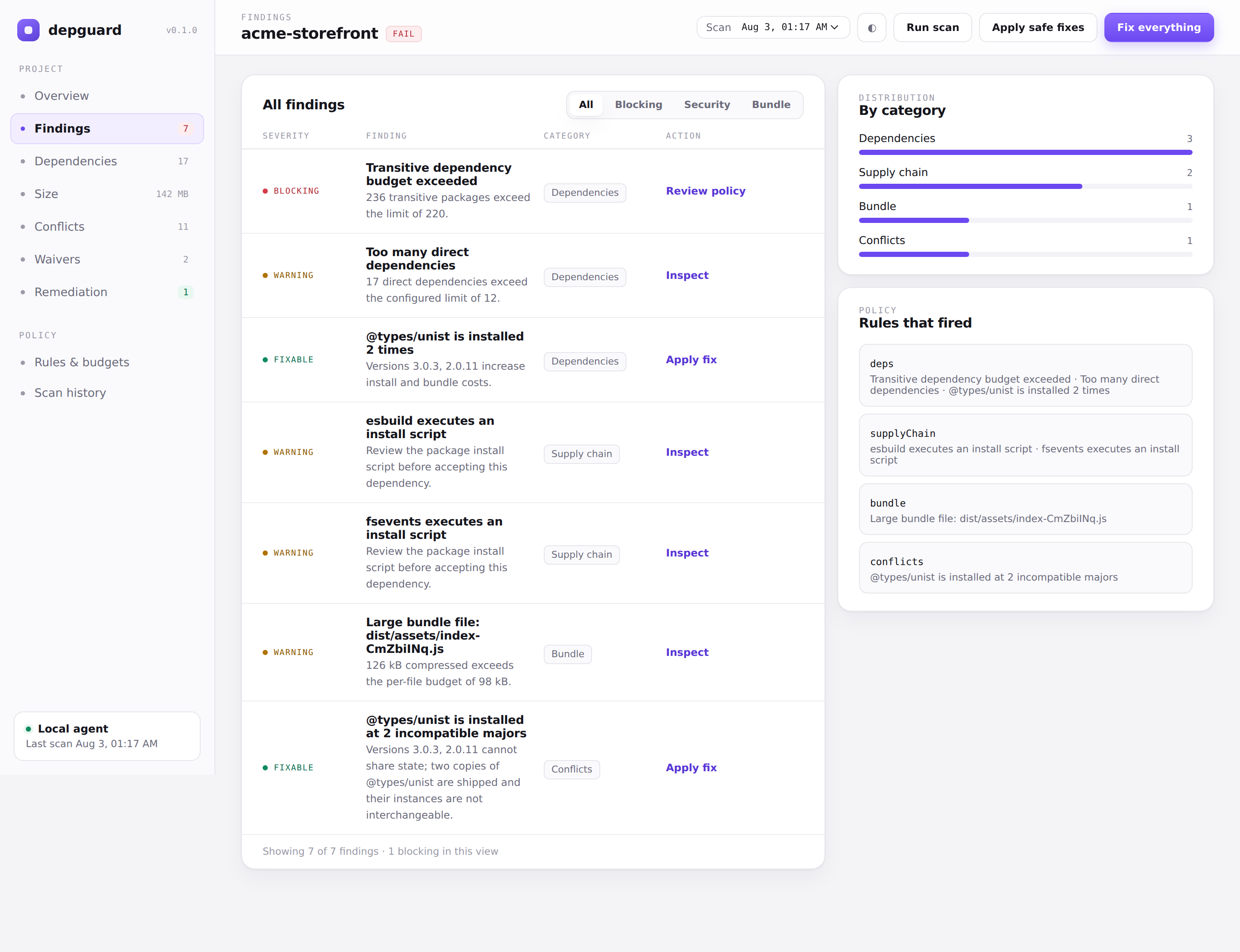
Findings sharing a rule and a title collapse into one row. The twelve lightningcss platform binaries below are one policy decision, not twelve; the right column shows which rules fired and how findings distribute across categories.
Dependencies
Every direct dependency with its resolved version, licence, policy status and the person who added it. Expanding a row shows the introducing commit, the files that import the package, and the paths that pull it in.
Remediation
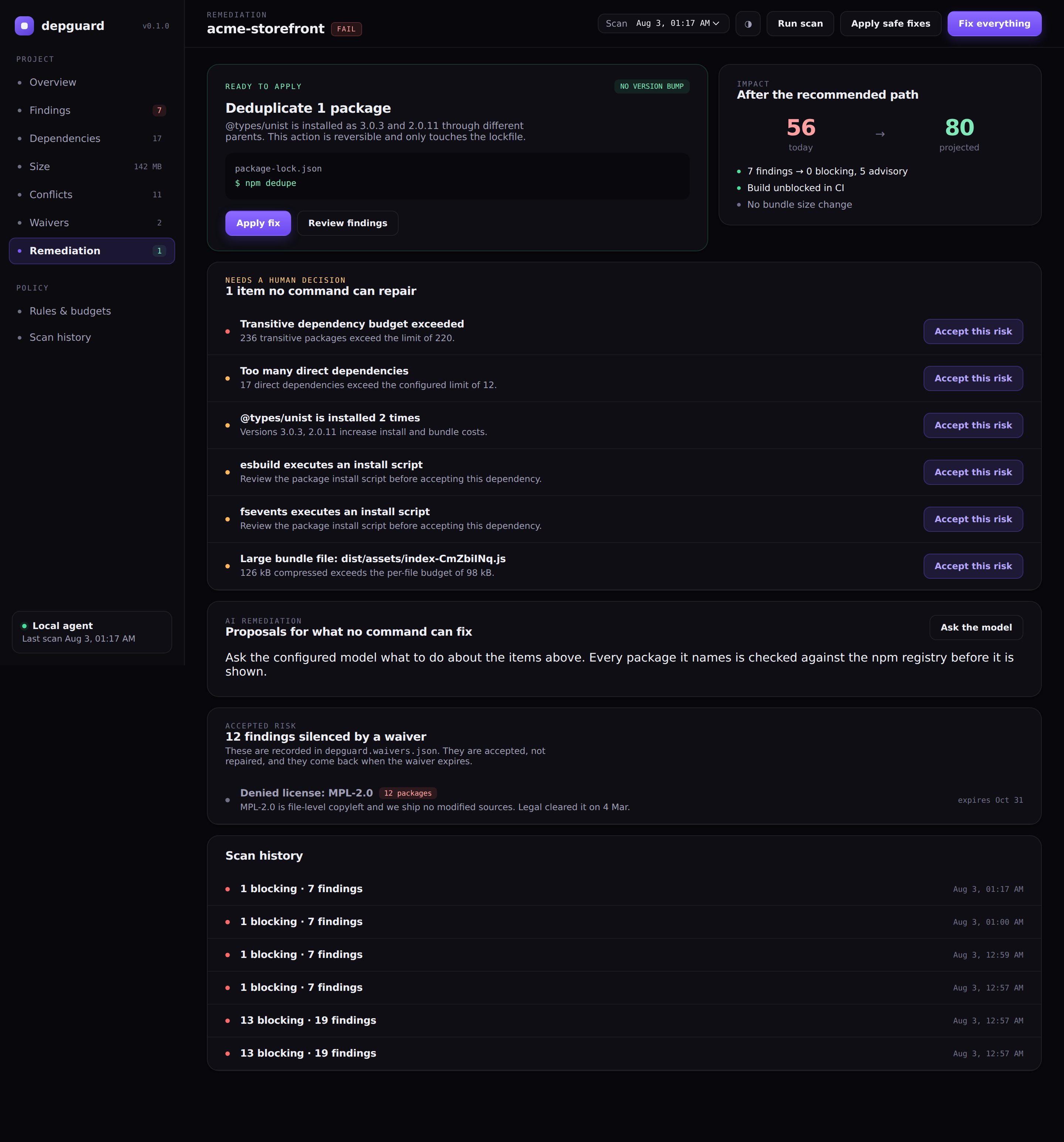
What can be applied automatically, what needs a human decision, what the model proposes, and what has already been accepted as risk. Fix everything in the top bar is the one-click path; it asks for a reason before waiving anything.
Commands and flags
depguard scan        Run every enabled scanner and write a report
depguard dashboard   Serve the report dashboard on 127.0.0.1
depguard fix         Preview or apply remediation
depguard explain     Show who added a dependency and which files it reaches
depguard waivers     List policy exceptions, or approve a pending one
depguard verify      Apply a change in a throwaway copy, then build and test it
depguard init        Write a starter policy and a GitHub Actions workflow
depguard help        Print usage
| Flag | Applies to | Meaning |
| --- | --- | --- |
| --cwd <path> | all | Project to analyse; defaults to the working directory |
| --config <path> | all | Explicit .mjs or .json policy file |
| --baseline <path> | scan | Report to compare bundle size against |
| --no-audit | scan, fix | Skip npm audit; makes the scan fully offline |
| --size | scan | Measure what each package costs on disk by walking node_modules |
| --json | scan, fix, explain | Print the machine-readable output to stdout |
| --notify | scan | Send the configured Slack and Teams messages |
| --ai | scan | Enable the AI reviewer for this run |
| --apply | fix | Actually apply the plan instead of previewing it |
| --all | fix | Apply everything mechanical, then waive what is left, warnings included |
| --waive | fix | Record the blocking findings with no mechanical fix as accepted risk |
| --reason <text> | fix | The reason stored on any waiver this run creates |
| --waiver-days <n> | fix | How long those waivers last before expiring (default 90) |
| --force | fix | Permit semver-major upgrades and npm audit fix |
| --approve <id> | waivers | Approve a pending waiver |
| --as <who> | waivers | Who is approving; required by --approve |
| --remove <pkg> | verify | Uninstall a package as part of the change being verified |
| --port <n> | dashboard | Override the dashboard port |
Exit codes: 0 pass or warnings only, 1 a blocking rule failed, 2 DepGuard itself errored (missing package.json, unreadable config, unknown command).
Bundle regression
bundle.maxIncrease needs something to compare against. Save a report from your main branch and pass it as the baseline:
npx depguard scan --baseline .depguard/baseline.jsonWithout --baseline, the previous report in .depguard/reports/ is not used automatically and the regression check stays silent — it reports a delta of zero rather than inventing one.
Configuration reference
depguard.config.mjs (or depguard.config.json, or any path via --config). Every key is optional; the defaults below are what you get with no config file at all.
export default {
  bundle: {
    directories: ["dist", "build/assets", ".next/static/chunks"],
    extensions: [".js", ".mjs", ".css"],
    maxTotal: "500kb",     // gzipped total across every matched file
    maxIncrease: "20kb",   // gzipped growth allowed against --baseline
    maxFile: "250kb",      // gzipped size allowed for a single file
  },
  dependencies: {
    maxDirect: 80,
    maxTransitive: 500,
    maxVersionsPerPackage: 2,
    rejectDeprecated: true,
    warnOnInstallScripts: true,
    deniedLicenses: ["GPL-3.0", "AGPL-3.0"],
    warnOnUnknownLicense: false,
    registryChecks: true,   // see the privacy note below
  },
  attribution: {
    enabled: true,
    includeTransitive: true,
    resolveViaGithub: false,          // needs a token; see below
    tokenEnv: "DEPGUARD_GITHUB_TOKEN",
  },
  waivers: {
    requireApproval: false,   // true: a waiver waits for a second person
    defaultDays: 90,
  },
  size: {
    enabled: false,       // walking node_modules is not free; --size opts in
    maxPackages: 2000,
  },
  usage: {
    enabled: true,
    directories: ["src", "app", "lib", "pages", "components"],
    maxFiles: 4000,
  },
  conflicts: {
    enabled: true,
    blockMissingPeers: true,
    blockPeerMismatches: true,
    detectMajorSplits: true,
  },
  security: {
    audit: true,
    omitDev: false,
    blockingSeverities: ["high", "critical"],
    ignoredAdvisories: [],  // npm advisory source ids
    requireAudit: true,     // an audit that could not run fails the scan
  },
  fixes: {
    autoApply: false,
    audit: true,
    dedupe: true,
    allowBreaking: false,
  },
  verification: {
    enabled: false,       // this runs your scripts; explicit opt-in
    buildScript: "build",
    testScript: "test",
    timeoutMs: 600000,
    keepSandbox: false,   // true keeps the copy so you can inspect it
    // Withheld from the sandbox; see the note below.
    envDeny: ["DEPGUARD_AI_KEY", "DEPGUARD_AI_ENDPOINT", "DEPGUARD_GITHUB_TOKEN",
              "DEPGUARD_SLACK_WEBHOOK", "DEPGUARD_TEAMS_WEBHOOK", "NPM_TOKEN",
              "NODE_AUTH_TOKEN", "GITHUB_TOKEN", "GH_TOKEN"],
    envDenyPatterns: ["(^|_)(TOKEN|SECRET|PASSWORD|PASSWD|CREDENTIALS|API_?KEY|PRIVATE_KEY)$", "^AWS_"],
    envAllow: [],         // names to keep despite the rules above
  },
  notifications: {
    on: ["fail"],           // any of "fail", "warn", "pass"
    dashboardUrl: "",
    slack: { enabled: false, webhookEnv: "DEPGUARD_SLACK_WEBHOOK" },
    teams: { enabled: false, webhookEnv: "DEPGUARD_TEAMS_WEBHOOK" },
  },
  ai: {
    enabled: false,
    endpointEnv: "DEPGUARD_AI_ENDPOINT",
    keyEnv: "DEPGUARD_AI_KEY",
    modelEnv: "DEPGUARD_AI_MODEL",
    timeoutMs: 20000,
  },
  dashboard: {
    host: "127.0.0.1",
    port: 4178,
    reportDirectory: ".depguard/reports",
  },
};
Sizes accept a number of bytes or a string with a unit: b, kb, kib, mb, mib, gb, gib — decimal units are powers of 1000, binary units powers of 1024. .mjs config files are imported, so they execute: same trust model as eslint.config.js or vite.config.js, meaning do not run DepGuard inside a repository you would not otherwise run npm install in.
Verification withholds credentials. depguard verify copies the project to a temp directory and runs npm install there with install scripts enabled — refusing to run them would verify something other than what a real user gets. That means code you have not read executes on your machine, sometimes code a model just named. The sandbox bounds what it can write; envDeny / envDenyPatterns bound what it can read, by removing anything that looks like a credential from the child environment. The names withheld are listed in the result, so a build that legitimately needs one can get it back through envAllow.
requireAudit fails closed. If npm audit is enabled but cannot run — offline, registry down, unreadable output — the scan has no vulnerability data, so it fails rather than passing on nothing. --no-audit remains a clean opt-out and produces no finding at all. Set requireAudit: false to go back to an advisory warning.
registryChecks sends network requests. When enabled, DepGuard asks registry.npmjs.org about each of your direct dependencies to detect deprecations published after your lockfile was written, which discloses those names to npm. Set registryChecks: false for a fully local scan; --no-audit additionally skips npm audit, which also talks to the registry.
Using it in CI
depguard init writes this workflow for you:
name: DepGuard
on:
  pull_request:
  push:
    branches: [main]

permissions:
  contents: read

jobs:
  dependency-policy:
    runs-on: ubuntu-latest
    steps:
      - uses: actions/checkout@v4
      - uses: actions/setup-node@v4
        with:
          node-version: 22
          cache: npm
      - run: npm ci
      - run: npx depguard-scan scan --notify
        env:
          DEPGUARD_SLACK_WEBHOOK: ${{ secrets.DEPGUARD_SLACK_WEBHOOK }}
To gate bundle regressions, restore the baseline report from your main branch — with actions/cache, or an artifact from the last main-branch run — and pass it via --baseline.
Slack and Microsoft Teams
Webhook URLs are credentials: keep them in environment variables or CI secrets, never in the config file. The config only ever names the variable.
notifications: {
  on: ["fail"],
  dashboardUrl: "https://internal.example.com/depguard",
  slack: { enabled: true, webhookEnv: "DEPGUARD_SLACK_WEBHOOK" },
  teams: { enabled: true, webhookEnv: "DEPGUARD_TEAMS_WEBHOOK" },
}
Slack receives a Block Kit message, Teams an Adaptive Card, both with the status, the blocking count, the bundle figure and the first five findings. Throttled requests (HTTP 429) are retried with exponential backoff; each attempt times out after 10 seconds so a silent webhook cannot hang your CI job. Delivery failures are recorded in the report and never change the policy outcome.
The AI reviewer (optional)
Disabled by default. It never decides whether the scan passes. The deterministic scanners produce the findings and the status; the model only summarizes them, ranks them and drafts a remediation order. If it fails, times out or returns nonsense, the report and exit code are unaffected.
Verified proposals
For findings no command can repair, the model is asked what to do: replace the package, accept the risk, or handle it by hand. Every package name it returns is checked against the npm registry before you see it — the package must exist, must not be deprecated, and must carry a licence your own policy accepts. A name failing any of those is downgraded to a manual item showing what was rejected and why. That check is the point: a model inventing a plausible package name, installed without verification, is precisely the typosquatting vector this tool exists to catch. DepGuard never runs a replacement for you either — swapping a dependency changes an API surface, so the proposal stops at a command you can read. In the dashboard this is the Ask the model button on the Remediation view.
Works with any endpoint accepting an OpenAI-style messages body and answering with choices[0].message.content, output_text or output:
export DEPGUARD_AI_ENDPOINT="https://your-provider.example/v1/chat/completions"
export DEPGUARD_AI_KEY="…"
export DEPGUARD_AI_MODEL="your-model"
npx depguard scan --ai
What leaves your machine when you enable it: your project name, the aggregate metrics, and up to 20 findings including package names and versions. Do not enable it for a project whose dependency list is itself confidential.
Sandbox verification
A proposal that installs is not a proposal that works. depguard verify applies a change in a throwaway copy of the project, then runs the project's own build and test scripts against it.
$ npx depguard verify [email protected]

Verifying in a throwaway copy — /home/you/project is not touched.

✓ Install the current tree (0.3s)
✓ Install [email protected] (0.4s)
✓ Production build (0.1s)
✖ Test suite (0.2s)

Bundle 133 kB → 131 kB gzip

Not verified: failed: Test suite
Exit code 0 when everything passes, 1 otherwise, so it works as a gate. Configured under verification in the config reference above.
Your working tree is never written to. The sandbox is built from git ls-files when the project is a repository, and from a filtered copy otherwise. node_modules is always excluded and reinstalled, so a linked or patched tree cannot make a broken change look fine. The verdict is the build and the tests — not the model's confidence, and not the fact that a package exists on the registry. When a project has no build or test script, the result says only "installs cleanly" rather than implying checks that never ran.
This executes code: the install scripts of whatever is being proposed, and your own build and test scripts. That is the point — refusing to run them would verify something other than what would ship — but treat depguard verify with the same care as npm install && npm run build. Child processes get a cleaned environment: NODE_TEST_CONTEXT, NODE_OPTIONS and npm's npm_* lifecycle variables are dropped, because whatever invoked DepGuard otherwise leaks into the run. Not theoretical — with NODE_TEST_CONTEXT inherited, a nested node --test switches to its child reporter and stops signalling failure through its exit code, so a broken suite verifies green.
Programmatic API
import { loadConfig, scanProject, planFixes } from "depguard-scan";

const { config } = await loadConfig(process.cwd());
const report = await scanProject({ cwd: process.cwd(), config });

console.log(report.status);              // "pass" | "warn" | "fail"
console.log(report.summary.blocking);    // number of blocking findings
console.log(planFixes(report, config));  // the safe remediation plan
Also exported: defineConfig, defaultConfig, applySafeFixes, applyUpgrades, applyWaivers, remediateAll, undecidedFindings, planUpgrades, proposeRemediation, verifyPackage, loadWaivers, saveWaivers, createWaiver, notify, enhanceReportWithAi, startDashboard, and the semver subset satisfies / maxSatisfying / compareVersions.
Report format
.depguard/reports/<id>.json, with latest.json always pointing at the most recent scan. schemaVersion is 1.
{
  "schemaVersion": 1,
  "id": "2026-08-02T21-25-41-000Z-1a2b3c4d",
  "createdAt": "2026-08-02T21:25:41.000Z",
  "project": { "name": "acme-storefront", "version": "4.2.0", "path": "/abs/path" },
  "status": "fail",
  "summary": {
    "total": 18, "blocking": 13, "fixable": 1, "waived": 0, "durationMs": 642,
    "counts": { "critical": 0, "high": 13, "warning": 5, "moderate": 0, "low": 0, "info": 0 }
  },
  "metrics": {
    "dependencies": { "direct": 16, "transitive": 236, "duplicates": [], "licenses": [], "packages": [] },
    "bundle": { "gzipBytes": 136545, "deltaGzipBytes": 0, "budgetBytes": 300000, "files": [] },
    "security": { "enabled": true, "status": "clean", "vulnerabilities": { "high": 0, "critical": 0 } },
    "conflicts": { "total": 1, "conflicts": [{ "type": "major-split", "package": "@types/unist", "installed": ["3.0.3", "2.0.11"] }] }
  },
  "findings": [
    {
      "id": "a1b2c3d4e5f6",     // stable across runs: hash of category, package, title, message
      "category": "license",
      "severity": "high",
      "blocking": true,
      "package": "lightningcss",
      "title": "Denied license: MPL-2.0",
      "message": "[email protected] uses a license denied by project policy."
    }
  ],
  "waived": [],
  "waivers": { "active": [], "expired": [] },
  "fixes": [{ "id": "npm-dedupe", "type": "npm-dedupe", "safe": true, "command": "npm dedupe" }],
  "ai": null
}
Finding ids are content hashes, so they stay stable between scans and can be used to track or suppress a specific finding downstream.
Security model
DepGuard analyses supply chains, so its own posture matters.
The package — no runtime dependencies, so nothing is installed transitively and there is nothing to compromise upstream. No install scripts of its own. The published tarball is an explicit allowlist (src, README.md, LICENSE): no reports, environment files or fixtures.
Executing package managers — npm is spawned with shell: false and an argument array, so no project or package metadata can reach a shell. Every spawn has a timeout: 60 s for npm audit, 120 s for fixes. Semver-major fixes need both a policy opt-in and --force.
The dashboard
- Binds
127.0.0.1only. - Validates
HostandOriginon every request, rejecting anything that is not a loopback name on the bound port. This is what stops DNS rebinding: a hostile page re-pointing its own domain at127.0.0.1would otherwise become same-origin with the dashboard, read your reports and reuse your session token to trigger fixes. - Mutating endpoints (
/api/scan,/api/fixes/apply) additionally require a random 24-byte session token, compared in constant time, with request bodies capped at 64 kB. - Serves a strict CSP —
default-src 'self', no inline scripts or styles, no remote origins. Nothing is fetched from the network, so a scan of a private project cannot leak through a font request. - All report content is HTML-escaped before rendering, so a package name crafted by a hostile maintainer cannot inject markup.
- Static file paths are allowlisted by character class and confined to the dashboard's own directory. Server errors return a generic message; paths and stack details go to your terminal only.
Verification — runs in a copy under the system temp directory, removed unless keepSandbox is set; the working tree is never written to. It executes the project's build and test scripts and the proposed package's install scripts, is opt-in, and is never part of a scan. Child processes get a cleaned environment.
Remediation — the one-click path applies mechanical fixes before it waives anything, so nothing repairable is silenced instead. Waivers require a reason, expire by default, and are written to a file meant for version control; a pass that depends on them is reported as such in the terminal, the dashboard and summary.waived. AI-proposed packages are verified against the registry before display and never installed automatically.
Publishing — released only from a tagged GitHub Actions run, which refuses to publish when the tag disagrees with package.json, and published with npm provenance: a signed attestation linking the tarball on the registry to the commit and workflow run that produced it.
Attribution — contributor names come from your own git history; reports store the login, display name and email domain, never the full address. Resolving a login through the GitHub API is off by default, requires an explicit token, and transmits only commit SHAs of the repository being scanned.
Credentials — Slack, Teams and AI credentials are read from environment variables only, never from the config file or the report. Reports never contain credentials, but they do contain the absolute project path and your full dependency inventory: treat them as internal.
Found a vulnerability? Open a security advisory rather than a public issue.
What DepGuard does not do
Being explicit about the boundaries, so you do not assume coverage you do not have:
- It does not verify lockfile integrity. It reads
resolvedURLs and package metadata but does not checkintegrityhashes, nor flag a dependency resolved from an unexpected registry. A poisoned lockfile pointing at a rogue host will not be reported. - It does not detect malicious code. No static analysis of package contents. It flags the existence of an install script; it does not read it.
- Waivers are not approvals. DepGuard records who wrote one and why; it cannot tell whether the person was entitled to. Enforce that with code review on
depguard.waivers.json. - npm only. Yarn, pnpm and Bun lockfiles are not parsed.
- Vulnerability data comes entirely from
npm audit, with its coverage and its false positives. There is no second advisory source. - Licence data comes from the lockfile, which reports what a package declares. It is not a legal audit and does not read
LICENSEfiles. - The bundle scanner measures files on disk, matched by directory and extension. It does not build your project, and does not attribute bytes to the dependency that contributed them.
- Attribution is not authorship of the decision. It reports the commit that introduced a dependency entry. A lockfile churned by an unrelated
npm installwill name whoever ran it. - A passing verification is not a guarantee. It proves the change installs, builds and passes the tests you already have. It cannot find behaviour those tests do not cover.
- Impact analysis reads specifiers, not the module graph. Dynamic requires built from variables, and imports behind bundler aliases, are not resolved.
- There is no package-staleness check. The release date needed for one lives only in npm's full packument, tens of megabytes per package — too expensive to fetch for every dependency on every scan.
Development
npm install --ignore-scripts
npm test        # node --test
npm run check   # syntax check of every entry point
Releasing
npm version minor
git push --follow-tags
Pushing a vX.Y.Z tag runs .github/workflows/release.yml, which re-runs the tests, refuses to continue if the tag and package.json disagree, and publishes with provenance. It needs an NPM_TOKEN secret with publish rights and an npm environment, which is where you can require a manual approval before anything reaches the registry.
Licence
MIT