
depsee
v0.1.3
Published
See your dependencies like never before — interactive dependency dashboard with health scores, dataviz and security audit
Downloads
40

Maintainers
 nicolasdlp
Readme
depsee
See your dependencies like never before.
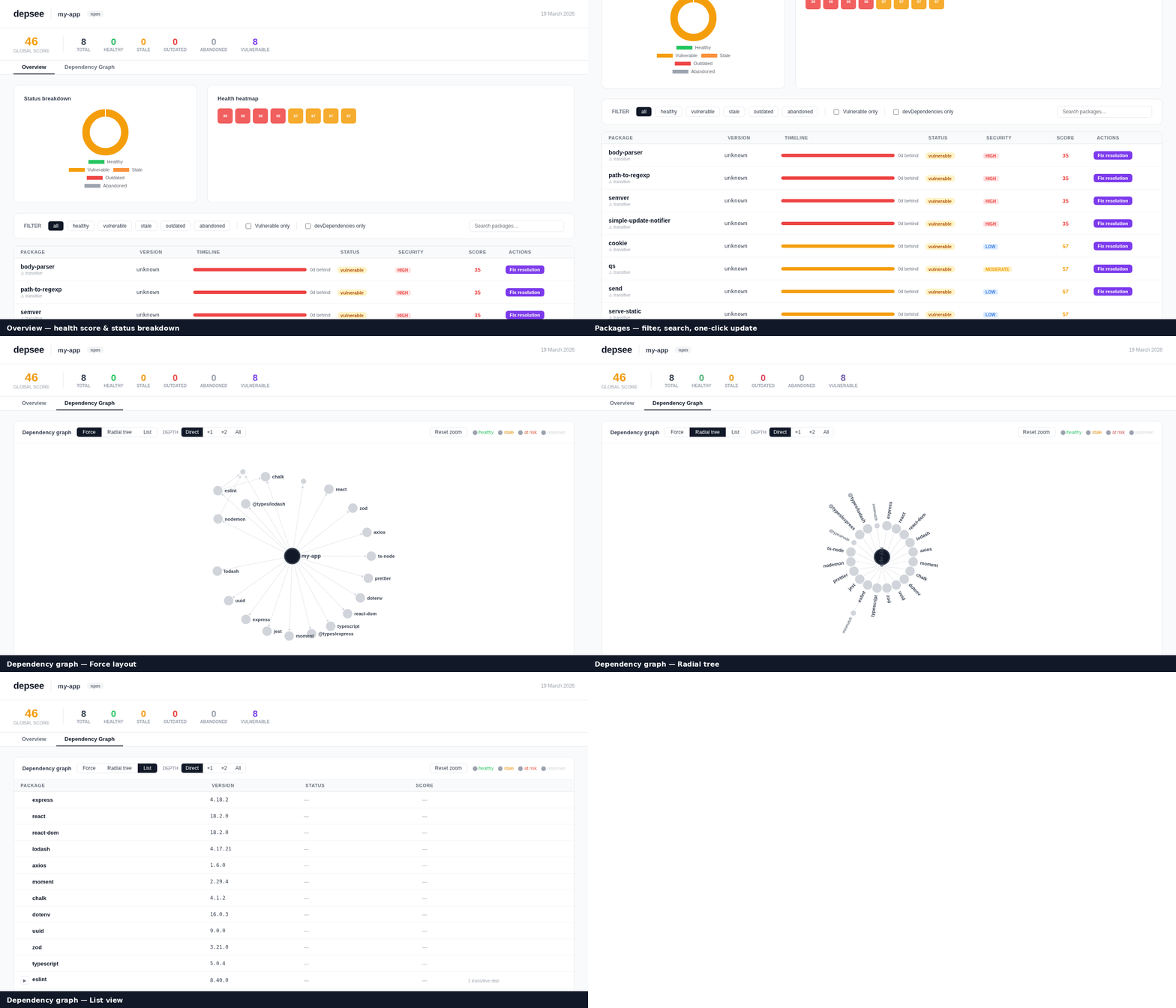
An interactive CLI dashboard for npm dependency health — health scores, dataviz, security audit, and one-click updates, all in your browser.





Features
- Health score (0–100) per package — weighted on age, staleness, missed versions, and publish frequency
- Security audit — integrates
npm audit,yarn audit,pnpm auditand surfaces CVEs per package - Interactive UI — real-time terminal overlay for update/remove/fix commands, streamed line by line
- Fix resolution — automatically adds
overrides(npm/pnpm/bun) orresolutions(yarn) for transitive vulnerabilities - Dataviz — donut chart by status, health heatmap, per-package timeline bars
- All package managers — npm, yarn, pnpm, bun (auto-detected from lockfile)
- CI mode — exit 1 when global score is below your threshold (
--ci --min-score 80) - JSON output — pipe-friendly, pure JSON on stdout when
--format json
Quick start
# Run without installing (recommended for one-off checks)
npx depsee

# Or install globally
npm install -g depsee
depsee
This analyses your project, writes depsee-report.html, and opens it in the browser.
Interactive dashboard
depsee --serve
# → Opens http://localhost:4242
The dashboard lets you update, remove, or fix vulnerabilities with a single click and watch the output stream in real time directly in the UI.
Screenshot
Run
depsee --servein any npm project to see the live dashboard.
Usage
depsee [options]| Option | Default | Description |
|---|---|---|
| --serve | false | Launch the interactive UI at localhost:<port> |
| --port <n> | 4242 | Port for --serve mode |
| --format <fmt> | html | Output format: html or json |
| --output <path> | depsee-report.html | Output file path |
| --only <type> | (all) | Filter: deps (skip devDeps) or devDeps (skip deps) |
| --ignore <pkgs> | — | Comma-separated list of packages to skip |
| --no-audit | false | Skip the security audit |
| --ci | false | Exit 1 if global score is below --min-score |
| --min-score <n> | 60 | Minimum score for CI gate |
| --debug | false | Print verbose debug output |
| --help | — | Show help |
| --version | — | Show version |
Examples
# Interactive dashboard on port 3000
depsee --serve --port 3000

# CI gate — fail the build if score < 75
depsee --ci --min-score 75 --no-audit

# JSON output, skip dev deps, pipe to jq
depsee --format json --only=deps | jq '.summary'

# Skip known false-positives
depsee --ignore=lodash,moment

# Save an HTML report to a custom path
depsee --output reports/deps-$(date +%F).html
Health score
Each package receives a score from 0 to 100, computed from four weighted signals:
| Signal | Weight | Description | |---|---|---| | Age of installed version | 30% | How long ago the installed version was published | | Staleness (gap to latest) | 30% | Days between installed and latest release | | Missed versions | 20% | Number of releases skipped | | Publish frequency | 20% | How actively the package is maintained |
A severity cap is applied on top of the weighted score:
| Severity | Score cap | |---|---| | Critical | 20 | | High | 35 | | Moderate | 60 | | Low / Info | No cap |
The package status is derived from the final score:
| Status | Condition |
|---|---|
| vulnerable | Any vulnerability present |
| abandoned | Frequency < 0.5 releases/year and gap > 365 days |
| healthy | Score ≥ 75 |
| stale | Score ≥ 45 |
| outdated | Score < 45 |
Package manager support
depsee auto-detects your package manager from the lockfile (in priority order: bun.lockb → pnpm-lock.yaml → yarn.lock → package-lock.json).
| PM | Detect | Update | Remove | Audit |
|---|---|---|---|---|
| npm | package-lock.json | npm install <pkg>@latest | npm uninstall <pkg> | npm audit --json |
| yarn | yarn.lock | yarn add <pkg> | yarn remove <pkg> | yarn audit --json |
| pnpm | pnpm-lock.yaml | pnpm add <pkg> | pnpm remove <pkg> | pnpm audit --json |
| bun | bun.lockb | bun add <pkg> | bun remove <pkg> | npm audit --json |
Programmatic API
depsee can be used as a library in your own scripts:
import { analyze } from 'depsee'

const report = await analyze({
  cwd: process.cwd(),       // project root
  includeDevDeps: true,     // include devDependencies
  audit: true,              // run security audit
  ignore: ['lodash'],       // skip these packages
  debug: false,             // verbose logging
})

console.log(report.summary)
// {
//   projectName: 'my-app',
//   total: 42,
//   healthy: 30,
//   stale: 5,
//   outdated: 4,
//   abandoned: 1,
//   vulnerable: 2,
//   score: 78,
//   packageManager: 'npm',
//   generatedAt: '2026-03-19T…'
// }

// Write an HTML report
await report.toHTML('./depsee-report.html')

// Write a JSON report
await report.toJSON('./depsee-report.json')
Types
interface DepInfo {
  name: string
  type: 'dependency' | 'devDependency' | 'transitive'
  wanted: string        // version range from package.json
  installed: string     // resolved installed version
  latest: string        // latest version on the registry
  installedAt: string   // ISO date of installed version
  latestAt: string      // ISO date of latest version
  gapDays: number       // days behind latest
  missedVersions: number
  publishFrequency: number
  score: number         // 0–100
  status: 'healthy' | 'stale' | 'outdated' | 'abandoned' | 'vulnerable'
  vulnerabilities: Vulnerability[]
}

interface Vulnerability {
  id: string
  title: string
  severity: 'critical' | 'high' | 'moderate' | 'low' | 'info'
  url: string
  fixAvailable: boolean
  fixedIn?: string
}
CI integration
GitHub Actions
- name: Check dependency health
  run: npx depsee --ci --min-score 70 --no-audit
Or with the security audit included:
- name: Check dependency health + security
  run: npx depsee --ci --min-score 70
Tip: add
--only=depsto skip devDependencies in production CI pipelines.
Pre-commit hook (with husky)
npx husky add .husky/pre-commit "npx depsee --ci --min-score 60 --no-audit"Development
git clone https://github.com/Nicolas-Deleplace/depsee
cd depsee
npm install

# Build
npm run build

# Unit tests
npm test

# Integration tests
npm run test:e2e

# All tests
npm run test:all

# Type-check
npm run typecheck

# Watch mode
npm run test:watch
Project structure
src/
├── cli.ts          CLI entry point — argument parsing, output formatting
├── server.ts       HTTP server for --serve mode (streaming NDJSON)
├── analyzer.ts     Core analysis pipeline
├── registry.ts     npm registry client (batch fetching with Zod validation)
├── auditor.ts      npm/yarn/pnpm audit parser
├── scorer.ts       Health score computation and status derivation
├── detector.ts     Package manager detection and command generation
├── renderer.ts     HTML report generator (interactive dashboard)
├── types.ts        Shared TypeScript types
└── __tests__/
    ├── scorer.test.ts    17 unit tests
    ├── detector.test.ts  24 unit tests
    ├── auditor.test.ts   22 unit tests
    ├── analyzer.test.ts  13 integration tests
    ├── e2e.test.ts        15 integration + CLI smoke tests
    └── fixtures/          npm/yarn/pnpm audit JSON fixtures
Publishing a new release
# Bump the version
npm version patch   # or minor / major

# Push the tag — the release workflow takes care of the rest
git push --follow-tags
The release workflow will:
- Run the full test suite
- Publish to npm with provenance (
--provenance) - Create a GitHub Release with auto-generated changelog
Requirements
- Node.js ≥ 20
- One of: npm, yarn, pnpm, or bun
License
MIT © Nicolas Deleplace