
design-constraint-validator
v2.3.0
Published
Mathematical constraint validator for design systems — ensuring consistency, accessibility, and logical coherence

Maintainers
 decisionthemes
Readme
Design Constraint Validator (DCV)
Mathematical constraint validator for design systems — ensuring consistency, accessibility, and logical coherence.







Design Constraint Validator (DCV) validates design constraints across token sets and styles:
- ✅ Accessibility: WCAG text contrast, perceptual lightness floor/ceilings
- ✅ Order & Monotonicity: increasing typography scales, spacing hierarchies
- ✅ Thresholds & Policies: min/max ranges, cross-axis guards (size × weight × contrast)
- ✅ Graph Intelligence: Hasse/poset graph export; "why" explanations with implicated edges
This is not a schema linter; it's a reasoning validator for values and relationships.
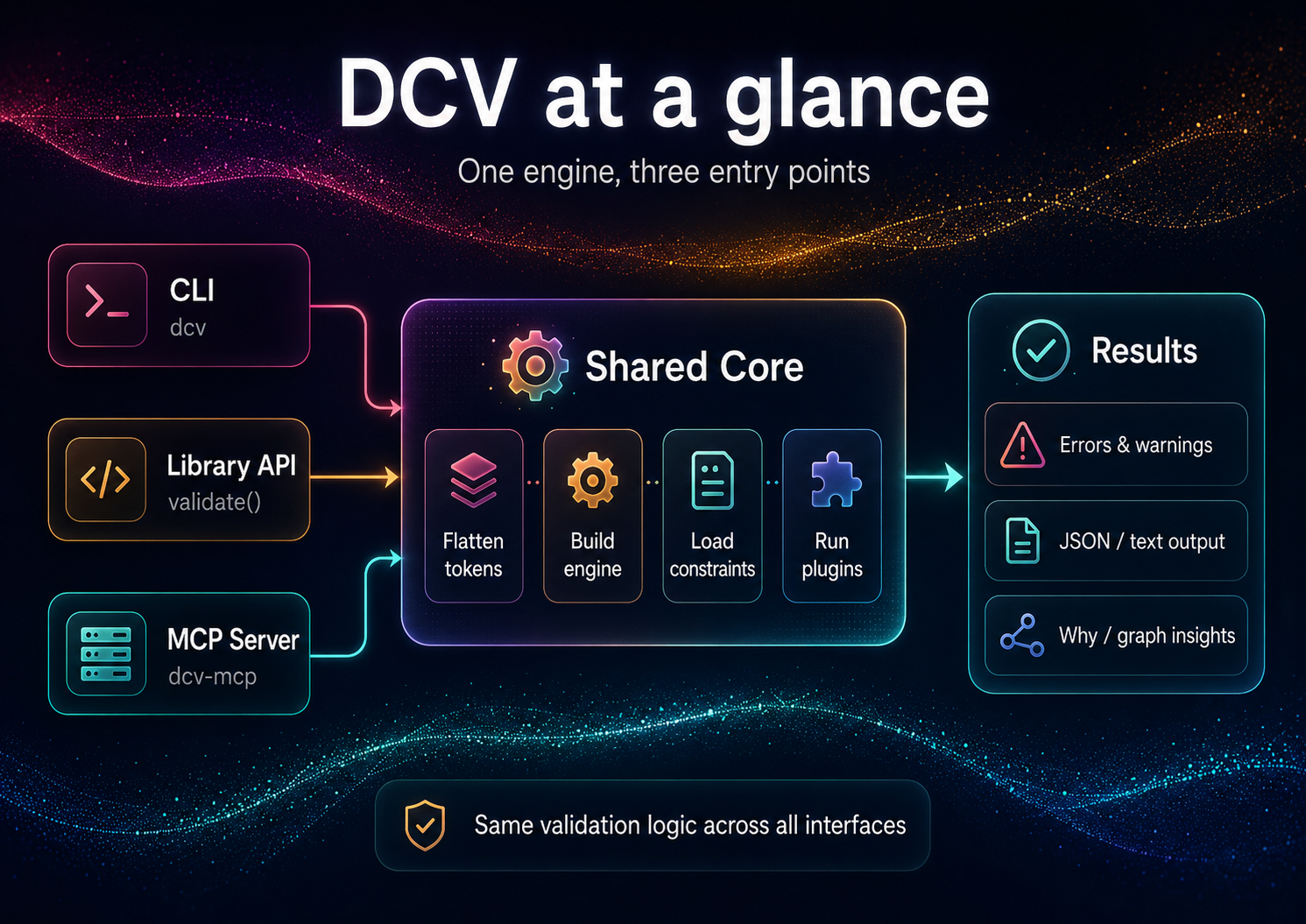
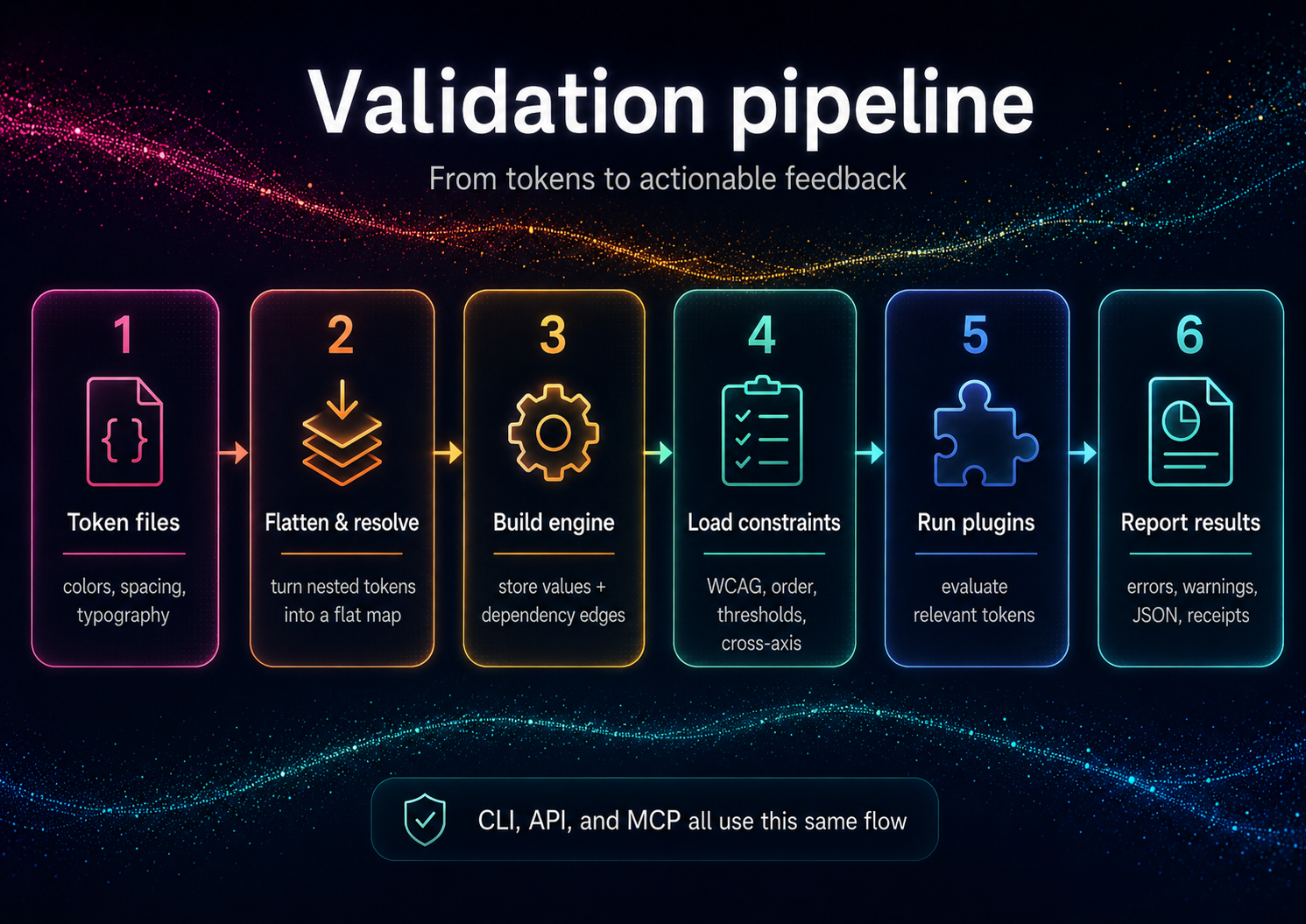
Installation
# Local (recommended)
npm i -D design-constraint-validator

# One-off run, no install (the bin name `dcv` belongs to an unrelated package)
npx design-constraint-validator --help
After a local install, the shorter dcv bin is available (e.g. npx dcv --help).
Requirements: Node.js ≥ 18.x (ESM)
Quick Start
DCV validates your tokens against your constraints. From an empty directory:
# 1. Your design tokens (DTCG-style "$value")
cat > tokens.json <<'JSON'
{
  "color": {
    "text": { "$value": "#888888" },
    "bg":   { "$value": "#999999" }
  }
}
JSON

# 2. Your constraints — auto-discovered as dcv.config.json in the cwd
cat > dcv.config.json <<'JSON'
{
  "constraints": {
    "enableBuiltInWcagDefaults": false,
    "enableBuiltInThreshold": false,
    "wcag": [
      { "foreground": "color.text", "background": "color.bg", "ratio": 4.5, "description": "Body text on background" }
    ]
  }
}
JSON

# 3. Validate (positional path or --tokens; exits non-zero on violations)
npx design-constraint-validator validate tokens.json --summary table

# Explain one token (the tokenId is required)
npx design-constraint-validator why color.text --tokens tokens.json --format table

# Export the dependency graph
npx design-constraint-validator graph --tokens tokens.json --format mermaid > graph.mmd
These one-offs use the full package name because the bare
dcvbin name on npm belongs to an unrelated package. Afternpm i -D design-constraint-validator, use the shorternpx dcv ….
Example output (validate):
validate: 1 error(s), 0 warning(s)
ERROR wcag-contrast  color.text|color.bg @ Body text on background — Contrast 1.24:1 < 4.5:1
scope   rules  warnings  errors
------  -----  --------  ------
global  1      0         1
Exit code is 1 when violations are found, 0 when clean (use --fail-on off to always exit 0). The built-in WCAG/threshold defaults target the bundled example token ids, so disable them (as above) when validating your own token names.
Programmatic API
import { validate } from 'design-constraint-validator';

// Synchronous. Point at files, or pass `tokens` / `constraints` inline.
const result = validate({
  tokensPath: './tokens.json',
  configPath: './dcv.config.json', // omit to auto-discover dcv.config.json in the cwd
});

if (!result.ok) {
  for (const v of result.violations) {
    console.log(`[${v.ruleId}] ${v.message}`);
  }
  process.exitCode = 1;
}
See API Reference for complete programmatic usage.
Use from AI agents (MCP)
DCV ships a second binary, dcv-mcp, that exposes the validator over MCP stdio for agent clients. Add it to a Claude Desktop or generic MCP client config like this:
{
  "mcpServers": {
    "dcv": {
      "command": "npx",
      "args": ["-y", "--package", "design-constraint-validator", "dcv-mcp"]
    }
  }
}
The server exposes six read-only, JSON-returning tools:
validate- validate inlinetokensor atokensPathagainst inlineconstraintsor a config file.why- explain provenance, aliases, dependencies, dependents, and alias chain for one token id.graph- return token dependencynodesandedges.list-constraints- enumerate the active constraints (WCAG pairs, thresholds, order/lightness scales, cross-axis) for the given input.explain- turn a violation into plain-English text plus machine-readable facts.suggest-fix- compute a verified satisfying value for a violation (WCAG color, threshold/monotonic boundary) without writing anything.
The three derivation tools (list-constraints, explain, suggest-fix) stay read-only — they return suggestions; applying them is up to you (dcv set / dcv patch). See AI Guide for the full agent loop.
Tool failures are returned as structured JSON: { "ok": false, "error": { "code": "...", "message": "..." } }.
Documentation
For Everyone
- Getting Started - 5-minute tutorial
- Features & Complete Guide - All features, examples, and FAQ
- Examples - Sample projects and use cases
For Users
- Constraints - All 5 constraint types in detail
- CLI Reference - Complete command documentation
- Configuration - Config file options
- Concepts - Core terminology and defaults
For Developers
- API Reference - Programmatic usage
- Architecture - Internal design
- Adapters - Input/output formats
Additional Resources
- Prior Art / Method - Design rationale (Decision Themes, receipts)
- AI Guide - Using DCV with ChatGPT/Claude/Copilot
- Contributing - Contribution guidelines
- Security - Supply chain security measures
Why Constraints, Not Conventions?
Conventional linters catch schema issues ("has a value, has a type"). DCV enforces relationships that matter to users and brand integrity:
- Legible contrast under all themes and states
- Proper hierarchical spacing/typography (monotonic scales)
- Coherent cross-axis behavior (e.g., weight increases with size where needed)
- Policy conformance (AA/AAA, internal thresholds)
This transforms tokens from "bags of numbers" into a formal design system.
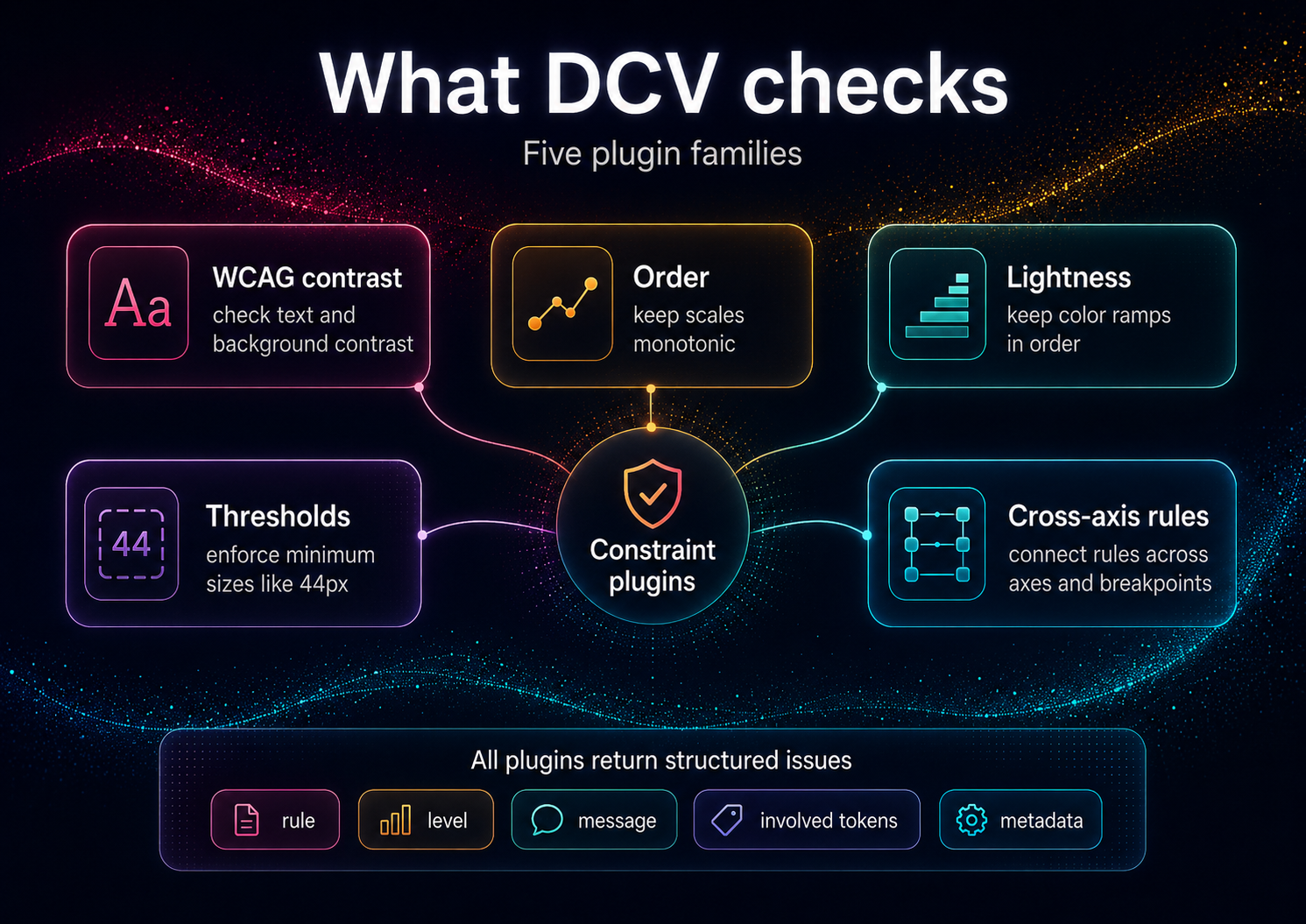
Comparison: Schema Linters vs DCV
| Feature | Schema Linters | DCV | |---------|----------------|-----| | Validates | JSON structure, types | Mathematical relationships, accessibility | | Catches | Missing fields, wrong types | Contrast violations, hierarchy breaks | | Purpose | Format compliance | Design system integrity | | Examples | DTCG schema validator | WCAG checks, monotonic scales |
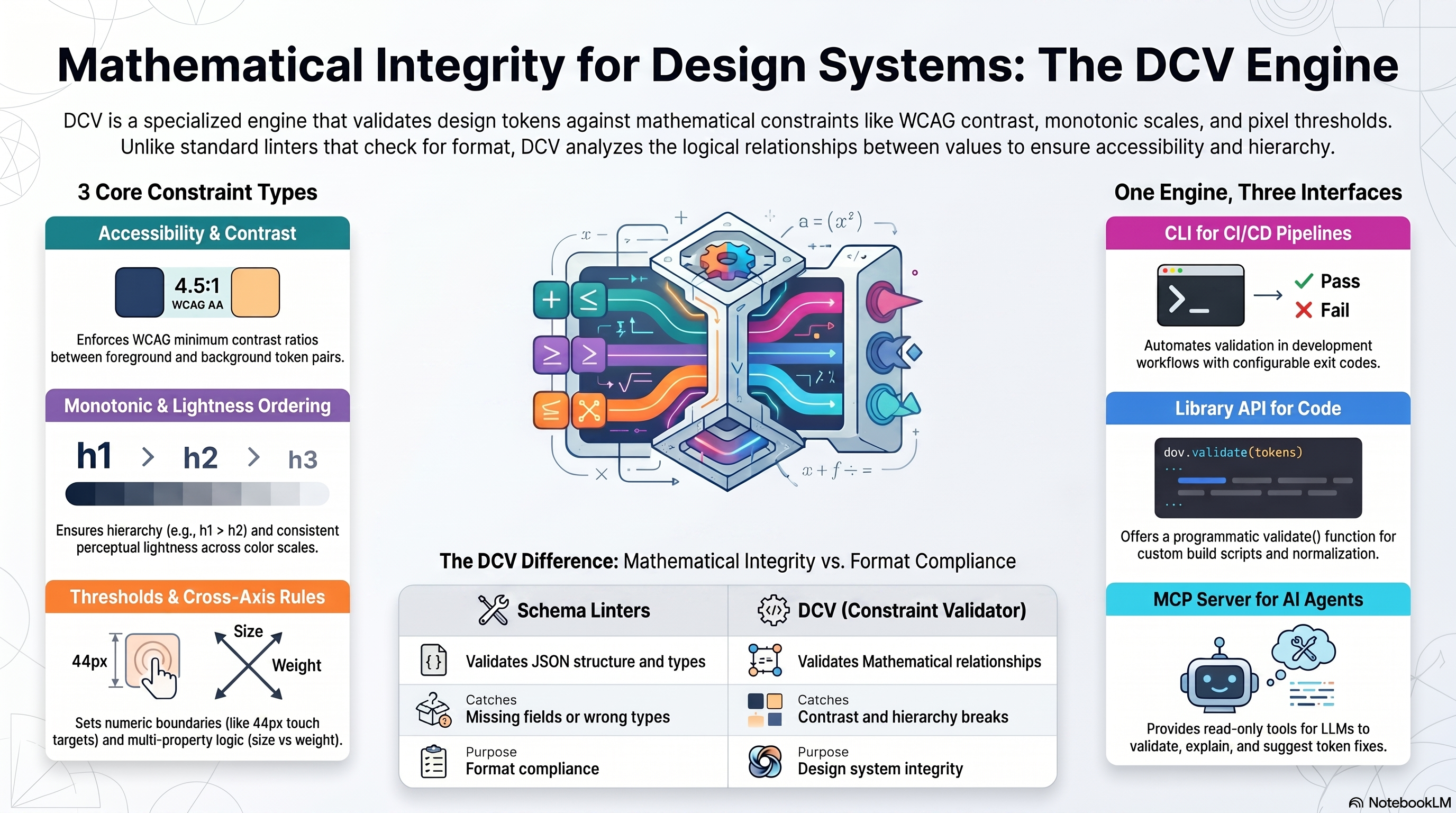
DCV is not affiliated with Anima's
design-tokens-validator(schema-focused).
Input Formats
DCV accepts token JSON (flat or nested) and optional policy JSON. Adapters normalize common ecosystems:
- Style Dictionary - See examples/style-dictionary/
- Tokens Studio JSON - See examples/tokens-studio/
- DTCG (Design Tokens Community Group) — reads the 2025.10 stable spec (structured sRGB colors, structured dimensions,
{alias}references,$extensionspassthrough; non-sRGB spaces warn rather than mis-calculate; composite types out of scope). See examples/dtcg/
Full adapter documentation: Adapters
DCV & DecisionThemes
DCV is the standalone validation engine — use it for any token system.
DecisionThemes (coming 2026) is a complete design system framework built on DCV:
- 5-axis decision model (Tone, Emphasis, Size, Density, Shape)
- VT/DT pipeline (Value Themes + Decision Themes → deterministic CSS configs)
- Studio UI + Hub marketplace for sharing Decision Systems
DCV powers DecisionThemes' validation layer — but works perfectly standalone. Preview: www.decisionthemes.com
Method & Prior Art
The Design Constraint Validator engine is based on a theming and validation method published as defensive prior art.
To understand the underlying architecture (Decision Themes / Value Themes, deterministic compute, post-compute validation and receipts):
These documents keep the method openly implementable and prevent patent lock-up.
Security & Supply Chain
SBOM (Software Bill of Materials)
DCV generates CycloneDX-compliant SBOMs for supply chain transparency:
- CI Builds: SBOM artifacts on every CI run (90-day retention)
- Version tags: SBOM artifacts for release tags
- GitHub Releases: SBOM files (JSON + XML) attached when a GitHub Release is created
- Manual: Run
npx @cyclonedx/cyclonedx-npmin project root
Download:
Roadmap
- Plugin API for custom constraints
- VS Code diagnostics (inline explain)
- Cross-axis packs (typography × weight × contrast)
- Signed / attestable receipts —
dcv validate --receiptalready emits environment + input content hashes today; cryptographic signing is the roadmap part - UI graph explorer (node inspector, violations focus)
Philosophy
Constraints, not conventions.
Design systems need mathematical guarantees. This validator:
- Enforces relationships - Typography hierarchies, color progressions
- Validates accessibility - WCAG contrast with alpha compositing
- Explains violations - Provenance tracing shows why rules fail
- Scales with complexity - Incremental validation of 1000s of tokens
Related Projects
This is the core validation engine. For a complete decision-driven design system with a 5-axis framework (Tone, Emphasis, Size, Density, Shape) and theme configurator UI, see DecisionThemes (coming soon).
Contributing
Contributions welcome! See CONTRIBUTING.md
License
MIT © Cseperke Papp