
designgate
v1.2.5
Published
Installable design quality rules, browser rendering, and verification loops for any coding agent.

Maintainers
 hosnainrafi
Readme
DesignGate


DesignGate is an installable, agent-agnostic UI quality gate. It gives a coding agent explicit modern-design rules, detects the project’s existing design primitives, captures real browser evidence at mobile, tablet, and desktop widths, and combines deterministic Tier A verification with opt-in vision-based Tier B grading.
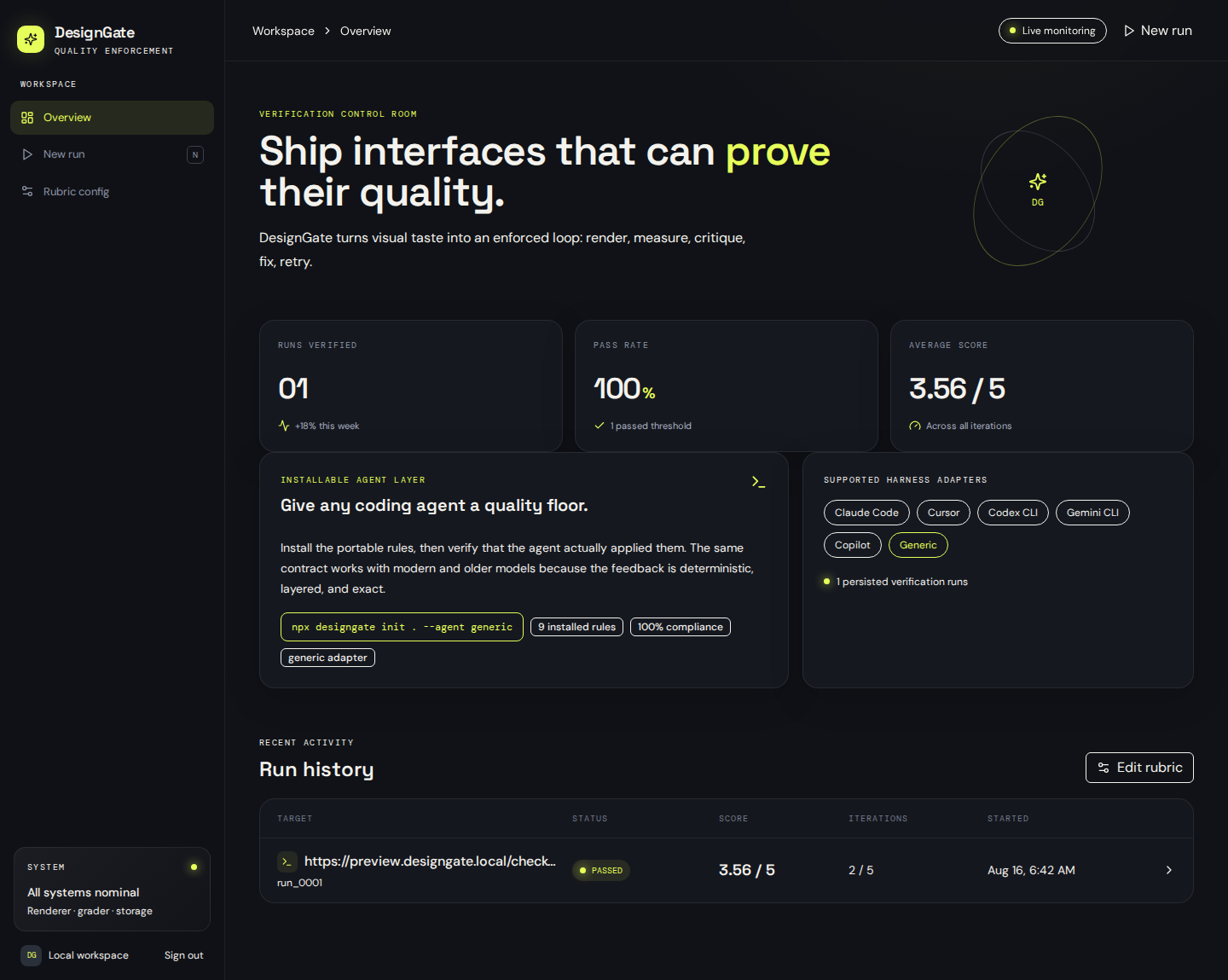
Actual product evidence. This browser-rendered capture comes from the DesignGate dashboard, which records responsive evidence, grading outcomes, and retry history. The public CLI can now run the same Tier B visual-quality gate locally with
--grade; the dashboard remains an optional persistence and comparison layer.
Quick start: the complete standalone gate
# Install the project contract and inventory existing tokens/components first.
npx designgate@latest init . --agent claude-code --preset react

# Start the project preview in another terminal, then opt into standalone Tier B grading.
export ANTHROPIC_API_KEY="your-key"
npx designgate@latest check http://localhost:3000 --project . --grade

# Let a trusted local generator receive Phase-0 context plus exact Tier A/Tier B feedback.
npx designgate@latest loop . \
  --generator "npm run agent:fix" \
  --grade --target http://localhost:3000 --max-iterations 5
--grade is explicit: it sends the three captured images to the configured vision provider. Anthropic remains the default for backward compatibility, while openai-compatible supports Mistral, MiniMax, OpenRouter, z.ai, and other compatible endpoints. With no configured key, the command fails before making a request; it never silently replaces a requested visual-quality check with Tier A-only verification. See provider-agnostic Tier B grading for configuration examples.
Sample combined report
{
  "schemaVersion": "1.3.0",
  "tierA": { "passed": true, "score": 100 },
  "tierB": {
    "provider": "anthropic",
    "overallScore": 3.8,
    "passed": true,
    "evaluatedBreakpoints": ["mobile", "tablet", "desktop"]
  }
}
Documentation
| Guide | What it covers |
| --- | --- |
| Product Guide | Architecture, standalone Tier A/Tier B grading, model resolution, context detection, evidence flow, reports, bounded loops, safeguards, and older-model usage. |
| AutoClaw Desktop Integration | Installable OpenClaw skill, $designgate prompts, source/npx command paths, and end-to-end website-building workflow. |
| Scaling Roadmap | Modular CLI target, queue workers, S3, database, vision-grading, security, observability, CI, references, and licensing boundaries. |
| Operations and Release Guide | Evidence import, troubleshooting, npm publishing, GitHub operations, validation, and branch protection. |
| No-Cost Team Operations | Workspace/project isolation, scoped roles, reviews, audit trail, manual retention, quotas, and the user-triggered execution model. |
| Image to Code | image-to-code command: convert a design screenshot into a production-ready React component through the vision provider, with design-token extraction, responsive adaptation, accessibility enforcement, and optional Tier A/Tier B grading of the regenerated target. |
| Vercel Interface Guidelines | The vercel-interface-guidelines extension packaging the latest official Vercel Web Interface Guidelines as seven verifiable rules (DG-VERCEL-001 to DG-VERCEL-007) plus the vercel:fetch-rules refresh command. |
For traceable source material used by the AutoClaw integration guide, see research notes.
Install into any agent project
npx designgate@latest init . --agent claude-codeThe package is published under designgate; use the npm form for normal projects. For source inspection or unreleased development, clone the repository and invoke the CLI directly:
git clone https://github.com/HosnainRafi/designgate.git
node ./designgate/cli/designgate.mjs init . --agent claude-code
The initializer writes designgate.config.json, an auditable .designgate/manifest.json, .designgate/project-context.json with discovered tokens/components, every compiled adapter under .designgate/agents/, native agent instruction files, and .github/workflows/designgate.yml.
AutoClaw Desktop and OpenClaw skill
The repository includes a root SKILL.md for OpenClaw-compatible desktop-agent workflows. After reviewing the repository, install it from Git into the active workspace:
openclaw skills install git:HosnainRafi/designgate@main --as designgateIn AutoClaw, reference $designgate in a project-building prompt. The skill tells the agent to install or inspect designgate.config.json, apply the native rule contract, capture all three breakpoints, run verification, and relay failed detail instructions verbatim to the generator. See the complete AutoClaw Desktop guide before enabling a shared/global skill.
| Agent harness | Native instruction file |
|---|---|
| Claude Code | CLAUDE.md |
| Cursor | .cursor/rules/designgate.mdc |
| Codex CLI | AGENTS.md |
| Gemini CLI | GEMINI.md |
| GitHub Copilot | .github/copilot-instructions.md |
| Generic | DESIGNGATE.md |
Capture real browser evidence
Render a running URL or a local HTML file. The renderer uses Playwright Chromium and saves full-page PNGs at 390×844, 834×1112, and 1440×1000 along with a capture manifest.
npx playwright install chromium
npx designgate@latest render http://localhost:3000 --project .
npx designgate@latest render ./preview/index.html --project .
npx designgate@latest evidence . --run-id 42 --iteration 1
The images and metadata are written below .designgate/captures/; .designgate/latest-capture.json is consumed by the verification report. For the hosted DesignGate application, upload those three files through the run evidence flow so its existing S3-backed iteration record can display and grade them.
evidence prepares the typed payload at .designgate/evidence-import.json. Submit that payload to the hosted app’s public runs.importEvidence procedure after a matching run iteration exists. The procedure stores the three image bytes in S3 at runs/<runId>/iteration-<iteration>/, replaces the iteration’s screenshot map with URL-plus-capture metadata, and exposes it through the report API.
Verify, grade, and enforce
npx designgate@latest verify .
npx designgate@latest check http://localhost:3000 --project .
npx designgate@latest check http://localhost:3000 --project . --grade
npx designgate@latest loop . --generator "npm run agent:fix" --grade --target http://localhost:3000 --max-iterations 5
verify creates a deterministic Tier A .designgate/report.json. check --grade and loop --grade create a combined report with per-rule payload hashes, Phase-0 project context, mobile/tablet/desktop captures, Tier B dimension scores, exact visual critique, classified changed files, adapter-manifest matching, and exact generator feedback. The bounded loop stops only when the required Tier A checks and Tier B thresholds pass, or when it reaches the configured iteration cap.
| Surface | Purpose | Requires hosted dashboard? |
| --- | --- | --- |
| verify | Deterministic Tier A rule evidence | No |
| grade | Grade an existing local three-breakpoint capture with the configured vision provider | No; requires the configured provider key |
| check --grade | Render, grade, and write one combined local report | No; requires the configured provider key |
| loop --grade | Render, grade, critique, and retry the generator until the combined gate passes or reaches its cap | No; requires the configured provider key |
| evidence | Prepare a typed payload for optional S3-backed hosted run history | Only this persistence path uses the hosted app |
The hosted dashboard is therefore an optional persistence, comparison, and team-review layer; it is not the execution path for open CLI Tier B grading.
GitHub pull-request gate
init creates a GitHub Actions workflow that installs Chromium, initializes DesignGate, optionally renders the URL held in the repository variable DESIGNGATE_TARGET, verifies the quality contract, and uploads the report as a workflow artifact. Set DESIGNGATE_TARGET to a preview URL reachable from GitHub Actions; otherwise the workflow still performs static rule verification.
Publishing to npm
The repository is configured as a public package with a bin entrypoint and a prepack guard. Use an npm account that owns the intended package name:
pnpm install
pnpm test
pnpm build
pnpm pack --dry-run --json --ignore-scripts
npm login
npm publish --access public
If designgate is already taken, set a scoped name such as @your-org/designgate in package.json and publish with npm publish --access public. This repository prepares and validates the release, but publishing itself requires the package owner’s npm credentials and approval.
Compatibility with older models
The generated instructions are layered and deterministic: inspect, apply tokens and responsive layout, add motion safely, report changed files/rule IDs, then verify. When a gate fails, DesignGate passes the exact missing instruction back to the generator. This keeps weaker or older models on a short, reproducible correction loop instead of giving them vague design feedback.
Rule contract
Each portable rule has a stable ID, category, required/optional status, exact instruction payload, and cryptographic payload hash. Core coverage includes typography, semantic color, layout hierarchy, motion, responsive behavior, accessibility, asset discipline, component reuse, and completion verification.
Framework presets
DesignGate can install the portable core rules plus a framework-specific preset:
npx designgate@latest init . --preset react
npx designgate@latest init . --preset nextjs
npx designgate@latest init . --preset vue
npx designgate@latest init . --preset component-library
npx designgate@latest rules .
The selected preset is recorded in .designgate/manifest.json, included in native agent instruction files, and exposed by designgate rules for audit tooling.
Clean-project npm smoke test
Before publishing a release, run the repository checks and validate the actual package contents:
pnpm check
pnpm test
npm pack --dry-run --json --ignore-scripts
Then test the command shape in an empty directory:
mkdir /tmp/designgate-clean && cd /tmp/designgate-clean
npx designgate@latest init . --preset react
npx designgate@latest rules .
Publishing requires an npm account with permission for the package name:
npm login
npm publish --access public
Branch protection
The generated workflow exposes the verify-ui check. This repository’s main branch is protected with pull requests, one approval, the passing verify-ui status check, stale-review dismissal, conversation resolution, linear history, and administrator enforcement. Apply the same policy to a fork or downstream installation from Settings → Branches or with an administrator-scoped token.
For administrators who want to apply the policy by API instead of the GitHub UI:
GITHUB_TOKEN=ghp_... npm run github:protectThe token must have repository administration permission. The command requires the verify-ui check, one approving review, stale-review dismissal, conversation resolution, linear history, and blocks force pushes and deletion. Override DESIGNGATE_GITHUB_OWNER, DESIGNGATE_GITHUB_REPO, and DESIGNGATE_GITHUB_BRANCH for another repository.
World-class design contracts (prescriptive, not avoidance)
DesignGate replaces vague avoidance guidance with four exact, prescriptive contracts embedded into every installed agent instruction. Each project must declare its choices from the approved sets, so an AI following DesignGate builds with the same discipline as a top-tier studio:
| Contract | File | What it mandates |
| --- | --- | --- |
| Typography | rules/designgate-world-class-typography.md | One of four proven type systems (Editorial Luxury, Swiss Precision, Warm Humanist, Tech Brutalist) with exact fonts, scale ratios, and hierarchy rules |
| Color & Material | rules/designgate-world-class-color.md | One of four approved palettes (Ink & Ivory, Midnight Electric, Clay & Sand, Monochrome Signal) plus a material direction (Paper, Glass, Ink Void, Grid), with contrast floors and accent-ratio limits |
| Imagery & Art-Direction | rules/designgate-world-class-imagery.md | One of four image directions (Rendered Abstraction, Treated Editorial, Spatial Product, Generative) with palette lock, spec discipline, and generation prompt patterns |
| Motion Bible | rules/designgate-motion-bible.md | The complete 2025–2026 motion catalog (24 techniques, surface states, hero patterns) with non-negotiable easing physics, duration bands, and a 60fps budget |
No site is considered complete until it states its chosen type system, palette, image direction, and motion techniques in the build report.
3D designs and Goal Mode
DesignGate supports an additive immersive3d extension for browser-rendered 3D interfaces. Activate it with the gaming-3d preset:
npx designgate@latest init . --agent claude-code --preset gaming-3d
npx designgate@latest plan "Build a multiplayer 3D game with a cinematic lobby" --project .
npx designgate@latest build "Build a multiplayer 3D game with a cinematic lobby" --generator "npm run agent:generate" --project . --target http://localhost:3000 --grade
The supported Goal Mode categories are gaming, portfolio, and ecommerce; unknown categories fail explicitly. Immersive runs add deterministic canvas/WebGL, dependency, depth, interaction, and performance evidence and conditionally add the Tier B immersiveness dimension. Projects that do not enable immersive3d or Goal Mode retain the legacy behavior. See docs/GUIDE.md for the complete contract.
Modern motion and 21st.dev-grade component craft
For premium modern websites — award-site scroll choreography, animated heroes, parallax, tilt cards, glow depth, shimmer buttons, bento grids, marquees, number tickers, and other effects popularized by the 21st.dev component registry — DesignGate ships two additive presets. Both register the modern-motion extension, which contributes five Tier A checks and a sixth Tier B dimension, motionCraft, weighted at 20% of the vision grade:
npx designgate@latest init . --agent claude-code --preset modern-motion
npx designgate@latest plan "Build a marketing site with an animated hero and scroll storytelling" --project .
npx designgate@latest build "Build a marketing site with an animated hero and scroll storytelling" --generator "npm run agent:generate" --project . --target http://localhost:3000 --grade
| Preset | Activates | Use when |
| --- | --- | --- |
| modern-motion | Motion choreography, glow depth, interactive pointer states | Premium motion without real-time 3D (marketing sites, portfolios, product launches) |
| modern-motion-3d | All of the above, plus WebGL/3D surface rules | Ambient 3D or Three.js scenes layered with scroll choreography |
| premium-3d | Motion + 3D rules plus the premium-stack extension: curated component libraries (Aceternity UI, Magic UI, ReactBits, 21st.dev, shadcn/ui), smooth scrolling (Lenis, GSAP ScrollSmoother, Locomotive Scroll), texture/grain craft, and RAF-driven scroll/canvas handling | High-end, awwwards-grade premium sites where 3D, motion, and component polish all matter |
The extension verifies a real motion library import (GSAP, Framer Motion/motion.dev, or Motion One), visible choreography evidence, a prefers-reduced-motion fallback, animated pointer states, and scroll-safe mobile behavior. The premium-3d preset additionally activates the premium-stack extension, which checks that projects draw on curated premium component libraries, configure smooth scrolling, craft textures and grain rather than flat backgrounds, and drive scroll and canvas work inside requestAnimationFrame. The Tier B premiumCraft dimension (10%, alongside 10% motionCraft) grades component polish, surface depth, and finish. The Tier B motionCraft score judges sequencing, easing personality, scroll-driven effects that enhance content, and the absence of jank or over-animation. The supported Goal Mode categories are gaming, portfolio, and ecommerce; unknown categories fail explicitly. Projects that do not enable any extension retain the legacy behavior. See docs/GUIDE.md for the complete contract.
Vercel Web Interface Guidelines extension
DesignGate ships an additive vercel-interface-guidelines extension that packages the latest official Vercel Web Interface Guidelines (accessibility, focus management, motion discipline, image performance, and rendering performance) as seven verifiable rules, DG-VERCEL-001 through DG-VERCEL-007. It also contributes a vercelCraft Tier B dimension weighted at 15% of the vision grade:
npx designgate@latest init . --agent claude-code
# Enable the extension in designgate.config.json, then run:
npx designgate@latest verify .
Enable the extension by setting extensions["vercel-interface-guidelines"].enabled to true in the project's designgate.config.json, and every init, verify, grade, and loop run will enforce the Vercel contracts alongside the base rules. When Vercel publishes updated guidelines, pull the freshest rules into the package with npx designgate@latest vercel:fetch-rules (also available as npm run designgate:vercel-fetch-rules). Full details in docs/VERCEL_INTERFACE_GUIDELINES.md.
Image to code
DesignGate converts design screenshots into production-ready React components with image-to-code. The command sends the screenshot to the configured vision provider, which emits a single default-export component that faithfully reproduces the layout, typography, spacing, color tokens, and copy from the design, with responsive adaptation, accessible interactive surfaces, and prefers-reduced-motion handling:
# Render the target first so you have a real capture, then convert a design screenshot.
npx designgate@latest render ./mockup/index.html --project .
npx designgate@latest image-to-code ./design.png --project . --target ./mockup/index.html
# Optionally grade the regenerated target with Tier A checks and Tier B vision grading.
npx designgate@latest image-to-code ./design.png --project . --target ./mockup/index.html --grade
The same Anthropic/OpenAI-compatible configuration as Tier B grading is reused, and with --grade the regenerated target is captured and scored inline. See docs/IMAGE_TO_CODE.md for the full contract and configuration.