
detect-wagtail
v1.0.0
Published
Detect whether a site or page is built with Wagtail

Maintainers
 thibaudcolas
Readme
Detect Wagtail
Detect whether a site or page is built with Wagtail.
Usage
You can run the detection with:
- The online website, detect-wagtail.netlify.app.
- A bookmarklet, also available from detect-wagtail.netlify.app.
- A CLI, without installing anything:
npx detect-wagtail <url> - As an npm package for more custom needs, detect-wagtail
CLI
npx detect-wagtail https://example.comOptions:
--json: output machine-readable JSON.--strictness <level>: strictness of the detection, one ofstrict(default),less_strict_but_long,strictest,lax,laxest.
Exit codes: 0 Wagtail detected on every checked URL, 1 not detected on at least one, 2 error (invalid argument, invalid URL, or fetch failure).
npm package
const { detectWagtail, renditions } = require("detect-wagtail");

// Example HTML string that may contain Wagtail image renditions
const htmlContent = `<div><img src="/media/images/example.fill-300.jpg"></div>`;

// Use the default strict pattern to check for Wagtail markup
if (detectWagtail(htmlContent)) {
  console.log("Wagtail detected!");
}
import { detectWagtail, renditions } from "detect-wagtail";TypeScript type definitions are bundled with the package.
The renditions object also directly exposes 5 regular expressions depending on how strict or lax the matching should be:
strict: Optimized for real-world relevance, minimizing false positives.less_strict_but_long: A bit looser than strict, capturing additional cases.strictest: Very specific matching with no avoidable false positives.lax: Looser matching that may yield more false positives.laxest: The most lenient pattern based solely on rendition suffixes or the original_images folder.
if (renditions.lax.test(htmlContent)) {
  console.log("Detected potential Wagtail markup (using lax matching).");
}
How it works
Full read: Detecting Wagtail in the wild.
This uses regular expressions to check whether images on the page match a predetermined pattern:
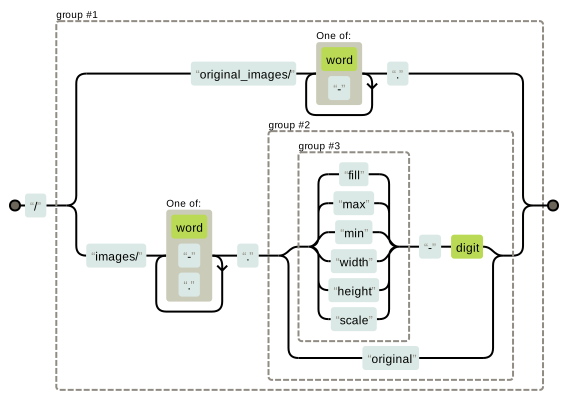
We also check whether the rich text content on the page matches how Wagtail stores this data.
There can be false positives with such simple checks, but they have the benefit of working regardless of whether the target site is directly served by Wagtail, or if Wagtail is used as a headless CMS.
Related links
- Detecting Wagtail in the wild
- Wappalyzer
- WhatCMS.org
- detect-django-version
- Use consistent heuristics to tell if a site is made with Wagtail
Contributing
See CONTRIBUTING.md for setup and development commands.