
dev-element-picker
v1.0.5
Published
A tiny React dev-tool overlay that lets you click any DOM element on your page and copy its tag, selector, computed styles, matched CSS rules and outerHTML to the clipboard. Designed to be pasted into any AI coding assistant (Claude Code, Cursor, Codex, C

Maintainers
 ivanhueso
Readme
dev-element-picker
A tiny React dev-tool overlay that lets you click any DOM element on your page and copy its tag, selector, computed styles, matched CSS rules and outerHTML to the clipboard — formatted to be pasted into any AI coding assistant.
Designed for one specific workflow: you're tweaking a UI and want your AI assistant to know exactly which element you mean and how it looks, without you having to write "the third card on the homepage" or paste a screenshot.
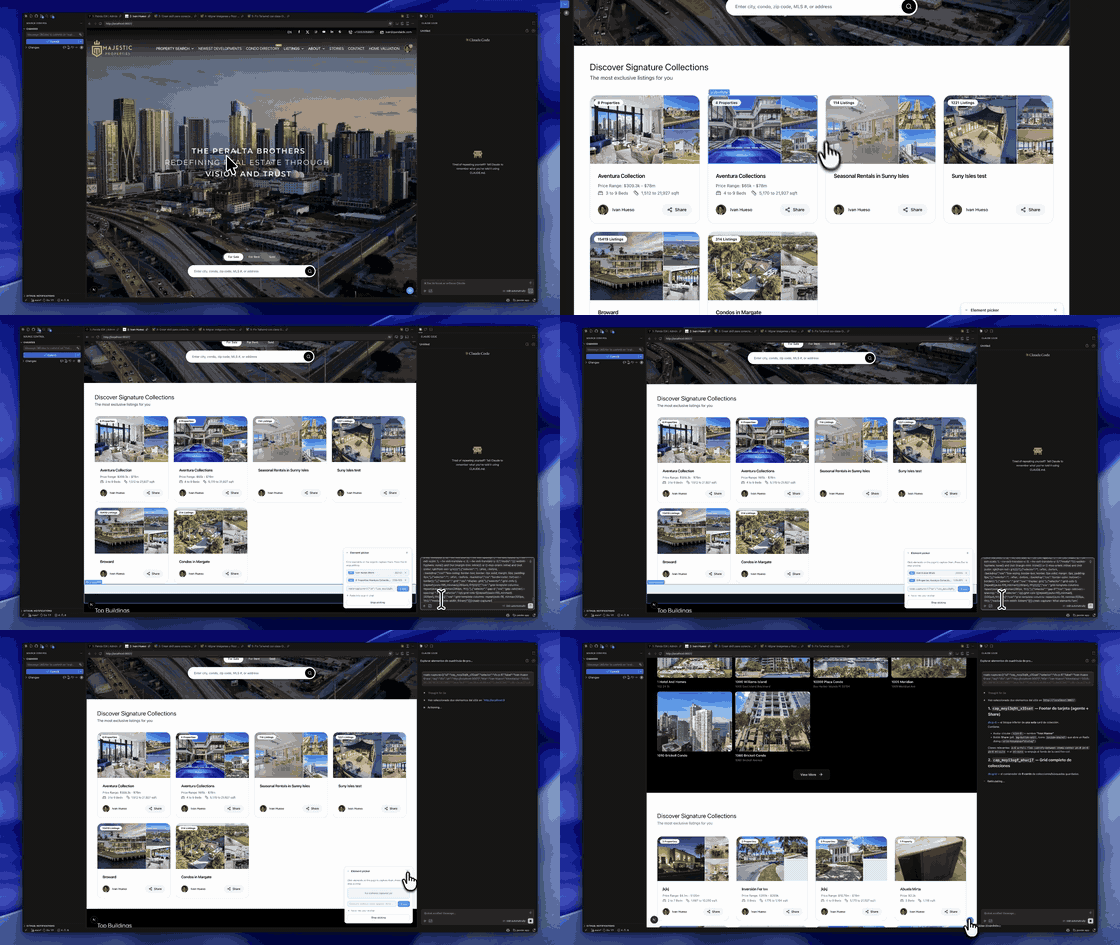
Demo: pick an element, hit Copy, paste into your AI chat. The model gets the exact selector, computed styles, and matched CSS rules.
Features
- Floating activator in the bottom-right corner of your dev environment
- Click-to-pick any element on the page; multi-select supported
- Capture payload includes: tag, computed selector,
outerHTML,innerText, bounding rect, computed styles (filtered to non-default values), and all matched CSS rules from every stylesheet - One-click copy wraps the payload in a
<web-capture>...</web-capture>JSON tag, ready to paste into any AI chat - Keyboard shortcut:
Cmd/Ctrl + Shift + .to toggle the panel - You decide when to mount it — the package does no env detection. Wrap it in your own dev-only condition (see below).
- Zero runtime dependencies, < 10 KB minified
Install
npm install dev-element-picker
# or
pnpm add dev-element-picker
# or
yarn add dev-element-picker
Peer dependency: react >= 16.8.
Usage
Mount the component once at the root of your app, gated to dev only. It renders nothing until activated.
// app/layout.tsx (Next.js App Router)
import { DevPicker } from "dev-element-picker"

export default function RootLayout({ children }: { children: React.ReactNode }) {
  return (
    <html>
      <body>
        {children}
        {process.env.NODE_ENV === "development" && <DevPicker />}
      </body>
    </html>
  )
}
// pages/_app.tsx (Next.js Pages Router) — or any React root
import { DevPicker } from "dev-element-picker"
export default function App({ Component, pageProps }) {
return (
<>
<Component {...pageProps} />
{process.env.NODE_ENV === "development" && <DevPicker />}
</>
)
}// Vite / CRA
import { DevPicker } from "dev-element-picker"
export function Root() {
return (
<>
<App />
{import.meta.env.DEV && <DevPicker />}
</>
)
}The package itself does not check NODE_ENV — that's intentional. Bundlers can dead-code-eliminate the entire import in production when you wrap it with the env guard above.
How to use it with your AI assistant
The picker outputs a self-describing tag — <web-capture>[...JSON...]</web-capture> — that any LLM can parse without further explanation. Workflow:
- Run your app in dev mode and open it in your browser or in the VS Code Simple Browser (
> Simple Browser: Show). - Click the floating sky-blue dot in the bottom-right corner (or press
Cmd/Ctrl + Shift + .). - Click the element you want to discuss. Pick more if needed.
- Hit Copy.
- Paste into your AI chat with a prompt.
Works with any AI coding tool
The capture is plain text, so it works anywhere you can paste:
- Claude Code (terminal CLI or VS Code extension) — paste into the prompt
- GitHub Copilot Chat (VS Code) — paste into the chat panel
- Cursor — paste into the AI sidebar
- Codex CLI / Codex VS Code extension — paste into the prompt
- ChatGPT / Claude.ai web — paste directly into the conversation
- Gemini Code Assist, Continue.dev, Cline, Aider, etc.
Example prompt
<web-capture>[{"id":"cap_...","selector":"div.card","tag":"div", ... }]</web-capture>

Make the border-radius match our design system token --radius-lg
and bump the shadow one step. Only change this component.
The model now has the exact selector, the computed styles it currently has, and every CSS rule that applies to it — no guessing.
Capture payload schema
Each capture object the picker emits looks like this:
type Capture = {
  id: string
  selector: string         // approximate: tag + first id or class
  label: string            // first 40 chars of innerText, or the selector
  tag: string              // lowercase tag name
  url: string              // page URL at capture time
  title: string            // document.title
  timestamp: string        // ISO 8601
  innerText: string
  outerHTML: string
  rect: { x: number; y: number; width: number; height: number }
  computedStyles: Record<string, string>  // only non-default values, ~40 props
  cssRules: Array<{ selector: string; css: string; media?: string }>
}
The clipboard payload is <web-capture> + JSON.stringify(captures) + </web-capture>.
Programmatic API
The picker exposes an imperative handle on window for tests or custom triggers:
window.__devElementPicker?.toggle()   // open/close the panel
window.__devElementPicker?.destroy()  // tear down completely
Keyboard shortcuts
| Action | Shortcut |
| ----------------- | ------------------------- |
| Toggle picker | Cmd/Ctrl + Shift + . |
| Stop picking | Esc |
FAQ
Will it ship in my production bundle?
Yes — unless you guard the import. The package no longer auto-detects NODE_ENV; that decision is yours. The recommended pattern is {process.env.NODE_ENV === "development" && <DevPicker />} (see Usage). When wrapped that way, modern bundlers (Next.js, Vite, webpack with DefinePlugin) statically replace process.env.NODE_ENV and dead-code-eliminate the import in production builds.
Does it interfere with my app's event handlers?
While picking, click events are captured at the document level with stopImmediatePropagation so your app doesn't see them. The picker stops listening as soon as you press Esc or click "Stop picking".
It blocks document.styleSheets from a cross-origin CDN.
Cross-origin stylesheets without CORS headers throw on cssRules access. The picker swallows those errors and skips the sheet — you'll get computed styles but not the matched rules from that origin.
Can I customize the colors / position / shortcut? Not yet. PRs welcome — open an issue first to discuss.
License
MIT © Ivan Hueso