
devdock-cli
v0.3.2
Published
AI-powered local dev environment manager — zero config, one command

Maintainers
 roshu09
Readme
AI-powered local dev environment manager
Clone any repo. Run one command. Everything just works.






Install · Demo · Commands · How It Works · Contributing
The Problem
You clone a repo. You spend the next 2 hours:
- 😤 Figuring out which Docker services to spin up
- 🔍 Hunting for
.envvalues that aren't documented - 🔥 Debugging port conflicts with your other project
- 💀 Googling why Postgres won't connect
devdock fixes all of this with one command.
$ devdock upDemo
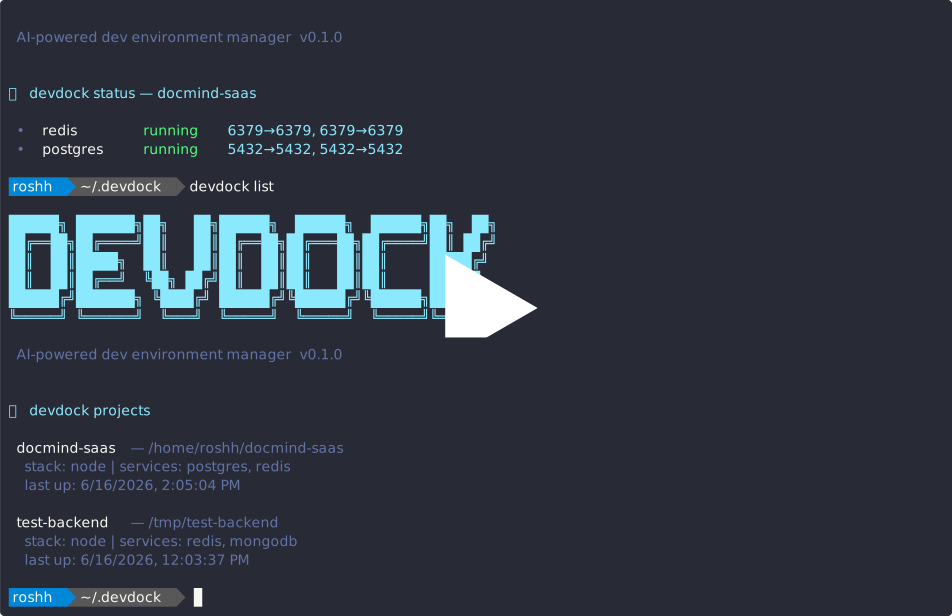
Click to watch — devdock up on a real Node.js + Postgres + Redis project
Install
npm install -g devdock-cli
devdock init
Requirements:
- Node.js 18+
- Docker Desktop (Windows/Mac) or Docker Engine (Linux)
- Windows: Docker Desktop must be running
- Free Groq API key → console.groq.com (needed for
devdock doctor)
Commands
| Command | Description |
|---|---|
| devdock init | One-time setup — saves your Groq API key |
| devdock up [path] | ⚡ Auto-detect stack + spin up all services |
| devdock down [path] | Stop all services for a project |
| devdock status [path] | Live container health + ports |
| devdock doctor [path] | 🤖 AI diagnosis of broken environments |
| devdock switch | Switch between projects instantly |
| devdock list | All projects managed by devdock |
How It Works
Your Repo
│
▼
┌──────────────────────────────────────┐
│ 📦 Project Analyzer │
│ reads package.json, .env.example, │
│ Dockerfile, requirements.txt │
└──────────────────┬───────────────────┘
│ detects stack + services
▼
┌──────────────────────────────────────┐
│ 🐳 Docker Manager │
│ pulls images, creates network, │
│ starts containers on free ports │
└──────────────────┬───────────────────┘
│ service URLs + ports
▼
┌──────────────────────────────────────┐
│ ⚙️ ENV Generator │
│ creates .env with connection │
│ strings auto-filled │
└──────────────────┬───────────────────┘
│
▼
┌──────────────────────────────────────┐
│ 🤖 AI Engine (Groq / llama-3.3-70b) │
│ diagnoses issues, infers missing │
│ config, explains root causes │
└──────────────────────────────────────┘
Supported Stacks
| Stack | Detected via |
|---|---|
| 🟢 Node.js | package.json |
| 🐍 Python | requirements.txt, pyproject.toml |
| 🐘 PHP | composer.json |
| 🐹 Go | go.mod |
Supported Services
| Service | Image | Default Port |
|---|---|---|
| 🐘 PostgreSQL | postgres:15-alpine | 5432 |
| 🔴 Redis | redis:7-alpine | 6379 |
| 🍃 MongoDB | mongo:7 | 27017 |
| 🐬 MySQL | mysql:8 | 3306 |
| 🐇 RabbitMQ | rabbitmq:3-management-alpine | 5672 |
Port conflict resolution built-in — if 5432 is taken, devdock finds the next free port automatically.
Why devdock?
| Feature | devdock | Manual setup | docker-compose | |---|---|---|---| | Auto-detects services | ✅ | ❌ | ❌ | | Generates .env | ✅ | ❌ | ❌ | | Port conflict resolution | ✅ | ❌ | ❌ | | AI diagnosis | ✅ | ❌ | ❌ | | Multi-project switching | ✅ | ❌ | ❌ | | Zero config needed | ✅ | ❌ | ❌ |
Contributing
PRs welcome!
git clone https://github.com/Roshu09/devdock.git
cd devdock
npm install
npm link --workspace=packages/cli
devdock --version
See CONTRIBUTING.md for details.
Tech Stack
Built with: Node.js · Commander.js · Dockerode · Groq AI · Inquirer.js · Chalk · Ora
MIT © Roshan Kumar · npm · Report a Bug
Built by a developer, for developers 🚀