dexie-typesafe
v1.0.0
Published
Typesafe schema building producing typesafe dexie Table, Collection and Where

Maintainers
 tonyhallett
Readme
dexie-typesafe
A Very Minimalistic Type Safe Wrapper for Dexie
Requires TypeScript >=5
Type safe dexie schema
The "tableBuilder" functions ensure that the schema does represent what you see in the database.
That there is no need to know dexie's schema syntax
Provide the type that expect to get from the database, for inbound tables this will include the primary key regardless of being auto increment or not.
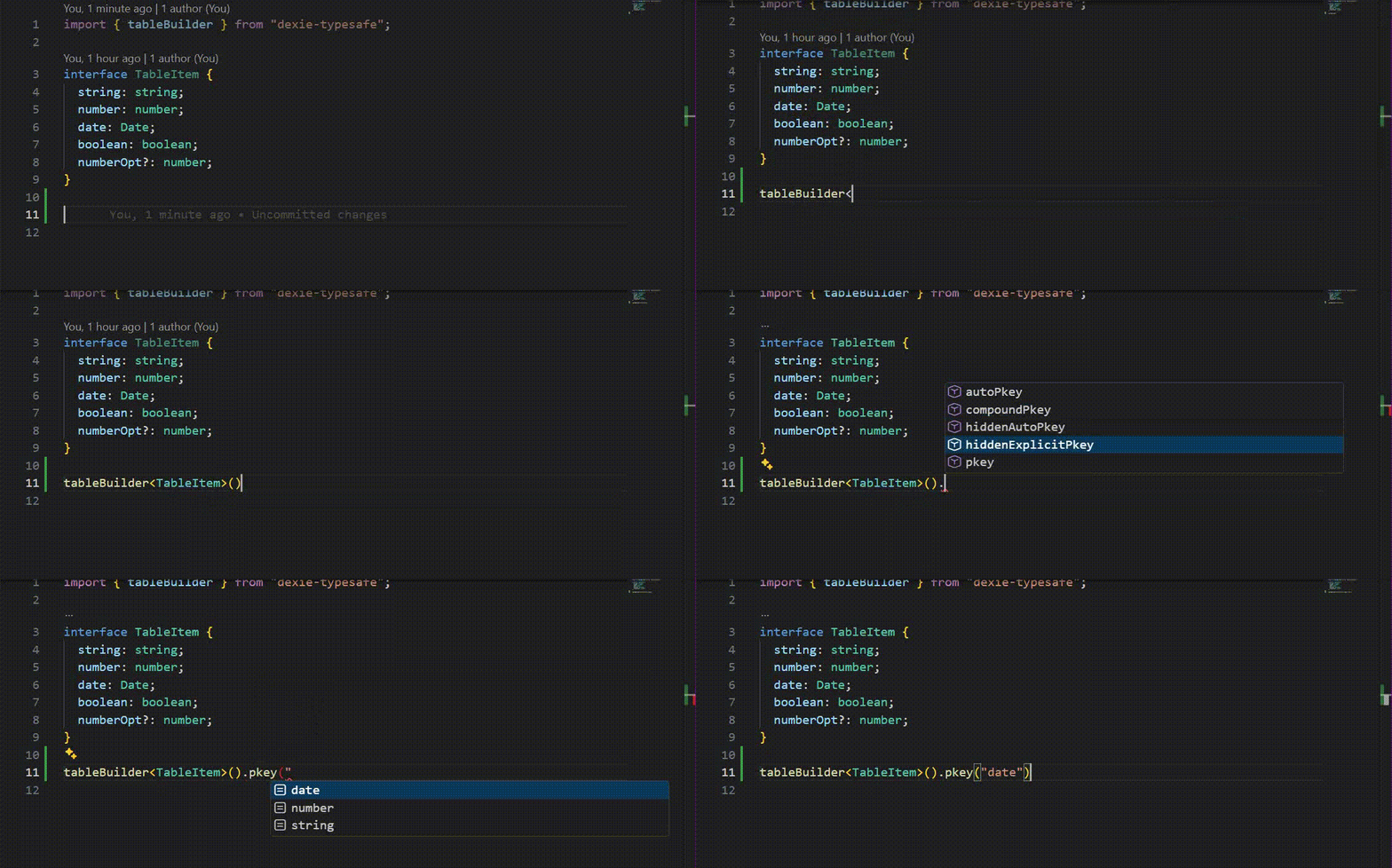
Determine the type of table by choosing the appropriate "pkey" method.
For outbound tables use hiddenExplicitPkey or hiddenAutoPkey.
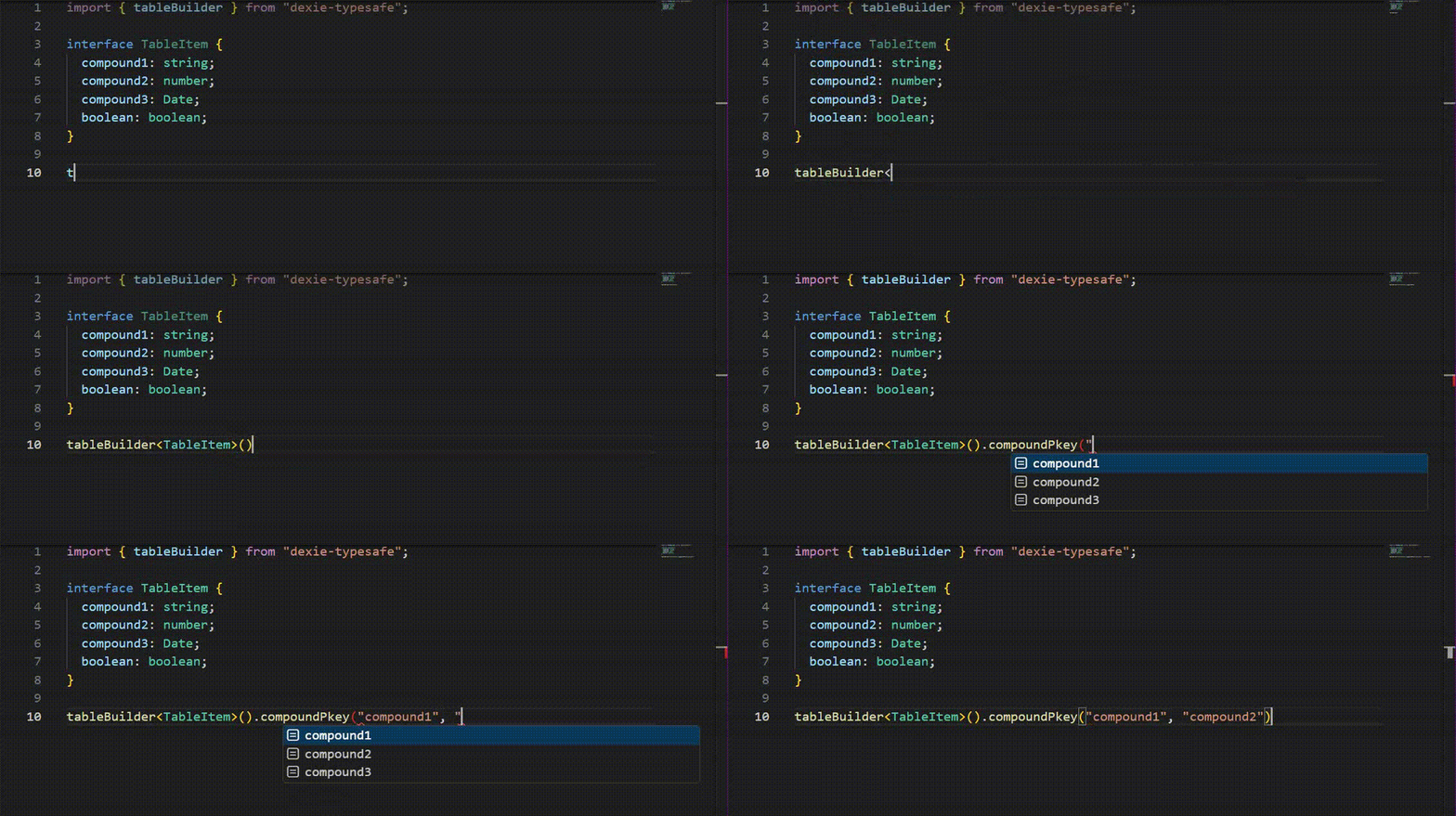
For inbound use pkey, compoundPkey or autoPkey and receive type safety for the path that you choose as well as filtering out invalid paths.
Demo - primary key path choices
pkey
compound
After choosing your table type, choose all the indexes that you require with the same path type safety and build().
Demo - index path choices
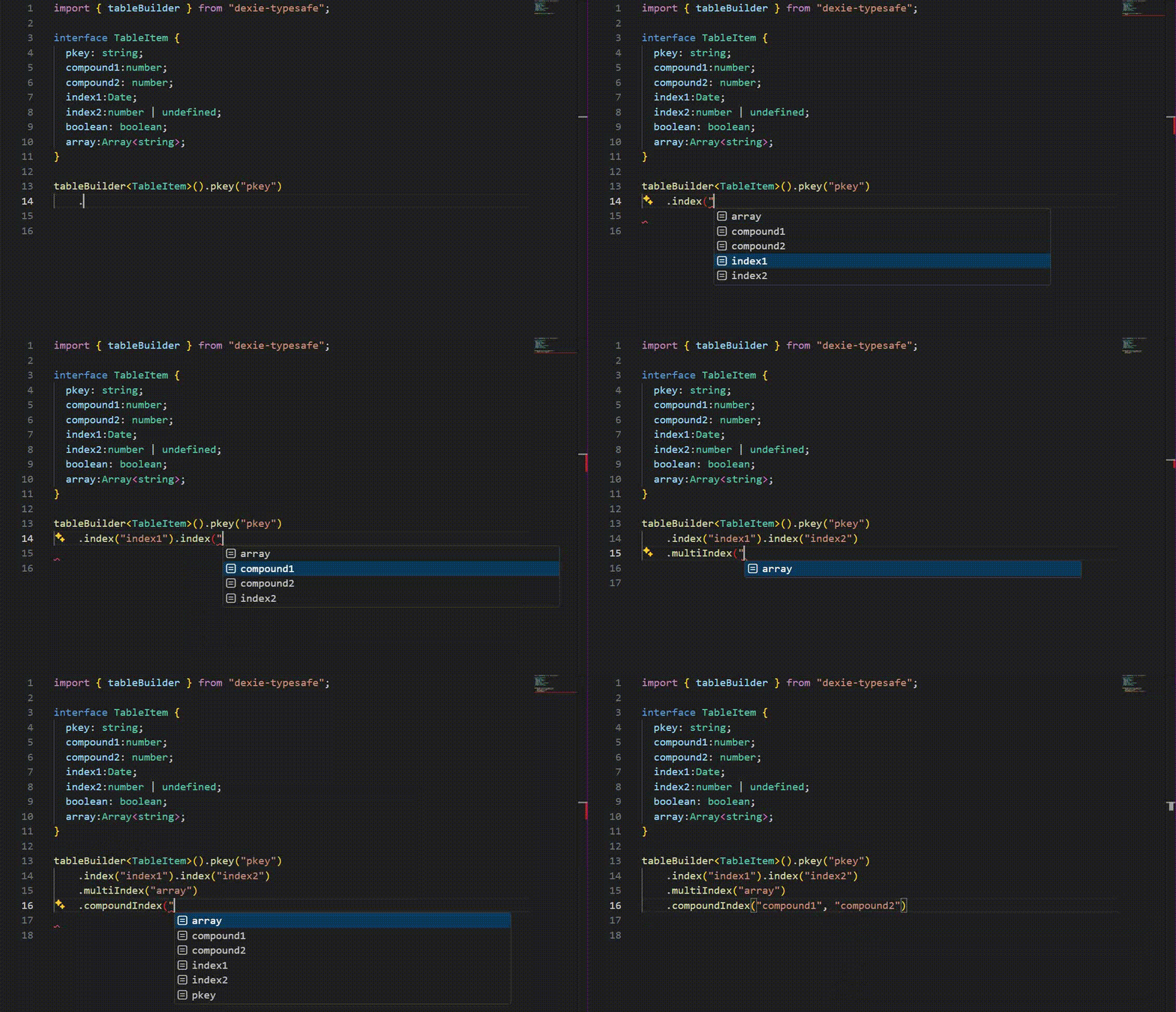
Now that the paths have been chosen, dexie methods that accept paths will be typed correctly and parameters or return types that depend on a primary key or index type, will be too.
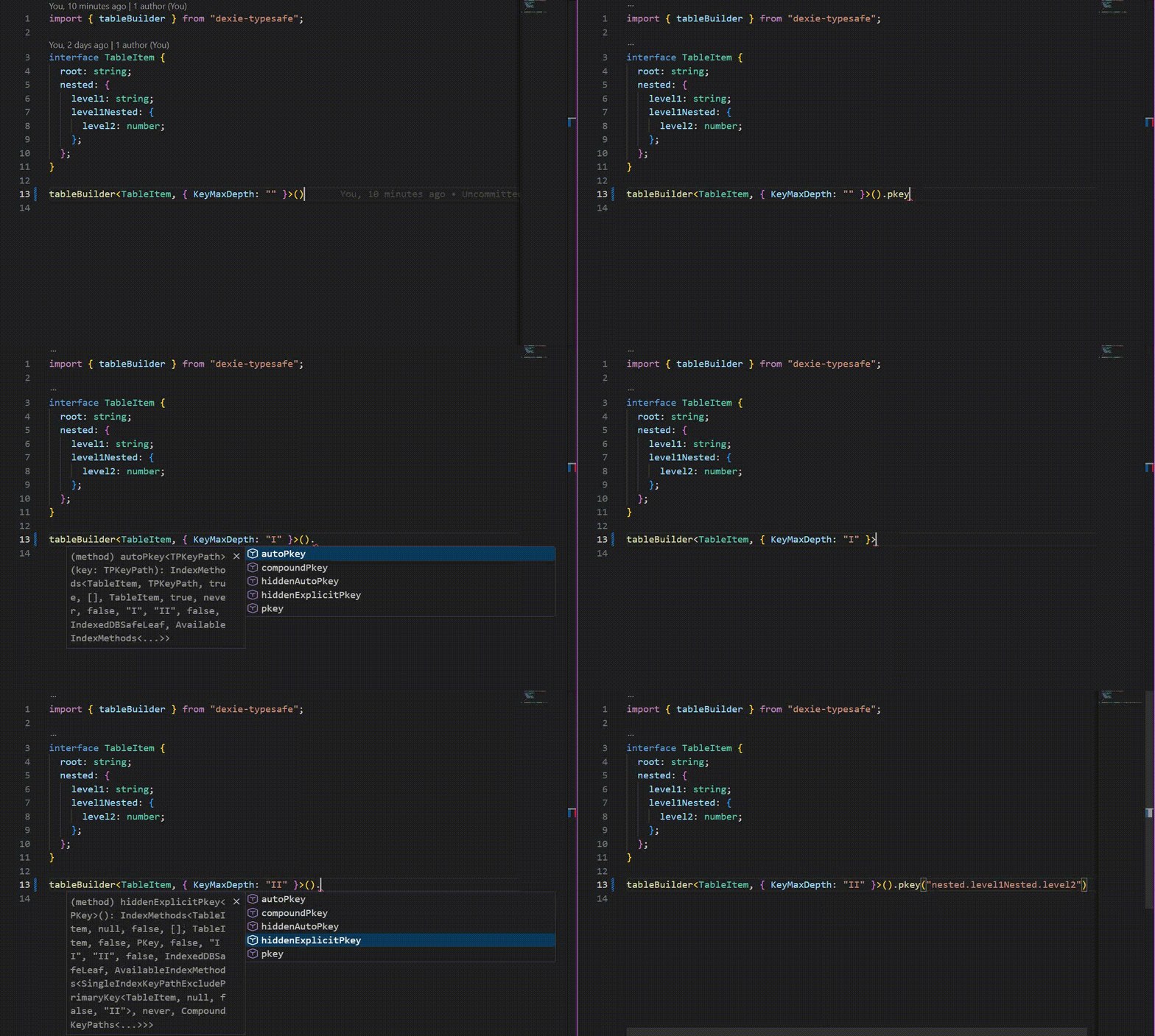
If you need to choose nested paths, use the options-based generics and set KeyMaxDepth to values like "I", "II", "III", etc. Use "" (empty string) to allow all depths. Note there are two depth controls:
MaxDepth: used for update/modify operations and equality helpers (defaults toLevel2).KeyMaxDepth: used for key-path typing on primary keys and indexes (defaults toNoDescend).
export function tableBuilder<
  TDatabase,
  TOptions extends Options = {}
>
Demo - KeyMaxDepth option
AllowTypeSpecificProperties
This is an option (default false) that adheres to the IndexedDb spec so key paths can use
type-specific properties.
mapToClass
Dexie tables have the mapToClass method. Dexie-typesafe does not as it will do this internally if you use either of
export function tableClassBuilder<
  TGetCtor extends new (...args: any) => any,
  TOptions extends Options = {}
>(
  ctor: TGetCtor
)

export function tableClassBuilderExcluded<
  TGetCtor extends new (...args: any) => any,
  TOptions extends Options = {}
>(
  ctor: TGetCtor
) {
  return {
    excludedKeys<
      TExcludeProps extends keyof InstanceType<TGetCtor> & string
    >()...}
}
Provide the ctor to either tableClassBuilder, if you have any properties that should not appear in the database then use tableClassBuilderExcluded.
e.g
class EntityClass {
    constructor(id: number) {
        this.id = id;
    }
    id: number;
    excluded: string = "";
    other: string = "";
    method() {}
}


tableClassBuilderExcluded(EntityClass).excludedKeys<"excluded">().

// choose your pkey, indexes as normal
The table will have its "getting" methods, such as get, typed to the provided type.
Table properties
Use the return value from build with the dexieFactory to get
Tables typed specifically to what you choose, inbound / outbound, auto / not auto.
These tables will be available on db and transactions as properties, the property names are taken from the keys of the object you supply as first argument.
Demo - dexieFactory, table properties
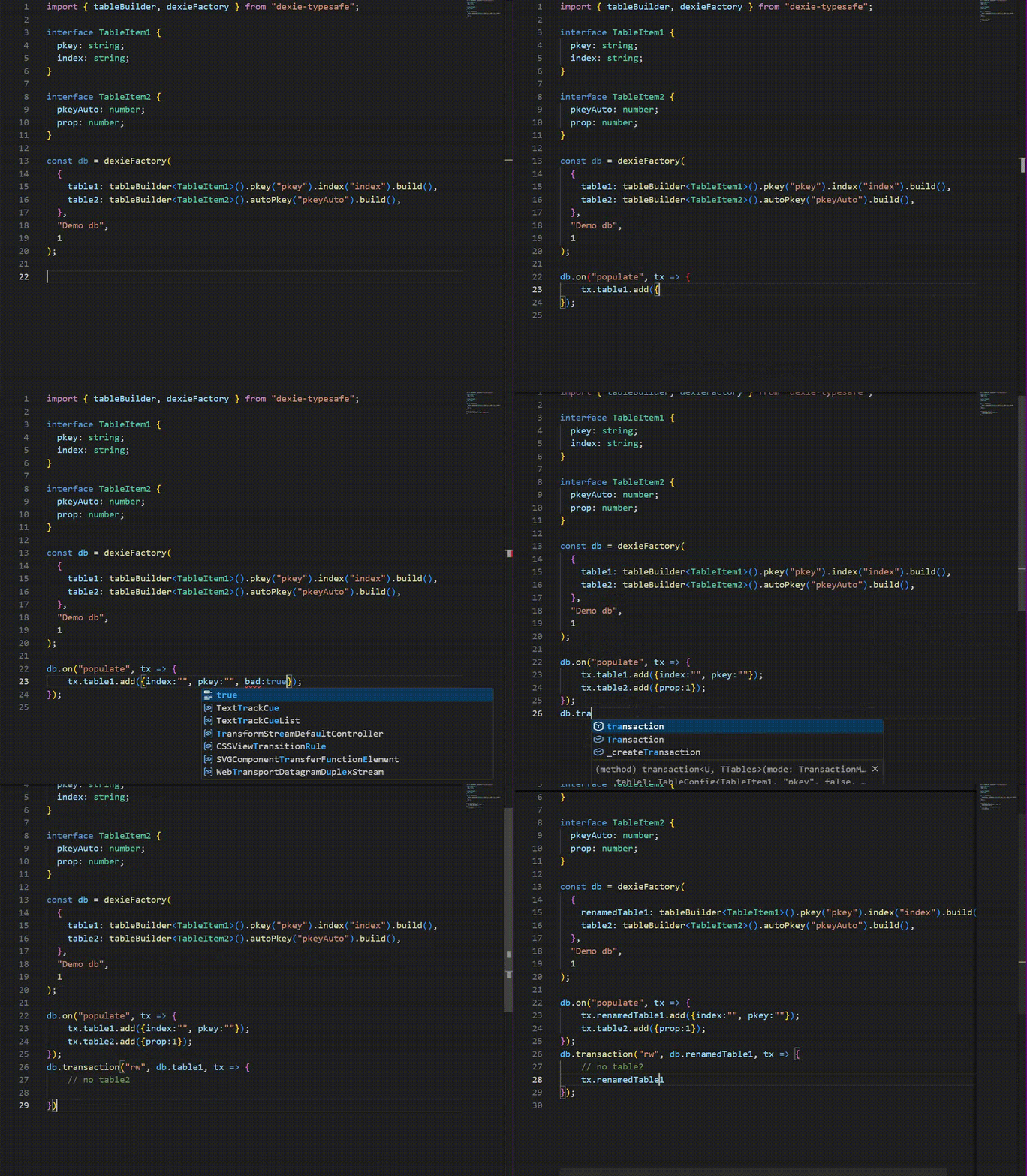
Table type specific methods
Different Table types, as specified by your table builder "pkey" method choices, enable :
- Properly defined
add/bulkAdd/put/bulkPutwith respect to the key/keys argument and necessary overloads.
Dexie docs
No excess data properties
Dexie-typesafe has excess data properties prevention on by default when adding a single entry or put.
Note on methods vs function properties: IndexedDB serializes properties but will error on function properties.
Typescript is unable to distinguish parameterless methods from function-valued properties; to avoid false positives, strict checks treat zero-argument callables as potential methods and allow them.
In addition to add, for table inbound auto there is an alias addObject that will return the added object with the primary key from the database applied ( as this is what dexie does for you. )
There are bulkAddTuple, bulkPutTuple alias methods with excess data properties prevention for when you have the parameter as a tuple rather than an array.
ExcessDataProperties option
- Turn off (single-object only): set
{ ExcessDataProperties: true }to disable excess-property checks for singleadd/addObject/put. Tuple aliases remain strict. - Extend leaves: provide additional allowed leaf types for excess checks while remaining strict.
Examples:
// Disable excess-property checks for single add/put/addObject (tuple methods stay strict)
tableBuilder<MyEntity, { ExcessDataProperties: true }>().pkey("id");

// Extend allowed leaf types for excess-property checks (still strict)
tableBuilder<MyEntity, { ExcessDataProperties: { Leaves: MyCustomLeaf } }>().pkey("id");
With Table inbound the update method is overloaded to allowing providing the primary key using your table item type.
Typing the "insert" method parameters differently to the "get" method return values for when the table type is inbound auto.
Primary key / index value typing
By choosing your primary key / indexes it is possible to use the property types in different methods.
In Collection method callbacks
each
eachKey
eachUniqueKey
eachPrimaryKey
keys
uniqueKeys
primaryKeys
parameter types
Table get, bulkGet,
Demo - Table.get
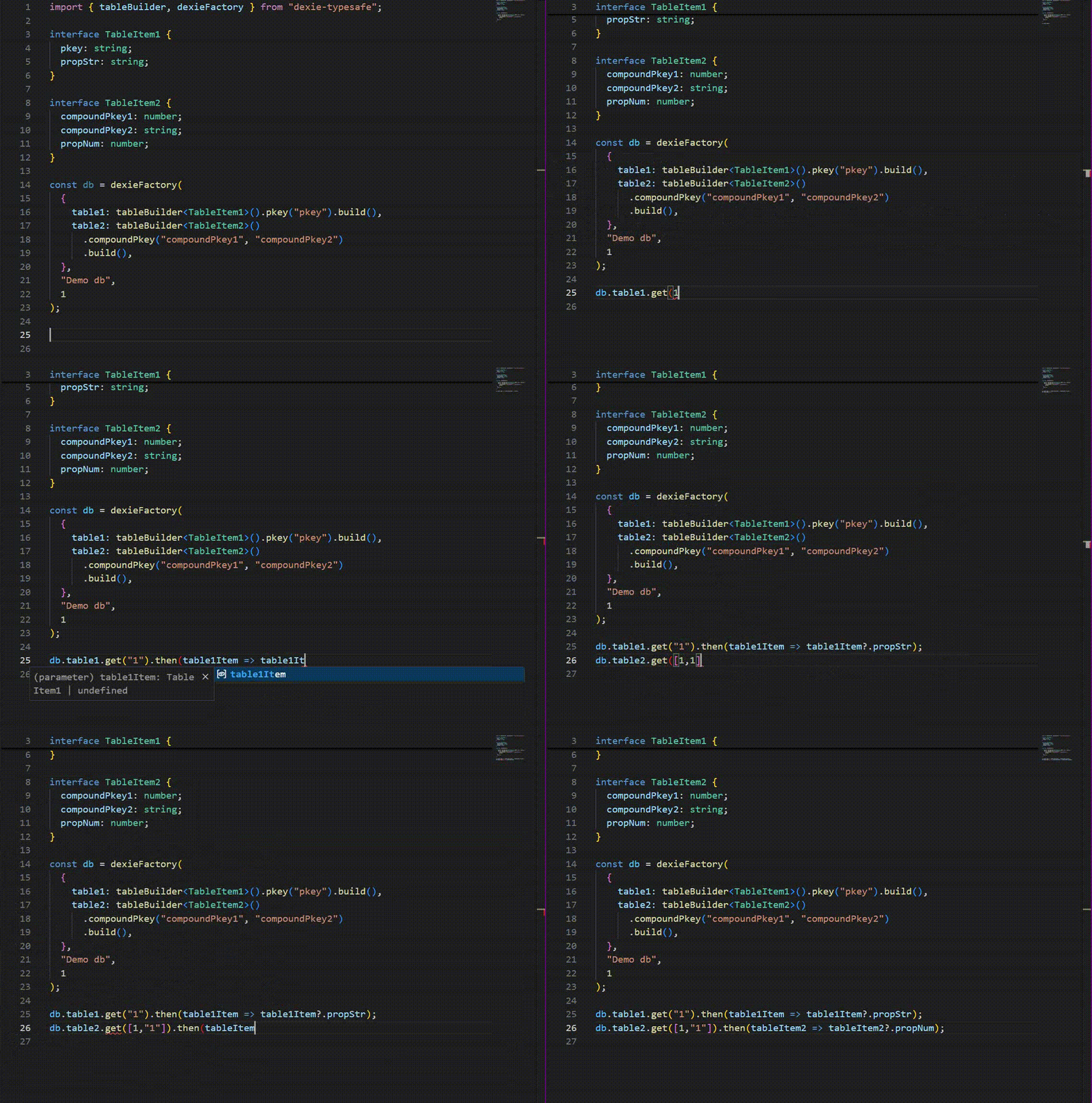
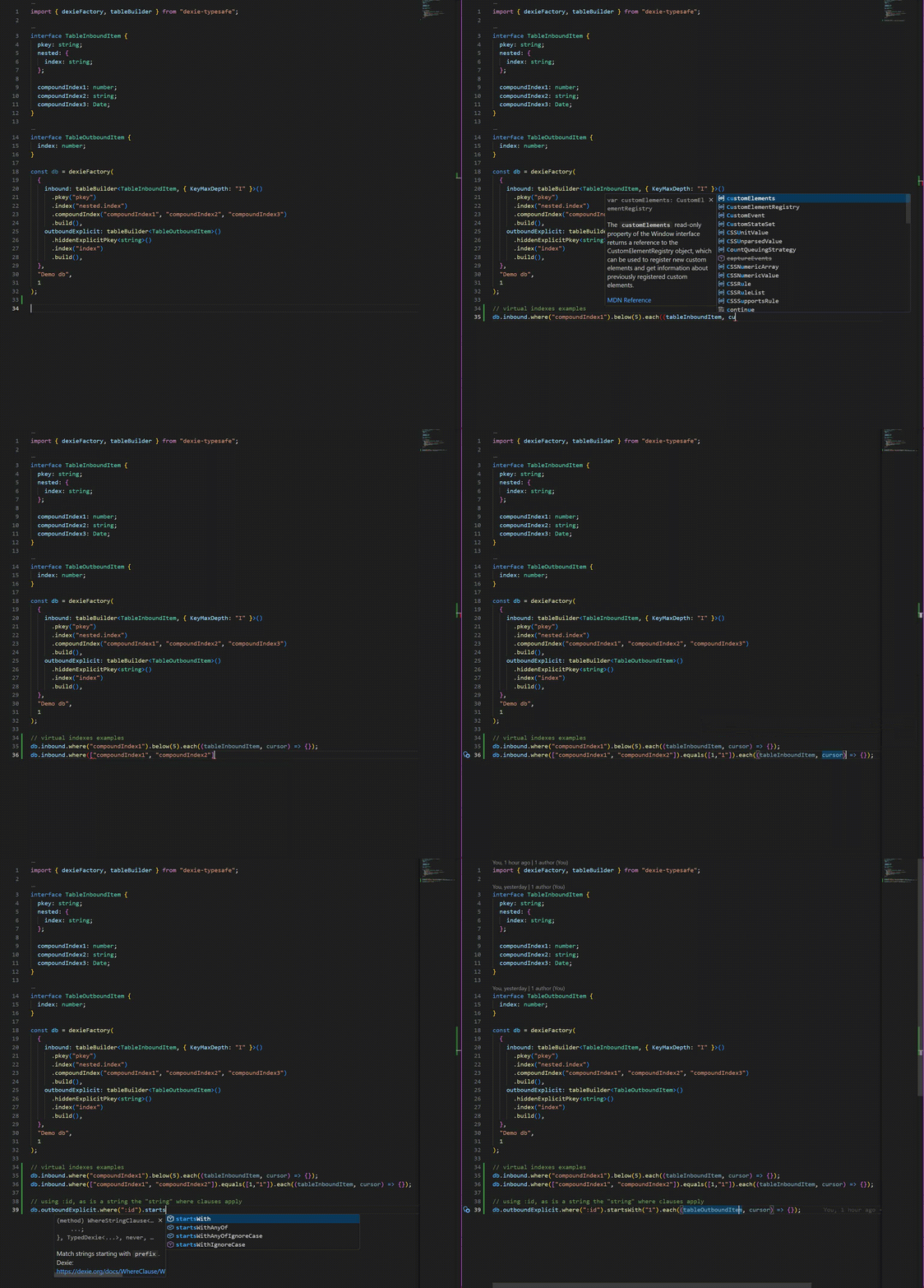
Table where / Collection.or
Demo - Table.where
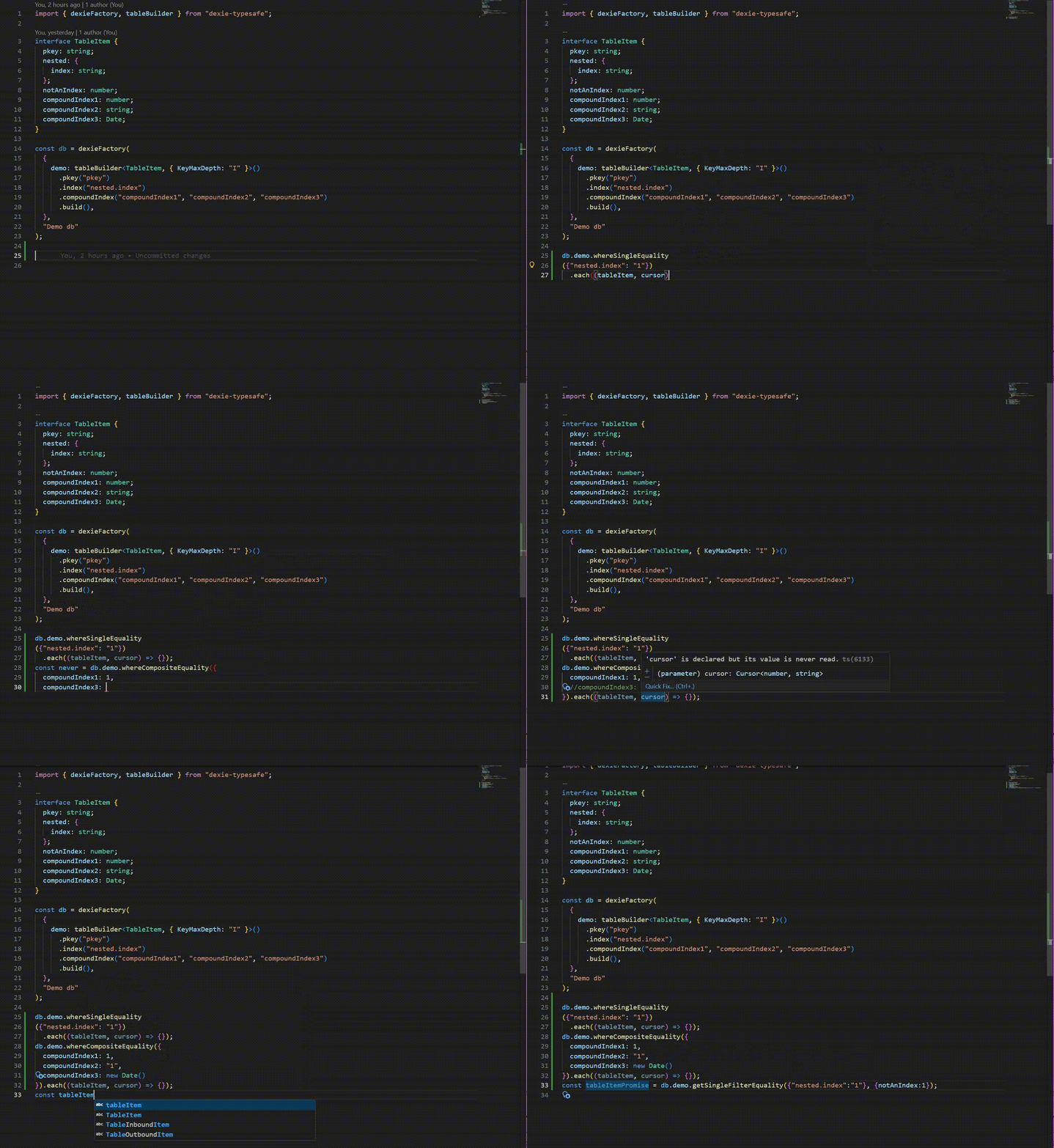
get / where equality
To improve the typescript there are alias methods that you should probably use.
getEquality - prefer being explicit and use one of
getCompositeEquality - using a composite index in full or virtually getSingleEquality - using a single index getSingleFilterEquality - using an index and performing a filter ( given that you have not set up a composite index)
Similarly there is
whereEquality
whereCompositeEquality whereSingleEquality whereSingleFilterEquality
Demo - equality
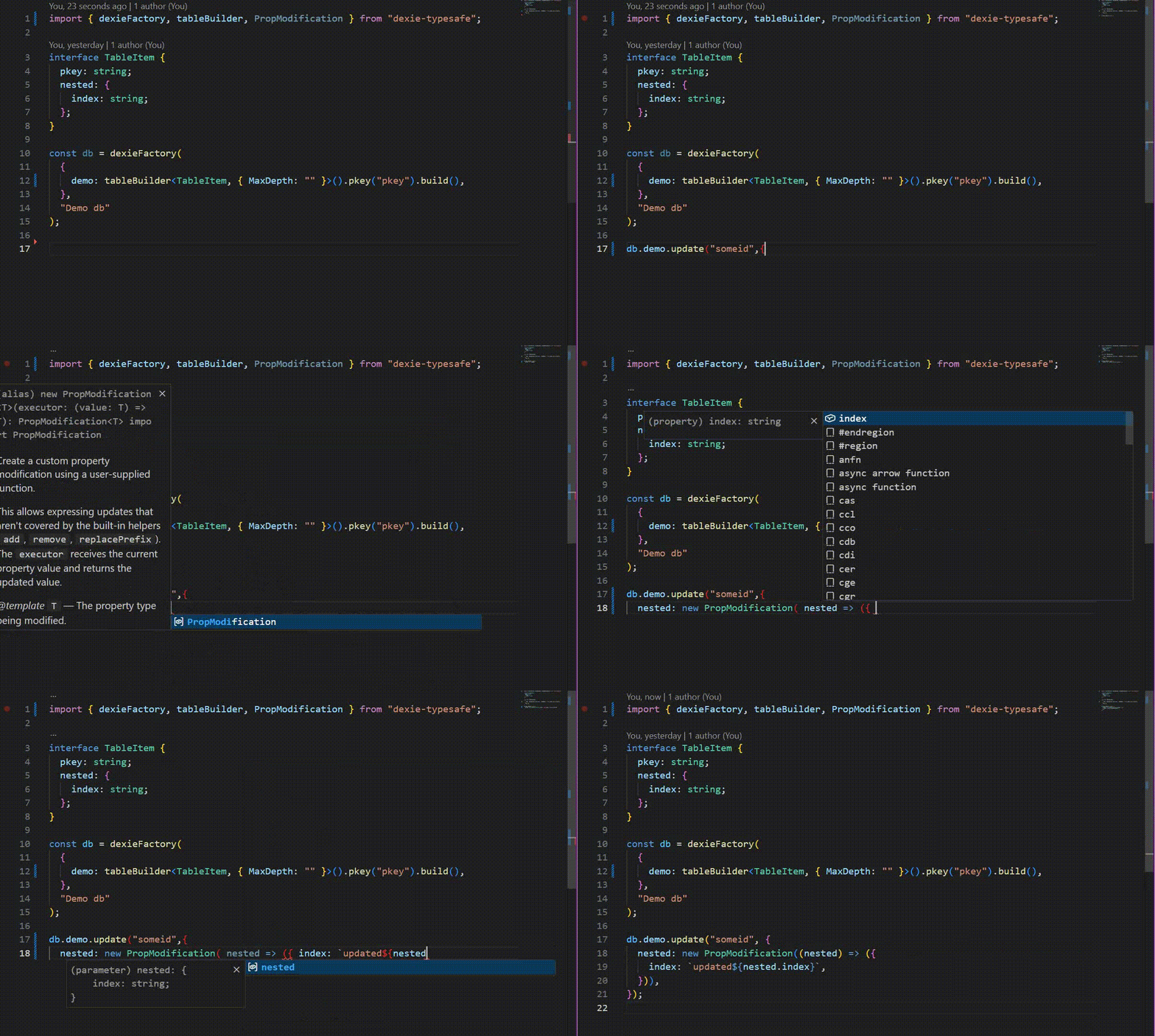
PropModification
Dexie tables can be updated / upserted and collections modified with PropModification. Dexie provides three methods that produce a PropModification add remove replacePrefix
example code
import { replacePrefix } from 'dexie';

db.files
  .where('filePath')
  .startsWith('foo/')
  .modify({
    filePath: replacePrefix('foo/', 'bar/')
  });
Although this works it is not suitable for strong typing. Their typescript
export class PropModification {
  ["@@propmod"]: PropModSpec;
  constructor(spec: PropModSpec);
  execute<T>(value: T): T;
}
Instead, dexie-typesafe provides its own
export abstract class PropModificationBase<T> {
  private readonly __brand!: T;
  abstract execute(value: T): T;
}

export class PropModification<T> extends PropModificationBase<T> {
  executor: (value: T) => T;
  constructor(executor: (value: T) => T) {
    super();
    this.executor = executor;
  }
  override execute(value: T): T {
    return this.executor(value);
  }
}
Although PropModificationBase does not appear to have Dexie's PropModification in its prototype chain it does but is not exposed to typescript. For PropModification derivations to work that need to be instanceof.
Dexie-typesafe has its own add, remove and replacePrefix methods that call dexie's but return PropModificationBase<T> instead.
The PropModification<T> with its executor can be used to update any property type safely.
Demo - PropModification
Database upgrade
Dexie database schemas are changed using database versioning.
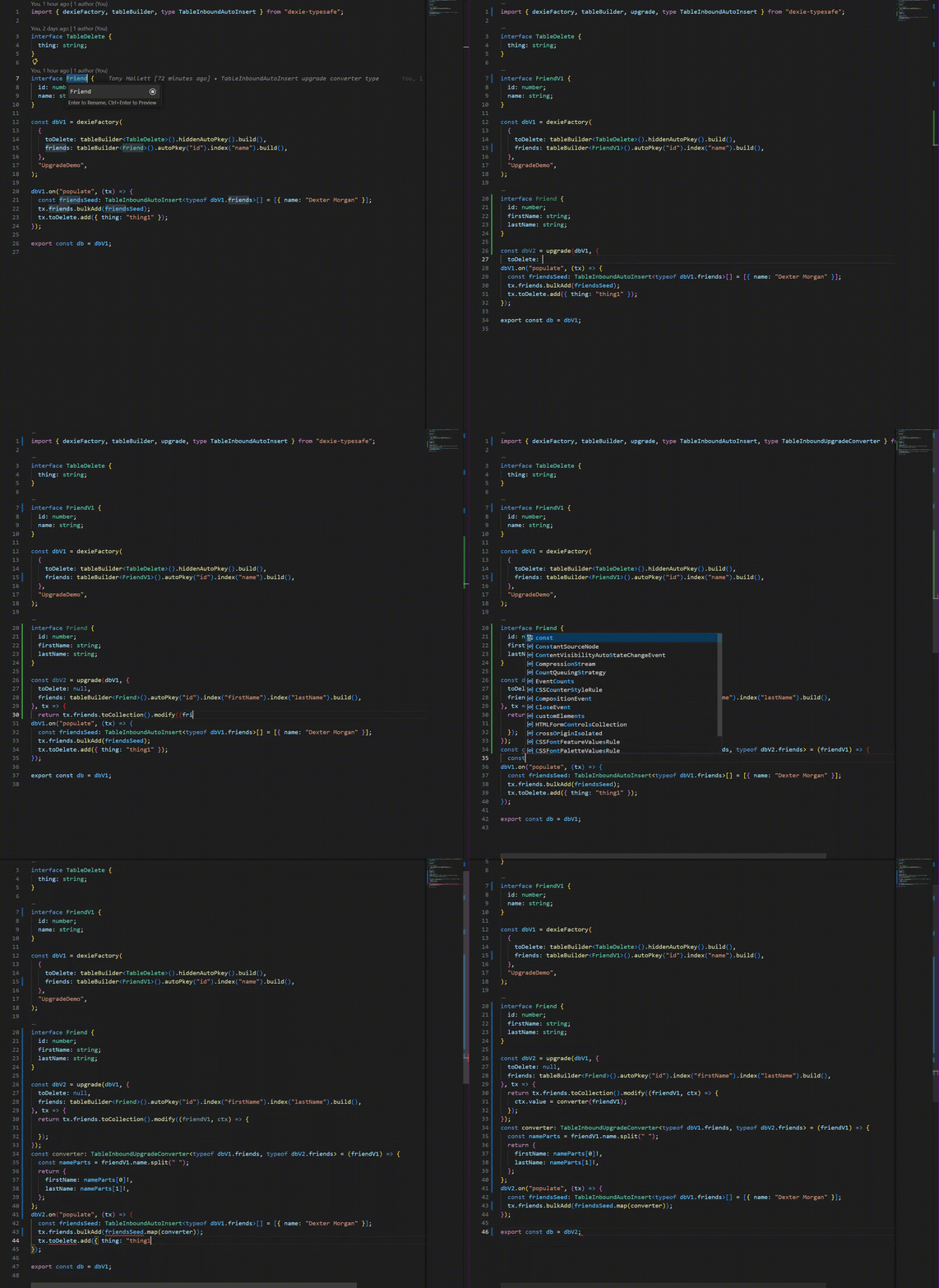
Dexie-typesafe works differently, it has a standalone overloaded upgrade function. Below is the implementation signature.
export function upgrade<
  TTypedDexie extends TypedDexie<any, any>,
  TNewConfig extends Record<string, TableConfigAny | null>,
>(
  db: TTypedDexie,
  tableConfigs: TNewConfig,
  versionOrUpgrade?: number | UpgradeFunction<TTypedDexie, TNewConfig>,
  upgradeFunction?: UpgradeFunction<TTypedDexie, TNewConfig>,
): UpgradedDexie<GetDexieConfig<TTypedDexie>, TNewConfig>;
TTypedDexie is what you received from the dexie factory.
The schema is updated using table builders as used by the dexie factory.
A different "db" type is returned as this reflects the new config.
Tables can be deleted with null.
Most importantly, if your schema mandates updating existing tables then you will need to supply the upgradeFunction.
type UpgradeTransaction<
  TOldConfig extends Record<string, TableConfigAny>,
  TNewConfig extends Record<string, TableConfigAny | null>,
> = TransactionWithTables<UpgradeConfig<TOldConfig, TNewConfig>>;

type UpgradeFunction<
  TTypedDexie extends TypedDexie<any, any>,
  TNewConfig extends Record<string, TableConfigAny | null>,
> = (trans: UpgradeTransaction<GetDexieConfig<TTypedDexie>, TNewConfig>) => PromiseLike<any> | void;
It is not necessary to understand the typescript except to know that
TransactionWithTables is as before, a Dexie transaction with properties that are dexie-typesafe tables, except this time the tables are typed to "get" the old table items and add / update with the new table items.
The upgrade function is best explained via a demo
Demo - upgrade function