
diffstalker
v0.12.3
Published
Interactive terminal UI for git staging, committing, and live diff review


Readme
diffstalker
A live, always-on view of everything changing in your git repos — open it in your browser or your terminal. It watches your repositories in real time, follows you as you switch projects, and shows word-level diffs so you always know exactly what changed.
The web UI, live: your working-tree changes with word-level diffs and per-hunk edit times ("1 minute ago"). Point it at a repo and leave it open — it updates itself.
Why diffstalker?
Keep up with AI. When AI assistants edit your code, changes happen fast. diffstalker gives you a live picture of what's being modified — as it happens — so you review changes in the moment instead of reconstructing them afterward. The Journal view even keeps a running timeline of every edit.
Always-on visibility. Put it on a second monitor and forget about it. As you switch between projects, diffstalker follows along — showing your current changes, staged files, and diffs without you ever needing to alt-tab or type git status.
Runs in the browser. A daemon does the git work and serves a full web UI over HTTP. Open a tab, keep it on a spare screen, and watch your repos live — no terminal required. Prefer the terminal? The same daemon backs a TUI too.
Dead-simple integration. Follow mode watches one plain text file for repository paths. Any script, hook, or tool can write to it. Add two lines to your shell config and every cd into a git repo updates the display automatically.
The web UI
The engine runs as a background daemon, diffstalkerd, which serves a Vue 3 web app over the same REST + Server-Sent Events it uses internally. Run it on a port and open it in your browser:
npm install -g diffstalkerd
diffstalkerd --port 7337
# then open http://localhost:7337
That's it. The UI streams live over SSE — status, diffs, and the change timeline all update on their own. Follow mode is on by default, so the view switches with you as you move between projects (or open any repo by its absolute path from the switcher, top-left).
Five views
Changes — your working tree, live (shown above). A grouped file list (Modified / Untracked / Staged) beside the selected file's diff, with word-level highlighting and per-hunk edit times. Click + / − on a row to stage or unstage.
Journal — a running timeline of every change as it happens, tracked per hunk. Each entry has a timestamp, path, a kind (created / edited / expanded / shrunk / reverted / renamed), stats, and its own diff. When a hunk changes again, the older entry collapses and a fresh one appears at the bottom.
History — the commit log beside a full commit detail: metadata and a multi-file diff.
Compare — a GitHub-PR-style view against any base branch: a collapsible commits list, a file tree, and stacked per-file diffs. Toggle between unified and side-by-side layout.
Explorer — a lazy file tree with git-status decoration beside syntax-highlighted file content.
Plus, everywhere: word-level diff highlighting, an app-wide unified / split diff toggle, optional syntax highlighting in diffs, follow and auto mode, search (Ctrl+P — file names, file contents, or the open file's outline, each named on the overlay so you never have to remember which key), six themes, a hotkeys overlay (?), and a layout that reflows for portrait (vertical) monitors.
The web UI is a viewer with one write: file-level stage / unstage from the Changes list. Commit, discard, hunk-level staging, and remote/branch operations live in the terminal UI. See the Web UI section of FEATURES.md for the full list.
Security: the daemon has no authentication, so it binds loopback only — a unix socket, or
--porton127.0.0.1(there is no option to bind a routable interface). While on a port it also runs an origin guard: aHostallow-list blocks DNS-rebinding and cross-site requests are rejected (CSRF), plus a strict CSP and hardening headers on every response. To reach it from another machine, use an SSH tunnel (ssh -L 7337:localhost:7337 …). See SECURITY.md.
The terminal UI
The same daemon backs a terminal client, diffstalker, for when you'd rather stay in the shell. It auto-spawns the daemon for you on first run:
npm install -g diffstalker
diffstalker # current directory
diffstalker /path/to/repo
diffstalker --follow # watch for repo changes (great on a second monitor)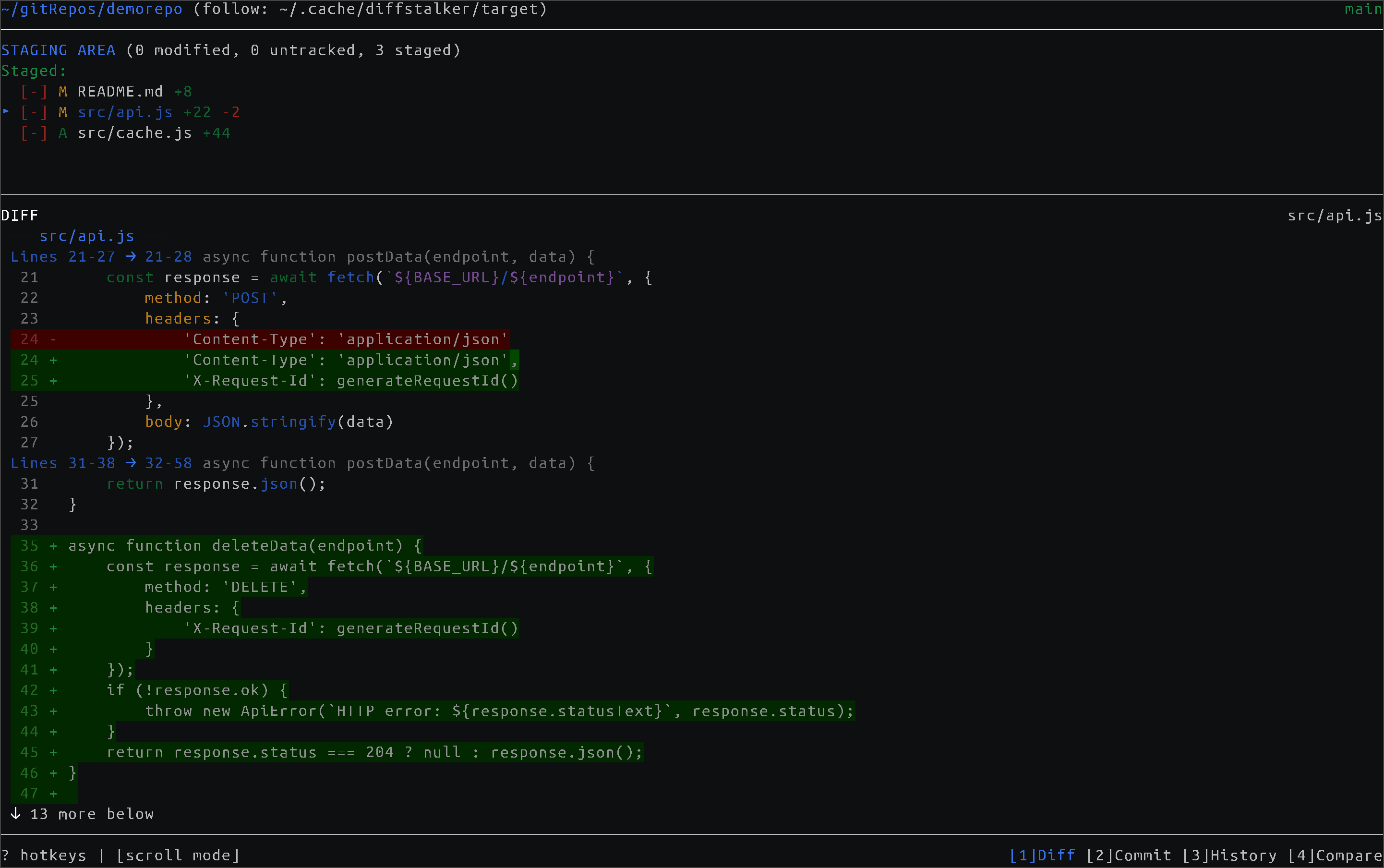 Stage files and review changes with word-level diff highlighting.
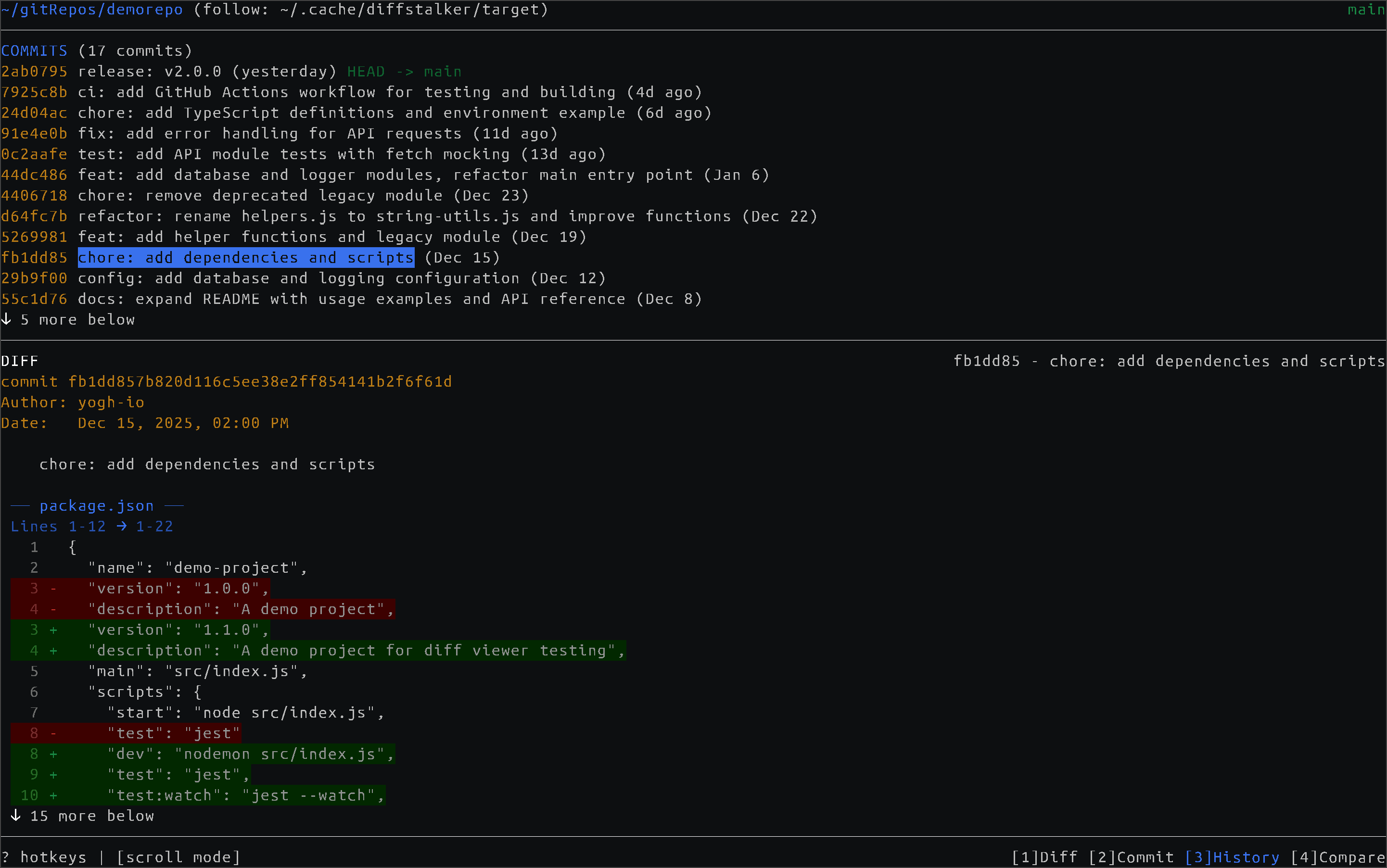 Browse commit history and inspect past changes.
The terminal UI is the full-power client — staging, hunk staging, commit and amend, discard, PR compare, and remote/branch operations. Its five views map to keys 1–5 (Diff, Commit, History, PR, Explorer); press ? for the full keybinding reference.
Follow mode
Follow mode is what makes diffstalker "stalk" — it tracks whichever repo you're working in. The daemon watches ~/.cache/diffstalker/target; write or append a repository path to that file and the display switches to it (it reads the last non-empty line, so both styles work). It's on by default.
Integration examples
Shell hook — update on every cd:
# Add to .bashrc or .zshrc
diffstalker_notify() {
    [[ -d .git ]] && echo "$PWD" > ~/.cache/diffstalker/target
}
cd() { builtin cd "$@" && diffstalker_notify; }
Tmux — update on pane/window switch:
# In .tmux.conf
set-hook -g pane-focus-in 'run-shell "tmux display -p \"#{pane_current_path}\" > ~/.cache/diffstalker/target"'
Neovim — update when changing buffers:
-- In init.lua
vim.api.nvim_create_autocmd({"BufEnter"}, {
  callback = function()
    local root = vim.fn.finddir('.git/..', vim.fn.expand('%:p:h') .. ';')
    if root ~= '' then
      local f = io.open(os.getenv('HOME') .. '/.cache/diffstalker/target', 'w')
      if f then f:write(vim.fn.fnamemodify(root, ':p:h')); f:close() end
    end
  end
})
Any script:
echo "/path/to/repo" > ~/.cache/diffstalker/target   # overwrite
echo "/path/to/repo" >> ~/.cache/diffstalker/target  # append (also works)
The file-based approach is intentionally simple. IDE plugins, window manager hooks, project switchers, git hooks — if it can write to a file, it can drive diffstalker.
Architecture
One engine, two front-ends. The git state lives in diffstalkerd, a Node http daemon that serves @diffstalker/core (headless git state) over REST + Server-Sent Events. Both clients are pure daemon clients that hold no in-process git of their own:
- the web UI (Vue 3) is served by the daemon at
GET /over the same REST + SSE, same-origin; - the terminal UI installs
diffstalkerdas a dependency and auto-spawns it on a unix socket.
Because the state is one shared service, both stay live over the same event stream.
Installation
Linux. That is what diffstalker is built and tested on. The daemon's default
transport is a unix socket under $XDG_RUNTIME_DIR, so macOS (which does not set
it) needs an explicit --socket PATH, and native Windows is not supported — use
WSL2. Requires Node 20.19 or newer, and git on PATH.
Web UI (the daemon that serves it):
npm install -g diffstalkerd
diffstalkerd --port 7337    # open http://localhost:7337
--port adds the browser's transport: the daemon still binds its usual unix
socket, so the terminal UI attaches to this same daemon rather than starting a
second one, and both clients watch one git state. The port carries a reduced
API (reads plus file staging); commit, discard and every remote operation stay
on the owner-only socket.
Terminal UI (pulls in diffstalkerd automatically and spawns it for you):
npm install -g diffstalkerArch Linux — one AUR package gives you both bins and the web UI. It builds the
current main, so it tracks the repo rather than the published releases:
yay -S diffstalker-git # or paru -S diffstalker-gitThe package ships a systemd user service, so the daemon and its web UI can just be running:
systemctl --user enable --now diffstalkerd
# web UI at http://diffstalker.localhost:7337/
If that fails with diffstalker: /usr/bin/diffstalker exists in filesystem, an
earlier npm install -g diffstalker or npm link owns the path — npm's prefix
on Arch is /usr, so its bins land in pacman's territory unowned, and pacman
will not install over a file no package owns. The build warns about this before
it happens; clear it and retry:
sudo npm rm -g diffstalker diffstalkerd     # also drops /usr/lib/node_modules
yay -S diffstalker-git
Or from source (the repo is a bun workspace of several packages):
git clone https://github.com/yogh-io/diffstalker.git
cd diffstalker
bun install && bun run build       # builds all packages
cd packages/cli && bun link        # link the `diffstalker` bin
# or run it directly: bun run start
For a local web UI in development:
bun run dev:web                    # Vite dev server (HMR) at http://localhost:5173
bun run serve                      # dev daemon from source (always current, Bun
                                   # inspector) serving the web UI at :17337.
                                   # bun run serve /path/to/repo ... pre-opens repos.
Keybindings (terminal UI)
| Action | Keys |
|--------|------|
| Navigate | ↑/↓ or j/k |
| Switch panes | Tab |
| Switch views | 1-5 |
| Toggle stage | Space or Enter |
| Stage/unstage all | Shift+A / Shift+Z |
| Discard changes | d (with confirmation) |
| Fuzzy file finder | Ctrl+P or / in Explorer |
| Resize panes | [ / ] |
| Toggle line wrap | w |
| Themes | t |
| Help | ? |
Full keybinding reference available with ? in either UI.
Themes
Six built-in themes (both UIs) — the web has a switcher top-right; the terminal uses t:
| Theme | Description | |-------|-------------| | Dark / Light | Default palettes | | Dark / Light (colorblind) | Blue/red palette for color vision deficiency | | Dark / Light (ANSI) | Uses your terminal's 16 colors for full consistency |
Configuration
Terminal UI config: ~/.config/diffstalker/config.json
{
  "theme": "dark",
  "splitRatio": 0.4,
  "targetFile": "~/.cache/diffstalker/target"
}
CLI options
Terminal UI — diffstalker [options] [path]:
  -f, --follow [FILE]  Watch file for repo paths
  -s, --socket PATH    diffstalkerd socket to attach to or spawn on
      --instance NAME  Attach to the daemon named NAME (spawns it if absent)
  -d, --debug          Log path changes to stderr
  -h, --help           Show help
Daemon — diffstalkerd [options]:
  --port N             Bind TCP port N (loopback only) and serve the web UI at GET /
  --socket PATH        Bind a unix socket instead of a port
  --instance NAME      Bind <NAME>.sock, so several daemons can coexist
  --no-follow          Disable follow mode
  --follow-file PATH   Hook file to watch (default: ~/.cache/diffstalker/target)
See packages/daemon/README.md for the full endpoint table and follow-mode notes.
License
MIT