
directus-extension-inframe
v2.2.0
Published
Display dashboards, reports and external sites in iframes, directly in your Directus panel. Install, configure and centralize everything in one place!

Maintainers
 sidartaveloso
Readme
🚀 inFrame: The Ultimate Module for External Content Integration in Directus


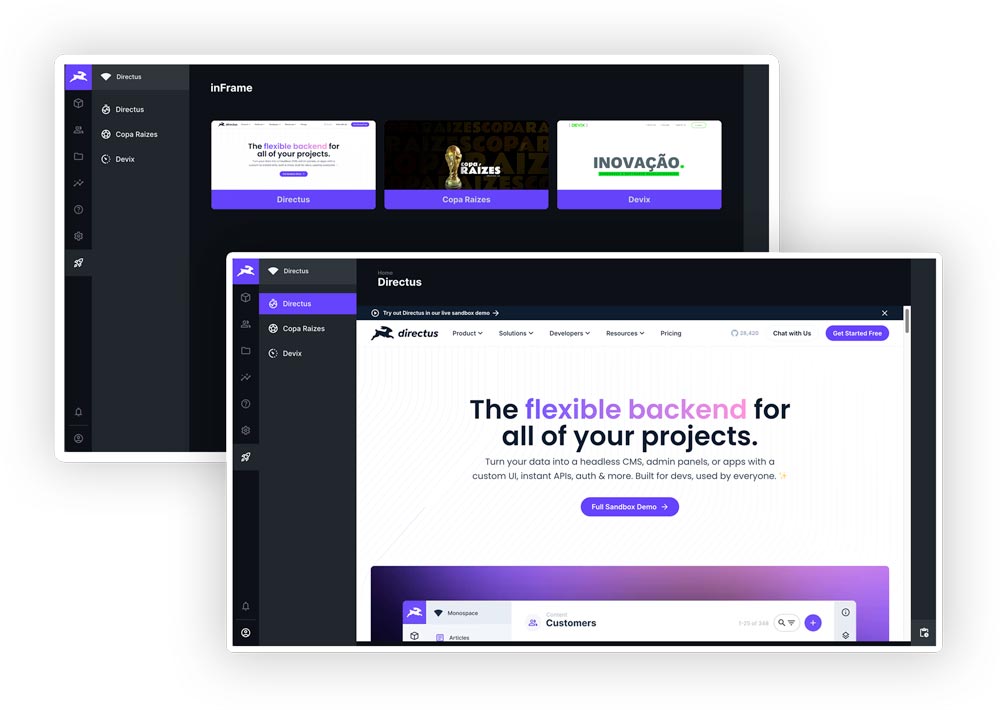
💡 Stop Switching Tabs. Start Integrating.
inFrame is the plug-and-play solution that transforms your Directus admin panel into a centralized information
hub. Integrate BI dashboards, real-time reports, external tools, and any content via iframe directly into your
Headless CMS.
Boost Productivity: Get instant access to critical data and third-party tools without ever leaving Directus.
🎯 Why inFrame is Essential for Your Directus Project
| Key Benefit | Description | | :-------------------------------- | :---------------------------------------------------------------------------------------------------- | | 📊 BI & Dashboard Integration | Connect Power BI, Tableau, Metabase, Grafana, or any Business Intelligence tool. | | 🔗 Tool Centralization | Organize external links and systems into a single, easily accessible module for your entire team. | | ⚡ Zero-Config Installation | The extension automatically creates all necessary collections and fields. Install and use in seconds! | | 🔄 Navigation Persistence | The module automatically saves and restores your last view, even after closing the browser. | | 🌍 Multilingual Support | Ready for global projects, with automatic translations for multiple languages. |
✨ Exclusive Feature: Dynamic URL Variables
Take integration to the next level. inFrame allows you to inject user data and the current Directus context directly into your iframe's URL. Perfect for authentication and report personalization.
Available Variables
| Variable | Description | Usage Example |
| :------------ | :---------------------------------------------------------- | :---------------------------------------------- |
| $token | Directus access token (JWT). (Use with extreme caution) | https://app.site.com/report?auth=$token |
| $user_id | ID of the logged-in user. | https://metabase.com/dash?user_id=$user_id |
| $user_email | Email of the logged-in user. | https://analytics.com/view?viewer=$user_email |
| $user_role | Key of the user's role. | https://app.site.com/access?role=$user_role |
| $timestamp | Current timestamp (ISO 8601). | https://app.site.com/log?time=$timestamp |
| $locale | User's language preference (e.g., en-US). | https://app.site.com/lang?locale=$locale |
⚠️ Security: Responsible Use of $token
Using the $token exposes the Directus access token in the URL, which can be a security risk. We strongly recommend
using $user_id or $user_email whenever possible.
[!WARNING] Use
$tokenONLY with sites you fully trust and control. The token can leak in server logs, browser history, andRefererheaders. The extension will block the use of$tokenin URLs that do not use HTTPS.
🛠️ Installation: Click & Go (Zero Config)
The inFrame module is designed for immediate use. Choose the installation method that suits your setup:
1. Directus Marketplace (Recommended)
The easiest way to install is directly through the Directus Admin App:
- Navigate to Settings -> Extensions.
- Find "inFrame Module" in the Marketplace.
- Click "Install".
- Restart your Directus server (if self-hosted).
- Done! The "Reports" module will appear in your sidebar.
2. Manual Installation (NPM/PNPM)
For self-hosted environments or custom setups, you can install via your package manager:
# Using NPM
npm install directus-extension-inframe

# Using PNPM
pnpm add directus-extension-inframe
Automatic Setup: The extension automatically creates all necessary collections, fields, and relations upon installation:
- ✅
inframeCollection to manage your content. - ✅ Translation Collections (
languages,inframe_translations). - ✅ All required fields and relations configured.
📖 How to Use
- Access the Module: Click on "Reports" in the sidebar.
- Create a New Item: Click "Create new" and fill in:
- URL: The link to the iframe content.
- Status: Published, Draft, or Archived.
- Icon: Choose a Material Design icon for the item.
- Save: The content will be displayed in the iframe, ready for interaction.
⚙️ Advanced Configuration (Docker)
If you are using Docker, you may need to configure the Content Security Policy (CSP) to allow loading iframes from external domains.
environment:
  # Add trusted domains to the frame-src directive
  CONTENT_SECURITY_POLICY_DIRECTIVES__FRAME_SRC: "'self' https://your-bi-domain.com https://another-tool.com"
[!CAUTION] Avoid using
'*'in production. List only trusted domains.
🌍 Compatibility
Tested and compatible with:
- Directus 11.x: 11.15.4 and newer versions
🤝 Contributing
Contributions are welcome! See our Contributing Guide for details on how to set up the development environment, run tests, and submit Pull Requests.
📝 License
This project is licensed under the MIT License - see the LICENSE file for details.