
directus-extension-pdf-factory
v1.0.0
Published
This package is a node for Directus flows, utilizing the PDFMake library for generating PDF documents. It can also create e-invoices
Downloads
16

Maintainers
 eikaramba
Readme
PDF Factory Operation for Directus
The “PDF Factory Operation” extension for Directus allows automated generation of PDF files using custom JSON templates.
This operation can be integrated within Directus workflows, allowing the creation of highly customized PDF documents.
Use dynamic values extracted from other operations via operationKey, such as {{read_users_collection.first_name}},
to customize the PDF content.
Installation
Refer to the Official Guide for details on installing the extension from the Marketplace or manually.
Features
- 📄 Generate PDF files based on JSON content
- 🔨 Utilize liquidjs templating
- 📧 Attach xml files for e-invoices to the PDF files
- 🔗 Add external fonts via URL
- 🔗 Add internal fonts via UUID
- 📁 Custom file name and path
- 🗂️ Store generated PDF files in Directus
Usage
Add the PDF Factory Operation via the flow builder and configure the operation with the desired settings. The
operation will generate a PDF file based on the provided JSON content.
Liquidjs Templating
The PDF Factory Operation supports Liquidjs templating, allowing you to create dynamic content in your PDF files.
In order to not conflict with the directus liquidjs templating syntax, the PDF Factory Operation uses a different syntax for variable interpolation. Instead of using {{variable}}, you will use {<variable>}. This allows you to include both Directus variables and the PDF Factory variables in the same template without conflicts, however all variables from the flow are also passed to the PDF Factory operation, so you can use them in the same way as you would use them in a Directus template.
For example, to include a user's first name in the PDF, you would write {<read_users_collection.first_name>} in your JSON template.
Invoice creation
The main reason for this extension is to create invoices in PDF format. To do this, there are three files in the examples folder that can be used as a starting point:
invoice.js: This file contains the JavaScript code for a script operation in directus that reads the invoice data from a collection and prepares it for the PDF generation. It is necessary so that your data structure matches the JSON template. You can of course adapt it to your needs.invoice.json: This file contains the JSON template for the invoice. It generates a PDF/A-3a compliant PDF file with the invoice data. You can customize this template to fit your needs.invoice.xml: This file contains the XML data for the e-invoice, which can be attached to the PDF. You can customize this XML file to match your invoice data.invoice.pdf: This is an example of the generated PDF file based on the provided JSON template and XML data.
Useful other extensions
In order to get a complete payment/invoice flow i recommend to use the other following extensions:
- Stripe Integration A Directus extension that allows you to build flows and custom endpoints to handle Stripe Webhooks and make Stripe API calls. With this you can trigger the payment flow and also handle the webhook events (which will then use this extension to create the invoice).
- Emailer A Directus extension that allows you to send emails with attachments. You can use this extension to send the generated PDF invoice via email to the customer directly from the flow.
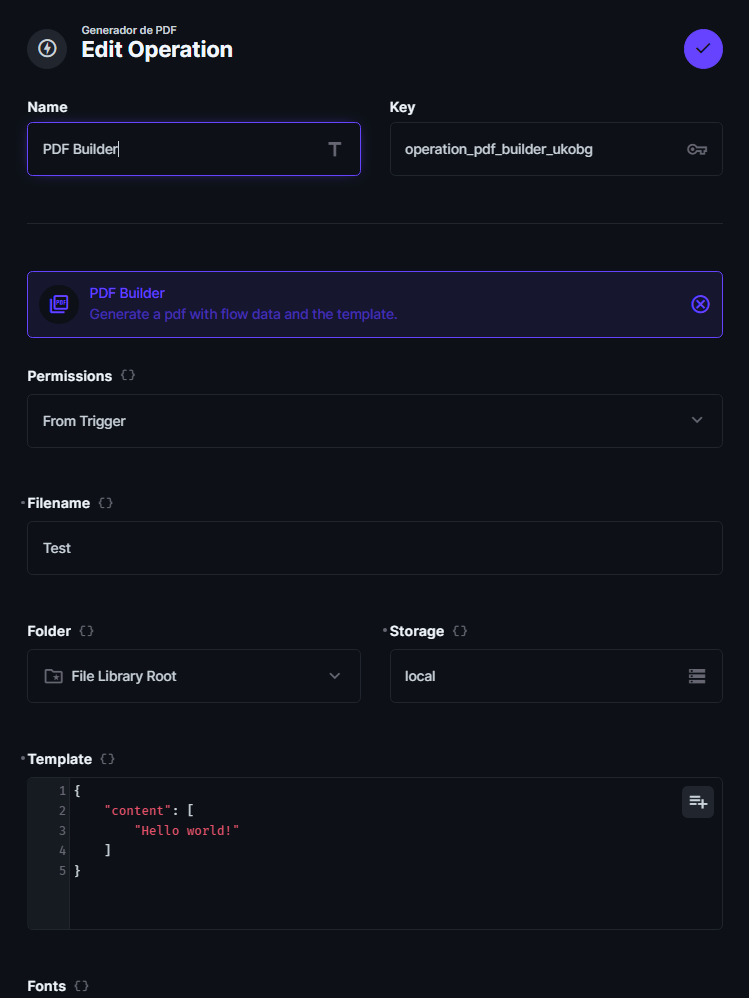
General Form View
This view shows the general configuration form for the PDF Factory operation, where you can define the operation key, permissions, filename, storage, and the JSON template that will be used to generate the PDF.
Aknowledgements
This extension was cloned from the directus-extension-pdf-builder repository and adapted to include liquidjs templating and e-invoice support.