
directus-extension-polymorphic-reference
v1.5.1
Published
Resolve polymorphic (collection + id) references into navigable, templated links — Laravel-style morphTo for Directus. Ships an interface (reads the collection from a sibling field) and a display (for self-describing values).
Downloads
141

Maintainers
 johannes.wigandt
Readme
Directus Polymorphic Reference
A Directus bundle for polymorphic references — a target collection plus a primary key, like Laravel's morphTo. It turns a pair of plain columns (entity_type + entity_id) into a searchable, navigable relational field, with the target collection resolved at runtime.
Think of a comments collection whose rows can belong to either articles, products, or pages:
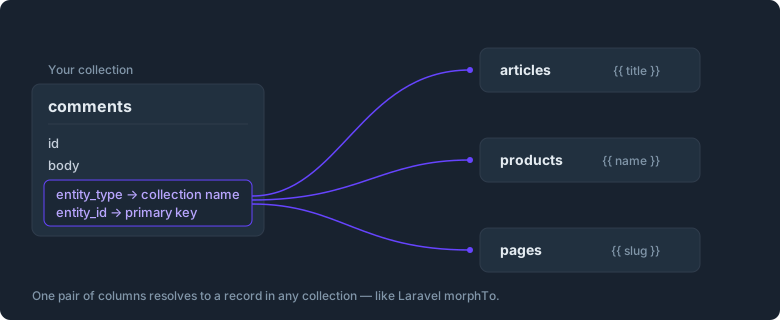
comments
├─ id
├─ body
├─ entity_type  = "products"   ← which collection this comment belongs to
└─ entity_id    = "8f3a1c…"    ← the primary key within that collection
entity_type + entity_id together point at one record — but Directus has no native field for that. This bundle adds it.
What's in the bundle
| Entry | Type | Use it for |
| --- | --- | --- |
| Polymorphic Reference | Interface | The entity_id field — a searchable dropdown that lists records from the collection named in entity_type, writes the chosen primary key, and links out to the record. |
| Collection Select | Interface | The entity_type field — a dropdown that lists all collections dynamically, so you never maintain a hardcoded choices list. |
| Polymorphic Reference | Display | The entity_id column in list/table layouts — renders the templated label as plain text. |
Setup
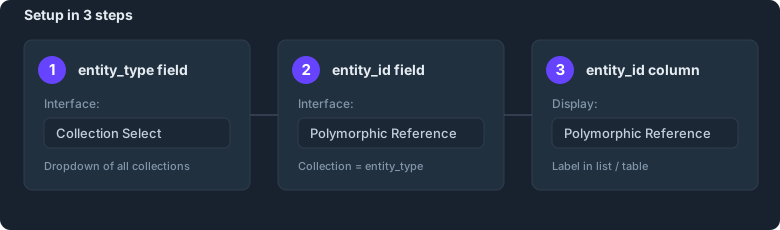
1. entity_type → Collection Select interface
Settings → Data Model → your collection → field entity_type → Interface → Collection Select.
- Include system collections: off (hides
directus_*) - Stores the technical collection name (
articles,products, …) — exactly what the reference resolves against.
2. entity_id → Polymorphic Reference interface (detail view)
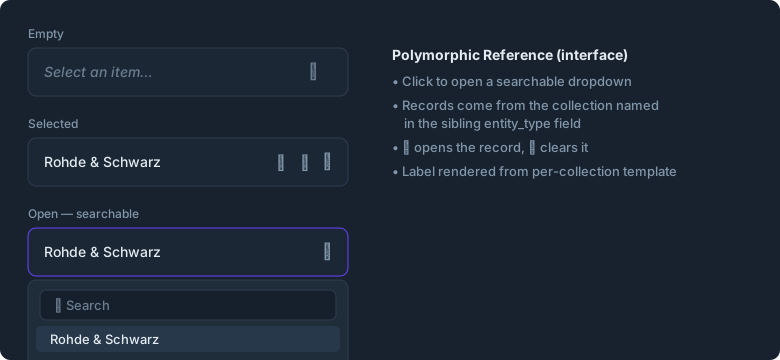
Field entity_id → Interface → Polymorphic Reference.
- Collection (
collectionField):entity_type— the sibling field holding the target collection name. - Display Templates per Collection: one row per possible collection; click together which fields to show, e.g.
articles→{{ title }}products→{{ name }} ({{ sku }})
- Item Link: shows a launch icon that opens the selected record.
- Create item action: shows a plus icon that opens Directus' create form for the currently selected target collection.
- Clear on collection change: clears
entity_idwhenentity_typechanges, so a stale primary key from the previous collection is not kept accidentally. - Filter: optionally restrict which records are selectable, per target collection (e.g. only active accounts).
You get a native-style relational control: click the field, search, pick a record (its primary key is written to entity_id), open it via the launch icon, or clear the selection.
3. entity_id → Polymorphic Reference display (list/table)
In a list layout, set the entity_id column's display to Polymorphic Reference.
- Collection (
collectionField):entity_type - Display Templates per Collection as above.
Because a Directus display only receives the value of its own field, the display looks the row up by entity_id == value to read entity_type, then renders the label as plain text. Use the detail-view interface when you need the launch icon to open the referenced record.
Why an interface for the detail view?
A Directus display only ever receives the value of its own field — it has no direct access to sibling columns of the same row (verified against render-display.vue and adjust-fields-for-displays.ts in core). The display works around this with an extra lookup; the interface runs inside the item form and can inject('values'), so it reads entity_type directly — which is why it's the right tool for editing in the detail view.
Per-collection templates
The interface and the display both expose a Display Template repeater. Each row binds a system-display-template editor to the collection chosen in that same row (via collectionField), giving the familiar Directus "click the fields you want to show" experience — per target collection. When no row matches the resolved collection, the raw primary key is shown. Only the fields referenced by the matched template are fetched.
System collections
Links and lookups are mapped for directus_users, directus_files, directus_roles. Other directus_* collections render without a link (they have no Content-module route); regular collections link to /content/<collection>/<id>.
Internationalization
UI labels and runtime strings use Directus' own translation keys ($t: for option labels, useI18n() core keys in components — collection, source, format, display_template, item_link, show_link_to_item, search, no_items, open, deselect, select_an_item, …), so the bulk of the UI is localized in every language Directus ships. A few help notes and choice labels that have no core equivalent default to English.
Development
npm install
npm run dev      # watch build
npm run build    # production build → dist/
npm run check    # typecheck, build, and package dry run
Then drop dist/ into your Directus extensions/<name>/ folder, or npm run link for local development. Requires Directus host ^11.
License
MIT