
directus-extension-seed-studio
v1.1.0
Published
Generate realistic schema-aware test data for any Directus project — in one click. Detects field types, interfaces, and relationships; produces Faker-powered realistic content.

Maintainers
 khanahmad4527
Readme
Seed Studio
Generate realistic schema-aware test data for any Directus project — in one click.
Why Seed Studio
Every Directus user — solo dev, agency, internal-tools team — hits the same wall: build a schema, look at empty tables, then either hand-craft hundreds of rows or write a one-off seed script that rots the moment the schema changes.
Seed Studio reads your live schema, detects what each field should contain (based on type, interface, name heuristics, validation rules and the data already in the table), resolves relationships, and writes realistic data in batches. Four-hour seed-script tasks become 30-second one-click generations.
The difference between fake data and useful fake data is coherence. Generating each field independently gives you rows like first_name: "Ana", last_name: "Smith", full_name: "Bob Jones", email: "[email protected]", city: "Paris", country: "Japan" — obviously synthetic at a glance, and useless for a demo or a screenshot. Seed Studio builds one imaginary person, company, product or article per row and derives the related fields from it, then repairs cross-field relationships (created ≤ updated, cost ≤ price, drafts have no publication date) before anything is written.
Features
Realism
- One imaginary entity per row: name, username, email, company, domain, city and postcode all agree
- Cross-field invariants: date ordering, price relationships,
total = quantity × price, status ⇄ publication date - Weighted value distributions —
publisheddominatesdraftdominatesarchived, instead of a uniform third each - Realistic empty values: optional fields are left blank at a configurable rate
- Dates skewed toward the present and clustered into working hours
- Learn from existing data: samples the rows already in a collection and matches their value frequencies, numeric ranges, id formats (
INV-04812) and null rates - Structured Markdown/HTML bodies with headings and lists, GeoJSON matching the column's geometry type, and a template DSL (
{{person.firstName}} at {{company.name}})
Schema awareness
- Strategy auto-detection from type, interface, field name,
meta.optionsand validation rules — each suggestion explains itself in the UI meta.validationis a Directus filter AST, and it is honoured:_gte,_lte,_between,_in,_regex,_starts_with, … constrain the generated valuemeta.conditionsreplayed per row, so rows match what the item form would allow- Sort columns increment; archive columns keep most rows visible; alias and presentation fields are never written
- Relation graph: whole-project seeding in topological order, with cycles broken on optional foreign keys, and M2M junction rows written after their parents
- Composite constraints respected:
max_length,decimal(p,s)ceilings, unique columns (existing values are pre-loaded so new rows never collide)
Reproducibility & safety
- Every run records its seed. Same seed + same settings ⇒ byte-identical rows, independent of batch size
- Undo a run: the primary keys written are recorded, so a mistake is reversed exactly — no "delete everything and hope"
- Dry run that reports which rows Directus would reject, and why, before writing
- Pre-flight warnings: flows that would fire once per row, revision/activity volume, empty parent collections, production-looking instances
- Cancel a running generation; wipe requires typing the collection name
- Fast write mode (API engine) suppresses hooks, flows, activity and revisions
- 72 faker locales (API engine) for non-English projects
Two engines
Seed Studio ships an app extension (the module you see) and an API extension (the endpoint that does the writing). The module works with or without the endpoint, and tells you which one it is using.
| | API engine (endpoint installed) | In-browser engine (app only) |
|---|---|---|
| Where it runs | Directus server, via ItemsService | Your browser tab, via the REST API |
| Suppress flows / revisions | Yes — emitEvents: false, no accountability | No: the REST API cannot suppress them |
| Batch size | Up to 5,000 rows per insert | Capped at 200 — MAX_PAYLOAD_SIZE is 1 MB by default |
| Survives closing the tab | Yes, with SSE progress | No, the run stops |
| Faker locales | All 72 | English |
| Run history & undo | seed_studio_runs collection | localStorage in that browser |
| Works on Directus Cloud | Only if the extension is allowed | Yes |
Why this matters: the Directus Marketplace installs app extensions and sandboxed API extensions, and a sandboxed extension has no access to services/ItemsService — only log, sleep and request scopes. Self-hosted instances can allow unsandboxed extensions with MARKETPLACE_TRUST=all. So on Cloud the module falls back to the in-browser engine automatically rather than failing.
Fast write is worth one caveat: Directus 11 gates activity and revision writes on accountability being present (skipTracking only exists in Directus 12), so the portable way to skip them is to write without accountability. Fast-written rows therefore have an empty user_created. The UI says so where you choose it.
Screenshots
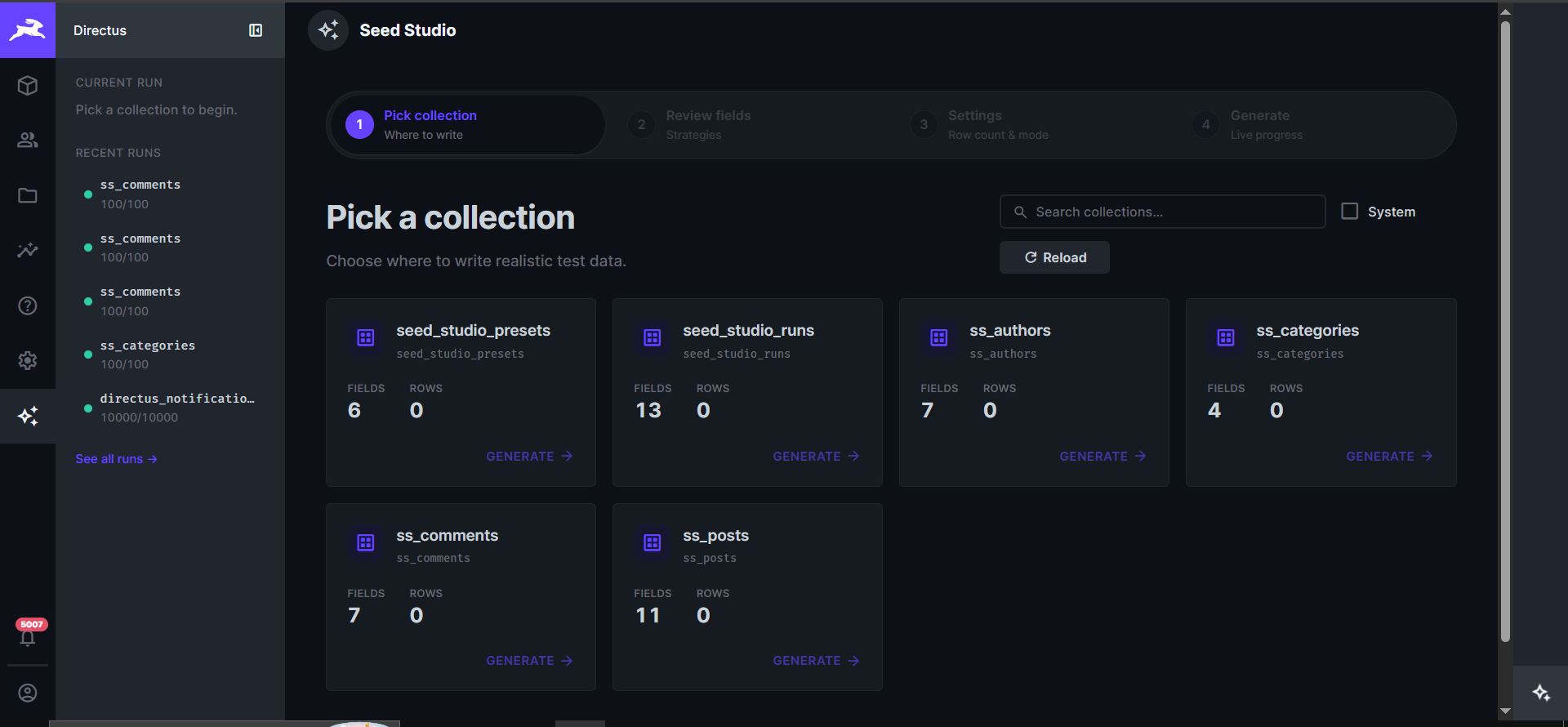
1 · Pick a collection
Bento grid of every user collection — with field count, row count, and one-click select. Sidebar shows recent generation runs with live status dots.
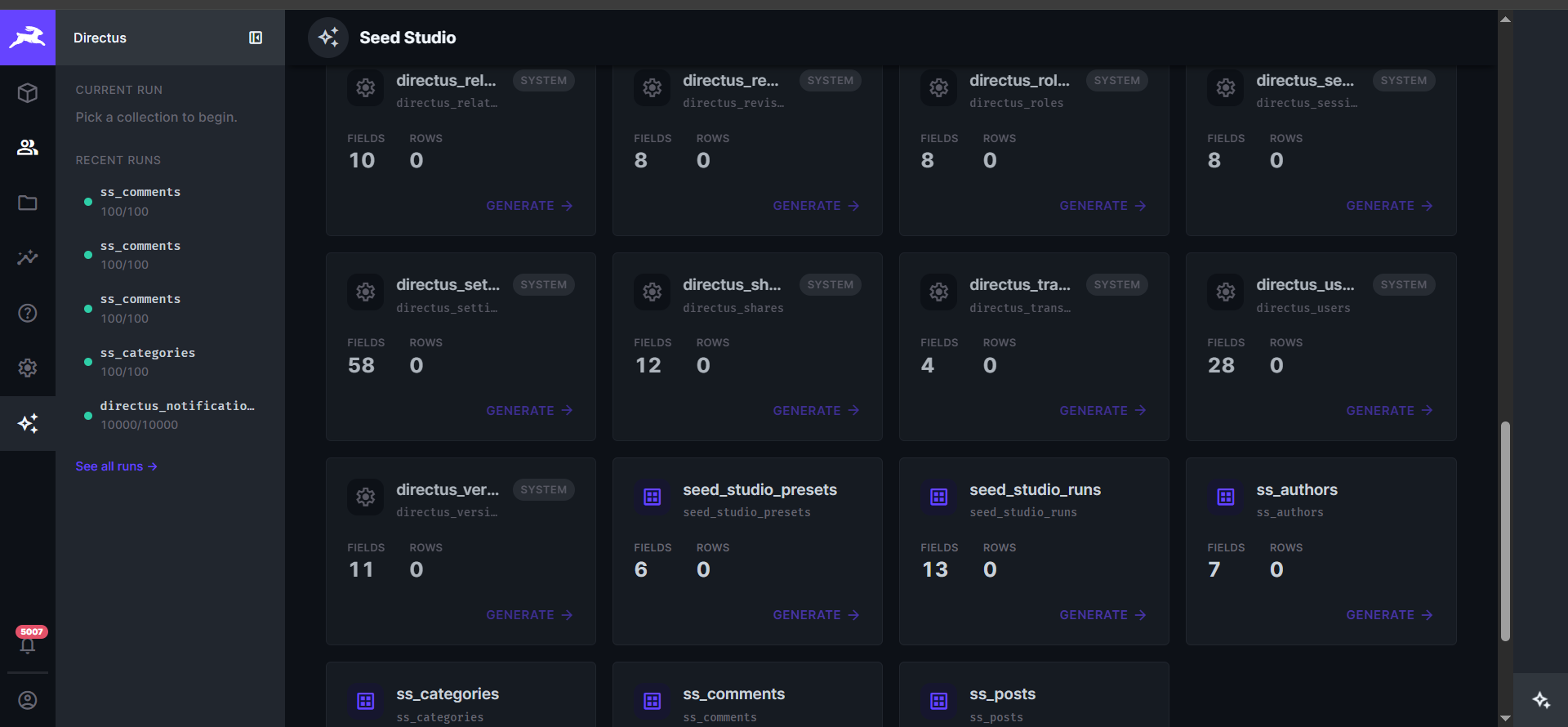
Toggle the System checkbox to also seed into Directus system collections (directus_notifications, directus_activity, directus_users, etc.) — the detector ships with per-field rules for each.
Not every system table is a legal target. Directus exposes all 33 of them through the same ItemsService as your own content, but most are the schema itself, auth state, or the migration ledger — Faker output there corrupts the instance rather than filling it. directus_migrations is the sharpest example: bogus rows convince Directus that migrations already ran, so the next upgrade silently skips them. Seed Studio therefore allowlists rather than blocklists:
| | Collections | Why |
|---|---|---|
| Seedable | users, files, folders, comments, notifications, activity, translations, dashboards, panels, presets, roles, flows, operations | Genuinely hold data |
| Blocked — schema | collections, fields, relations, migrations, extensions, settings, revisions, versions | The data model and its history |
| Blocked — security | sessions, access, permissions, policies, shares, oauth_* | Credentials and access rules |
| Blocked — platform | deployments, deployment_projects, deployment_runs, webhooks | Written by the platform, or fire real side effects |
Blocked collections are shown in the grid rather than hidden, dimmed and unselectable with the reason spelled out — a deliberate refusal is more useful than an absence. Some seedable ones carry a caveat instead of a block: directus_files generates metadata with no bytes behind it, so previews 404, and directus_activity is an append-only audit log you cannot un-pollute.
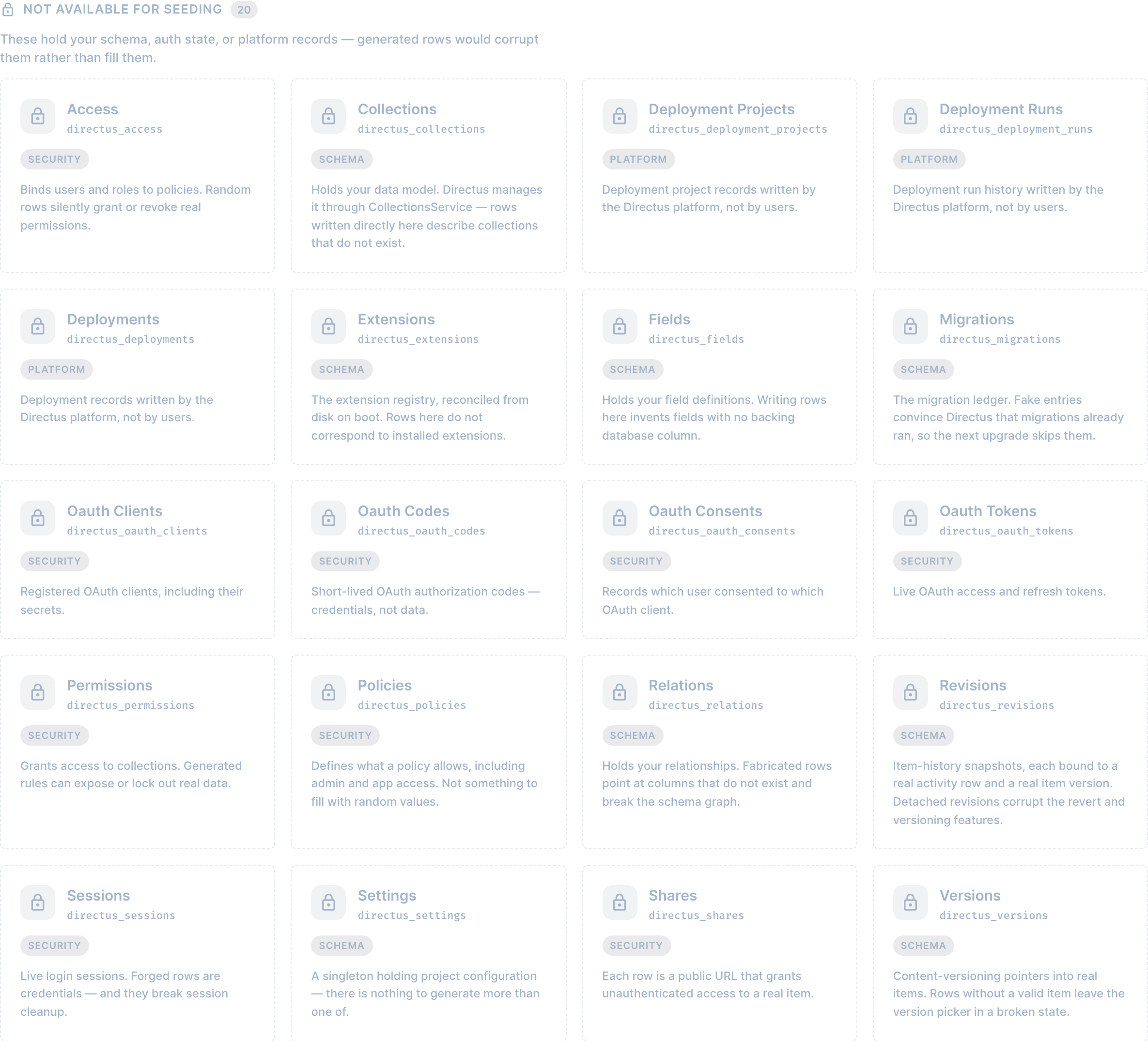
An unrecognised directus_* table is blocked by default. New Directus releases add system collections, and failing closed means a new version cannot turn into a data-corruption bug before someone classifies it.
Seed Studio's own seed_studio_runs and seed_studio_presets never appear at all, on any route: generating into them would forge the audit trail Undo reads back.
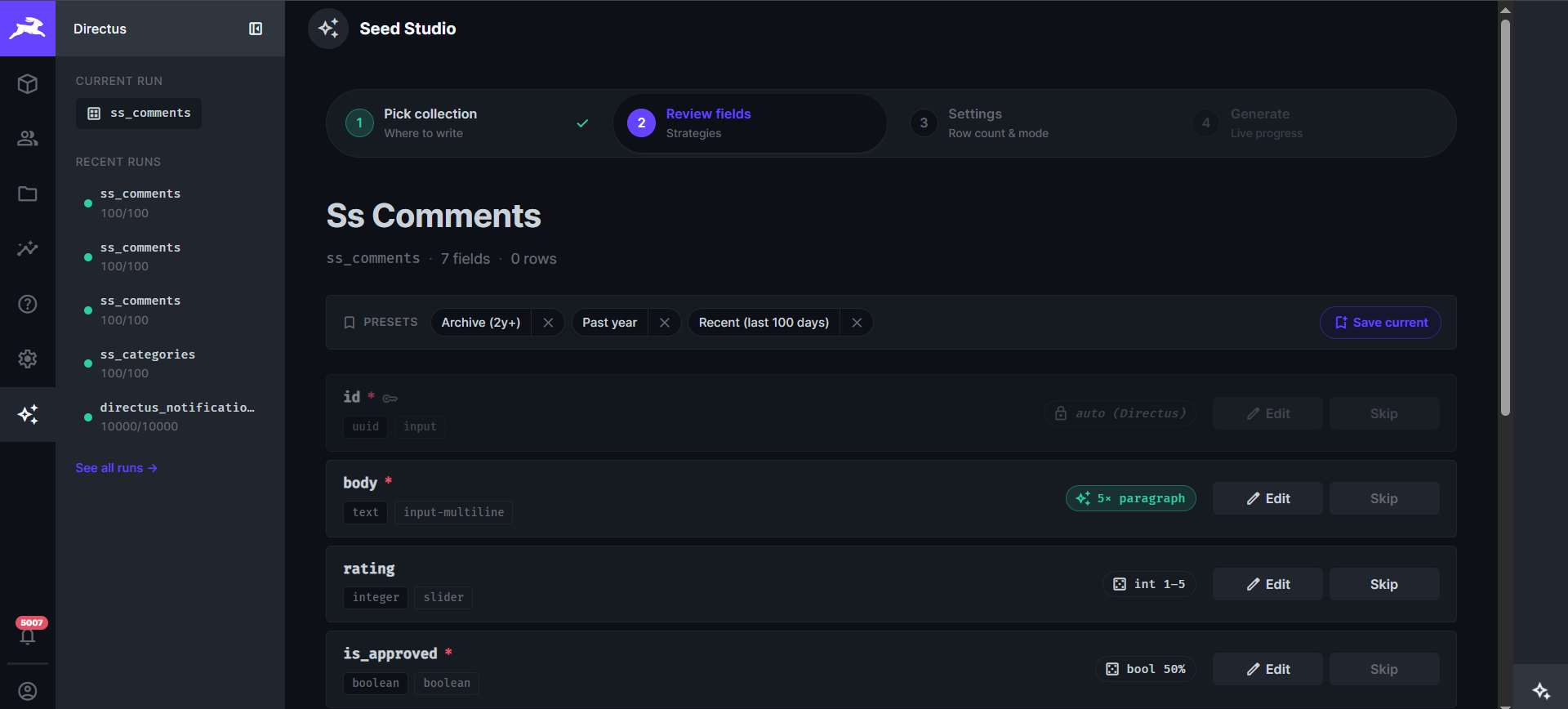
2 · Review strategies & save presets
Every field is shown with its auto-detected strategy badge — color-coded by family (faker / relation / random / system / built). Edit per-field, skip, or save the whole map as a named preset for re-use.
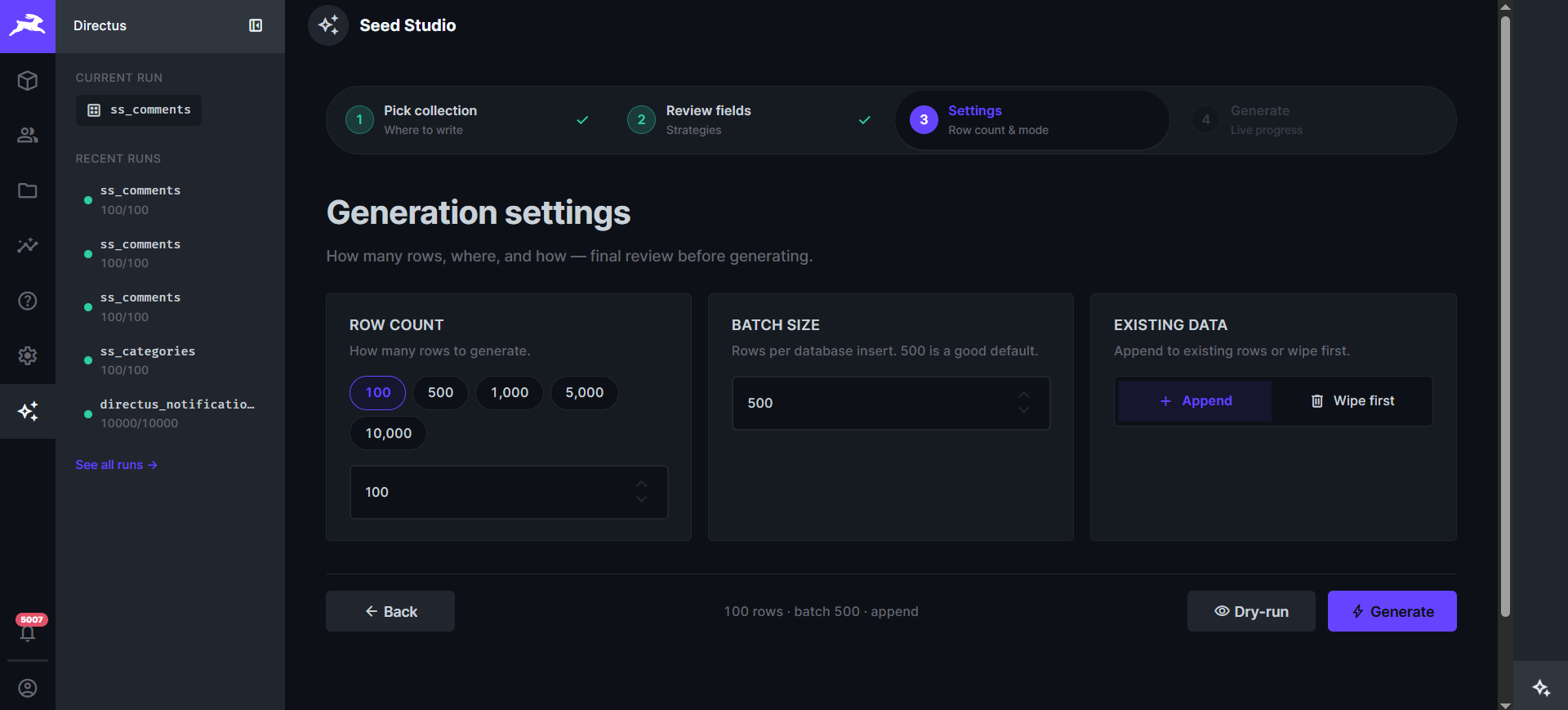
3 · Generation settings
Quick-pick row counts (100 / 500 / 1k / 5k / 10k), custom batch size, and append-vs-wipe mode with a typed confirmation dialog — plus realism toggles (coherent rows, invariants, realistic empties, conditional fields), the run seed and locale, and the write mode. Pre-flight warnings appear here: flows that would fire per row, revision volume, and parent collections that still need rows.
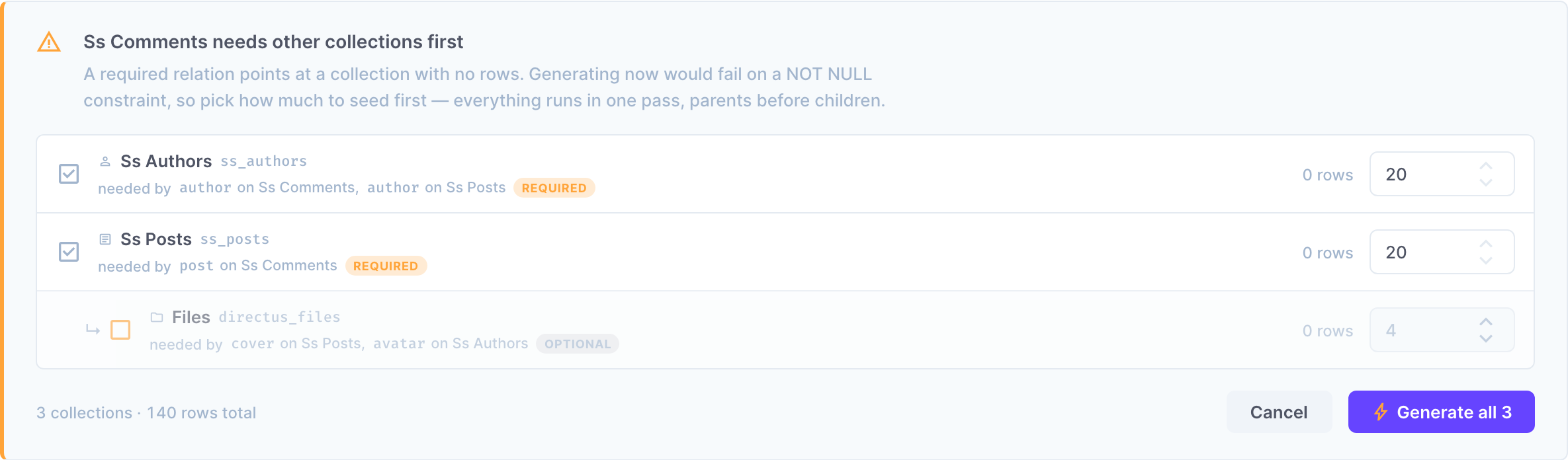
Dependency preflight. Seeding comments before posts cannot work: a required many-to-one has nothing to point at, and a nullable one quietly fills the column with nulls. Before you press Generate, Seed Studio walks the target's ancestry, counts rows in every parent, and reports what is missing:
- A required parent with no rows blocks the run. Each one is listed with the field that demands it and an editable row count, defaulting to roughly five children per parent. Tick what to include and the whole thing runs as one relation-ordered project run —
authors → posts → comments, parents always written first. - A nullable parent with no rows only warns, because the default answer for an optional relation is to leave it null. You can opt into filling it from the same panel.
- A required parent that Seed Studio refuses to write to (a blocked system table) is reported as unresolvable, with the reason — nothing the panel offers can fix it, so it says so instead of pretending.
The walk is transitive and deduplicated: it stops descending as soon as a parent already has rows, and a collection demanded by several fields (posts.cover and authors.avatar both need directus_files) appears once, since the decision belongs to the collection.
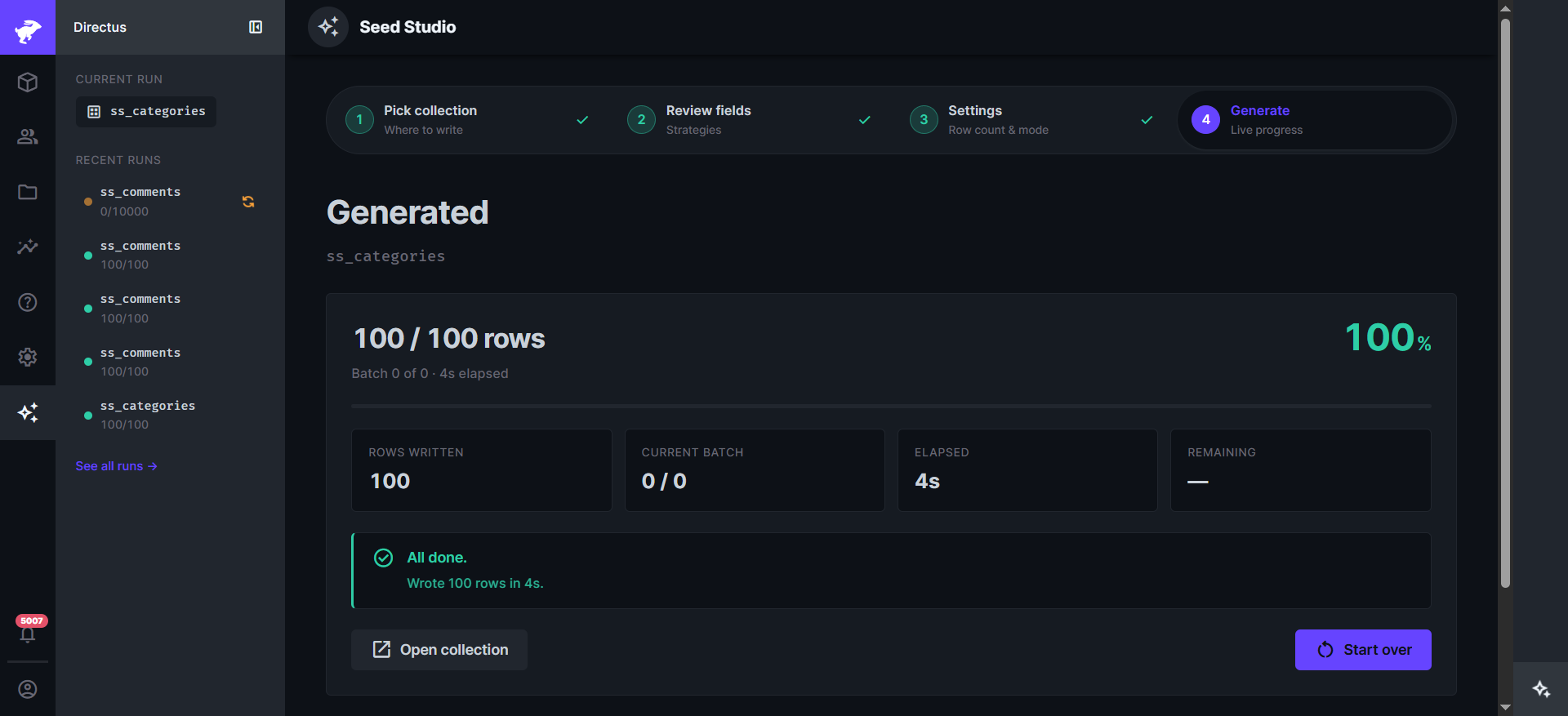
4 · Live progress
Server-Sent Events stream the live progress — rows written, current batch, elapsed time, ETA. Refresh-safe: leave the page mid-run, come back, the wizard auto-resumes.
Installation
Install via the Directus Marketplace, or via npm:
npm install directus-extension-seed-studioRestart Directus. The Seed Studio module will appear in the admin sidebar for any user with admin access.
Usage
- Open the Seed Studio module in the sidebar.
- Pick a collection.
- Review the auto-detected strategy for every field. Click the edit icon next to any row to override it; click Preview to see three sample values.
- Pick a row count (chips: 100 / 500 / 1,000 / 5,000 / 10,000, or custom).
- Choose Append or Wipe first (requires typing the collection name to confirm).
- Optional: toggle Dry-run preview to see 10 sample rows without writing.
- Click Generate and watch the progress bar fill.
Field name heuristics
| Name pattern (contains, case-insensitive) | Strategy |
|---|---|
| email | faker.internet.email() |
| phone, mobile, tel | faker.phone.number() |
| first_name, firstname, given_name | faker.person.firstName() |
| last_name, lastname, surname, family_name | faker.person.lastName() |
| full_name, name (exact) | faker.person.fullName() |
| username, handle | faker.internet.userName() |
| password | faker.internet.password() |
| url, website, homepage | faker.internet.url() |
| domain | faker.internet.domainName() |
| slug | derived from the row's title, suffixed to stay unique |
| title | the row entity's title (a person's name in users, a product name in products, …) |
| headline | faker.lorem.sentence() |
| description, summary, excerpt | faker.lorem.paragraph() |
| body, content, article | structured Markdown or HTML for rich-text interfaces, paragraphs otherwise |
| address, street | faker.location.streetAddress() |
| city | faker.location.city() |
| country | faker.location.country() |
| state, region, province | faker.location.state() |
| zip, postcode, postal_code | faker.location.zipCode() |
| lat, latitude | faker.location.latitude() |
| lng, lon, longitude | faker.location.longitude() |
| company, organization, org | faker.company.name() |
| job, role, position | faker.person.jobTitle() |
| price, amount, cost, total | float 1.00 – 1000.00 |
| quantity, qty, count, stock | int 0 – 1000 |
| age | int 18 – 80 |
| bio, about, profile | faker.person.bio() |
When the field name matches none of these, Seed Studio falls back to the interface, then to the type.
Strategy types
| Kind | What it does |
|---|---|
| system | Directus handles the value (id, date_created, etc.) |
| skip | Field is omitted from generated rows |
| null | Always emits null |
| fixed | Same hard-coded value every row |
| faker | Calls a @faker-js/faker method by path (allowlist enforced) |
| random_choice | Picks from a list |
| random_int | Integer in [min, max] |
| random_float | Float with fraction digits |
| random_date | Random date in [-daysBack, +daysForward] |
| random_boolean | Boolean with probability of true |
| uuid | crypto.randomUUID() |
| sequence | Pattern like INV-{0000} — index-based, zero-padded |
| m2o_random | Picks a random existing parent row |
| file_reuse | Picks a random existing file from directus_files |
| lorem_paragraphs | N paragraphs of lorem ipsum |
| coherent | Reads a trait from the row's shared entity (person.firstName, contact.email, commerce.price, …) |
| template | Mini DSL: {{person.firstName}}, {{row.title \| slug}}, {{pick(a,b,c)}}, {{int(1,5)}}, {{seq \| pad:5}} |
| weighted_choice | Picks from value:weight pairs, so common states dominate |
| regex | Generates a value matching a pattern (^INV-[0-9]{5}$) |
| geometry | GeoJSON matching the column's geometry type, inside a bounding box |
| markdown / html | Rich-text body with headings, lists and quotes |
| m2m_random | Writes junction rows linking each new parent to N related rows |
Every strategy also accepts a nullRate, the share of rows left empty (ignored for required fields).
All produced values are post-processed against the field's max_length, numeric range, decimal scale, validation rules, and is_unique constraint. Uniqueness is resolved by shape rather than by blind suffixing: emails keep a valid local part, numbers increment, and existing values in the table are pre-loaded so generated rows cannot collide with real ones.
The template DSL
{{person.firstName}} <{{contact.email}}>     entity traits — coherent within the row
{{row.title | slug}}                          another field of the same row
{{faker.commerce.productName}}                any faker <module>.<method>
{{pick(draft,published,archived)}}            inline choice
{{int(1,5)}}  {{float(1,99,2)}}  {{uuid}}     helpers
INV-{{seq | pad:5}}                           row number, 1-based, zero-padded
Filters: upper, lower, title, slug, trim, truncate:N, pad:N, initials.
This is not an eval. The only callables reachable from a template are faker modules on an allowlist, and path traversal is rejected — a template arriving in a request body cannot reach the JS runtime.
Audit collections
Seed Studio creates two collections on first use. Both are created hidden, so they stay out of your content sidebar; an install from an earlier version is hidden in place on the next boot. They are still browsable under Settings › Data Model if you want the raw rows, and they are never offered as a seed target.
seed_studio_runs
| Field | Type | Notes |
|---|---|---|
| id | uuid PK | |
| collection | string | which collection was generated |
| row_count_requested | integer | |
| row_count_written | integer | |
| dry_run | boolean | |
| wipe_first | boolean | |
| strategies | json | snapshot of strategies used |
| status | string | running / success / failed / cancelled / undone |
| error_message | text | populated on failure |
| duration_ms | integer | |
| started_at | timestamp | |
| completed_at | timestamp | |
| seed | bigInteger | re-run with this to reproduce the exact rows |
| options | json | seed, locale, coherence, write mode |
| created_ids | json | primary keys written — what Undo deletes |
| undoable | boolean | false once undone, or if the id list was capped |
| user_created | uuid | |
Both collections are created on the first write — opening the module to browse a schema does not touch your data model. An install from an earlier version has the newer columns added automatically.
seed_studio_presets
| Field | Type | Notes |
|---|---|---|
| id | uuid PK | |
| name | string | user-given preset name |
| collection | string | target collection |
| strategies | json | strategy map keyed by field name |
| options | json | run options saved with the preset |
| user_created | uuid | |
| date_created | timestamp | |
API endpoints
All routes are admin-only. Non-admins receive 403.
| Method | Path | Purpose |
|---|---|---|
| GET | /seed-studio/capabilities | What this engine can do (the app feature-detects on it) |
| GET | /seed-studio/collections | List collections with row counts |
| GET | /seed-studio/schema/:collection | Schema + auto-strategies, each with its reason |
| GET | /seed-studio/insights/:collection?count=N | Flows that would fire, revision volume, dependencies, production check |
| GET | /seed-studio/profile/:collection?sample=N | Learn strategies from the rows already there |
| GET | /seed-studio/preflight/:collection?count=N | Which parents are empty, and what to seed first |
| POST | /seed-studio/preview | Dry run — rows, plus what Directus would reject |
| POST | /seed-studio/generate | Start a generation run |
| POST | /seed-studio/generate/:runId/cancel | Stop a running generation |
| GET | /seed-studio/generate/:runId/progress | SSE progress stream |
| POST | /seed-studio/project/plan | Topological order + suggested row counts |
| POST | /seed-studio/project/run | Seed several collections in dependency order |
| GET | /seed-studio/presets/:collection | List presets |
| POST | /seed-studio/presets | Save a preset |
| DELETE | /seed-studio/presets/:id | Delete a preset |
| GET | /seed-studio/runs | List recent runs |
| POST | /seed-studio/runs/:id/undo | Delete exactly the rows a run created |
| GET | /seed-studio/faker-methods | Curated faker methods + locales |
POST /generate requires confirm: "<collection>" whenever wipeFirst is set — the guard lives in the engine, so every caller inherits it.
generate, preview, project/plan and project/run all reject a collection that is not a legal seed target with 400 and the reason, so the refusal does not depend on the UI honouring it.
Collection names and icons
Every collection the module renders is named and iconed the way Directus itself
would. The app's collections store already resolves both — it merges
meta.translations into i18n per locale, prefers a collection_names.<key>
translation where one exists, and falls back to formatTitle on the key — so
useCollectionName() reads that through useStores() rather than title-casing
the key locally. Renaming a collection in Directus, or translating it, is
reflected here for free, and each card carries the collection's real icon
instead of a generic one.
Two deliberate exceptions:
- The key is still shown, in monospace beside or beneath the name. A run
writes to
ss_authors, not to "Ss Authors", and the panel has to be precise about which table it means. - The wipe confirmation asks for the key, because that is the string you type to confirm.
For system tables the store has no collection_names.* entry, so its name is
just formatTitle('directus_files') — "Directus Files". The prefix is dropped,
since the list already tags those rows as system and prints the key underneath.
The endpoint keeps its own resolveDisplayName for the server side, where no
store exists, and it remains the fallback in the app.
Architecture
src/core/      the engine — no Node, no express, no faker import, no @directus/* runtime
src/endpoint/  API extension: ItemsService adapter + routes + SSE + run history
src/module/    admin app: REST adapter (the in-browser engine) + wizard UI
The engine talks to Directus only through the SeedDataSource interface, which is why the same code runs on the server and in the browser — and why the whole generator (batching, relation pools, uniqueness, junctions, undo) is testable against an in-memory data source with no database.
Permissions
Seed Studio is admin-only by design — the module hides itself for non-admins and every endpoint route returns 403 unless accountability.admin === true. This is a developer/admin tool: it can wipe data and generate at scale. Never grant access to a non-admin.
Compatibility
- Directus
^11.0.0 || ^12.0.0 - Node.js
>= 20 - Postgres, MySQL/MariaDB, or SQLite
Local development
This project uses pnpm as the package manager and ships a docker-compose.yml for one-command end-to-end testing.
git clone https://github.com/khanahmad4527/directus-extension-seed-studio.git
cd directus-extension-seed-studio
pnpm install
pnpm build            # produces dist/api.js + dist/app.js
pnpm dev              # watch + rebuild on change
Run with Docker (recommended)
pnpm build            # build once so dist/ exists
docker compose up     # starts Postgres + Redis + Directus + seeds test data
Open http://localhost:8055, log in with [email protected] / d1r3ctu5. The seed service creates four UUID-PK collections with M2O relations for you to try Seed Studio against:
ss_authors(id, name, email, bio, avatar → directus_files)ss_categories(id, name, slug)ss_posts(id, title, slug, content, status, author → ss_authors, category → ss_categories, cover → directus_files)ss_comments(id, body, rating, post → ss_posts, author → ss_authors)
All primary keys and every foreign key are uuid.
Stop and reset:
docker compose down -v       # also drops the database volume
rm -rf data                  # removes uploads + Postgres data on the host
Tests
pnpm test          # 232 tests, no database required
npx tsc --noEmit   # typecheck
The engine is driven through SeedDataSource, so tests use an in-memory implementation (test/helpers.ts) and cover the parts that are easy to get quietly wrong: reproducibility across batch sizes, alias fields never being written, uniqueness that keeps emails valid, validation ASTs, conditional fields, junction writes, cycle breaking, and the wipe guard.
Compatibility notes
- Directus
^11.0.0and^12.skipTracking(Directus 12) is passed when present; on Directus 11 fast write drops accountability instead, which has the same effect on activity and revisions. - Directus Cloud: install the module and use the in-browser engine, or self-host with
MARKETPLACE_TRUST=allfor the API engine. directus_filesrows generated here describe files that do not exist in storage — thumbnails and downloads will 404. Seed Studio warns before you do it.- Generated
directus_userscan sign in with the placeholder password and count toward user limits.
Roadmap
Next
- Real placeholder images via
FilesService.importOneinstead of metadata-only file rows - Translations (
special: ['translations']) generated per language, with locale-matched content - M2A junction generation, and o2m children written per parent
- Preset import/export as a committed JSON file, plus a Flow operation and
inithook so CI can seed - Post-run quality report: null rates, duplicate rates, FK coverage
Later
- Pre-built schema + seed templates (blog, e-commerce, CRM)
- Opt-in LLM strategy suggestions (schema names only, never row data), cached as a preset
License
MIT © Ahmad Khan
Author
Ahmad Khan — GitHub