
directus-extension-typograf
v1.0.0
Published
Apply typography rules to text fields with support for 27 languages

Maintainers
 antonko
Readme
Directus Extension Typograf
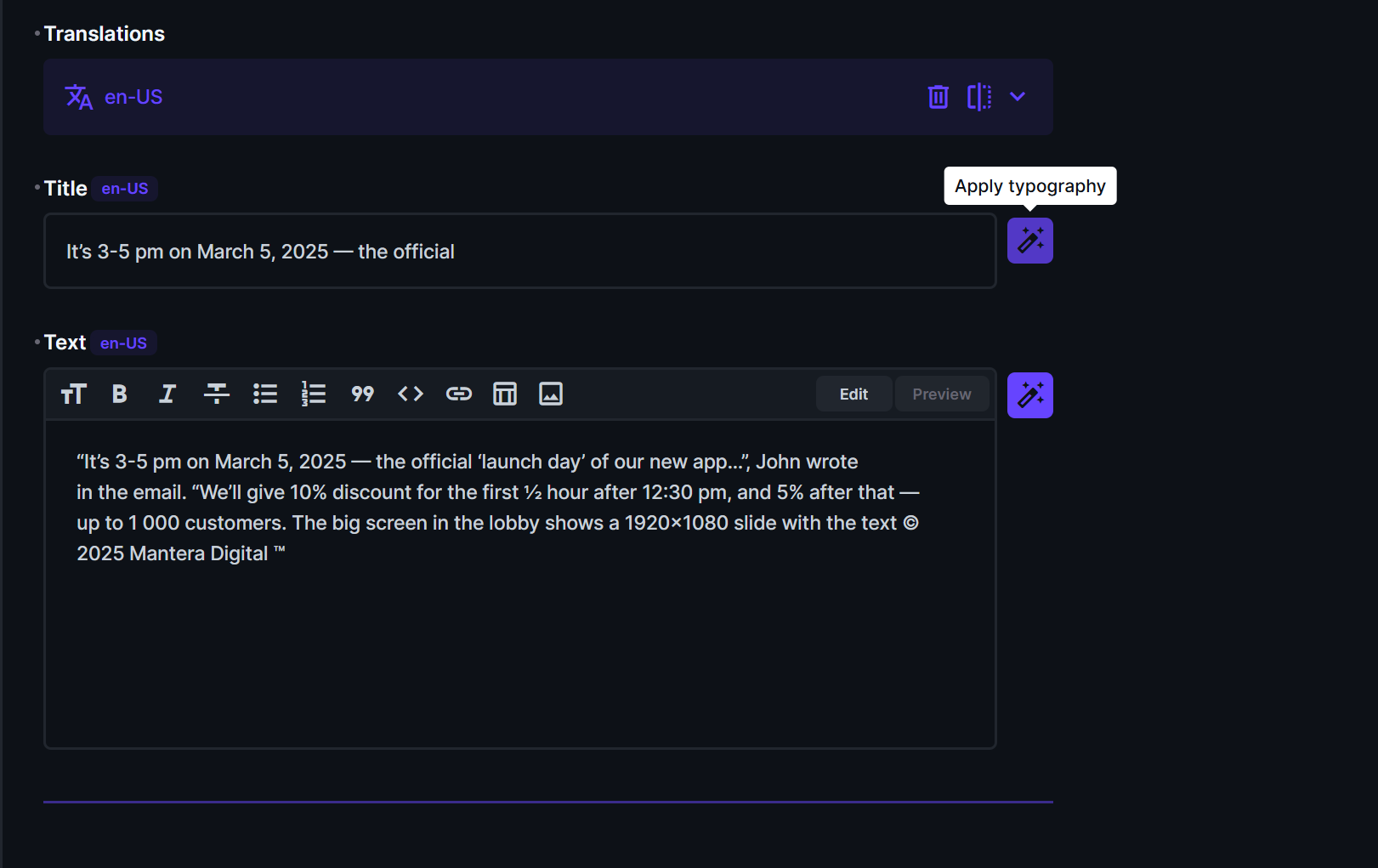
A custom interface for Directus CMS that adds a text field with a typography button. Applies language-specific typography rules using the typograf library.
Installation
Search for "typograf" in Settings → Extensions → Marketplace.
Or install manually:
npm install directus-extension-typografFeatures
- 4 Editor Types: Input, Textarea, WYSIWYG (HTML), Markdown
- 27 Languages: Full typography support for multiple languages
- Auto Language Detection: Automatically detects language from the
languages_codefield in translations - Safe Processing: Preserves HTML and Markdown structure during typographing
- Smart Constraints: Only Input is available for
stringfields; all editors fortextfields
What It Does
- Replaces straight quotes with language-appropriate quotation marks (e.g., «ёлочки» for Russian, "curly quotes" for English)
- Converts hyphens to proper dashes where needed
- Adds non-breaking spaces after short words
- Fixes multiple consecutive spaces
- And many more language-specific typography rules
Supported Languages
| Language | Code | Language | Code |
| ------------ | ------- | --------- | ---- |
| Belarusian | be | Italian | it |
| Bulgarian | bg | Latvian | lv |
| Catalan | ca | Dutch | nl |
| Czech | cs | Norwegian | no |
| Danish | da | Polish | pl |
| German | de | Romanian | ro |
| Greek | el | Russian | ru |
| English (UK) | en-GB | Serbian | sr |
| English (US) | en-US | Slovak | sk |
| Esperanto | eo | Slovenian | sl |
| Spanish | es | Swedish | sv |
| Estonian | et | Turkish | tr |
| Finnish | fi | Ukrainian | uk |
| French | fr | | |
| Hungarian | hu | | |
| Irish | ga | | |
Usage
- Go to your collection settings in Directus Admin
- Create or edit a field of type
stringortext - Select Typograf Input as the interface
- Configure options:
- Editor Type: Input / Textarea / WYSIWYG / Markdown
- Locale: Auto (from translations) or select a specific language
- Placeholder: Optional hint text
- When editing an item, click the typography button to apply rules
Note: For
string(VARCHAR) fields, only single-line Input is available. Fortext(TEXT) fields, all editor types are available.
Development
Requirements
- Node.js 18+
- Docker + Docker Compose
Running Locally
- Start Directus in Docker:
docker compose up- In a separate terminal, start extension dev mode:
cd extensions/directus-extension-typograf
npm run dev- Open Directus: http://localhost:8055
Building
cd extensions/directus-extension-typograf
npm run build
Technologies
- Directus 11.5.1
- Vue 3 (Composition API)
- TypeScript
- typograf 7.6.0
License
Apache-2.0