
dirextalk-deployer
v0.1.94
Published
Versioned Dirextalk deployer agent skill and portable deployment orchestration tools.
Downloads
574


Readme
Dirextalk Deployer
dirextalk-deployer deploys a production Dirextalk message server and wires the local agent room through Dirextalk's Matrix bridge. The supported local bridge is dirextalk-connect, installed per service from the npm package dirextalk-connect@latest by default or built from YingSuiAI/dirextalk-connect. MCP capability is declared separately from bridge-agent support; S6 writes the canonical remote HTTP MCP description and never assumes that every bridge agent can consume it.
Platform Architecture
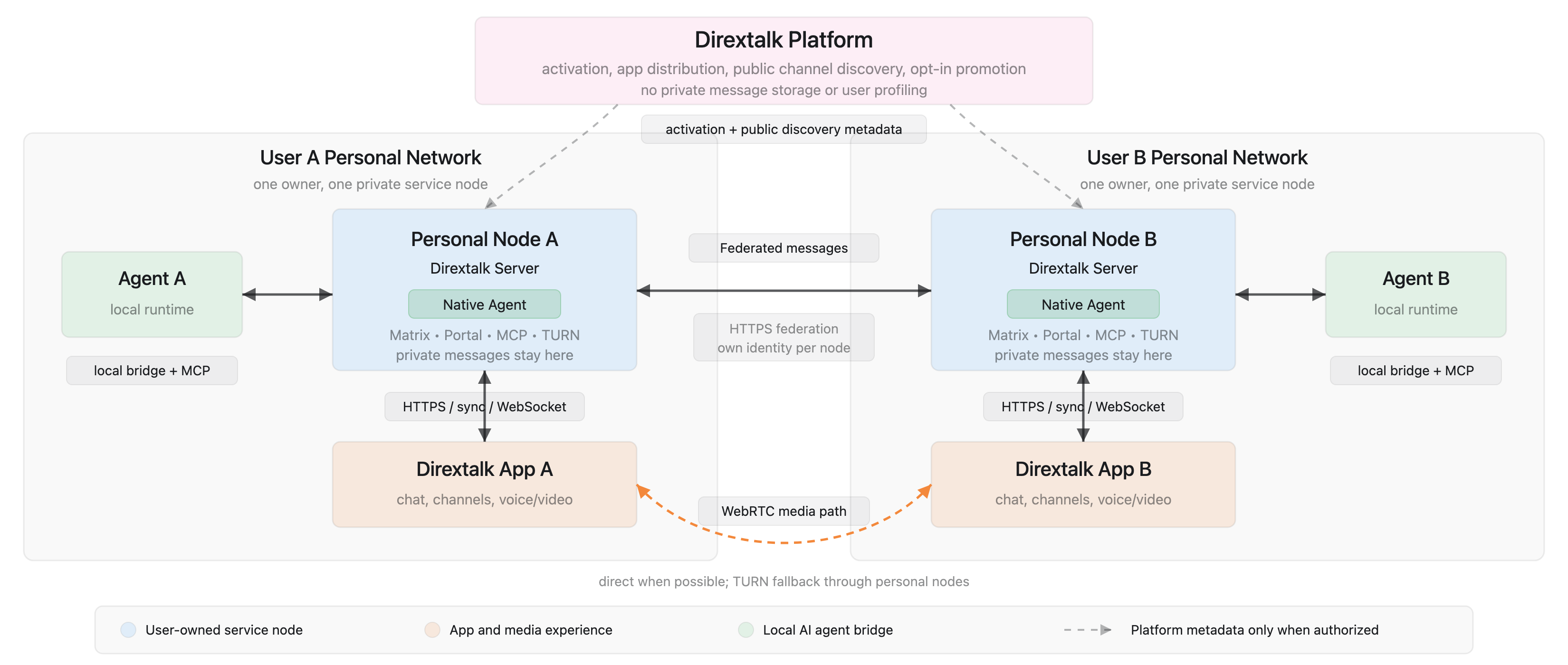
Contents
SKILL.md: Agent entrypoint, confirmation rules, deployment/destroy flow, and delivery format.scripts/: State machine, AWS Lightsail/EC2/DNS/user-data/verification/destroy scripts.references/: Tooling, deployment resume flow, dirextalk-connect wiring, state machine, architecture, troubleshooting, and recovery notes.agents/: Runtime metadata and recognition notes for agent hosts.assets/: README diagrams and other published documentation assets.
Web Deployment Console
The Dirextalk web deployment console provides a browser workflow for backend-only AWS deployment. It provisions, resumes, verifies, and destroys the cloud message-server resources, but it does not install or configure dirextalk-connect or link any agent on your local machine.
For local agent-room wiring, use this npm-installed dirextalk-deployer skill instead. Visit dirextalk.ai for the product website.
Before Deployment
- Prepare an AWS account, an AWS access key CSV or profile, and a real long-lived domain or subdomain. The deployer automatically uses Route53 when the current AWS account has a matching public hosted zone; otherwise it asks for an external A record only after allocating the fixed public IP.
- AWS resources created by this deployer can bill until they are destroyed. New deployments prefer the Lightsail $12/month Linux bundle by default. Users who have not used Lightsail generally receive three months of free Lightsail usage. New AWS customer accounts generally receive 100-200 USD in free credits. AWS official real-time policy prevails. If no region is configured, the deployer recommends a default AWS region from the local timezone and uses it in non-interactive runs; set
AWS_DEFAULT_REGION,AWS_REGION, AWS profile region, orDIREXTALK_DEFAULT_REGIONto override. S1 checks Lightsail bundle and availability-zone availability before confirmation; for manual zone checks, useaws lightsail get-regions --include-availability-zones --output jsonbecause plainget-regionscan omit zone details. If Lightsail has no usable resource in the selected region, S1 does not automatically switch to EC2; it records an EC2 estimate and waits for the operator to choose another Lightsail-capable region/zone or explicitly setDIREXTALK_CLOUD_PROVIDER=ec2. EC2 uses a 50 GiB gp3 root EBS volume by default. - Use
SKILL.mdas the agent-facing runbook. It contains the detailed deployment rules, confirmation gates, runtime wiring behavior, and recovery procedures.
Skill Installation And Updates
Install the deployer skill from npm, then place it into the current agent runtime's skill directory. The default install is global for the selected agent runtime. Use a project-local install only when you explicitly want the skill copied into a specific repository or workspace.
On Windows, open Git Bash before installing or refreshing the skill and run this preflight before npm writes anything:
case "$(uname -s)" in
  MINGW*) git_root=$(git --exec-path 2>/dev/null | sed 's#/mingw64/libexec/git-core$##'); command -v git >/dev/null && command -v cygpath >/dev/null && git --version | grep -q '\.windows\.' && [ -n "$git_root" ] && [ "$(cygpath -m "${EXEPATH:-}" | tr '[:upper:]' '[:lower:]')" = "$(printf '%s/bin' "$git_root" | tr '[:upper:]' '[:lower:]')" ] ;;
  Linux*|Darwin*) true ;;
  *) false ;;
esac
If it fails, install Git for Windows from https://git-scm.com/download/win, reopen Git Bash, and stop. This Windows-only gate deliberately rejects PowerShell, MSYS2, and Cygwin; native WSL is treated as Linux and uses its own Bash and POSIX paths. The skill CLI performs the same platform check before it can copy a skill.
The GitHub repository keeps tests for maintainers and CI, but the published npm package and installed skill copy exclude tests/ to keep user installs small.
For normal users, the GitHub repository is documentation and source code, not the skill installation path. Do not clone YingSuiAI/dirextalk-deployer just to install or use the skill. Clone this repository only for deployer development, local patching, or an explicitly requested project-local install.
If you want Codex to install and deploy in one instruction, do not say "install skills " or "install this GitHub repo as a skill". That can trigger GitHub skill installation, repository cloning, or a project-local copy instead of the npm-managed installer. Use a short instruction that gives the repository address for reading only and tells the agent to follow the README's npm install rule:
Read https://github.com/YingSuiAI/dirextalk-deployer README and follow its npm install rule, then deploy Dirextalk with domain __DOMAIN__.After reading this instruction, the agent should run the npm install commands below; it should not switch to a GitHub skill installer.
If Codex already lists dirextalk-deployer in its available skills, ask it to use that installed skill directly. If it does not, install or refresh it first:
All supported hosts use Bash. On native Windows, install Git for Windows, open Git Bash, and run the same commands. Native WSL runs them directly as Linux:
npm install -g dirextalk-deployer@latest
dirextalk-deployer skill install --agent codex
Update the installed skill with the same host runtime:
npm install -g dirextalk-deployer@latest
dirextalk-deployer skill update --agent codex
Use the matching agent name for your runtime: codex, claudecode, gemini, cursor, copilot, openclaw, hermes, opencode, qoder, reasonix, or another target listed in references/agent-targets.md. Add --scope project --project <path> only when you intentionally want a repository-local skill install:
dirextalk-deployer skill install --agent codex --scope project --project .The installer writes .dirextalk-skill-install.json into the target directory and refuses to overwrite unmanaged existing content unless --force is provided. Use @latest for normal installs and updates:
npm install -g dirextalk-deployer@latest
dirextalk-deployer skill update --agent codex
The CLI is implemented in Node and uses native paths for the host it runs on. On Windows, run it from Git Bash; it writes Windows-compatible C:/... paths for Windows-native consumers. Linux, macOS, and native WSL use their own Bash and POSIX paths.
Minimal Command
Before importing credentials, answer:
- Do you already have an AWS account? If not, register at AWS, complete email/phone verification, add a billing card, choose the Basic support plan, wait for activation, then create an AWS Budget or billing alert.
- Do you already have a domain or subdomain you control? If not, register or prepare one first. Do not ask where its DNS is managed: the deployer checks the current AWS account for a matching public Route53 hosted zone. When none exists, it continues with external DNS and prints the required A record after the fixed public IP is allocated.
Import and verify an AWS deployment profile from an AWS CSV. Root access keys
are the fastest first-deploy path but are highly privileged; save the CSV
securely and rotate or delete the key after deployment. A temporary
DirextalkDeployer IAM user is safer but takes more AWS console steps:
bash scripts/aws-credentials.sh import-csv /path/to/accessKeys.csv dirextalk-deployer us-east-1
export AWS_PROFILE=dirextalk-deployer
bash scripts/aws-credentials.sh verify dirextalk-deployer
Run from the repository root:
bash scripts/pricing-estimate.sh \
  --region us-east-1 \
  --cloud-provider lightsail \
  --domain-mode route53
AWS_DEFAULT_REGION=us-east-1 \
DOMAIN=__DOMAIN__ \
CONFIRM_DOMAIN_BINDING=1 \
bash scripts/orchestrate.shNormal deployment uses the deployer-owned production split release. Each fresh
deployment discovers Message Server and Agent through Docker Hub latest,
verifies the corresponding stable vX.Y.Z tag, source revision, and
linux/amd64 manifest digest, then atomically freezes both application snapshots
in state.json before infrastructure creation. Retry/resume reuses that
snapshot, while an existing node keeps its recorded application releases.
PostgreSQL/pgvector, Caddy, coturn, and the canonical split bundle remain fixed
Deployer-owned inputs.
The packaged canonical runtime bundle starts message-server, the external Agent,
one PostgreSQL/pgvector container with isolated Message Server and Agent roles
and databases, extension/core runners, and a separate Caddy
edge project. It verifies Message Server first and then starts the isolated
Agent path; Agent attention does not take healthy messaging or bootstrap export
offline. Agent updates and recovery preserve the exact receipt-bound Message
Server container and repair runner cgroup delegation before any Agent-only
restart. The target host never clones either source repository. The host updater is a separate
dirextalk-updater Release:
the supported Ubuntu 24.04+ x86_64 host with systemd >= 254 downloads the deployer-pinned updater asset and
verifies the deployer-pinned SHA-256 before atomic installation. The local
machine does not need Go, and S3 never copies an updater binary over SSH.
The updater remains independently pinned and checksum-verified. Fresh nodes
install its root-owned control plane with the resident watchdog disabled by
default; authorized direct jobs and their job-owned recovery remain available.
New direct version upgrades do not install a daily GitHub discovery timer; an
update is created only when an authorized client requests the current central
target.
DIREXTALK_CLOUD_PROVIDER=lightsail is optional because Lightsail is the default. To use the retained EC2 path instead, add DIREXTALK_CLOUD_PROVIDER=ec2. EC2 accepts INSTANCE_TYPE=t3.small or a larger explicit type and still uses a 50 GiB gp3 root EBS volume by default. If Lightsail is the default and S1 finds no usable Lightsail bundle or availability zone in the selected region, S1 records an EC2 cost estimate but does not automatically switch to EC2; choose another Lightsail-capable region/zone or explicitly rerun with DIREXTALK_CLOUD_PROVIDER=ec2. If no region is configured, non-interactive runs use the local-timezone recommendation; override it with DIREXTALK_DEFAULT_REGION or the standard AWS region settings. Let S1 auto-detect Lightsail availability unless you are debugging AWS directly; the safe manual command is aws lightsail get-regions --include-availability-zones --output json.
On native Windows, install Git for Windows, open Git Bash, and use the same commands as Linux/macOS. Run the Git Bash preflight in Skill Installation And Updates before any lifecycle command; if it fails, install Git from https://git-scm.com/download/win and reopen Git Bash. Native WSL is supported as Linux, but a service directory must stay owned by one environment: do not switch a Git-Bash-owned service directory into WSL or a WSL-owned directory into Windows tooling.
export AWS_DEFAULT_REGION=us-east-1
export DOMAIN=__DOMAIN__
export CONFIRM_DOMAIN_BINDING=1
export DIREXTALK_CLOUD_PROVIDER=lightsail
bash scripts/orchestrate.sh
Recommendation-only local bridge and MCP wiring:
DIREXTALK_AGENT_INSTALL=recommend bash scripts/orchestrate.shAutomatic local bridge and MCP install is the default. Set runtime selectors only when auto-detection is ambiguous:
DIREXTALK_AGENT_PLATFORM=auto \
DIREXTALK_CONNECT_AGENT=claudecode \
DIREXTALK_AGENT_INSTALL_MODE=recommended \
bash scripts/orchestrate.sh
Supported install modes: recommended and dirextalk-connect.
If DIREXTALK_AGENT_PLATFORM=auto cannot identify a single supported runtime, set DIREXTALK_CONNECT_AGENT explicitly. S6 writes mode = "yolo" by default for generated agent options; an explicit mode in DIREXTALK_CONNECT_AGENT_OPTIONS_TOML or DIREXTALK_CURSOR_MODE still overrides it. Cursor wiring uses Cursor Agent CLI: on POSIX S6 resolves the official agent command to an absolute executable path, while Windows uses %LOCALAPPDATA%\cursor-agent\agent.cmd. If the Cursor Agent CLI is not logged in, run the resolved command with login once, then rerun the deployer. OpenCode wiring searches opencode on PATH and the global opencode-ai npm package, or accepts DIREXTALK_OPENCODE_COMMAND. An active OpenClaw or Hermes host owns MCP even when it launches Codex or another child; only explicit DIREXTALK_AGENT_PLATFORM=<child> bypasses host auto-detection. OpenClaw Gateway ACP defaults to ["acp", "--session", "agent:main:main"] and auto-detects its Gateway. Explicit settings require all of DIREXTALK_OPENCLAW_ACP_URL, DIREXTALK_OPENCLAW_ACP_TOKEN_FILE, and DIREXTALK_OPENCLAW_ACP_SESSION. Fully replaceable OpenClaw args and generic host command overrides are rejected. DIREXTALK_HERMES_ACP_ARGS_TOML may add child Hermes args while S6 preserves the required adapter/profile prefix.
Check status from the same Bash session:
bash scripts/orchestrate.sh status
DOMAIN=<domain> bash scripts/orchestrate.sh status
Destroy recorded resources:
DOMAIN=<domain> bash scripts/destroy.shDestroy stops and uninstalls the local dirextalk-connect daemon only when its reported WorkDir
matches the current service's ~/.dirextalk/nodes/<service_id>/dirextalk-connect
directory, then removes that service directory.
update.sh treats the remote root-owned split receipt as the current
application-version authority (so an App-initiated upgrade may legitimately be
ahead of local state). It resolves controlled release identities and runs the
canonical split wrapper over SSH. It does not require an owner access token or
call the server release API. Server and Agent can be updated together or
independently; an Agent update requires its explicit compatibility floor.
Arbitrary image references remain unsupported:
DOMAIN=<domain> bash scripts/update.sh
DIREXTALK_MESSAGE_SERVER_VERSION=vX.Y.Z \
  DIREXTALK_AGENT_VERSION=vX.Y.Z \
  DIREXTALK_AGENT_MINIMUM_SERVER_VERSION=vX.Y.Z \
  DOMAIN=<domain> bash scripts/update.sh
DIREXTALK_AGENT_VERSION=vX.Y.Z \
  DIREXTALK_AGENT_MINIMUM_SERVER_VERSION=vX.Y.Z \
  DOMAIN=<domain> bash scripts/update.sh
Reset application data while preserving EC2, DNS, fixed IP, and Caddy TLS:
DIREXTALK_RESET_APP_DATA_CONFIRM=1 DOMAIN=<domain> bash scripts/reset-app-data.sh
DIREXTALK_EXISTING_STATE_ACTION=continue DOMAIN=<domain> bash scripts/orchestrate.sh
Application data reset clears server-side app volumes, so the follow-up
orchestrate run regenerates local credentials/MCP artifacts and automatically
reinstalls/restarts dirextalk-connect unless explicitly overridden with
DIREXTALK_AGENT_INSTALL=recommend or skip. MCP uses the server HTTP endpoint
and does not install a local MCP CLI.
Deployment is delivered only after S0-S7 and
DOMAIN=<domain> bash scripts/orchestrate.sh verify runtime pass. This final
gate proves the service-scoped dirextalk-connect daemon is Running, its logs
contain dirextalk-connect is running without Agent backend errors, and the MCP
runtime checks succeed.
Local Bridge
S6 writes these service-scoped files under ~/.dirextalk/nodes/<service_id>/:
credentials.json
dirextalk-connect/config.toml
dirextalk-connect/data/
dirextalk-connect/matrix-session.json
mcp/README.md
mcp/openclaw.md
mcp/hermes.md
Linux/macOS/WSL Bash manual install:
npm install --prefix ~/.dirextalk/nodes/<service_id>/dirextalk-connect dirextalk-connect@latest
~/.dirextalk/nodes/<service_id>/dirextalk-connect/dirextalk-connect daemon install --config ~/.dirextalk/nodes/<service_id>/dirextalk-connect/config.toml --service-name <service_id> --force
~/.dirextalk/nodes/<service_id>/dirextalk-connect/dirextalk-connect daemon status --service-name <service_id>
~/.dirextalk/nodes/<service_id>/dirextalk-connect/dirextalk-connect daemon logs --service-name <service_id> -n 120
Windows Git Bash manual install:
service_dir=$(cygpath -m "$HOME/.dirextalk/nodes/<service_id>")
runtime_dir="$service_dir/dirextalk-connect"
connect="$runtime_dir/dirextalk-connect.cmd"
npm install --prefix "$runtime_dir" dirextalk-connect@latest
"$connect" daemon install --config "$runtime_dir/config.toml" --service-name <service_id> --force
"$connect" daemon status --service-name <service_id>
"$connect" daemon logs --service-name <service_id> -n 120
With the default DIREXTALK_AGENT_INSTALL=auto, S6 waits for daemon status
Running and a recent dirextalk-connect is running log before marking local
wiring done. Agent startup errors in the logs, such as a missing Cursor Agent
CLI, login/auth/trust failures, ACP startup failure, or agent offline state,
fail S6 instead of reporting deployment success.
MCP is not installed as a local CLI during S6. The canonical config connects to
https://<domain>/mcp using the service agent token. No local MCP CLI, daemon,
proxy, or listening port is required. S6 records one of session, project,
host-managed, conditional, or unsupported; an undeclared runtime fails closed.
The capability registry matches dirextalk-connect and follows the effective
connect agent, while the detected host runtime selects reviewable artifacts.
ACP, Claude Code, Codex, Copilot, Gemini, Kimi, OpenCode, and Qoder are
session; Antigravity, Cursor, and iFlow are host-managed; Devin, Pi,
Reasonix, and tmux are unsupported. Detected OpenClaw and Hermes hosts are
always host-managed and require the ACP bridge; a non-ACP connect override is
rejected. Their native registries own MCP while connect bridges conversation.
Unsupported and unknown selections fail closed. The vocabulary retains project and conditional, but
no current backend uses them. S6 never generates a generic JSON fallback.
Host-managed selection retains its guidance artifact but omits the canonical
MCP URL/token fields from dirextalk-connect/config.toml. In auto mode,
OpenClaw is registered through openclaw config patch --stdin and must pass
openclaw mcp probe <server-name> --json before the bridge starts. An inherited
OPENCLAW_CONFIG_PATH and optional DIREXTALK_OPENCLAW_PROFILE select the
native registry/profile; destroy removes the managed entry and service token.
Hermes clones the current configured native profile into a marked per-service
profile (or uses an explicit DIREXTALK_HERMES_PROFILE), registers the endpoint
through Hermes' native API, and requires a live tool probe before bridge startup.
This preserves the source profile's model/provider authentication; destroy
removes only a deployer-owned profile, or only the managed MCP entry from an
explicit external profile. Other host-managed backends without a safe native
adapter remain operator-confirmed and require later runtime verification.
S6 never runs mcp set, generates a bearer-token server JSON, or places the
token in process arguments.
Voice input is supported when an STT provider key is available. Set DIREXTALK_SPEECH_API_KEY or provider-specific variables such as DIREXTALK_SPEECH_QWEN_API_KEY; S6 will then write [speech] enabled = true into dirextalk-connect/config.toml.
Source builds use:
git clone https://github.com/YingSuiAI/dirextalk-connect.git
cd connect
make build AGENTS=<dirextalk-connect-agent> PLATFORMS_INCLUDE=matrix
Validation
# Default development check: changed files plus declared neighboring contracts.
npm test
# Release-candidate check: packaging, version combination, rollback, and split faults.
npm run test:release
# Explicit broader lanes; do not run routinely.
npm run test:quick
npm run test:stage
npm run test:full
git diff --check
The affected selector reads uncommitted files and commits ahead of
origin/main. Override the comparison only when needed with
DIREXTALK_TEST_BASE=<ref> or DIREXTALK_TEST_CHANGED_FILES=<paths>. The full
EC2, legacy, updater, DNS, S6, and runtime matrices are retained for explicit
manual validation, not every development stage or release.
The Ubuntu release CI job requires the split fault lane and may pull only the
repository-pinned Caddy image. For an equivalent mandatory local run on a Linux
Docker host, use the command in references/verification-recovery.md.
On Windows these npm test commands may be launched directly from PowerShell,
Command Prompt, or Git Bash. The test launcher finds Git for Windows Bash and
runs the Bash-only suite there; lifecycle deployment commands themselves still
run from Git Bash.