
dist-info
v0.0.2
Published
本地或线上打包时,将构建信息注入网页的一个插件

Maintainers
 gcshi
gcshiReadme
插件简介
dist-info是一款可以将git信息或自定义内容注入html内的插件,安装它后,我们在浏览器的控制台便可以查看这些信息。
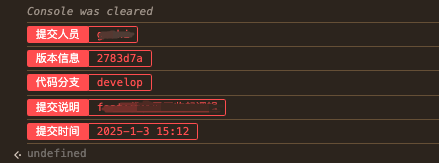
它能够在各种流水线构建平台中工作,当我们需要追溯线上代码的打包信息时,这款插件非常实用!
使用
dist-info能够在webapck5或vite中使用,你可以将它视为webapck或vite的一个插件。
- 安装
npm i dist - info--dev- 基础配置
在webpack项目中使用
const DistInfo = require("dist-info");
module.exports = {
    // ...
    plugins: [
        new DistInfo()
    ],
};
在vite项目中使用
import {
    defineConfig
} from 'vite';
import distInfo from 'dist-info';

export default defineConfig({
    plugins: [distInfo()],
});- 查看信息
打开控制台,输入"info",即可查看代码信息或自定义内容。
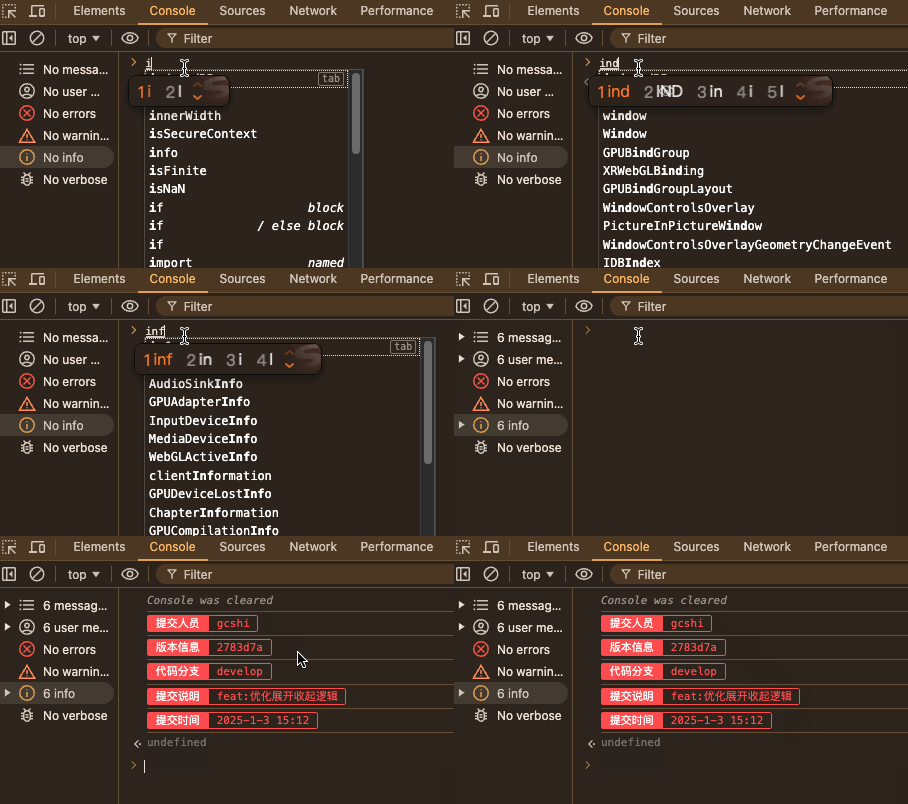
注:如果生产环境作为了qiankun子应用,输入info会报错,因为qiankun将子应用的window对象代理到了proxy上,因此,此时需要输入proxy.info。
可选配置
dist-info可以传入一个自定义配置distInfoOptions
// webapck
new DistInfo(distInfoOptions)
// vite
distInfo(distInfoOptions)
distInfoOptions完整的类型定义如下:
interface DistInfoOptions {
    name ? : string; // 控制台输入的指令名称
    immediate ? : boolean; // 是否立即将构建信息输出在控制台
    preset ? : boolean; // 是否使用预设的打印信息
    consoleList ? : {
        description: string;
        value: string;
    } []; // 用户自定义的打印信息
}

// 默认值的类型声明
const distInfoOptions: DistInfoOptions = {
    name: "info",
    immediate: false,
    preset: true,
    consoleList: [],
};
name
默认情况下,在控制台输入info即可打印出构建信息。这个值可以根据您的情况更改,当您设置为dist时,需要在控制台输入dist才能打印出构建信息。
export default defineConfig({
    plugins: [
        distInfo({
            name: "dist"
        })
    ],
});
immediate
默认情况下,需要在控制台输入指令才能打印构建信息,如果您希望构建信息直接输出在控制台,您可以将其设置为true。
export default defineConfig({
    plugins: [
        distInfo({
            immediate: true
        })
    ],
});
为了信息安全,建议在生产环境不要将此值设置为ture。
或者可以动态设置:immediate: process.env. NODE_ENV === "development"
consoleList
通过此项,您可以自定义要打印的信息
const distInfoOptions = {
    consoleList: [{
            description: "环境信息",
            value: `当前环境为${process.env.NODE_ENV}`,
        },
        {
            description: "接口文档",
            value: "http://xxxx.xom",
        },
    ],
};

export default defineConfig({
    plugins: [
        distInfo(distInfoOptions)
    ],
});
当description与插件预设的信息重复时,预设值会被覆盖
如何打印流水线的构建信息
您可能关注使用流水线构建时,如何打印想要的值,我们以coding流水线为例:
首先,我们需要查找官方提供的环境变量名称,如官方提供了 GIT_COMMIT_SHORT的环境变量(修订版本号的前 7 位),那么,通过process.env. GIT_COMMIT_SHORT我们便可以访问该值。
const distInfoOptions = {
    consoleList: [{
        description: "代码版本号",
        value: process.env.GIT_COMMIT_SHORT,
    }],
};

export default defineConfig({
    plugins: [
        distInfo(distInfoOptions)
    ],
});
其他流水线工具配置是一样的
preset
默认情况下,插件已经内置了打印的构建信息,如果您不需要,只想使用自己定义的信息,将其设置为false即可。