
ditherto
v0.2.0
Published
Dither images into fixed palettes in browsers, Node, and the CLI. Optional resizing, photo palettes, and responsive rendering.

Maintainers
 vexlin
Readme
ditherto
Dither images into a fixed palette, with optional resizing and tone adjustments. A TypeScript library for browsers, workers and Node, with a small PNG CLI and interactive examples.
Nine core algorithms: Atkinson, Floyd–Steinberg, Sierra Lite, Stucki, Bayer ordered dithering, Knoll, Halftone, Riemersma, and Nearest color. Two additional blue-noise variants are available through the optional ditherto/blue-noise entry. Bring your own palette or use black/white, monochrome red/green/blue/yellow, Game Boy, CGA, RGB, or 16-level grayscale.
Homepage · Image playground · Algorithm gallery · Why render live? · CLI guide · API
This README follows main. The expanded algorithm collection is available in the website and source build; it is not included in the published 0.1.0 npm package. A subsequent npm release will include these additions.
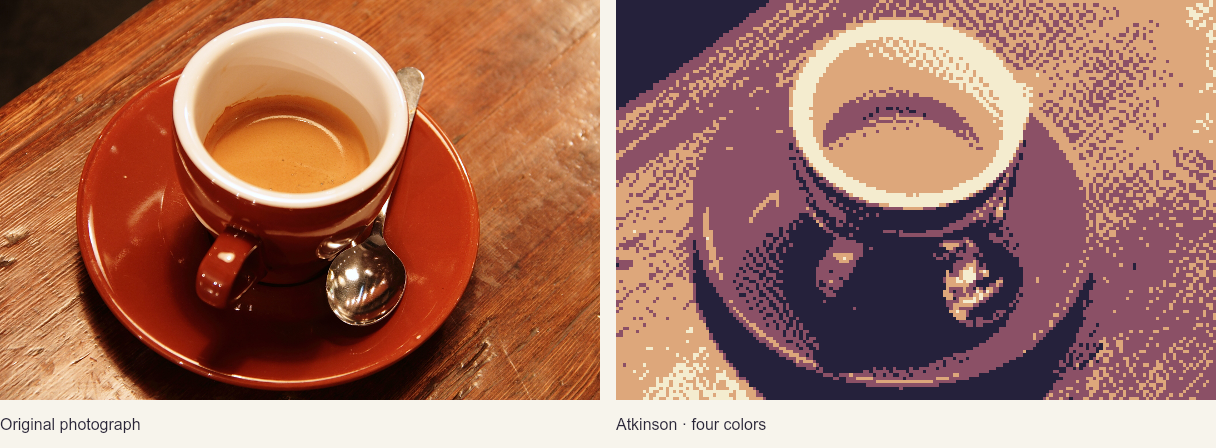
One image, a whole page, or a folder of assets. Choose a shared palette and algorithm, then tune each image's exposure and contrast. The pixel API keeps original dimensions by default; responsive browser bindings automatically follow the layout. No framework required.
Try it
Open either playground above—no account or installation. Images stay on your device. The image playground exports PNGs, JavaScript and a matching CLI command. The Arcana site includes five tarot studies, Orchid, Amber, Moss, Game Boy, Blue Mono, and black-and-white Mono themes, and live rendering from the originals as the layout changes. The tarot examples use compact full-color WebP sources for faster loading, with the PNG masters preserved in the repository. Orchid is the default; your selected theme carries between the example pages. The algorithm gallery compares all eleven algorithms in large preview cards. Upload an image or choose a tarot study, adjust shared palette and tone controls, and tune Bayer size, Knoll strength, serpentine scanning, halftone cells, or Riemersma history by family. Inspect and download individual results at 1× or 2×, toggle originals, or carry a sample and its settings into the playground. Resizing rerenders from the original.
Install the library in your project:
npm install dithertoOr run the CLI directly:
npx ditherto photo.jpg -o photo.png --palette MONO_BLUENode 20 or newer is required for the CLI and build tools. To develop locally or run the playgrounds from source:
git clone https://github.com/vexlin/ditherto.git
cd ditherto
npm ci
npm run build
node dist/cli.js photo.jpg -o photo.png --palette MONO_BLUE
npm run demo
The last command starts a local server at http://127.0.0.1:4173; the homepage is at /index.html. For a local package you can install into another project, run npm pack, then npm install /path/to/ditherto-0.1.0.tgz in that project.
See the npm package and release procedure.
The Why page puts an original, a live dither, and a pre-exported 320px PNG in one responsive row. Resize the comparison to see the difference between rebuilding the dot pattern and scaling an existing one; a pixelated-CSS toggle demonstrates the alternative of retaining hard edges on the fixed export.
CLI for people and agents
A command takes one source file and writes one PNG. No resize is required:
npx ditherto photo.jpg -o photo.png --palette MONO_BLUECreate a small web asset, reuse an art-directed palette, and get a machine-readable result:
npx ditherto photo.jpg -o assets/photo.png \
  --palette '#25213b,#8b5066,#dda77b,#f4eccf' \
  --algorithm atkinson --width 320 --resample area \
--exposure 0.3 --contrast 1.1 --json{"input":"photo.jpg","output":"assets/photo.png","width":320,"height":213}The dimensions above illustrate a 3:2 input. --json writes one JSON object to stdout on success; failures write to stderr and exit with code 1. Success exits with code 0. Explicit output paths keep source files separate; an existing output file is overwritten. --palette accepts a built-in name (case-insensitive) or 1–256 comma-separated six-digit hex colors. Quote hex lists in your shell. Use --paletteimg reference.jpg --palette-colors 8 to borrow colors from a photo instead; it cannot be combined with --palette.
A useful agent workflow is render → inspect the PNG → adjust → retain the chosen settings. Keep the original source for every candidate and give candidates different output names. For example, vary exposure while holding the palette and algorithm fixed:
# Bash / POSIX-style shell. Run against the original photo every time.
for exposure in -0.5 0 0.5; do
  npx ditherto photo.jpg -o "candidates/photo-ev${exposure}.png" \
    --palette GAMEBOY --algorithm atkinson \
    --width 240 --resample area --exposure "$exposure" --json
done
For fast batches, install once (npm install --global ditherto) and call ditherto, or use node dist/cli.js from the checkout. To avoid process startup for every file in a large batch, use the Node API in one process. There is no hidden auto-tuning: the caller chooses the look, and settings are explicit and reproducible for the same decoded pixels.
# Process a directory, preserving filenames and leaving originals intact.
for file in photos/*.jpg; do
  [ -f "$file" ] || continue
  name="${file##*/}"
  ditherto "$file" -o "out/${name%.*}.png" \
    --palette MONO_RED --width 320 --resample area --json
done
Run node dist/cli.js --help for all flags. The CLI supports PNG output and local input paths. For browser URLs, Blob inputs and custom algorithms, use the JavaScript API.
See the difference
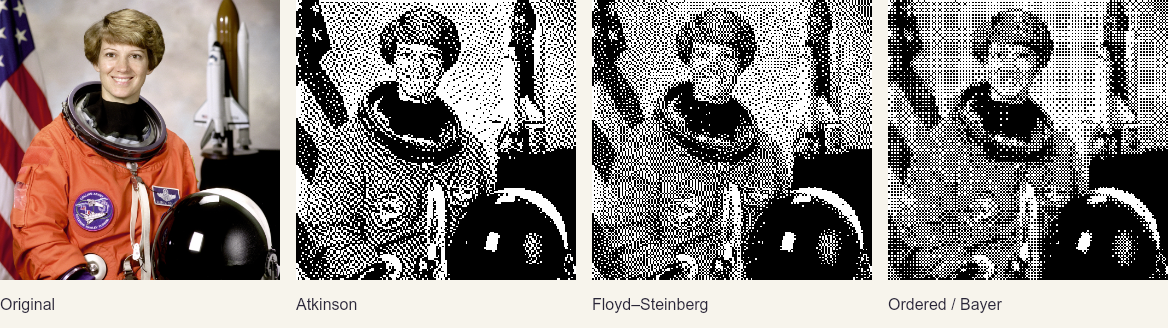
The algorithms share a black/white palette here. Atkinson discards part of the error for a more open texture; Floyd–Steinberg distributes it across neighboring pixels; Bayer uses a repeating threshold grid.
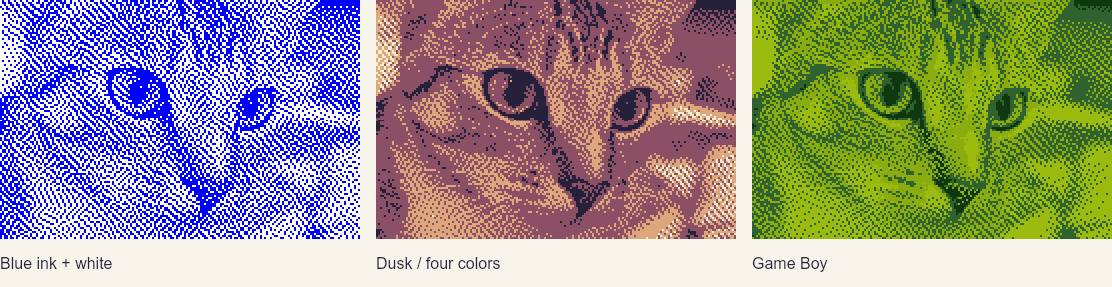
These static documentation pictures are lossless PNGs generated by the library itself. GitHub may scale them; use the live homepage to see previews rerendered from the original photos at their displayed size. Credits and reproduction details: NASA portrait (public domain), coffee by Rachel Michetti and Chelsea by Stefan van der Walt (CC0).
Browser
For images on a page, let your CSS layout determine the display size. No width or height option is required. The responsive helper follows each image wrapper's content width and rerenders from the original whenever that width changes.
<div class="photo">
  <img class="dither" src="photo.jpg" alt="A mountain landscape">
</div>
import { observeDitherDOM, PALETTES } from 'ditherto/dom';
const images = observeDitherDOM('img.dither', {
algorithm: 'atkinson',
palette: PALETTES.GAMEBOY,
resample: 'area', // Average photo detail when fitting the display size
});
await images.ready;
// On unmount, stop observing and restore the original image elements:
// images.destroy();Give each image its own wrapper sized by your layout, such as a grid cell. The canvas fills that wrapper and retains the source aspect ratio. This helper follows wrapper width; it does not reproduce arbitrary image-specific fixed-height or cropped object-fit layouts. See responsive images and per-image settings for updates, cleanup and shared-worker rendering.
Process pixels at the original size
The lower-level pixel API preserves the source image's native dimensions unless you explicitly supply width or height. It does not observe the DOM or infer display dimensions.
import { ditherToImageData, PALETTES } from 'ditherto/browser';

const originalImage = document.querySelector('img')!;
const pixels = await ditherToImageData(originalImage, {
  algorithm: 'atkinson',
  palette: PALETTES.GAMEBOY,
}); // Same pixel dimensions as the original image

const canvas = document.querySelector('canvas')!;
canvas.width = pixels.width;
canvas.height = pixels.height;
canvas.getContext('2d')!.putImageData(pixels, 0, 0);
Use ditherto/browser with browser bundlers: its build contains no Node or native-canvas imports. For direct module imports, serve the built dist/browser.js alongside your application (or dist/dom.js for the responsive helper). The browser entry also accepts RGBA pixels or Blobs in module workers.
ditherToImageData waits for an image element to load. URL inputs require same-origin access or permission through CORS. For interactive controls, keep the original source and call the function again with new options; do not feed the previous dithered result back in. Large jobs are synchronous during the pixel-processing portion, so run them in a worker, as the playground does.
Node (20+)
import { writeFile } from 'node:fs/promises';
import { ditherToImageData, PALETTES } from 'ditherto';
import { encodePng } from 'ditherto/node';

const pixels = await ditherToImageData('./photo.jpg', {
  algorithm: 'floyd-steinberg',
  palette: PALETTES.GAMEBOY,
});
await writeFile('./photo.dithered.png', encodePng(pixels));
Omitting width and height preserves the source dimensions. Add either option only when you want to resize.
@napi-rs/canvas handles Node decoding and PNG encoding. PNG output retains dimensions and transparency. CommonJS require('ditherto') and require('ditherto/node') are also supported.
API
ditherToImageData(input, options?)
The preferred API returns { width, height, data, colorSpace } in every runtime. data is a Uint8ClampedArray of RGBA pixels. In browsers and supported workers the result is a native ImageData; in Node it is an equivalent record. Inputs are never modified.
Accepted inputs:
ImageDataor an equivalent RGBA record.- Browser
HTMLImageElement,Blob,File, image URL,ArrayBufferorUint8Array. - Node file path, HTTP(S) URL,
Buffer,Uint8Array,ArrayBuffer,BloborFile.
Decoded format support depends on the host browser or Node canvas decoder. Animated files are processed as a single decoded frame, not an animation.
| Option | Default | Behavior |
| --- | --- | --- |
| algorithm | 'atkinson' | Any core algorithm listed below, or an explicitly registered optional/custom algorithm |
| algorithmOptions | Algorithm defaults | Per-algorithm settings listed below; unsupported keys and values are rejected |
| palette | PALETTES.BW | Readonly RGB triples, integer channels 0–255 |
| paletteImg | — | Palette swatch or reference photo; explicit palette takes precedence |
| paletteColors | — | Quantize paletteImg to at most 1–256 representative colors; omitted means exact extraction |
| width, height | Omitted: no resizing | Optional positive integer bounds; preserve aspect ratio and fit inside both when supplied |
| resample | 'nearest' | 'area' averages source-pixel coverage when shrinking photos; both use nearest-neighbor enlargement |
| step | 1 | Positive integer pixel-block size; dimensions do not change |
| exposure | 0 | −4 to +4 photographic stops in linear sRGB, before dithering |
| contrast | 1 | 0–2 slope around the encoded sRGB midpoint; 1 is neutral |
| quality | — | Deprecated compatibility hint; validated but does not change pixels or PNG output |
Resizing is optional. With neither width nor height, the pipeline skips resampling and dithers at the original pixel dimensions. Setting resample alone does not change dimensions; it chooses the filter to use if resizing is requested. This is separate from observeDitherDOM, which automatically supplies dimensions from the page layout.
Explicit width/height options can upscale as well as downscale. Nearest-neighbor resizing samples pixel centers. Area resizing integrates each destination pixel’s exact source footprint, including fractional ratios, in encoded sRGB (not linear light). It weights colors by alpha before averaging, so invisible RGB cannot create colored fringes. Both filters are deterministic given the same decoded RGBA pixels; host decoders and color management may differ. The playground defaults to area; the library keeps nearest for compatibility. Extremely thin images retain a minimum dimension of one pixel. Decoded inputs and processed outputs are limited to 8192 pixels per side and 16,777,216 pixels total; these are allocation guards, not a decoder memory guarantee.
RGB matching uses squared Euclidean distance in encoded sRGB. Alpha is retained per pixel; fully transparent pixels do not spread error. Blocks sample the top-left visible pixel (the origin when visible) and fill RGB across the block while retaining each pixel's alpha.
Monochrome defaults
Use PALETTES.MONO_RED, PALETTES.MONO_GREEN, PALETTES.MONO_BLUE, or PALETTES.MONO_YELLOW for a single colored ink on white. Each palette contains exactly two colors:
| Palette | Ink | Paper |
| --- | --- | --- |
| MONO_RED | #ff0000 | #ffffff |
| MONO_GREEN | #00ff00 | #ffffff |
| MONO_BLUE | #0000ff | #ffffff |
| MONO_YELLOW | #ffff00 | #ffffff |
const pixels = await ditherToImageData(originalImage, {
  palette: PALETTES.MONO_BLUE,
});
These are ordinary palettes, available from the main, browser and DOM entries, and work with all algorithms (halftone uses the darkest/lightest pair). Both examples include them in the palette menu. They use the existing RGB color matching, with no grayscale conversion or extra effect. Bright green and yellow produce lighter marks on white; use a custom darker ink color if you want stronger contrast. Transparency is preserved, so white is a palette color rather than a background compositing operation.
ditherImage(input, options?)
Compatibility API: returns ImageData in browsers/workers, but raw RGB Uint8Array bytes in Node. These bytes are not a PNG/JPEG and do not include dimensions or alpha. Prefer ditherToImageData for new integrations.
generatePalette(input, options?)
For photographs, explicitly request a color budget:
import { generatePalette, ditherToImageData } from 'ditherto/browser';

const palette = await generatePalette(referencePhoto, { colors: 8 });
const pixels = await ditherToImageData(originalImage, {
  palette,
  width: 320,
  resample: 'area',
  exposure: 0.5, // Half a stop brighter
  contrast: 1.2, // 20% more contrast
});
Or use the shorthand ditherToImageData(originalImage, { paletteImg: referencePhoto, paletteColors: 8 }). Keep the generated palette to reuse it across size, tone and algorithm changes. The playground caches it in its worker and embeds the RGB values in the copied recipe.
colors is an integer from 1 to 256. Photo quantization uses deterministic, alpha-weighted median cut over a bounded 5-bit-per-channel RGB histogram. Frequent, opaque colors have more influence; invisible pixels are ignored. Output contains up to the requested number of unique colors, sorted dark to light. Small palettes already within the budget retain their exact colors. Similar histogram colors can merge; representative colors are weighted averages, not necessarily exact source pixels. A fully transparent photo produces a clear error.
Without colors, the existing exact-swatch behavior remains: extract all unique visible RGB colors, with a default maxColors: 256 guard (configurable to 4096). Exceeding that guard rejects the image; it does not silently quantize. colors and maxColors cannot be combined.
Exposure and contrast
The processing order is resize → exposure → contrast → dither. Exposure doubles linear-light intensity for each positive stop, using the sRGB transfer curve. Contrast changes the slope around encoded sRGB 0.5; the final RGB values are clipped to 0–255. The playground shows contrast as −100% to +100%, corresponding to API factors 0 to 2. Alpha is preserved. Neutral settings reproduce the prior pipeline exactly.
Adjustments affect the image being dithered, not the reference palette. Reset always starts from original pixels. This is an SDR adjustment, not RAW development or highlight recovery. Inputs are assumed to be decoded sRGB, as elsewhere in the pipeline.
Shared style with per-image tuning
You can hold palette and algorithm constant while adjusting each image independently. This uses ordinary options; no special batch or agent runtime is required.
import { ditherToImageData, PALETTES, type DitherOptions } from 'ditherto/browser';

const style = {
  algorithm: 'atkinson',
  palette: PALETTES.GAMEBOY,
} satisfies Pick<DitherOptions, 'algorithm' | 'palette'>;

const tuning: Record<string, Pick<DitherOptions, 'exposure' | 'contrast'>> = {
  portrait: { exposure: 0.5, contrast: 1.1 },
  landscape: { exposure: -0.2, contrast: 1.25 },
};

const pixels = await ditherToImageData('/images/portrait.jpg', {
  width: 320,
  resample: 'area',
  ...tuning.portrait,
  ...style,
});
The values above illustrate configuration, not recommended settings for every portrait or landscape. A person or agent can render candidate adjustments from the original, inspect them at the intended display size, and save the chosen options. Keep the shared style fixed during that search when visual consistency is a requirement. Explicit palettes take precedence over palette-image extraction.
The same API supports browser, worker, server and build-time workflows. Callers control scheduling and caching. Determinism applies to identical decoded RGBA input and settings; host image decoders can differ.
Algorithm settings
| Algorithm | algorithmOptions | Defaults |
| --- | --- | --- |
| atkinson, floyd-steinberg, sierra-lite, stucki | serpentine: boolean | false |
| ordered | bayerSize: 2, 4, 8, 16 | 4 |
| knoll | bayerSize, strength: 0–1, candidates: 1–256 | 4, 0.2, 32 |
| halftone | cellSize: 2–16 (integer) | 8 |
| riemersma | history: 2–64 (integer) | 16 |
| nearest | None | — |
| ordered-blue-noise (optional) | None; fixed 64×64 mask | — |
| knoll-blue-noise (optional) | strength, candidates | 0.2, 32 |
Settings are validated by the selected algorithm. Unknown keys, wrong types and out-of-range values
throw before image decoding. Matrix and cell sizes are in logical pixels, so step enlarges them.
Existing algorithms retain their previous defaults and output. The CLI equivalents are --serpentine,
--bayer-size, --strength, --candidates, --cell-size, and --history.
Halftone averages each cell and draws clustered dots with the darkest and lightest palette colors.
With more than two palette entries it emits one console.warn per render describing the selected
colors; it never fails solely because there are extra colors. The CLI sends that warning to stderr,
so --json stdout stays machine-readable. Fewer than two distinct colors is an error.
await ditherToImageData(originalImage, {
  algorithm: 'stucki', algorithmOptions: { serpentine: true }, palette: PALETTES.GAMEBOY,
});
Blue noise is opt-in to keep its mask out of the core bundle:
import { algorithms, ditherToImageData } from 'ditherto/browser';
import { registerBlueNoise } from 'ditherto/blue-noise';
registerBlueNoise(algorithms);
const pixels = await ditherToImageData(originalImage, {
  algorithm: 'knoll-blue-noise', algorithmOptions: { strength: 0.2, candidates: 32 },
});
Use algorithms from the same entry point that renders: ditherto, ditherto/browser, or
ditherto/dom. Importing the optional module alone has no registry side effects. Register it within
any worker that renders blue noise. The CLI handles registration automatically; the playground loads
the module only when selected. Direct algorithm objects are also exported for custom registries.
See algorithm contracts and release validation for alpha behavior, palette ordering, performance limits, blue-noise provenance, and reproducible checks.
Knoll and nearest-color mapping
Knoll uses multiple palette-color candidates per pixel, sampled through a deterministic Bayer pattern (4×4 by default). Its default is 20% strength and 32 candidate selections. Lower strength gives flatter color; higher strength gives more texture. More candidates refine the color mixture but cost more processing time. Run larger interactive jobs in a worker.
const pixels = await ditherToImageData(originalImage, {
  algorithm: 'knoll',
  algorithmOptions: { strength: 0.2, candidates: 32 },
  palette: PALETTES.GAMEBOY,
});
strength ranges from 0 to 1; candidates is an integer from 1 to 256. Both are optional. They control Knoll and Knoll blue noise; passing them to another built-in throws an error. The exported KnollOptions type describes these settings. The open AlgorithmOptions record supports custom algorithms; validation is performed at runtime by the selected algorithm.
Choose algorithm: 'nearest' for flat palette mapping with no dithering. It matches Knoll at zero strength exactly, including palette-order ties, alpha and pixel blocks. nearest here selects a color-mapping algorithm; resample: 'nearest' separately controls image resizing.
npx ditherto photo.jpg -o knoll.png --algorithm knoll --strength 0.2 --candidates 32 --palette GAMEBOY
npx ditherto photo.jpg -o flat.png --algorithm nearest --palette GAMEBOY
The CLI's --strength and --candidates flags require --algorithm knoll or --algorithm knoll-blue-noise. The playground reveals these controls when Knoll is selected and includes them in the copied JavaScript and CLI recipes.
DOM helpers accept the same options. In HTML, use JSON:
<img class="dither" src="photo.png" data-algorithm="knoll"
     data-algorithm-options='{"strength":0.2,"candidates":32}'>
Responsive updates replace the complete algorithmOptions object rather than merging its keys. When switching from Knoll to another algorithm, clear the override with algorithmOptions: undefined (or supply {} to override inherited settings).
algorithms.register(algorithm)
import { algorithms } from 'ditherto';

algorithms.register({
  name: 'my-algorithm',
  apply(image, palette, step) {
    // Return an RGBA image record or ImageData.
    return image;
  },
});
Custom algorithms can accept an optional fourth argument to apply(data, palette, step, options) and opt into configuration with validateOptions(options). An optional validatePalette(palette) hook enforces palette constraints before processing (and before input decoding for explicit palettes). The hook receives explicitly supplied options before image loading; throw on unsupported keys or values. Without a validation hook, nonempty algorithmOptions are rejected. Existing three-argument implementations remain compatible.
The pipeline isolates input pixels before invoking plugins. algorithms.list() lists registered names. Palette order breaks nearest-color ties deterministically.
One-shot DOM helpers
<img class="dither" data-algorithm="ordered" src="photo.png" alt="A mountain landscape">import { autoDitherDOM } from 'ditherto/browser';
const canvases = await autoDitherDOM('img.dither');The helper waits for loading, replaces matching images with canvases, retains their accessible labels, and rejects on failure. ditherImageElement(img, options) processes one element. Palette and tone attributes are data-palette-img, data-palette-colors, data-exposure, and data-contrast. These are one-shot helpers: they keep the source pixel dimensions unless resize options or attributes are supplied, and they do not track later layout changes. For automatic display sizing, resize observation, independent updates and cleanup, use observeDitherDOM below. Explicit options override data attributes in the one-shot helpers.
Responsive images and per-image settings
Import ditherto/dom when you want the library to manage image elements. Omit width and height to render at the layout's current display width automatically. It reexports the browser API and adds observeDitherDOM; importing it is safe during server rendering, but calling the helper requires a browser with ResizeObserver. The ordinary browser entry does not include this integration.
<div class="photo"><img class="dither" src="portrait.jpg" alt="Portrait" data-exposure="0.4"></div>
<div class="photo"><img class="dither" src="landscape.jpg" alt="Landscape" data-contrast="1.2"></div>
import { observeDitherDOM, PALETTES } from 'ditherto/dom';
const gallery = observeDitherDOM('img.dither', {
palette: PALETTES.GAMEBOY,
algorithm: 'atkinson',
resample: 'area',
}, {
onError: (error, image) => console.error(image.src, error),
});
const results = await gallery.ready; // Promise.allSettled results, in selector order
await gallery.images[0].update({ exposure: 0.7 });
await gallery.images[0].update({ exposure: undefined }); // use the attribute/default again
// After changing the original src or attributes:
await gallery.images[0].refresh();
// On unmount: release pixels/observers and restore the same original nodes.
gallery.destroy();The selector is a snapshot. Use root to scope it to a container or shadow root; bind newly inserted images separately. Settings are merged in this order: shared defaults → image data attributes → resolveOptions(image) → handle.update() overrides. A resolver can retrieve per-image settings from a saved manifest. update() merges changes; undefined removes an override. refresh() rereads source pixels and settings while retaining overrides. gallery.refresh() refreshes all bindings and returns settled results.
Give each image a dedicated wrapper with a width determined by your layout (for example, a grid cell). The canvas fills its parent's content width, retaining the image's aspect ratio. An optional width/height caps bitmap resolution, so a lower-resolution image can be displayed larger with crisp pixels. This helper does not reproduce arbitrary object-fit, crop, fixed-height or original image width rules. Bitmap resolution is in CSS pixels, independent of device pixel ratio. Renders always start from cached original pixels, never from an earlier dithered result. The cached source stays fixed across resizes; call refresh() after changing src, srcset or <picture> selection.
Each controller has one resize observer and a serial render queue. Updates are coalesced (default debounceMs: 60), and superseded calls resolve with the latest result. Initially hidden or disconnected wrappers resolve to null; a later observed width change schedules rendering. An unloaded image waits for its native load/error event without holding the queue, so native lazy loading can delay its ready result until it enters view. A failed image retains its original or last successful canvas; inspect handle.error or supply onError. Accessible labels are copied to the canvas. Event listeners on the original image resume when that same node is restored; interaction intended during dithering should be attached to the wrapper.
Call handle.destroy() for one image or gallery.destroy() for the group. Disposal rejects pending per-image calls with AbortError, releases cached pixels and prevents late results from painting. It does not stop computations already running in an injected renderer. DOM removal alone does not dispose a binding; framework integrations should call destroy() on unmount.
The default renderer runs on the calling thread, yielding between images. For expensive interactive processing, supply render(source, options): Promise<ImageData> backed by a worker. It receives an isolated pixel copy that may be transferred or modified. One worker can serve the whole group: see the algorithm gallery and its shared-worker wiring. Worker lifetime belongs to the caller. The gallery uses a different algorithm and settings per image, with shared palette and tone controls, layout resizing, uploads, original/processed toggling, and a pixel inspector. Its copied recipe includes each algorithm’s settings and the optional blue-noise registration.
Algorithm behavior
- Floyd–Steinberg: left-to-right by default, optionally serpentine; error weights 7/16 right, 3/16 below-left, 5/16 below, 1/16 below-right. Unclamped floating-point error buffers avoid intermediate byte rounding.
- Atkinson: six forward neighbors each receive 1/8 of the error; 1/4 is intentionally discarded. The diffusion implementations use only a few rows of scratch memory.
- Ordered: a configurable Bayer matrix (2, 4, 8 or 16 per side; default 4) with centered thresholds
(rank + 0.5) / (size * size). Black/white follows ordinary intensity thresholding. Arbitrary palettes use a documented extension: find the nearest color, choose the best RGB segment from it to another palette color, and use the threshold to select between them. Exact palette colors remain unchanged. This is deterministic, not randomized noise.
Additional algorithm contracts and performance notes are in ALGORITHMS.md.
See the design audit for references, compatibility changes, findings and remaining work.
Development
npm run build:site   # static homepage and playgrounds in _site/
npm run assets:site  # regenerate the real README/site pictures
npm run typecheck
npm run lint
npm run test:ci       # unit, oracle, golden PNG, real Node I/O and DOM tests
npm run test:package  # build + ESM/CJS/CLI/encoder checks
npx playwright install chromium firefox webkit
npm run test:browser # Chromium/Firefox/WebKit, photos, workers, resizing, downloads
npm run benchmark    # reproducible processing benchmark, excludes decode/encode
npm run dev          # rebuild when TypeScript sources change
Run node scripts/review-photos.mjs after building to generate a side-by-side photographic review sheet in test-results/. Fixture sources and licenses are recorded in tests/fixtures/photos/README.md.
The browser test suite captures desktop/mobile previews in test-results/. CI uses the committed lockfile and runs Node 20/22 checks plus Chromium, Firefox and WebKit tests. Photo-palette tests cover real decoding, alpha/population weighting, deterministic output, color budgets and separate reference uploads. Tone tests cover exposure stops, contrast endpoints, reset and Node/browser parity. The photographic corpus covers independent Pillow BOX references, fractional ratios, alpha, JPEG EXIF orientations 2–8, tagged sRGB, and lossless WebP. These checks do not certify arbitrary wide-gamut profiles or every browser/OS decoder.
MIT licensed.