
docbox
v1.0.11
Published
an api documentation website


Readme


Docbox is an open source REST API documentation system. It takes structured Markdown files and generates a friendly two-column layout with navigation, permalinks, and examples. The documentation source files that Docbox uses are friendly for documentation authors and free of presentational code: it's Markdown.
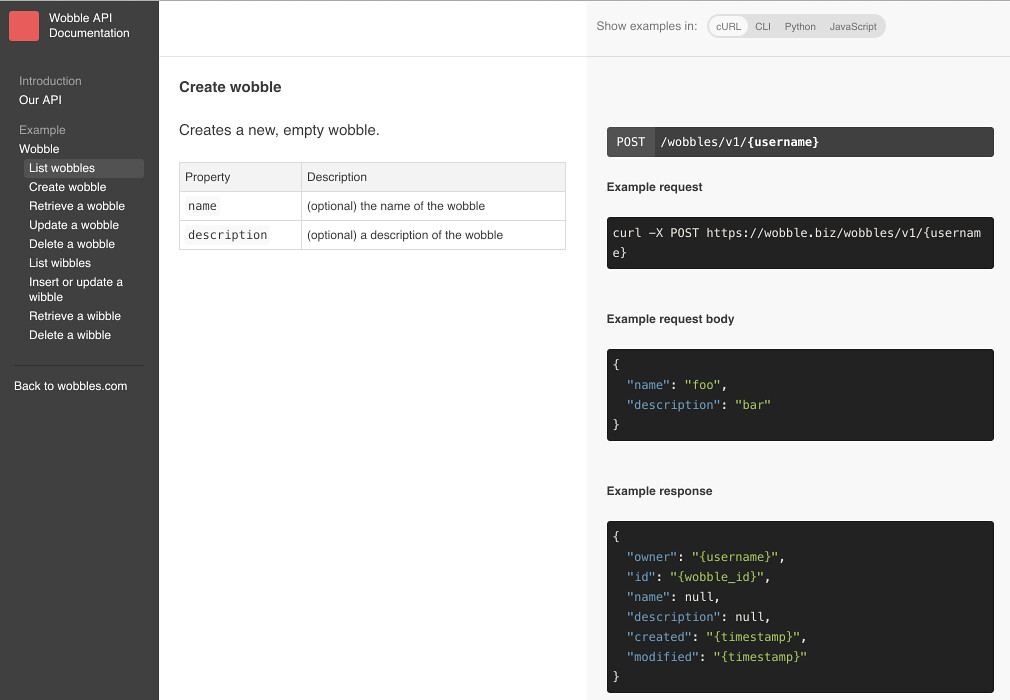
Docbox is a JavaScript application written with React. The core magic is thanks to the remark Markdown parser, which enables the layout: after parsing a file into an Abstract Syntax Tree, we can move examples to the right, prose to the left, and build the navigation system.
It has a supercharged test suite. Our tests check for everything from broken links to invalid examples and structure problems: this way, the application is only concerned with output and you can proactively enforce consistency and correctness. We even extract JavaScript examples from documentation and test them with eslint
When you're ready to ship, Docbox's build task minifies JavaScript and uses React's server rendering code to make documentation indexable for search engines and viewable without JavaScript.
Writing Documentation
Documentation is written as Markdown files in the content directory, and is organized by the src/custom/content.js file - that file requires each documentation page and puts them in order. This demo has a little bit of content - content/example.md and content/introduction.md, so that there's an example to follow.
Testing-driven
Docbox's test suite is an integral part of the design: it's designed to catch any error that would produce invalid documentation and also designed to be extended with custom rules for your documentation standards. Remember to run npm test if anything looks funky, and if you have a standard you want to enforce, to enforce it automatically by writing a test!
Customization
All custom code - code that relates to brands and specifics of APIs - is in the ./src/custom directory. Content is src/custom/content.js and brand names & tweaks are in src/custom/index.js, with inline documentation for both.
Development
We care about the ease of writing documentation. Docbox comes with batteries included: after you npm install the project, you can run npm start and its development server, budo, will serve the website locally and update automatically.
Requirements
- Node v4 or higher
- NPM
- Git
To run the site locally:
- Clone this repository
2.
git clone https://github.com/tmcw/docbox.git npm installnpm start- Open http://localhost:9966/
Tests
Tests cover both the source code of Docbox as well as the content in the content/ directory.
To run tests:
- Clone this repository
2.
git clone https://github.com/tmcw/docbox.git npm installnpm test
Deployment
The npm run build command builds a bundle.js file that contains all the JavaScript code and content needed to show the site, and creates an index.html file that already contains the site content. Note that this replaces the existing index.html file, so it's best to run this only when deploying the site and to undo changes to index.html if you want to keep working on content.
- Clone this repository
2.
git clone https://github.com/tmcw/docbox.git npm installnpm run build
Using docbox
- Mapbox API Documentation
- Mapillary uses docbox for API Documentation and Tiles Documentation
- The open source Project OSRM routing engine uses Docbox for its API documentation.
- 8th Wall uses Docbox for the documentation of their AR product
- do you use docbox? let us know!
FAQ & See Also
Props to Tripit's Slate project, which served as the inspiration for Docbox's layout. We also maintain a list of similar projects.