
docker-compose-helper
v1.1.1
Published
Helper for docker-compose


Readme
Docker compose helper
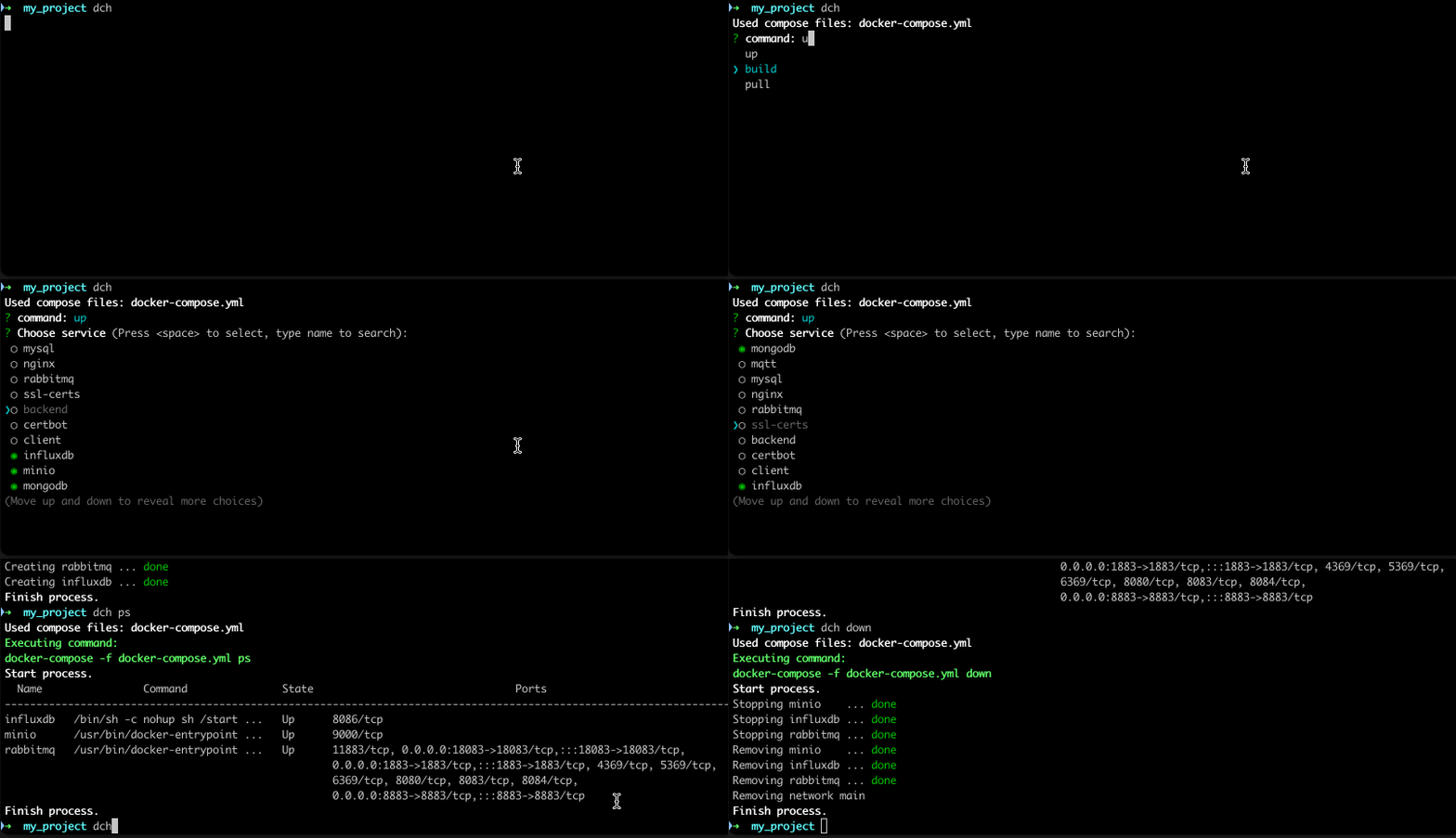
Sometimes you have multiple services in your docker-compose configurations as well as multiple compose files. But for some cases you still need run only few services of many. And each time is needed to write huge command passing docker-compose files (-f docker-compose.yml -f docker-compose.dev.yml) and list of services then after command, which is exhausting and easy to make mistakes. This simple script make it a bit better experience. It analyzes compose file and provide interactive CLI to construct full command with files, services and commonly used docker-compose commands.
Installation
npm i -g docker-compose-helperUsage
- Go to directory where compose file is localed
- Run command (currently supported commands up, down, stop, logs, build, ps, pull, rm):
- passing it directly as argument
➜ my_project ✗ dch up Used compose files: docker-compose.develop.yml, docker-compose.test.yml, docker-compose.yml ? Choose service (Press <space> to select, type name to search): ❯◯ backend ◯ certbot ◯ client ◯ influxdb ◯ minio ◯ mongodb ◯ mqtt ◯ mysql ◯ nginx ◯ rabbitmq (Move up and down to reveal more choices) - select command from list (use arrows or type to search):
➜  my_project ✗ dch
Used compose files: docker-compose.develop.yml, docker-compose.test.yml, docker-compose.yml
? command: u
❯ up
  build
  pull
- passing it directly as argument
- Select service (you cen type to search and use list as multi-select) and press enter to run command.
Commands arguments
Some commands already include predefined arguments to make usage more robust. (e.g. up append also --force-recreate to have new container each time you want to up it and -d not to append service output).
| command | arguments included |
|-----------|--------------------|
|up | -d --force-recreate|
|logs | -f --tail 10 |
|rm | -f -s |
Docker commands
Also it is included ability to attach to container shell using docker exec -it contaner_name bash command. In commands list there two options bash and sh.
Configuration
If you want use only some docker-compose files or set specific order, you can configure it creating .dch.json file in directory where compose files are located:
{
    "composeFiles": [
        "docker-compose.yml",
        "docker-compose.develop.yml"
    ]
}
By default script will use all yaml files found in directory which has structure like to docker-compose files (has services and version section in tpp level).