
docker-compose-viz
v0.1.2
Published
Docker Compose Viz

Maintainers
 nebev
nebevReadme
Docker Compose Viz
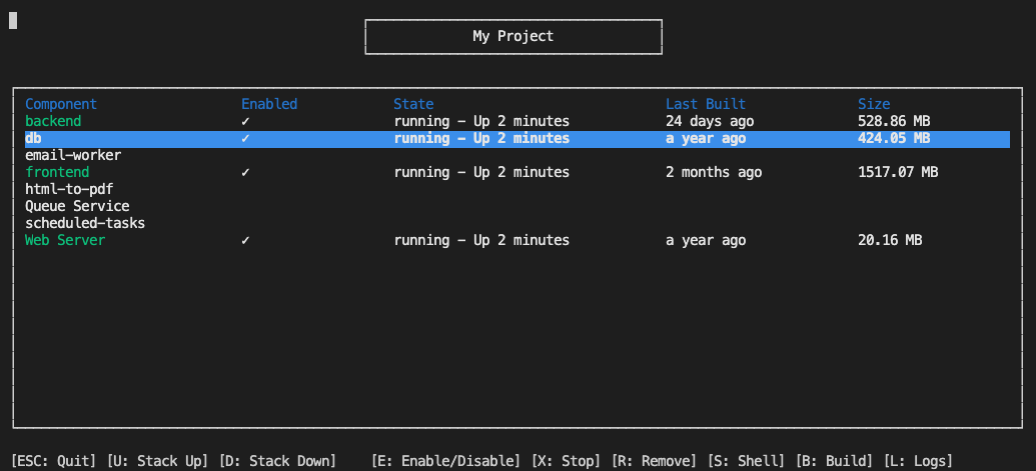
Docker Compose Viz (dcv for short) is a CLI GUI application that helps you manage complex microservice-oriented projects that utilise docker-compose.
Installing
You'll need NodeJS 10+. dcv works best when installed globally. You'll also need docker and docker-compose installed.
npm install -g docker-compose-vizHint: Depending on your npm settings, you may need to run this command using sudo.
Then, simply run dcv in your project directory and you're good to go!
Why?
docker-compose is a useful tool that helps orchestrate microservices together for the purposes of local development. It does this really well, but containers are expensive in terms of CPU & Memory and often you just don't need to run everything in the stack - especially when you're doing local development on a given microservice.
So dcv allows you to keep your existing docker-compose files as they stand, but it allows you to selectively disable certain services so you can work on the microservice(s) that you need to focus on.
eg. You might have a backend, an authentication service, a database, a queue and an emailer. Chances are, unless you're actively sending emails in your local development environment, you probably don't need to run the emailer. You might not need to queue service either. dcv allows you to disable those services and just run what you need.
What can it do?
- Selectively run
docker-composeservices - Bring up & Tear down the compose stack
- Stop containers
- Remove containers
- Rebuild containers
- Easily shell into containers
- View container logs
How does it work?
dcv won't overwrite your existing docker-compose YML files. Instead, it takes the services that you need to run and creates a temporary docker-compose file and orchestrates the stack using that.
It keeps a record of which services are currently enabled at ~/.dcv/dcv.json.
Customisation
By default, dcv will look for docker-compose.yml in the directory you run it.
dcv also allows you to customise what is displayed in the UI. Want to give your containers more meaningful names with spaces etc? You can do that using a settings override file. Simply put in a .dcv.json file into the directory where you'd normally run docker-compose and dcv will pick up your settings.
Example .dcv.json Override file
{
  "title": "My Cool Project",
  "composePath": "compose_files/all.yml",
  "names": {
    "web": "Web Server",
    "rabbitmq": "Queue Service"
  }
}
composePath can also be an array of docker-compose files. If you have multiple files with the same service name, order matters and the later file service definitions will overwrite those specified earlier.
Contributing
This project was written in a day. It's probably full of terrible bugs and gross inefficiencies. But you can help!
If you want to contribute, open an issue to work against so you get full credit for your fork. You can open the issue first so we can discuss and you can work your fork as we go along.
If you see a bug, please be so kind as to show how it's failing, and we'll do our best to get it fixed quickly.
Before sending a PR, please create an issue to introduce your idea and have a reference for your PR.
License
MIT License
Copyright (c) 2020 Ben Evans
Permission is hereby granted, free of charge, to any person obtaining a copy of this software and associated documentation files (the "Software"), to deal in the Software without restriction, including without limitation the rights to use, copy, modify, merge, publish, distribute, sublicense, and/or sell copies of the Software, and to permit persons to whom the Software is furnished to do so, subject to the following conditions:
The above copyright notice and this permission notice shall be included in all copies or substantial portions of the Software.
THE SOFTWARE IS PROVIDED "AS IS", WITHOUT WARRANTY OF ANY KIND, EXPRESS OR IMPLIED, INCLUDING BUT NOT LIMITED TO THE WARRANTIES OF MERCHANTABILITY, FITNESS FOR A PARTICULAR PURPOSE AND NONINFRINGEMENT. IN NO EVENT SHALL THE AUTHORS OR COPYRIGHT HOLDERS BE LIABLE FOR ANY CLAIM, DAMAGES OR OTHER LIABILITY, WHETHER IN AN ACTION OF CONTRACT, TORT OR OTHERWISE, ARISING FROM, OUT OF OR IN CONNECTION WITH THE SOFTWARE OR THE USE OR OTHER DEALINGS IN THE SOFTWARE.