doctreen
v1.4.3
Published
Auto-generates and serves API documentation for Node.js backends via middleware
Downloads
193
Maintainers
Readme
DocTreen
Auto-generate and serve interactive API documentation for Express, Fastify, Hono, Koa, and NestJS backends — with zero runtime dependencies and first-class Zod support.
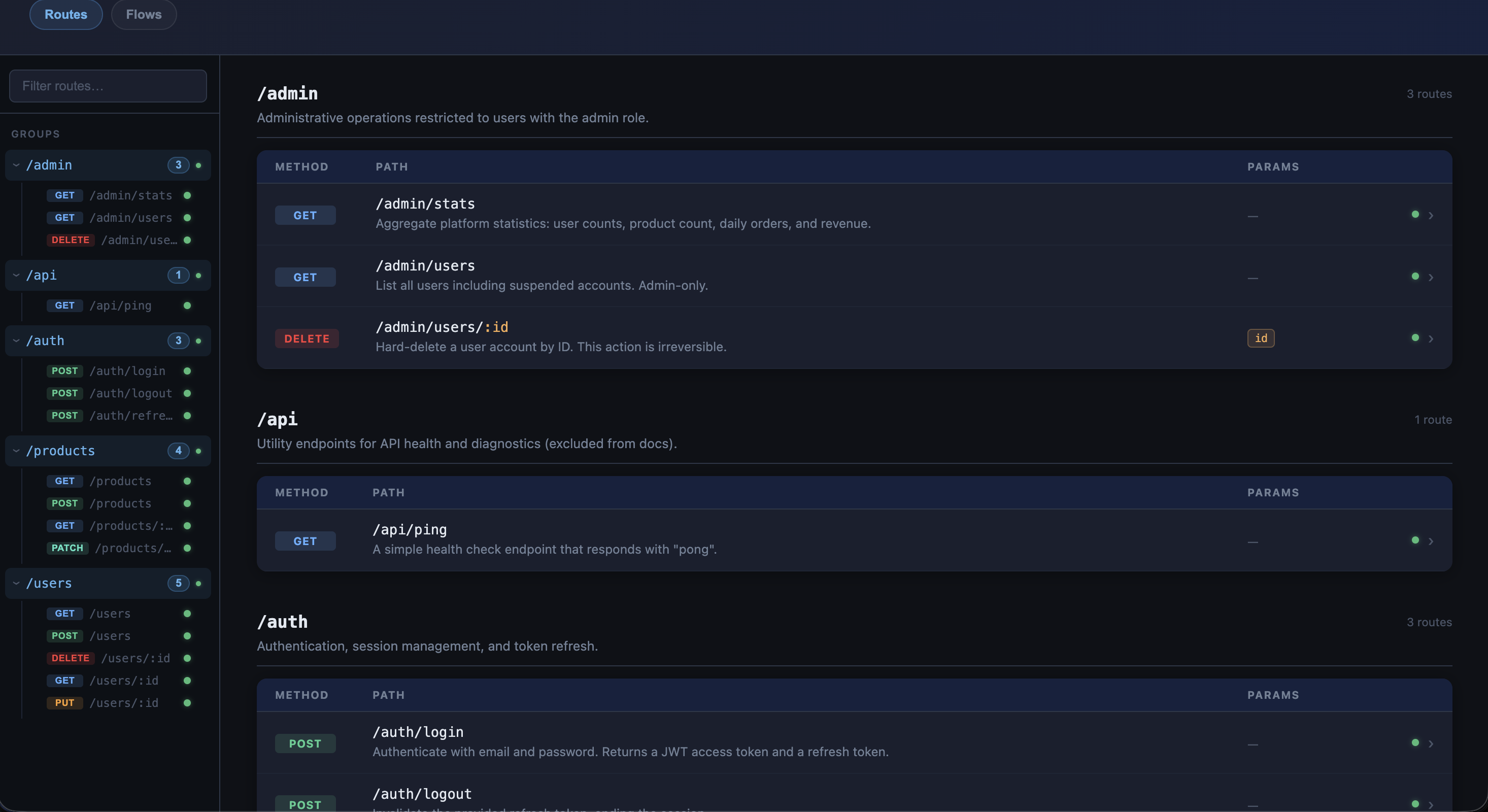
DocTreen introspects your app at startup or first request, reads inline JSDoc or decorator metadata, and serves a self-contained interactive docs UI at the configured docsPath. It also ships a request-flow engine for building and running multi-step API sequences directly inside the UI.

Contents
- Installation
- Quick Start
- Configuration
- NestJS — Decorator API
- Zod Support
- Request Flows
- Documenting Routes with JSDoc
- Schema Builder
- Named Schemas
- Explicit Route Definition with
defineRoute - Error Responses
- UI Features
- TypeScript
- How It Works
- Example Apps
Installation
npm install doctreenFor NestJS projects, also install the peer dependencies (if not already present):
npm install reflect-metadata rxjsFor Zod schema support:
npm install zodQuick Start
Express
const express = require('express');
const { expressAdapter } = require('doctreen/express');
const app = express();
app.use(express.json());
app.get('/users', (req, res) => res.json([]));
app.post('/users', (req, res) => res.status(201).json({ id: 1 }));
// Mount after your routes
app.use(expressAdapter(app, {
meta: { title: 'My API', version: '1.0.0' },
}));
app.listen(3000, () => console.log('Docs at http://localhost:3000/docs'));Fastify
const fastify = require('fastify')();
const { fastifyAdapter } = require('doctreen/fastify');
// Call BEFORE registering routes — uses the onRoute hook
fastifyAdapter(fastify, {
meta: { title: 'My API', version: '1.0.0' },
});
fastify.get('/users', async (req, reply) => reply.send([]));
fastify.listen({ port: 3000 });Hono
// Hono v4 is ESM-only — run with: npx tsx hono-app.js
import { Hono } from 'hono';
import { serve } from '@hono/node-server';
import { honoAdapter } from 'doctreen/hono';
const app = new Hono();
app.get('/users', (c) => c.json([]));
// Can be called before or after routes
honoAdapter(app, { meta: { title: 'My API', version: '1.0.0' } });
serve({ fetch: app.fetch, port: 3000 });Koa
const Koa = require('koa');
const Router = require('@koa/router');
const { koaAdapter } = require('doctreen/koa');
const app = new Koa();
const router = new Router();
router.get('/users', (ctx) => { ctx.body = []; });
// Can be called before or after routes
koaAdapter(router, { meta: { title: 'My API', version: '1.0.0' } });
app.use(router.routes());
app.use(router.allowedMethods());
app.listen(3000);NestJS
import 'reflect-metadata';
import { NestFactory } from '@nestjs/core';
import { nestAdapter } from 'doctreen/nest';
import { AppModule } from './app.module';
async function bootstrap() {
const app = await NestFactory.create(AppModule);
// Call after NestFactory.create(), before app.listen()
nestAdapter(app, {
meta: { title: 'My API', version: '1.0.0' },
});
await app.listen(3000);
console.log('Docs at http://localhost:3000/docs');
}
bootstrap();Then annotate your controller methods with @DocRoute (see NestJS — Decorator API).
Visit the configured docsPath (default: /docs) to see your documentation.
Configuration
All adapters accept the same config object:
{
docsPath: '/docs', // URL where the docs UI is served
enabled: true, // Set false to disable; defaults to NODE_ENV !== 'production'
liveReload: false, // Re-discover routes on every docs hit
meta: {
title: 'My API',
version: '1.0.0',
description: 'Full description shown in the UI header',
},
exclude: ['/health', /^\/internal\/.*/], // Paths to hide from docs
groups: { // Group routes under named sections in the sidebar
Users: ['/users', '/users/:id'],
Products: '/products',
},
flows: [...], // Inline flow presets (see Request Flows)
flowsPath: './doctreen-flows', // Directory of *.json flow files
}Config Reference
| Option | Type | Default | Description |
|---|---|---|---|
| docsPath | string | '/docs' | URL where the docs UI is served |
| enabled | boolean | NODE_ENV !== 'production' | Set to false to disable docs entirely |
| liveReload | boolean | false | Re-discover routes on every docs request |
| meta.title | string | 'API Documentation' | Title shown in the UI header |
| meta.version | string | '1.0.0' | Version label |
| meta.description | string | '' | Description shown below the title |
| exclude | string \| RegExp \| Array | [] | Routes to hide from the docs |
| groups | Record<string, string \| string[]> | {} | Group routes into named sidebar sections |
| flows | FlowDefinition[] | null | Inline request-flow presets |
| flowsPath | string | auto-detected | Directory of *.json flow files |
NestJS — Decorator API
DocTreen provides a decorator-based API for NestJS that integrates naturally with standard NestJS controller patterns.
Setup
// main.ts
import 'reflect-metadata';
import { NestFactory } from '@nestjs/core';
import { nestAdapter } from 'doctreen/nest';
import { AppModule } from './app.module';
async function bootstrap() {
const app = await NestFactory.create(AppModule);
nestAdapter(app, { meta: { title: 'My API', version: '2.0.0' } });
await app.listen(3000);
}
bootstrap();No changes to AppModule are required. DocTreen reads NestJS's internal route metadata directly — no DiscoveryModule import needed.
Works with both @nestjs/platform-express (default) and @nestjs/platform-fastify.
@DocRoute — Full schema on one decorator
import { Controller, Post, Body } from '@nestjs/common';
import { DocRoute } from 'doctreen/nest';
import { z } from 'zod';
const importSchema = z.object({
products: z.array(z.object({ sku: z.string(), price: z.number() })),
});
const importResponseSchema = z.object({
imported: z.number(),
skipped: z.number(),
});
@Controller('products')
export class ProductsController {
@Post('import')
@DocRoute({
description: 'Bulk import partner inventory',
headers: {
'x-partner-api-key': 'Partner API key',
'Content-Type': 'application/json',
},
request: {
body: importSchema,
},
response: importResponseSchema,
errors: {
400: 'Validation failed',
401: 'Missing or invalid API key',
429: 'Rate limit exceeded',
},
})
importProducts(@Body() body: any) {
return { imported: body.products.length, skipped: 0 };
}
}Granular decorators
Use the smaller decorators when you want to keep each concern separate, or when composing with other decorator libraries:
import { Controller, Get, Post, Delete, Param, Body } from '@nestjs/common';
import {
DocDescription,
DocHeaders,
DocRequest,
DocResponse,
DocErrors,
} from 'doctreen/nest';
import { z } from 'zod';
const UserSchema = z.object({ id: z.number(), name: z.string(), email: z.string() });
@Controller('users')
export class UsersController {
@Get()
@DocDescription('List all users')
@DocRequest({ query: z.object({ page: z.number().optional(), role: z.string().optional() }) })
@DocResponse(z.array(UserSchema))
getUsers() { return []; }
@Post()
@DocDescription('Create a new user')
@DocHeaders({ Authorization: 'Bearer <token>' })
@DocRequest({ body: z.object({ name: z.string(), email: z.string() }) })
@DocResponse(UserSchema)
@DocErrors({ 409: 'Email already in use', 422: 'Validation failed' })
createUser(@Body() body: any) { return { id: 1, ...body }; }
@Delete(':id')
@DocDescription('Delete a user by ID')
@DocErrors({ 404: 'User not found', 403: 'Insufficient permissions' })
deleteUser(@Param('id') id: string) { return { success: true }; }
}All @Doc* decorators merge onto the same metadata key — stack any combination on the same method.
@DocRoute schema reference
| Field | Type | Description |
|---|---|---|
| description | string | Human-readable description shown in the UI |
| headers | Record<string, string> | Request headers to document |
| request.body | SchemaNode \| ZodSchema | Request body shape |
| request.query | SchemaNode \| ZodSchema | Query parameter shape |
| response | SchemaNode \| ZodSchema | Success response shape |
| errors | Record<number, string \| { description?, schema? }> | Error responses by HTTP status |
Zod Support
DocTreen includes a standalone Zod → SchemaNode converter available as doctreen/zod. It is used automatically inside the NestJS adapter whenever a Zod schema is passed to @DocRoute or any @Doc* decorator.
zodToSchemaNode
import { z } from 'zod';
import { zodToSchemaNode } from 'doctreen/zod';
const schema = z.object({
id: z.number(),
name: z.string(),
email: z.string().email(),
role: z.enum(['admin', 'user']).optional(),
tags: z.array(z.string()),
});
const node = zodToSchemaNode(schema);
// {
// type: 'object',
// properties: {
// id: { type: 'number' },
// name: { type: 'string' },
// email: { type: 'string' },
// role: { type: 'string', optional: true },
// tags: { type: 'array', items: { type: 'string' } },
// }
// }Supported Zod types
| Zod type | SchemaNode output |
|---|---|
| z.string(), z.date() | { type: 'string' } |
| z.number(), z.bigint() | { type: 'number' } |
| z.boolean() | { type: 'boolean' } |
| z.null(), z.undefined(), z.void() | { type: 'null' } |
| z.any(), z.unknown() | { type: 'unknown' } |
| z.object({...}) | { type: 'object', properties: {...} } |
| z.array(T) | { type: 'array', items: T } |
| z.tuple([T, ...]) | { type: 'array', items: T[0] } |
| z.record(V) | { type: 'object', properties: {} } |
| z.optional(T) | { ...T, optional: true } |
| z.nullable(T) | { ...T, optional: true } |
| z.default(T) | unwraps to T |
| z.enum([...]) | { type: 'string' } |
| z.nativeEnum(E) | { type: 'string' } or { type: 'number' } |
| z.literal(v) | { type: typeof v } |
| z.union([A, B]) | first option |
| z.discriminatedUnion(...) | first option |
| z.intersection(A, B) | merged object properties |
| z.lazy(...) | resolved recursively |
| .transform(), .pipe() | unwraps to input schema |
Using zodToSchemaNode with other adapters
While the NestJS adapter handles Zod conversion automatically, you can use zodToSchemaNode with any adapter via defineRoute:
const { defineRoute } = require('doctreen/express');
const { zodToSchemaNode } = require('doctreen/zod');
const { z } = require('zod');
const CreateUserSchema = z.object({ name: z.string(), email: z.string() });
app.post('/users', defineRoute(
(req, res) => res.status(201).json({ id: 1 }),
{
description: 'Create a user',
request: { body: zodToSchemaNode(CreateUserSchema) },
response: zodToSchemaNode(CreateUserSchema.extend({ id: z.number() })),
}
));Request Flows
DocTreen loads named request-flow presets into the docs UI and runs them through a shared engine — also available as a CLI.
Flows are first-class in the UI:
- A top-level Flows tab keeps flows separate from route docs
- The Flows tab includes a built-in guide for writing flow JSON
- The built-in flow creator lets you assemble draft steps from documented routes
- Runtime inputs and per-run
baseUrloverrides are supported {{input.*}},{{vars.*}}, and{{env.*}}placeholders are supported in all step fields- Prior response fields can be promoted into
extractentries and reused as{{vars.*}} - Results are shown as both a visual execution timeline and raw JSON
Directory-based loading
Place *.json files in a ./doctreen-flows directory and they will be loaded automatically. Use flowsPath for a custom location:
app.use(expressAdapter(app, {
flowsPath: path.join(__dirname, 'doctreen-flows'),
meta: { title: 'My API', version: '1.0.0' },
}));Inline flows
app.use(expressAdapter(app, {
flows: [
{
version: 1,
name: 'Login smoke test',
baseUrl: 'http://localhost:3000',
steps: [
{
id: 'login',
request: {
method: 'POST',
path: '/auth/login',
body: { email: '[email protected]', password: 'secret' },
},
assert: { status: 200 },
extract: { token: { from: 'body', path: '$.token' } },
},
],
},
],
}));Flow format
{
"version": 1,
"name": "User onboarding",
"description": "Create a user, fetch it back, then delete it.",
"baseUrl": "http://localhost:3000",
"inputs": {
"email": { "type": "string", "required": true },
"name": { "type": "string", "required": true }
},
"steps": [
{
"id": "create-user",
"request": {
"method": "POST",
"path": "/users",
"body": { "email": "{{input.email}}", "name": "{{input.name}}" }
},
"extract": {
"userId": { "from": "body", "path": "$.id" }
},
"assert": {
"status": 201,
"body": { "$.email": "{{input.email}}" }
}
},
{
"id": "get-user",
"request": { "method": "GET", "path": "/users/{{vars.userId}}" },
"assert": {
"status": 200,
"exists": ["$.id", "$.createdAt"]
}
}
]
}Variable namespaces
| Namespace | Source |
|---|---|
| {{input.*}} | Runtime values entered in the docs UI or CLI |
| {{vars.*}} | Values extracted from previous step responses |
| {{env.*}} | Values from the flow file or environment overrides |
CLI runner
doctreen-flow run doctreen-flows/user-onboarding.json \
--input [email protected] \
--input name='Alice Smith'
# Named environment
doctreen-flow run doctreen-flows/user-onboarding.json --env staging
# Explicit environment file + JSON report
doctreen-flow run doctreen-flows/user-onboarding.json \
--env ./doctreen-flows/environments/staging.json \
--report jsonCLI flags:
| Flag | Description |
|---|---|
| --env <name\|file> | Load an environment preset |
| --base-url <url> | Override baseUrl for this run |
| --input key=value | Supply runtime inputs |
| --no-bail | Continue running after a failed step |
| --report text\|json | Output format (default: text) |
Documenting Routes with JSDoc
JSDoc parsing is available for Express, Fastify, Hono, and Koa.
For NestJS, use@DocRouteand the decorator API instead.
DocTreen reads JSDoc from handler function source at runtime. Place the JSDoc block inside the handler function body (at the top):
app.get('/users/:id', function (req, res) {
/**
* @description Get a user by ID
* @param {string} query.fields Comma-separated fields to return
* @response {string} id
* @response {string} name
* @response {string} email
*/
res.json({ id: req.params.id, name: 'Alice', email: '[email protected]' });
});Supported JSDoc tags
| Tag | Description | Example |
|---|---|---|
| @description | Route description | @description Get all users |
| @param {type} body.name | Request body field | @param {string} body.email |
| @param {type} query.name | Query parameter | @param {string} query.search |
| @response {type} name | Response field | @response {string} id |
| @returns {Type} | Full response type (schema ref) | @returns {User} |
| @header Name - value | Request header | @header Authorization - Bearer <token> |
Wrap a field name in [brackets] to mark it optional:
/**
* @param {string} body.name
* @param {string} [body.bio] optional
* @param {number} [body.age] optional
*/Schema Builder
DocTreen ships a lightweight schema builder (s) for defining typed request and response shapes without a runtime schema library.
const { s } = require('doctreen');
// import { s } from 'doctreen';
s.string() // { type: 'string' }
s.number() // { type: 'number' }
s.boolean() // { type: 'boolean' }
s.null() // { type: 'null' }
s.unknown() // { type: 'unknown' }
s.object({
id: s.number(),
name: s.string(),
bio: s.optional(s.string()), // optional field — shown with ? in the UI
})
s.array(s.string())
s.array(s.object({ id: s.number(), tag: s.string() }))
s.optional(s.string()) // wraps any node as optionals is re-exported from all adapter packages for convenience:
const { s } = require('doctreen/express');
const { s } = require('doctreen/fastify');
const { s } = require('doctreen/hono');
const { s } = require('doctreen/koa');
const { s } = require('doctreen/nest');Named Schemas
Register a schema under a name and reference it in JSDoc with {TypeName} or {TypeName[]}:
const { defineSchema, s } = require('doctreen');
defineSchema('User', s.object({
id: s.number(),
name: s.string(),
email: s.string(),
active: s.boolean(),
bio: s.optional(s.string()),
}));
app.get('/users', function (req, res) {
/**
* @description List all users
* @returns {User[]}
*/
res.json([]);
});
app.get('/users/:id', function (req, res) {
/**
* @description Get a user by ID
* @returns {User}
*/
res.json({ id: 1, name: 'Alice', email: '[email protected]', active: true });
});defineSchema is also re-exported from all adapter packages.
Explicit Route Definition with defineRoute
For full control, wrap a handler with defineRoute. Works the same across Express, Fastify, Hono, and Koa:
const { defineRoute, s } = require('doctreen/express');
// const { defineRoute, s } = require('doctreen/fastify');
// import { defineRoute, s } from 'doctreen/hono';
// const { defineRoute, s } = require('doctreen/koa');
app.post('/users', defineRoute(
(req, res) => {
res.status(201).json({ id: 1, name: req.body.name });
},
{
description: 'Create a new user account',
headers: {
Authorization: 'Bearer <token>',
'Content-Type': 'application/json',
},
request: {
body: s.object({ name: s.string(), email: s.string(), role: s.optional(s.string()) }),
query: null,
},
response: s.object({ id: s.number(), name: s.string(), email: s.string() }),
errors: {
409: 'Email address already in use',
422: { description: 'Validation failed', schema: s.object({ message: s.string(), field: s.string() }) },
},
}
));Schema resolution order (first wins):
| Adapter | Priority |
|---|---|
| Express | defineRoute → JSDoc → runtime inference |
| Fastify | defineRoute → Fastify native JSON Schema → JSDoc |
| Hono | defineRoute → JSDoc |
| Koa | defineRoute → JSDoc |
| NestJS | @DocRoute / @Doc* decorators |
Fastify native JSON Schema
If you already annotate routes with Fastify's built-in schema option, DocTreen reads it automatically — no defineRoute needed:
fastify.get('/users/:id', {
schema: {
description: 'Get a user by ID',
response: {
200: {
type: 'object',
properties: {
id: { type: 'number' },
name: { type: 'string' },
email: { type: 'string' },
},
},
},
},
handler: async (req, reply) => { /* ... */ },
});Error Responses
Document possible error responses via the errors field (available in defineRoute and @DocRoute):
errors: {
// Plain string — description only
401: 'Missing or invalid Authorization header',
// Object — description + error body schema
422: {
description: 'Validation failed',
schema: s.object({ message: s.string(), field: s.string() }),
},
// Object — schema only
500: { schema: s.object({ message: s.string() }) },
}Error responses appear in each route's detail panel, colour-coded by class (amber for 4xx, red for 5xx), and are exported as saved examples when downloading a Postman collection.
UI Features
Route Browser
- Sidebar groups routes by section (from
groupsconfig) or by first path segment - Color-coded method pills — GET, POST, PUT, PATCH, DELETE
- Property-count badge on routes with defined schemas
- Lives in its own Routes tab when flows are also enabled
Route Detail Panel
- Full schema tree for request body, query params, path params, and response
- Error responses — colour-coded by status class, with optional body schema
- Optional fields shown with
?suffix - Copy as cURL — ready-to-run curl command with example values filled in
- Copy for LLM — structured markdown description of the endpoint (useful for AI-assisted development)
- Export to Postman — downloads a Postman Collection v2.1 JSON; error responses are included as saved example responses
Flow Runner
- Dedicated Flows tab, separate from route documentation
- Built-in authoring guide with JSON examples
- Flow creator — assemble steps from documented routes, insert placeholders, map path params
- Capture prior response fields and convert them to
extractrules automatically - Run flows inside the UI with live input collection and
baseUrloverride - Visual execution timeline with per-step request/response details
- Raw JSON output from the shared runner
- Same format works with the
doctreen-flowCLI
TypeScript
DocTreen ships declaration files alongside the JavaScript. No separate @types/doctreen package is needed.
Express
import express from 'express';
import { expressAdapter, defineRoute, RouteSchemas } from 'doctreen/express';
import { s } from 'doctreen';
const app = express();
app.use(express.json());
app.post('/users', defineRoute<{ name: string }, never, { id: number; name: string }>(
(req, res) => res.status(201).json({ id: 1, name: req.body.name }),
{
description: 'Create a user',
request: { body: s.object({ name: s.string() }) },
response: s.object({ id: s.number(), name: s.string() }),
errors: { 409: 'Email already in use' },
}
));
app.use(expressAdapter(app, { meta: { title: 'My API', version: '1.0.0' } }));
app.listen(3000);Fastify
import Fastify from 'fastify';
import { fastifyAdapter } from 'doctreen/fastify';
const fastify = Fastify();
fastifyAdapter(fastify, { meta: { title: 'My API', version: '1.0.0' } });
fastify.get('/users', async (req, reply) => reply.send([]));
fastify.listen({ port: 3000 });Hono
import { Hono } from 'hono';
import { honoAdapter } from 'doctreen/hono';
const app = new Hono();
honoAdapter(app, { meta: { title: 'My API', version: '1.0.0' } });Koa
import Koa from 'koa';
import Router from '@koa/router';
import { koaAdapter } from 'doctreen/koa';
const app = new Koa();
const router = new Router();
koaAdapter(router, { meta: { title: 'My API', version: '1.0.0' } });
app.use(router.routes());
app.use(router.allowedMethods());NestJS
import 'reflect-metadata';
import { NestFactory } from '@nestjs/core';
import { Controller, Get, Post, Body, Module } from '@nestjs/common';
import { nestAdapter, DocRoute, DocDescription, DocResponse } from 'doctreen/nest';
import { z } from 'zod';
const UserSchema = z.object({ id: z.number(), name: z.string() });
@Controller('users')
class UsersController {
@Get()
@DocDescription('List all users')
@DocResponse(z.array(UserSchema))
getUsers() { return []; }
@Post()
@DocRoute({
description: 'Create a user',
request: { body: z.object({ name: z.string() }) },
response: UserSchema,
errors: { 409: 'Email already in use' },
})
createUser(@Body() body: { name: string }) {
return { id: 1, ...body };
}
}
@Module({ controllers: [UsersController] })
class AppModule {}
async function bootstrap() {
const app = await NestFactory.create(AppModule);
nestAdapter(app, { meta: { title: 'My API', version: '1.0.0' } });
await app.listen(3000);
}
bootstrap();Available types
import type {
SchemaNode, // { type, properties?, items?, optional? }
RouteEntry, // { method, path, params, description, errors, ... }
ErrorEntry, // { status, description, schema }
UserConfig, // full config object shape
NormalizedConfig,
ApiMeta,
RouteRegistry,
} from 'doctreen';
import type { RouteSchemas, ExpressLike } from 'doctreen/express';
import type { RouteSchemas, FastifyLike } from 'doctreen/fastify';
import type { RouteSchemas, HonoLike } from 'doctreen/hono';
import type { RouteSchemas, KoaRouterLike } from 'doctreen/koa';
import type { NestRouteSchemas, NestApplicationLike } from 'doctreen/nest';The structural interfaces (ExpressLike, FastifyLike, etc.) let you use doctreen without depending on a specific framework's type package.
How It Works
Express
expressAdapter(app, config)returns a middleware registered atdocsPath.- On the first request to
/docs, DocTreen walksapp._router.stackrecursively to discover all registered routes — lazy introspection solves the middleware-before-routes ordering problem. - Route handlers are wrapped so real HTTP traffic automatically populates request and response schemas.
- JSDoc comments inside handler functions are parsed via
fn.toString()at runtime. - If flows are configured,
POST /docs/__flows/runexecutes them through the shared runner.
Fastify
fastifyAdapter(fastify, config)registers anonRoutehook and adds the docs GET route.- Every route added after
fastifyAdapteris captured by the hook at registration time — no traffic needed. - Schema resolution order:
defineRoute→ Fastify native JSON Schema → JSDoc.
Hono
honoAdapter(app, config)adds a GET route atdocsPathto the Hono app.- On the first request to the docs page,
app.routesis read — all routes registered by that time are shown. - Can be called before or after your routes (lazy read at request time).
- Schema resolution order:
defineRoute→ JSDoc.
Koa
koaAdapter(router, config)adds a GET route atdocsPathto the@koa/routerinstance.- On the first request to the docs page,
router.stackis read — all routes registered by that time are shown. - Can be called before or after your routes (lazy read at request time).
- Schema resolution order:
defineRoute→ JSDoc.
NestJS
nestAdapter(app, config)is called afterNestFactory.create()and beforeapp.listen().- It registers the docs route directly on the underlying HTTP adapter (Express or Fastify platform), bypassing NestJS guards and interceptors — this is intentional for an internal docs endpoint.
- Route discovery reads NestJS's internal container (
app.container.getModules()) to enumerate all controllers and their methods. - For each controller method, it reads
Reflect.getMetadata('path', fn)andReflect.getMetadata('method', fn)— the same metadata keys set by@Get(),@Post(), etc. @DocRouteand@Doc*decorators attach their schemas under a separate metadata key on the same method function.- The global prefix (set via
app.setGlobalPrefix(...)) is prepended to all discovered paths. - Schema resolution order:
@DocRoute/@Doc*decorators (no JSDoc or runtime-inference fallback in NestJS).
Example Apps
npm run example # Express JS → http://localhost:3000/api/docs
npm run example:ts # Express TS → http://localhost:3000/api/docs
npm run example:fastify # Fastify JS → http://localhost:3001/api/docs
npm run example:fastify:ts # Fastify TS → http://localhost:3001/api/docs
npm run example:hono # Hono JS → http://localhost:3002/api/docs
npm run example:hono:ts # Hono TS → http://localhost:3002/api/docs
npm run example:koa # Koa JS → http://localhost:3003/api/docs
npm run example:koa:ts # Koa TS → http://localhost:3003/api/docs
npm run example:nest # NestJS TS → http://localhost:3001/docs| File | Framework | Highlights |
|---|---|---|
| example/app.js | Express | JSDoc, defineRoute, named schemas, error responses, flow presets |
| example/app.ts | Express | Fully typed with defineRoute generics, flow presets |
| example/fastify-app.js | Fastify | JSDoc, defineRoute, Fastify native JSON Schema, flow presets |
| example/fastify-app.ts | Fastify | Fully typed with Fastify route generics, flow presets |
| example/hono-app.js | Hono | JSDoc, defineRoute; run via npx tsx |
| example/hono-app.ts | Hono | Fully typed with Hono Context |
| example/koa-app.js | Koa | JSDoc, defineRoute, @koa/router |
| example/koa-app.ts | Koa | Fully typed with Router.RouterContext |
| example/nest-app.ts | NestJS | @DocRoute, @Doc* decorators, Zod schemas, s builder |
License
MIT