
docxodus
v12.6.5
Published
Render, edit, diff and project Word .docx files in the browser — DOCX to HTML, a block editor, Word-grade redlines with tracked changes, and anchor-addressed markdown for LLM agents. WebAssembly, no server.

Maintainers
 jsv4
jsv4Readme
Docxodus
View, edit, and diff Word .docx files in the browser. No server, no upload, no conversion
round-trip — a real OOXML engine compiled to WebAssembly, wrapped in TypeScript.
npm install docxodusDiff two documents into a redline Word will open
compareDocuments() returns a .docx carrying native Word tracked changes — w:ins, w:del,
and true move markup — not a text diff with highlighting. Open it in Word and accept/reject as usual.
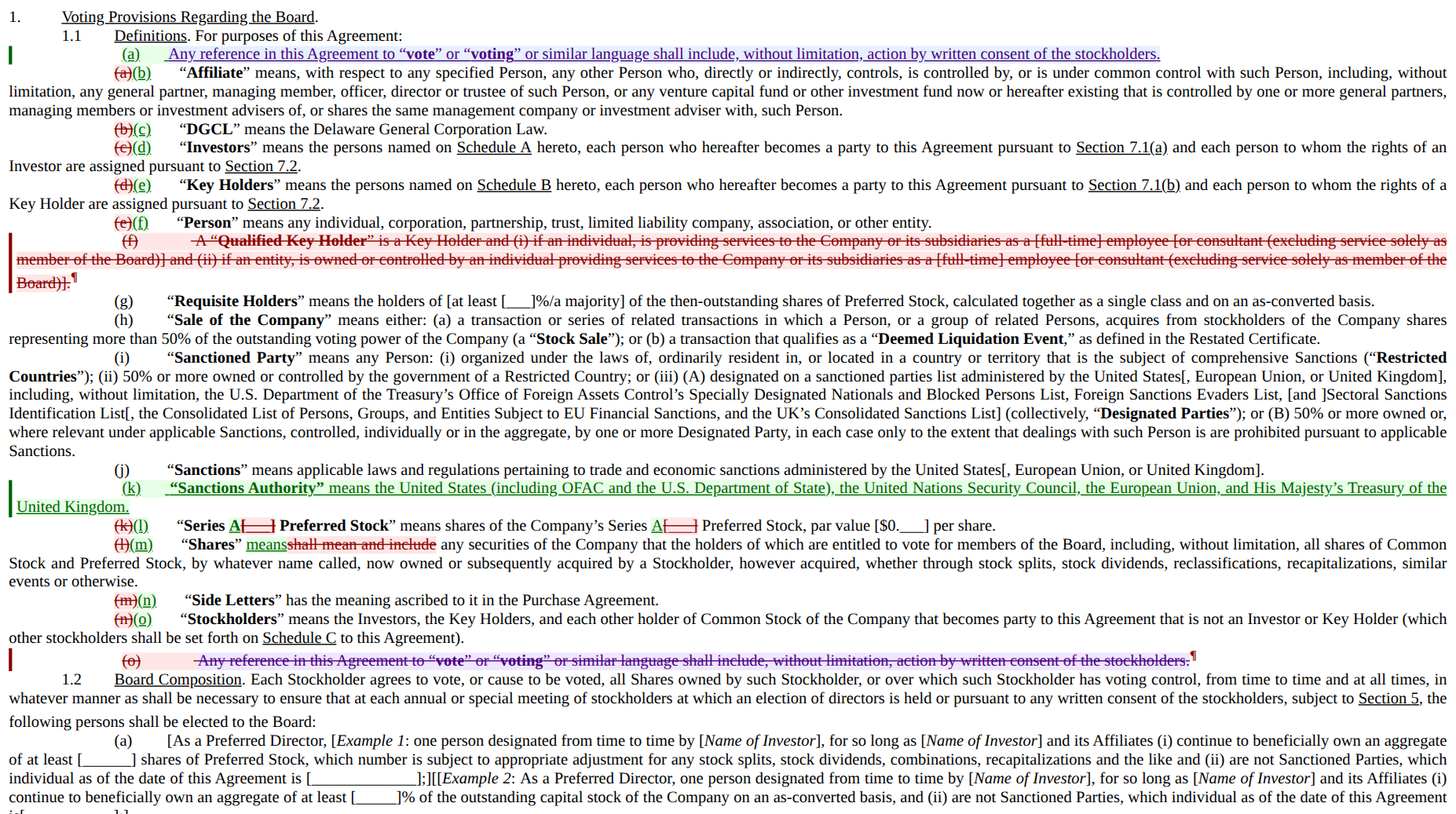
Real output. One frame: a struck definition, an inserted definition, word-level substitutions inside an untouched sentence, and a clause moved — struck in purple at the bottom, re-inserted at the top, linked as one operation instead of reported as an unrelated delete and insert.
getRevisions() gives you the same changes as structured data — typed, with move pairing and stable
kind:scope:unid anchors — so you can drive a review UI without parsing OOXML.
For audit and verification workflows, docxDiffGetSemanticChanges(left, right) returns the stable
docxodus.semantic-changes v1 object. It distinguishes content, formatting, structure, table,
story/review, relationship/media, and opaque-package families, with typed before/after values and
deterministic ids. An open session exposes the same opening-to-current comparison through
session.getSemanticChanges(); it requires the default captureInitialProjection: true setting.
See the semantic diff contract.
Render a document faithfully
convertDocxToHtml() keeps what naive converters drop: justification, style inheritance, legal
numbering, tables, images, comments, headers and footers, and real footnotes with back-references.
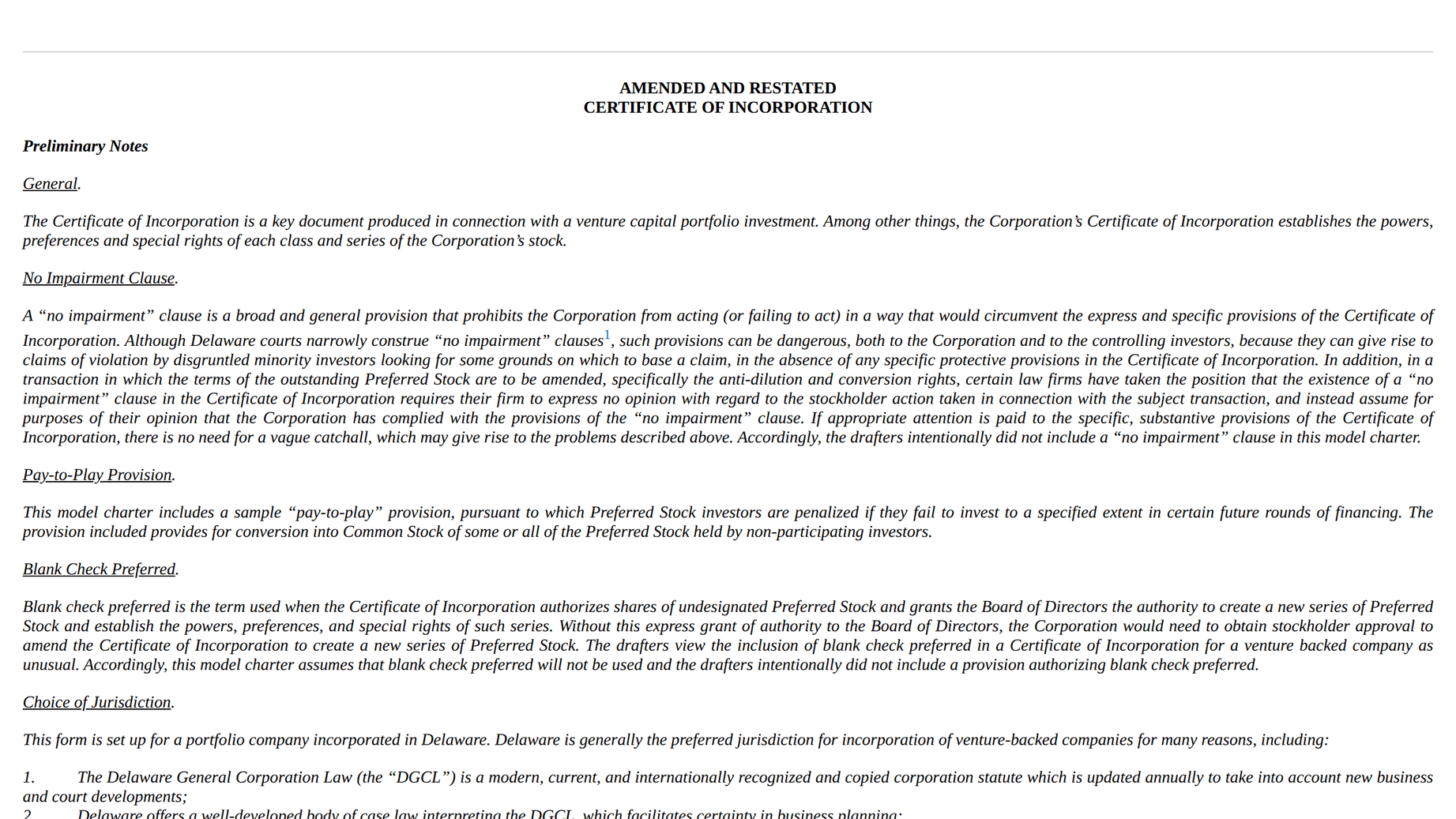
Paginated mode flows content into real page boxes with per-page numbers and page-anchored footnotes — a print-accurate preview in the browser.
Supply an exact layout token to materialize portable page citations from that layout:
const result = paginateHtml(html, viewer, {
  layoutToken: { documentVersion: session.getVersion(), rendererFingerprint: 'chromium-layout-v1' },
});
session.registerPageMap(result.pageMap!, 'chromium-layout-v1');
const citation = session.getPageCitation(anchorId, {
  documentVersion: session.getVersion(),
  rendererFingerprint: 'chromium-layout-v1',
});
navigateToPageCitation(viewer, citation);
Continuous renderers return explicit unavailability; Docxodus never estimates a citation page. See the PageMap contract.
Edit it in place
DocxEditor is a framework-agnostic block editor over the live document. Edits go through a
DocxSession, and only the changed block re-renders, so structural operations cost ~90–360 ms on
a 346-block, 94-footnote filing template. save() returns lossless bytes.
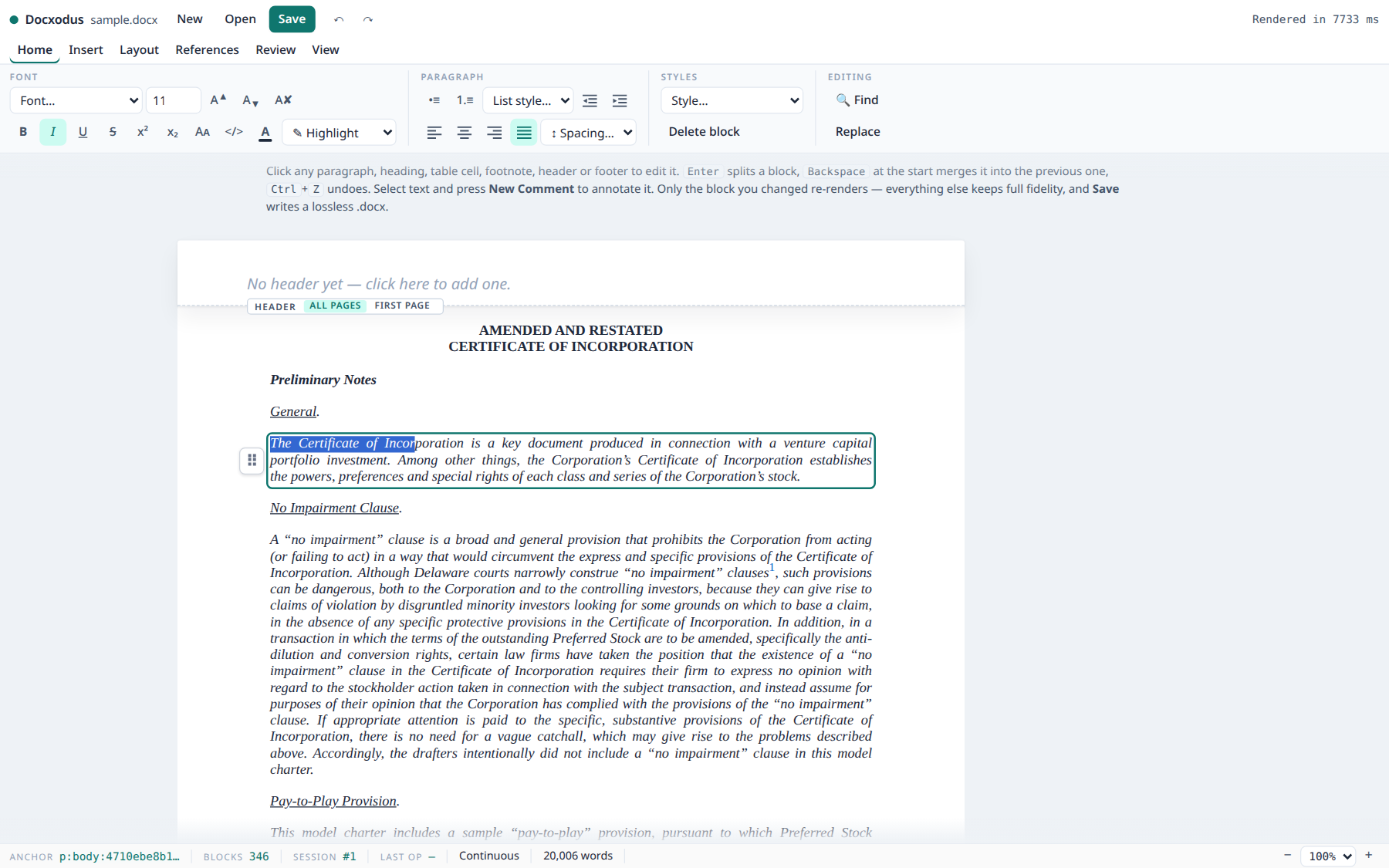
Two layers, so you can take as much UI as you want:
// The engine, with no chrome — bring your own UI.
import { DocxEditor } from 'docxodus';
const editor = DocxEditor.open(container, docxBytes, exports);

// Long document? Mount it in windows instead, yielding to the event loop between them, so the
// tab stays responsive and you can show progress. The result is the same editor and the same DOM.
const editor = await DocxEditor.openAsync(container, docxBytes, exports, {
  windowSize: 24,
  onProgress: (mounted, total) => console.log(`${mounted}/${total} blocks`),
});

// Or the whole surface: Word's tabbed ribbon (fonts, colour, styles, find & replace, links,
// pictures, tables, page setup, tracked changes), Word-style comment bubbles beside the page,
// in-place header/footer editing, a status bar with zoom, and the loading overlay.
import { mountRibbon } from 'docxodus';
const ribbon = mountRibbon(container, { exports });
ribbon.open(docxBytes, 'contract.docx');
The ribbon picks its layout from the width of the element you give it, so the same call serves a
full-page editor and a narrow embedded panel. examples/editor.html
is a host for it in ~60 lines.
Embed it with one script tag
The embed entry packages the viewer and editor behind one-call factories, with the WASM
runtime location auto-detected — no build step, no configuration:
<div id="doc" style="height: 100dvh"></div>
<script type="module">
  import { createRibbonEditor } from 'https://cdn.jsdelivr.net/npm/[email protected]/dist/embed.bundle.js';
  const ribbon = await createRibbonEditor('#doc', './contract.docx'); // or bytes / Blob / File
  // ...later: const editedBytes = ribbon.save();
</script>
That gives you the full editor UI. createEditor('#doc', source, options?) is the same document
without the chrome, and createViewer('#doc', source, options?) is the read-only counterpart.
Bundler users get the same API from docxodus/embed; classic-script pages can load
dist/embed.iife.js for a global Docxodus. See Embedding via CDN below.
Project it for an LLM
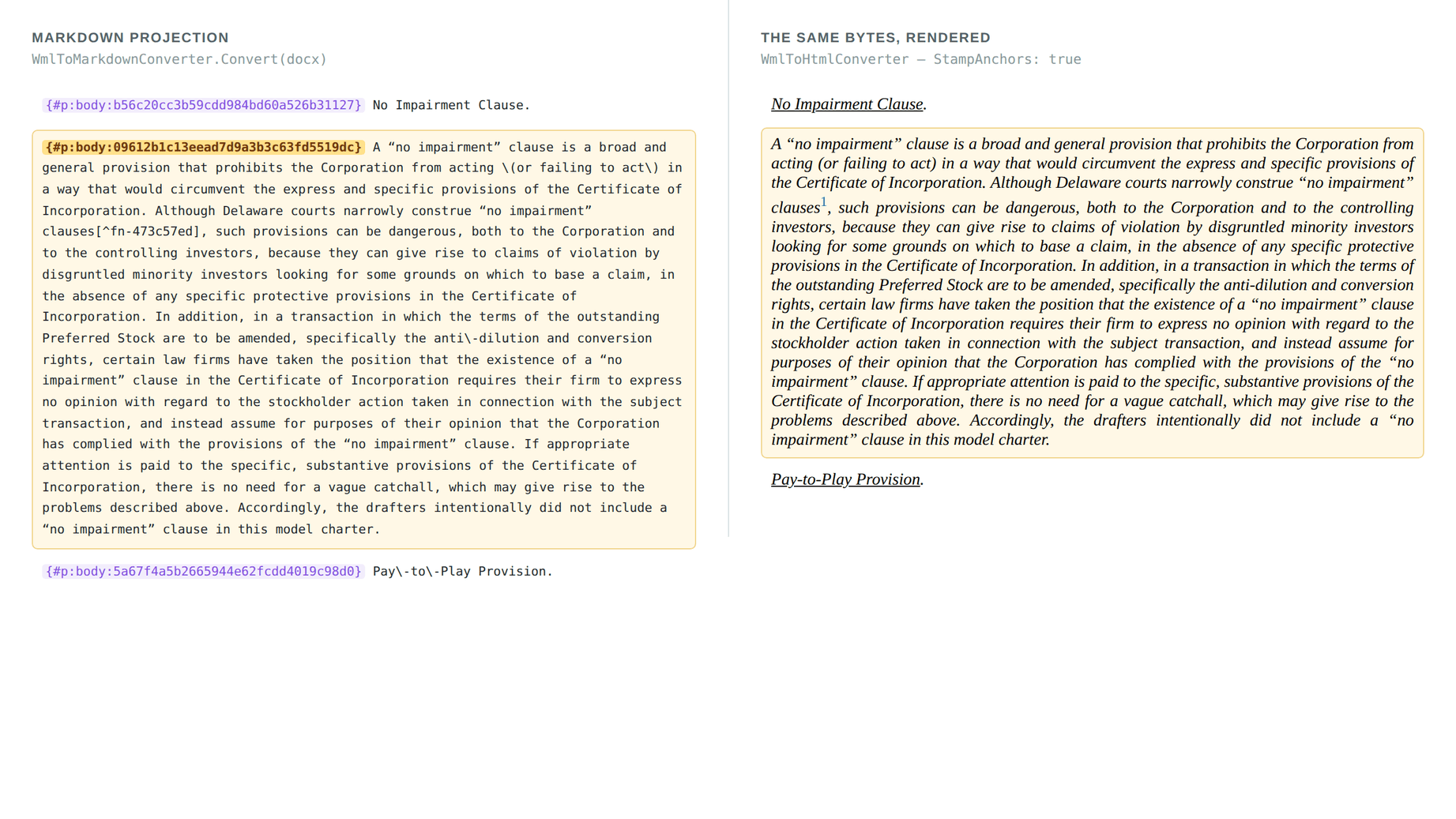
convertWmlToMarkdown() renders the document as markdown where every block carries a stable id,
so an agent can point at a clause and edit it — and openDocxSession() writes back to that same id.
Multi-step plans are atomic by default. Each callback may call any synchronous session mutation; success is one version/undo unit, while a failure or throw restores the complete package and history checkpoint:
const result = session.executeBatch([
  { tool: 'docx_edit', action: 'replace_text',
    mutation: () => session.replaceText(firstAnchor, 'Replacement text') },
  { tool: 'docx_create', action: 'set_header_text',
    mutation: () => session.setHeaderText(firstAnchor, 'default', 'Confidential') },
]);

if (!result.success) console.error(result.failure);
Pass 'best_effort' explicitly only when partial successes should be retained.
A retry after a lost response must not apply the edit twice. Give the batch a transaction id
and a serializable description of what it does; an identical retry returns the original result
without executing again, and reusing the id for a different request fails with
transaction_conflict:
const result = session.executeBatch(steps, 'atomic', {
  transactionId: 'plan-42-step-3',
  request: { replace: firstAnchor, header: 'Confidential' },
});
result.transaction; // { schemaVersion: 1, transactionId, requestFingerprint }
previewBatch answers "what would this do?" without touching the live session. It runs the
same steps against a complete isolated clone — each callback is handed the shadow session to
mutate — and returns the same receipt plus optional predicted HTML:
const preview = session.previewBatch([
  { tool: 'docx_edit', action: 'replace_text',
    mutation: shadow => shadow.replaceText(firstAnchor, 'Proposed replacement') },
], 'atomic', { html: 'full' });

console.log(preview.html, preview.revisionChanges.added, preview.warnings);
The live document's bytes, version and undo/redo history are unchanged either way. Preview
HTML shows tracked changes, comments, annotations, notes and headers/footers — the document
the batch would produce, matching what the Python and MCP clients render for the same batch.
packageHash is null when it could not be computed, so never assert replay equality
without checking for it.
A preview predicts generated values (new anchor ids, comment ids, revision timestamps), but a
later executeBatch runs afresh and may generate them differently. retain: true keeps the
successful preview's exact result package, and commitPreview makes it the live document as
previewed — one undo step, same ids, same packageHash:
const preview = session.previewBatch(steps, 'atomic', { html: 'full', retain: true });
showToReviewer(preview.html, preview.revisionChanges);
const commit = session.commitPreview(preview.retention!.previewId, {
  transactionId: 'plan-42-commit', request: { commit: preview.retention!.previewId },
});
commit.packageHash === preview.packageHash; // true
The commit refuses with preview_stale, editing nothing, if the session's version, package
content, tracked-changes mode or revision author moved since the preview, and with
preview_not_found once the preview expired, was evicted (8 previews, 64 MiB, 15 minutes per
session) or was already committed.
Delivery receipts from captured evidence
A session opened with captureDeliveryEvidence: true records the evidence a delivery change
receipt needs as its edits execute — the exact package before and after every mutation, each
executeBatch step's tool/action/args, transaction ids, and undo/redo lineage — and
buildDeliveryReceipt mints a receipt the portable verifier accepts:
const session = openDocxSession(bytes, { captureDeliveryEvidence: true });
session.executeBatch([
  { tool: 'docx_edit', action: 'replace_text', args: { anchorId: firstAnchor, markdown: 'Final wording' },
    mutation: () => session.replaceText(firstAnchor, 'Final wording') },
], 'atomic', { transactionId: 'plan-42', request: { replace: firstAnchor } });

const bundle = session.buildDeliveryReceipt({ privacyProfile: 'hashAndSummary' });
const receipt = bundle.artifacts.find(a => a.artifactId === 'change-receipt')!;
const artifacts = Object.fromEntries(bundle.artifacts
  .filter(a => a.bytes && a.artifactId !== 'change-receipt')
  .map(a => [a.artifactId, a.bytes!]));
await verifyDeliveryReceipt(new TextDecoder().decode(receipt.bytes!), artifacts); // isValid
Deliver the bundle's final-docx artifact: it is the bytes the receipt attests. A direct call
outside executeBatch is still captured exactly but recorded as an unlabeled mutation;
getDeliveryEvidenceStatus() counts those and names the first reason a receipt cannot be
minted (capture off, retention of 256 states / 512 MiB exceeded), in which case the bundle is
incomplete and the receipt artifact carries the reason instead of claiming a history.
Native links and bookmarks use the same stable anchors and exact character spans:
const session = openDocxSession(docxBytes, { persistAnchorIds: true });
const paragraph = Object.keys(session.project().anchorIndex)
  .find(id => id.startsWith('p:body:'))!;
session.addBookmark('Definitions', {
  startAnchorId: paragraph, startOffset: 0,
  endAnchorId: paragraph, endOffset: 11,
});
session.addHyperlink(paragraph, { start: 0, length: 11 }, 'internal', 'Definitions');
const links = session.listHyperlinks(); // ids feed updateHyperlink/removeHyperlink
const bookmarks = session.listBookmarks(); // exact endpoint range + per-paragraph segments
External links own their relationship in the actual body/header/footer/footnote/endnote part;
internal links are relationship-free bookmark targets. Bookmark rename retargets inbound links
atomically, and unsafe removal or cross-part ranges return typed EditResult errors.
Native images are occurrence-addressed too, with bytes kept explicit at the API boundary:
const capabilities = session.getImageCapabilities();
const inserted = session.insertImage(paragraph, 0, pngBytes, {
  widthPoints: 144,
  altText: 'Revenue by quarter',
});
const image = session.listImages().find(value => value.id === inserted.imageId)!;
session.setImageDimensions(image.id, { widthPoints: 108 });
PNG/JPEG/GIF/BMP/TIFF are writable. Existing WebP, external links, legacy VML, and unsupported
DrawingML remain enumerable with canMutate: false. Dimensions use points; floating offsets use
exact EMUs, and omitted insert dimensions use 96 DPI. The browser API accepts Uint8Array and
does not fetch image URLs or read paths.
Everything else
- Move detection — relocated content is identified as a move, not a delete plus an insert
- Format change detection — formatting-only changes (bold, italic, font size, …)
- Comment rendering — endnote-style, inline, or margin
- Document metadata — fast extraction for lazy loading and pagination
- OpenContracts export — for NLP and document-analysis pipelines
- External annotations — overlay annotations without modifying the DOCX
- Web Worker support — non-blocking WASM execution off the main thread
- React hooks —
useDocxodus,useConversion,useComparison - TypeScript — full type definitions included
Quick Start
Basic Usage
import { initialize, convertDocxToHtml, compareDocuments } from 'docxodus';

// Initialize the WASM runtime (call once at app startup)
await initialize('/path/to/wasm/');

// Convert DOCX to HTML
const html = await convertDocxToHtml(docxFile);

// Compare two documents
const redlinedDocx = await compareDocuments(originalFile, modifiedFile, {
  authorName: 'Reviewer'
});
React Usage
import { useDocxodus, useConversion, useComparison } from 'docxodus/react';

function DocumentViewer() {
  const { isReady, isLoading, error, convertToHtml } = useDocxodus('/wasm/');
  const [html, setHtml] = useState('');

  const handleFile = async (e: React.ChangeEvent<HTMLInputElement>) => {
    const file = e.target.files?.[0];
    if (file && isReady) {
      const result = await convertToHtml(file);
      setHtml(result);
    }
  };

  if (isLoading) return <div>Loading...</div>;
  if (error) return <div>Error: {error.message}</div>;

  return (
    <div>
      <input type="file" accept=".docx" onChange={handleFile} />
      <div dangerouslySetInnerHTML={{ __html: html }} />
    </div>
  );
}
Using the Comparison Hook
import { useComparison } from 'docxodus/react';

function DocumentComparer() {
  const {
    html,
    isComparing,
    error,
    compareToHtml,
    downloadResult
  } = useComparison('/wasm/');

  const handleCompare = async (original: File, modified: File) => {
    await compareToHtml(original, modified, { authorName: 'Legal Team' });
  };

  return (
    <div>
      {isComparing && <p>Comparing...</p>}
      {error && <p>Error: {error.message}</p>}
      {html && <div dangerouslySetInnerHTML={{ __html: html }} />}
      <button onClick={() => downloadResult('comparison.docx')}>
        Download Redlined DOCX
      </button>
    </div>
  );
}
Node.js (ES modules)
Import the engine from docxodus/core for server-side conversion, comparison, annotations,
and document sessions. It loads without a bundler or a custom Node loader:
import { readFile, writeFile } from 'node:fs/promises';
import { initialize, convertDocxToHtml, compareDocuments } from 'docxodus/core';

await initialize(); // Finds the WASM runtime included in the installed package.
const original = await readFile('original.docx');
const revised = await readFile('revised.docx');
await writeFile('original.html', await convertDocxToHtml(original));
await writeFile('redline.docx', await compareDocuments(original, revised));
docxodus/core exposes the engine functions, types, enums, annotation helpers, and history
APIs from docxodus, excluding DocxEditor, CommentGutter, mountRibbon, and their editor
types. The existing docxodus entry includes those browser editor APIs and requires a browser
bundler; use docxodus/core in plain Node ESM. Both entries share the same engine state.
Browser helpers retained in core, such as pagination, the document viewport, IndexedDB
storage, and history controls, still require their browser APIs when called.
API Reference
Package verification
generatePackageManifest(document) inspects supplied bytes without opening an editable package;
session.getPackageManifest() describes the current logical session checkpoint, including unsaved
edits, without advancing its version. Both return the same schema-v1 PackageManifest with exact
package, ordered OPC-content, and normalized-semantic SHA-256 identities plus entries,
relationships, facts, and structured findings. Worker users can call
worker.generatePackageManifest(document) or await workerSession.getPackageManifest(). See
package_manifests.md for the normalization boundary.
Stateful inspection and editing
openDocxSession(bytes) exposes the live document rather than a one-shot conversion. Inspect the
source before writing it: listStyles() returns the document's actual paragraph/character/table
styles, getFormatting(anchorId) keeps directParagraph separate from effectiveParagraph, and
listInlineSpans(anchorId) returns anchorId + span pairs accepted unchanged by applyFormat.
const session = openDocxSession(bytes);
try {
  const anchorId = Object.keys(session.project().anchorIndex)[0];
  const style = session.listStyles().find(s => s.name === "Strong Custom");
  const run = session.listInlineSpans(anchorId).find(s => s.text === "Defined Term");
  if (style && run) {
    session.applyFormat(run.anchorId, run.span, { runStyle: style.id });
  }
} finally {
  session.close();
}
An omitted property in a direct record means "not written at this layer"; it must not be treated
as false or zero. The matching effective record resolves document defaults and the full style
chain. getListMembership and getSectionInfo likewise return their query anchorId so callers
do not have to translate between inspection and mutation coordinate systems.
effective is deliberately a shorter cascade than the renderer's: it excludes the numbering
level's own paragraph properties and the table style's conditional formatting, so a list item
indented only by its numbering definition reports leftIndentTwips: 0 and a run bolded by a
firstRow table style reports bold: false. Use getListMembership for the real numbering
indentation. See docs/architecture/docx_mutation_api.md for the exact layer list.
Core Functions
initialize(basePath?: string): Promise<void>
Initialize the WASM runtime. Must be called before using any other functions.
convertDocxToHtml(document: File | Uint8Array, options?: ConversionOptions): Promise<string>
Convert a DOCX document to HTML.
import { CommentRenderMode, PaginationMode, AnnotationLabelMode } from 'docxodus';

interface ConversionOptions {
  pageTitle?: string;           // HTML document title
  cssPrefix?: string;           // CSS class prefix (default: "docx-")
  fabricateClasses?: boolean;   // Generate CSS classes (default: true)
  additionalCss?: string;       // Extra CSS to include
  commentRenderMode?: CommentRenderMode;  // How to render comments (default: Disabled)
  commentCssClassPrefix?: string;         // CSS prefix for comments
  paginationMode?: PaginationMode;        // None (0) or Paginated (1)
  paginationScale?: number;               // Scale factor for pages (default: 1.0)
  renderAnnotations?: boolean;            // Render custom annotations
  annotationLabelMode?: AnnotationLabelMode;  // Above, Inline, Tooltip, or None
  renderFootnotesAndEndnotes?: boolean;   // Include footnotes/endnotes sections
  renderHeadersAndFooters?: boolean;      // Include headers and footers
  renderTrackedChanges?: boolean;         // Show insertions/deletions visually
}
Comment Render Modes
Control how Word document comments are rendered in HTML output:
import { convertDocxToHtml, CommentRenderMode } from 'docxodus';

// Don't render comments (default)
const html = await convertDocxToHtml(docxFile, {
  commentRenderMode: CommentRenderMode.Disabled
});

// Render as footnotes with bidirectional links
const htmlEndnote = await convertDocxToHtml(docxFile, {
  commentRenderMode: CommentRenderMode.EndnoteStyle
});

// Render as inline tooltips (title attribute + data attributes)
const htmlInline = await convertDocxToHtml(docxFile, {
  commentRenderMode: CommentRenderMode.Inline
});

// Render in a side margin column (CSS flexbox layout)
const htmlMargin = await convertDocxToHtml(docxFile, {
  commentRenderMode: CommentRenderMode.Margin
});
| Mode | Value | Description |
|------|-------|-------------|
| Disabled | -1 | Don't render comments (default) |
| EndnoteStyle | 0 | Comments at document end with [1] style links |
| Inline | 1 | Tooltips via title and data-comment attributes |
| Margin | 2 | Side column using CSS flexbox |
compareDocuments(original, modified, options?): Promise<Uint8Array>
Compare two DOCX documents and return a redlined DOCX with tracked changes.
interface CompareOptions {
  authorName?: string;     // Author name for revisions (default: "Docxodus")
  detailThreshold?: number; // 0.0-1.0, lower = more detailed (default: 0.15)
  caseInsensitive?: boolean; // Case-insensitive comparison (default: false)
}
compareDocumentsToHtml(original, modified, options?): Promise<string>
Compare documents and return the result as HTML.
getRevisions(document: File | Uint8Array, options?): Promise<Revision[]>
Extract revision information from a compared document.
import {
  getRevisions,
  RevisionType,
  isInsertion,
  isDeletion,
  isMove,
  isMoveSource,
  isFormatChange,
  findMovePair
} from 'docxodus';
import type { Revision, GetRevisionsOptions } from 'docxodus';

// RevisionType enum
enum RevisionType {
  Inserted = "Inserted",      // Text or content that was added
  Deleted = "Deleted",        // Text or content that was removed
  Moved = "Moved",            // Text relocated within the document
  FormatChanged = "FormatChanged"  // Formatting-only change
}

// Revision interface with full documentation
interface Revision {
  author: string;
  date: string;
  revisionType: RevisionType | string;
  text: string;
  moveGroupId?: number;      // Links move source/destination pairs
  isMoveSource?: boolean;    // true = moved FROM here, false = moved TO here
  formatChange?: {           // Details for FormatChanged revisions
    oldProperties?: Record<string, string>;
    newProperties?: Record<string, string>;
    changedPropertyNames?: string[];
  };
}

// Get revisions with options
const revisions = await getRevisions(comparedDoc, {
  detectMoves: true,              // Enable move detection (default: true)
  moveSimilarityThreshold: 0.8,   // Jaccard similarity for moves (default: 0.8)
  moveMinimumWordCount: 3,        // Minimum words for move (default: 3)
  caseInsensitive: false          // Case-insensitive matching (default: false)
});

// Filter by type using helper functions
const insertions = revisions.filter(isInsertion);
const deletions = revisions.filter(isDeletion);
const moves = revisions.filter(isMove);
const formatChanges = revisions.filter(isFormatChange);

// Find move pairs
for (const rev of moves.filter(isMoveSource)) {
  const destination = findMovePair(rev, revisions);
  console.log(`"${rev.text}" moved to "${destination?.text}"`);
}

// Check format changes
for (const rev of formatChanges) {
  console.log(`Format changed: ${rev.formatChange?.changedPropertyNames?.join(', ')}`);
}
getDocumentMetadata(document: File | Uint8Array): Promise<DocumentMetadata>
Get document metadata for lazy loading and pagination without full HTML rendering.
const metadata = await getDocumentMetadata(docxFile);

console.log(`Sections: ${metadata.sections.length}`);
console.log(`Total paragraphs: ${metadata.totalParagraphs}`);
console.log(`Estimated pages: ${metadata.estimatedPageCount}`);
console.log(`Has comments: ${metadata.hasComments}`);
console.log(`Has tracked changes: ${metadata.hasTrackedChanges}`);

// Section dimensions (in points, 1pt = 1/72 inch)
const section = metadata.sections[0];
console.log(`Page size: ${section.pageWidthPt} x ${section.pageHeightPt} pt`);
exportToOpenContract(document: File | Uint8Array): Promise<OpenContractDocExport>
Export document to OpenContracts format for NLP/document analysis.
const export = await exportToOpenContract(docxFile);
console.log(`Title: ${export.title}`);
console.log(`Content: ${export.content.length} characters`);
console.log(`Pages: ${export.pageCount}`);
console.log(`Structural annotations: ${export.labelledText.length}`);
Web Worker API
For non-blocking WASM execution, use the worker-based API:
import { createWorkerDocxodus } from 'docxodus/worker';

// Create a worker instance
const docxodus = await createWorkerDocxodus({ wasmBasePath: '/wasm/' });

// All operations run in a Web Worker - main thread stays responsive
const html = await docxodus.convertDocxToHtml(docxFile, options);
const redlined = await docxodus.compareDocuments(original, modified, options);
const revisions = await docxodus.getRevisions(docxFile);
const comments = await docxodus.getComments(docxFile);
const metadata = await docxodus.getDocumentMetadata(docxFile);

// The external annotation family runs there too, so a read-only viewer that renders
// through the worker can annotate without booting a second runtime on the main thread.
const set = await docxodus.createExternalAnnotationSet(docxFile, 'doc-1');
const annotated = await docxodus.projectAnnotationsOntoHtml(html, set);
const validation = await docxodus.validateExternalAnnotations(docxFile, set);
const exported = await docxodus.exportToOpenContract(docxFile);

// Terminate when done
docxodus.terminate();
projectAnnotationsOntoHtml parses its input as XML: hand it the converter's output (or
another well-formed serialization), not a live DOM's innerHTML, which leaves <br> and
<img> unclosed. DocxEditor.open() stays main-thread only — it writes into a live container.
First-call warmup
createWorkerDocxodus() warms the .NET WASM runtime, but the comparison code
path is not exercised until your first compareDocuments(). That first call
pays a one-time warmup cost (comparison-assembly initialization + JIT of the
diff/XML engine) — roughly 2× the latency of every subsequent compare.
prepare() is an optional method that pays this cost up front. Call it once
after creating the worker — during app boot, or while the user is still picking
files — so the first user-triggered comparison is already hot. It does not
run automatically; if you skip it, the first compare simply absorbs the warmup
as before.
const docxodus = await createWorkerDocxodus({ wasmBasePath: '/wasm/' });

// Optional: warm the comparison path ahead of the first user action.
await docxodus.prepare();

// Now hot — the first real compare runs at steady-state speed and triggers
// no further .wasm fetches.
const redlined = await docxodus.compareDocuments(original, modified);
prepare() is idempotent (repeated calls share one in-flight warmup and resolve
immediately once complete), needs no input documents or seed files of your own
(it builds tiny seed documents inside the worker), and is concurrent-safe —
issuing a compareDocuments() while a prepare() is still in flight will not
double-load assemblies.
React Hooks
useDocxodus(wasmBasePath?: string)
Main hook providing all Docxodus functionality.
Returns:
isReady: boolean- Whether WASM is loadedisLoading: boolean- Whether WASM is loadingerror: Error | null- Initialization errorconvertToHtml()- Convert DOCX to HTMLcompare()- Compare documentscompareToHtml()- Compare and get HTMLgetRevisions()- Get revision listgetDocumentMetadata()- Get document metadata
useConversion(wasmBasePath?: string)
Simplified hook for DOCX to HTML conversion with state management.
useComparison(wasmBasePath?: string)
Simplified hook for document comparison with state management.
useAnnotations(wasmBasePath?: string)
Hook for managing custom annotations on documents.
useDocumentStructure(wasmBasePath?: string)
Hook for document structure analysis and element-based targeting.
Embedding via CDN
Everything in the published package — the JS wrappers AND the WASM runtime — is served by npm CDNs
(jsDelivr, unpkg) with Access-Control-Allow-Origin: * and correct application/wasm MIME types,
so a page can embed a full viewer or editor without hosting anything itself.
One-tag viewer / editor (recommended)
<div id="viewer"></div>
<div id="editor"></div>
<div id="app" style="height: 100dvh"></div>
<script type="module">
  import { createViewer, createEditor, createRibbonEditor }
    from 'https://cdn.jsdelivr.net/npm/[email protected]/dist/embed.bundle.js';

  // Choose a factory, or render several into separate containers as shown.
  // Source may be a URL, Uint8Array, ArrayBuffer, Blob, or File.
  const viewer = await createViewer('#viewer', './contract.docx');

  // No source opens a blank "New document"; returns a DocxEditor.
  const editor = await createEditor('#editor', './contract.docx', { paginated: false });
  const bytes = editor.save(); // lossless DOCX bytes

  // The whole editor UI in one call — ribbon, rail, table picker, loading overlay.
  // Density follows the CONTAINER's width, so this is also the mobile answer.
  const ribbon = await createRibbonEditor('#app', './contract.docx', {
    chrome: 'auto',       // 'full' | 'compact' | 'auto' (default)
    rail: true,           // the live kind:scope:unid / session / last-op readout
    hint: true,           // the editing hint above the document
    loader: true,         // the staged loading overlay; false removes it
  });
</script>
dist/embed.bundle.js is a self-contained ESM bundle re-exporting the entire main API
(convert, compare, diff, sessions, annotations) plus
createViewer/createEditor/createRibbonEditor/mountRibbon/DocxEditor, so it also works as
a no-build way to use any other function.
For pages that can't use modules, dist/embed.iife.js exposes the same surface as a global:
<div id="doc"></div>
<script src="https://cdn.jsdelivr.net/npm/[email protected]/dist/embed.iife.js"></script>
<script>
  Docxodus.createRibbonEditor('#doc').then((ribbon) => { /* ... */ });
</script>
How WASM resolution works
The ~18 MB runtime request set in dist/wasm/ loads lazily from the same directory the bundle
was loaded from (import.meta.url for module scripts, document.currentScript for the IIFE):
first <bundle dir>/wasm/, then <bundle dir>/ as a fallback. On a CDN that resolves to
.../dist/wasm/_framework/... automatically. To serve the WASM assets from somewhere else, pass
{ wasmBasePath: 'https://your.host/wasm/' } to either factory (or call initialize(path) first).
CDN caveats
- Pin an exact version in production (
[email protected], not@latest) — CDN responses are cached as immutable, and the wire shapes between the JS wrappers and the WASM assemblies must come from the same release. - The build patches the .NET loader to fetch with
credentials: "omit"— required because the CDN'sAccess-Control-Allow-Origin: *cannot be combined with credentialed requests. - The Web Worker entry (
docxodus/worker) is not CDN-loadable cross-origin (browsers require same-origin worker scripts); embed runs the engine on the main thread. Self-host the package if you need the worker. - Converter CSS is scoped to a private inner mount so
body,span, and document-class rules cannot restyle the host page. Document-global@importand@pagerules are omitted; use the full-document conversion/print path rather than an embed factory if those rules are required. - First load fetches ~18 MB uncompressed across about 49 requests; subsequent loads hit the browser cache.
Standalone paginated HTML
docxodus/export-browser turns a DOCX into a complete offline HTML document whose body contains
the finalized fixed page boxes—not the hidden measurement tree. It returns the HTML together with
the exact PageMap, renderer fingerprint, warnings, and a schema-v2 render report from that same
sanitized tree.
import { convertDocxToPaginatedHtml } from 'docxodus/export-browser';

const source = new Uint8Array(await file.arrayBuffer());
const result = await convertDocxToPaginatedHtml(source, {
  reviewProfile: 'final',
  commentProfile: 'endnotes',
  documentVersion: 12,
  expectedSourceDigest: verifiedSha256,
});

download(new Blob([result.html], { type: 'text/html' }));
console.log(result.pageCount, result.pageMap, result.renderReport);
The exporter copies caller bytes before its first asynchronous boundary, verifies them with the
package manifest API, performs layout in an attached script-disabled frame, embeds or removes every
automatic resource, and reopens the serialized result to verify page count and physical geometry.
External HTTPS/mail/tel links remain user-activated links and are inventoried in the report; the
exporter never follows them. unsupportedContent: 'strict' rejects visible placeholders or omitted
resources instead of returning a nominally complete artifact.
All three revision profiles (final, original, markup) are supported; final and original
derive their projection out-of-place and never mutate the caller's bytes. strictFonts: true
turns unresolved or unverified font families into failures; supplying a fontResolver (in Node,
fontDirectories on @docxodus/export) is what makes families verifiable. A font the browser
supplied on its own is labelled browserObserved; it is not presented as a verified host-font
environment.
By default the worker loads from dist/wasm/ beside the package entry point. A deployment that
hosts those files elsewhere may pass wasmBasePath. docxodus/export-assets.json is the closed,
SHA-256-addressed runtime asset graph, and docxodus/render-report.schema.json is the report schema.
Hosting WASM Files
The WASM files need to be served from your web server. After building:
- Copy the contents of
dist/wasm/to your public directory - Pass the path to
initialize()or the React hooks
Example directory structure:
public/
  wasm/
    _framework/
      dotnet.js
      dotnet.native.wasm
      ... (other framework files)
Package and Runtime Size
| Component | Approx. uncompressed size | |-----------|---------------------------:| | dotnet.native.wasm | 1.5 MB | | Managed/runtime WASM modules | 15.5 MB | | WASM payload total | 17.0 MB | | Published package (all bundles, types, maps, and WASM) | 20.0 MB |
Only the runtime request set (~18 MB including loader JavaScript) is fetched during first initialization; source maps, declarations, and unrelated entry bundles are not. Runtime files are loaded on demand and cached by the browser.
Browser Support
- Chrome 89+
- Firefox 89+
- Safari 15+
- Edge 89+
Requires WebAssembly SIMD support.
Portable document history
See the concise history-controls API guide for latest/version
loading, comparison, checkpoint/restore and .docxhistory import/export over host-owned storage.
mountHistoryControls adds an accessible panel with separate previews, exact checkpoint retries
and explicit history sharing. openIndexedDbHistoryStore provides optional browser persistence.
These controls require structuredClone and crypto.randomUUID; the optional store also requires IndexedDB.
The shared editor example includes an optional Version history drawer.
One npm run build produces the library, local editors and deployable site; run npm run demo:serve
and open http://localhost:8088/editor.html. In an embed, pass history: true to
createRibbonEditor, or { history: { workspaceId: "my-document" } } to resume saved work across reloads.
License
MIT
Credits
Built on Docxodus, a .NET library for document manipulation based on OpenXML-PowerTools.