
dopecanvas
v0.1.7
Published
The office editor built for the AI era — a drop-in React component that renders LLM-generated HTML as paginated, editable documents.

Maintainers
 dopeoffice
Readme
DopeCanvas
The office suite built for the AI era.
DopeCanvas is a drop-in React component that replaces Word, Excel, and PowerPoint with a single, unified document canvas. It renders LLM-generated HTML as a paginated, editable document -- complete with tables, charts, rich formatting, and page breaks -- so your users work in a familiar office-like environment while your AI writes the code behind it.
The LLM sees HTML. The user sees a professional report. Both can edit it.
Why DopeCanvas?
The problem with traditional office tools
Word, Excel, and PowerPoint are powerful individually, but painful together. Building a complex report means juggling three apps, copy-pasting between them, versioning each file separately, and hoping nothing breaks when you update a number in a spreadsheet that feeds into a chart in a slide deck that references a paragraph in a document.
The problem with Notion-style tools
Notion solved the integration problem, but introduced new ones: limited formatting control, a learning curve that amounts to a new way of working, and -- critically -- poor compatibility with LLM workflows. You can't easily have an AI generate a Notion page with precise layout, formulas, and styling.
The DopeCanvas solution
DopeCanvas takes a different approach entirely:
- HTML is the document format. LLMs already understand HTML natively. No custom schemas, no proprietary formats, no serialization loss. The AI writes HTML/CSS, and DopeCanvas renders it as a paginated, editable document.
- One canvas, all capabilities. Text, tables, charts, styled layouts -- everything lives in one document, on real pages with real page breaks. No switching between apps.
- Users edit visually. Click any text to edit it. Use the toolbar for formatting. It feels like Word, but it's powered by the web.
- Programmatic API. Load content, extract content, sync to databases. DopeCanvas is a framework, not just a viewer.
How It Works
LLM writes HTML/CSS/JS
        |
        v
  DopeCanvas.loadHTML()
        |
        v
  Pagination Engine measures content,
  distributes blocks across pages
        |
        v
  User sees paginated, editable document
  (white pages, margins, shadows, page numbers)
        |
        v
  User clicks to edit (contentEditable)
  Toolbar provides formatting (bold, italic, etc.)
        |
        v
  DopeCanvas.getHTML() returns modified HTML
        |
        v
  Sync to database, send back to LLM, export
The key insight: the LLM works with code, the user works with a document, and they're editing the same thing.
Quick Start
Install
npm install dopecanvasBasic Usage
import { DopeCanvas } from 'dopecanvas';

function App() {
  // This HTML could come from an LLM, a database, or an API
  const html = `
    <h1 style="color: #1a1a2e; font-family: Georgia, serif;">
      Quarterly Report
    </h1>
    <p style="line-height: 1.6;">
      Revenue reached <strong>$48.2M</strong>, a 23% YoY increase.
    </p>
    <table style="width: 100%; border-collapse: collapse;">
      <tr style="background: #1a1a2e; color: white;">
        <th style="padding: 10px;">Metric</th>
        <th style="padding: 10px;">Q3</th>
        <th style="padding: 10px;">Q4</th>
      </tr>
      <tr>
        <td style="padding: 8px; border-bottom: 1px solid #ddd;">Revenue</td>
        <td style="padding: 8px; border-bottom: 1px solid #ddd;">$42.5M</td>
        <td style="padding: 8px; border-bottom: 1px solid #ddd;">$48.2M</td>
      </tr>
    </table>
  `;

  return (
    <DopeCanvas
      html={html}
      onContentChange={(updated) => {
        console.log('User edited the document:', updated);
      }}
    />
  );
}
That's it. You get a paginated, editable document with a formatting toolbar, page setup controls, and an API to read the content back.
With Page Configuration
<DopeCanvas
  html={html}
  pageConfig={{
    size: 'a4',        // 'letter' | 'a4' | 'legal' | { width, height }
    margins: {
      top: 96,         // pixels (96px = 1 inch at 96 DPI)
      right: 96,
      bottom: 96,
      left: 96,
    },
  }}
  onContentChange={(html) => saveToDatabase(html)}
  onPageConfigChange={(config) => console.log('Page settings changed:', config)}
/>
With the Document API
import { DocumentAPI } from 'dopecanvas';

const api = new DocumentAPI();

// Load content programmatically
api.loadHTML('<h1>Hello World</h1><p>Generated by AI.</p>');

// Listen for user edits
api.onChange((html) => {
  syncToDatabase(html);
});

// Read content
const html = api.getHTML();
const text = api.getPlainText();

// Access specific elements for database sync
const tableContent = api.getElementContent('revenue-table');
api.setElementContent('summary', '<p>Updated by the system.</p>');
What Makes This LLM-Native
HTML in, HTML out
Most document editors use proprietary internal models (ProseMirror schemas, Slate.js value trees, OOXML). These are hostile to LLMs -- the AI has to learn a custom format, and translation is lossy.
DopeCanvas uses HTML as the document format. Period. The LLM writes HTML with inline styles, classes, and any structure it wants. DopeCanvas renders it faithfully and returns it faithfully. No schema stripping, no attribute sanitization, no surprises.
No editor framework baggage
We deliberately chose native contentEditable over TipTap, ProseMirror, or Slate.js. Those frameworks enforce schemas that strip CSS classes, inline styles, data attributes, and JavaScript -- destroying the LLM's output. With DopeCanvas, what the AI writes is exactly what renders.
Structured content for structured prompts
Because the document is real HTML, you can:
- Ask the LLM to generate a report section and inject it at a specific element ID
- Extract a table from the document and send it back to the LLM for analysis
- Have the LLM update specific sections while preserving user edits elsewhere
- Round-trip between AI generation and human editing without format conversion
Plain JavaScript = formulas, charts, and live analysis
This is the killer feature that falls out of using real HTML: <script> tags just work.
Other editors strip scripts during sanitization. DopeCanvas activates them. That means an LLM can generate a full analytical report with computed totals, interactive Chart.js visualizations, and cross-table data binding — using nothing but plain JavaScript — and it all runs live inside the document.
Computed cells and formulas. No formula engine needed. The LLM writes a <script> that reads data from table cells, computes totals/averages/growth percentages, and writes the results back. When the user edits a number, an input event listener recalculates everything instantly:
<table id="revenue">
  <tr><td>Q1</td><td class="num">$9.8M</td></tr>
  <tr><td>Q2</td><td class="num">$11.2M</td></tr>
  <tr class="total-row">
    <td>Total</td><td class="num fx" id="total">$21.0M</td>
  </tr>
</table>

<script>
(function () {
  var table = document.getElementById('revenue');
  function recalc() {
    var rows = table.querySelectorAll('tr:not(.total-row)');
    var sum = 0;
    rows.forEach(function (tr) {
      var text = tr.querySelector('.num').textContent;
      sum += parseFloat(text.replace(/[^0-9.]/g, ''));
    });
    document.getElementById('total').textContent = '$' + sum.toFixed(1) + 'M';
  }
  recalc();
  table.addEventListener('input', recalc);
})();
</script>
Charts from table data. The LLM generates a <canvas> element and a script that loads Chart.js from a CDN, reads values from the table, and renders a bar chart, line graph, or doughnut. When the user edits a cell, the chart animates to reflect the new data:
<canvas id="chart" width="560" height="300"></canvas>

<script>
(function () {
  function init() {
    // Read data from the table, build chart
    var chart = new Chart(document.getElementById('chart'), {
      type: 'bar',
      data: { labels: ['Q1','Q2','Q3','Q4'], datasets: [/*...*/] }
    });
    // Re-read table and update chart on every edit
    document.getElementById('revenue').addEventListener('input', function () {
      chart.data.datasets[0].data = readTableData();
      chart.update();
    });
  }
  // Load Chart.js dynamically, then init
  var s = document.createElement('script');
  s.src = 'https://cdn.jsdelivr.net/npm/chart.js@4/dist/chart.umd.min.js';
  s.onload = init;
  document.head.appendChild(s);
})();
</script>
Why this matters. The LLM doesn't need to learn a plugin API, a chart config schema, or a formula language. It writes the same JavaScript it already knows. Any library that runs in a browser — Chart.js, D3, MathJax, Mermaid — can be loaded and used. The document is a full web page with the UX of a Word doc.
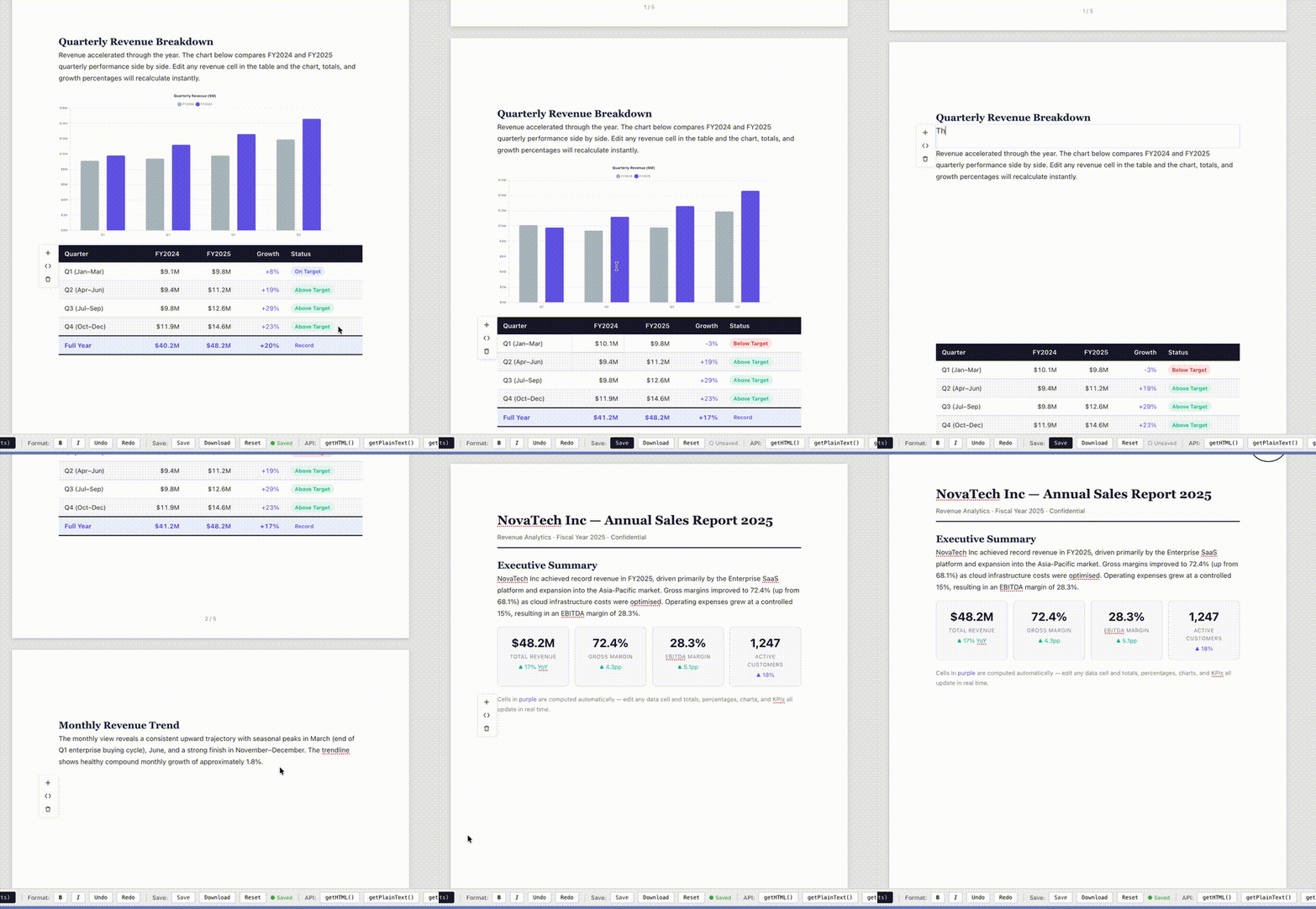
The included sample-report-charts.html demo shows this in action: four Chart.js charts (bar, line, doughnut, horizontal bar) all driven by editable tables with live-updating totals, growth percentages, and KPI cards.
See it in action
Edit a table cell and watch every chart, total, and KPI card update instantly:
Features
Pagination Engine
- Real page sizes: Letter (8.5 x 11"), A4 (210 x 297mm), Legal (8.5 x 14"), or custom dimensions
- Configurable margins (top, right, bottom, left)
- Automatic content measurement and distribution across pages
- CSS
break-before: page/break-after: pagefor manual page breaks - Page numbers
Visual Document Rendering
- White pages on a scrollable gray background (like Word/Google Docs)
- Page shadows and margins
- Content rendered exactly as the HTML specifies -- gradients, flexbox, grid, anything
Inline Editing
- Click any text to edit in place via
contentEditable - Table cells are individually editable
- All original CSS styling is preserved during editing
Formatting Toolbar
- Text: Bold, Italic, Underline, Strikethrough, Font Size, Headings (H1-H6)
- Color: Text color, Highlight color
- Alignment: Left, Center, Right, Justify
- Lists: Ordered, Unordered, Indent, Outdent
- Page: Size selector, Margin controls
- History: Undo / Redo
- Contextual: toolbar adapts based on whether you're editing text, a table, or other elements
Document API
loadHTML(html, css?)-- Load content into the canvasgetHTML()-- Get current content (reflects user edits)getPlainText()-- Get text content without markuponChange(callback)-- Subscribe to edit eventsgetPageCount()/setPageConfig()-- Page operationsquerySelectorAll()/getElementContent()/setElementContent()-- Element-level access
Architecture
dopecanvas/
  src/
    core/
      PageLayoutEngine.ts    -- Measures blocks, distributes across pages
      EditableManager.ts     -- contentEditable, MutationObserver, undo/redo
      DocumentEngine.ts      -- Orchestrator
      types.ts               -- PageConfig, PageSize, etc.
    components/
      DopeCanvas.tsx          -- Main React component (toolbar + paged view)
      PagedView.tsx           -- Renders paginated pages
      Page.tsx                -- Single page frame
      Toolbar/                -- Formatting and page setup controls
    api/
      DocumentAPI.ts          -- External programmatic interface
    hooks/
      useDocumentEngine.ts    -- React hook for the engine
      useSelectionContext.ts  -- Selection state tracking
No dependencies beyond React. No TipTap, no ProseMirror, no Slate, no draft-js. Just React, TypeScript, and the browser's native editing APIs.
Use Cases
- AI report generation -- LLM generates a financial report, user reviews and edits it visually, system syncs changes back
- Template-based documents -- Define HTML templates with placeholder IDs, fill them programmatically, let users customize
- Collaborative AI editing -- User writes in the canvas, sends sections to an LLM for rewriting, merges results back
- Data-driven documents -- Tables bound to database queries, charts generated from data, all in one paginated view
- Print-ready output -- Paginated layout with proper page breaks, margins, and formatting for PDF export
Roadmap
- [x] Live formulas via JS -- LLM-authored
<script>tags compute totals, growth %, averages in real time - [x] Charts via JS -- Chart.js / D3 / any library loaded from CDN, driven by editable table data
- [ ] Table formulas (Excel-style) -- Cell references (A1, B2:C5) with HyperFormula engine for spreadsheet power users
- [ ] Database binding -- Postgres/Convex tables backing document tables
- [ ] Contextual toolbars -- Different tools for text, tables, charts, images
- [ ] Collaborative editing -- Multi-user real-time editing via CRDT
- [x] PDF export -- High-fidelity print from the paginated layout
- [ ] Drag and drop -- Move blocks between pages
- [ ] Image handling -- Insert, resize, position images within the document
- [ ] Presentation mode -- Page-by-page slideshow from the same document
- [ ] TOC -- Generate table of content
Development
# Clone and install
git clone https://github.com/yourusername/dopecanvas.git
cd dopecanvas
npm install

# Start dev server
npm run dev

# Build
npm run build

# Type check
npx tsc --noEmit
See It In Action
Visit dopeoffice.ai to see DopeCanvas powering a full AI-native office suite. It's the reference implementation showing what's possible when you combine this framework with an LLM backend -- AI-generated reports, live editing, database-synced tables, and more.
License
MIT