
draw2agent
v2.1.1
Published
Draw on your website, let your AI agent see it. Visual context for code generation via MCP.
Downloads
333

Maintainers
 zer0abd
Readme
draw2agent ✏️


Draw on your website. Your AI agent sees it.
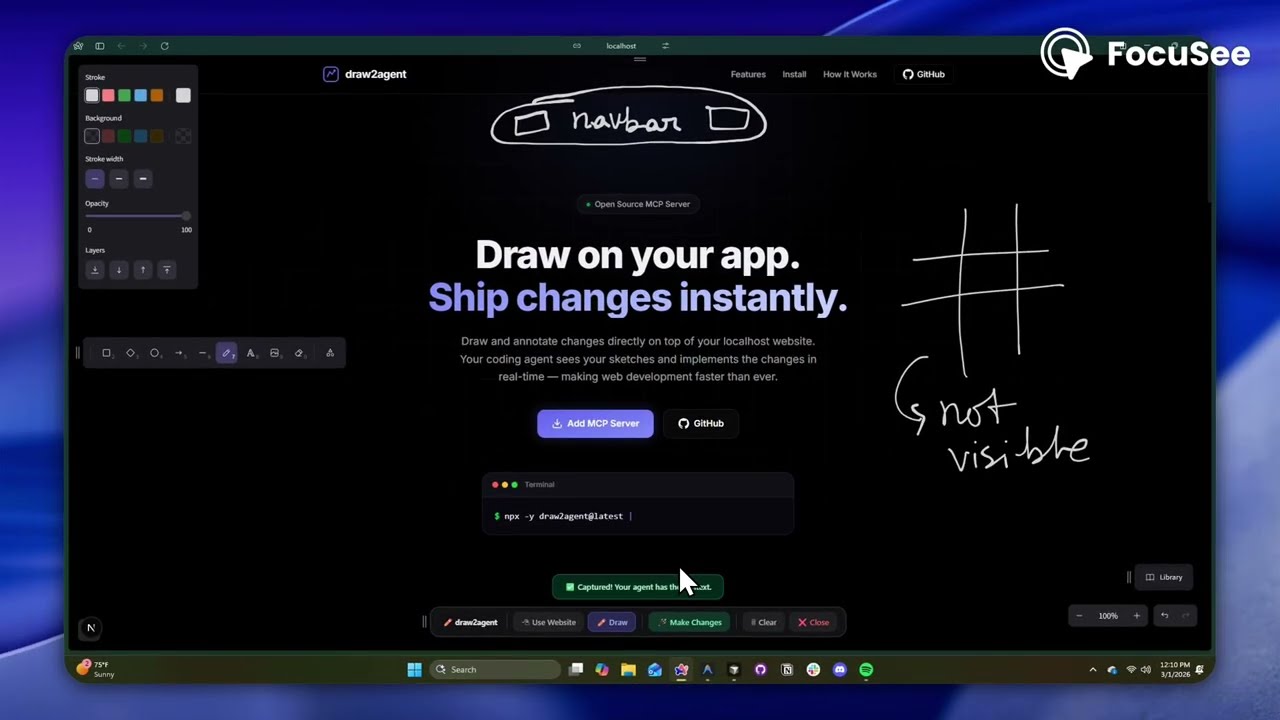
draw2agent is an MCP server that lets you draw annotations directly on top of your local dev page. When you submit, your IDE agent receives a screenshot, structured DOM data, and annotation context to make precise code edits.
👉 Try it out at: draw2agent.vercel.app
Demo
Quick Start
1. Add to your IDE (one-time)
Cursor (~/.cursor/mcp.json):
{
  "mcpServers": {
    "draw2agent": {
      "command": "npx",
      "args": ["-y", "draw2agent@latest"]
    }
  }
}
2. Use it
Tell your agent:
"Use draw2agent to fix the navbar"
- 🌐 Agent opens your browser with drawing tools on your page
- ✏️ Draw circles, arrows, text directly on your website
- 📸 Click Submit
- 🤖 Agent reads the visual context and applies code changes
How It Works
Your Dev Page (proxied)
├── Your original page content
└── Excalidraw overlay (transparent, on top)
    ├── Draw mode: annotate directly on the page
    ├── Select mode: interact with the page normally (Esc)
    └── Submit: screenshot + DOM + annotations → agent
Tools
The MCP server exposes the following tools:
| Tool | Description |
|---|---|
| launch_canvas | Opens your dev page with the drawing overlay |
| launch_ipad_canvas | Serves the page on your LAN and returns a QR code for drawing from iPad/mobile |
| launch_scratch | Opens a standalone Excalidraw whiteboard for freehand sketching |
| get_drawing_state | Returns screenshot, DOM nodes, and annotations for the current state |
launch_canvas
The core tool — proxies your localhost dev server and injects an Excalidraw overlay. Draw annotations directly on your running app, then submit to send visual context to your agent. The tool blocks until you submit.
launch_ipad_canvas
Same as launch_canvas, but serves the proxy on your computer's local network (LAN) address. Automatically opens a new browser tab on your computer with a QR code. Scan it from your iPad or phone — connected to the same Wi-Fi network — to draw annotations with touch. Perfect for whiteboard-style feedback sessions. No internet tunnel required, so it's fast and reliable.
launch_scratch
Opens a blank Excalidraw whiteboard — no target URL needed. Sketch UI mockups, wireframes, or diagrams from scratch. Your agent receives the drawing and implements the design.
get_drawing_state
Returns the last captured drawing state (screenshot, DOM nodes, annotations) without launching a new session. Useful for re-fetching context.
Releasing
Publishing to npm is automated via GitHub Actions (.github/workflows/publish.yml).
To cut a release, just bump the version and push to main:
npm version patch   # or minor / major — updates package.json
git push origin main
When package.json's version changes on main, the workflow builds the
server + overlay and publishes the new version to npm. You can also trigger it
manually from the Actions tab (e.g. to publish the current version).
One-time setup: npm Trusted Publishing
The workflow authenticates with npm via OIDC — no NPM_TOKEN secret needed.
Configure the trusted publisher once:
- Go to npmjs.com/package/draw2agent → Settings → Trusted Publisher.
- Choose GitHub Actions and enter:
- Organization or user:
zero-abd - Repository:
draw2agent - Workflow filename:
publish.yml
- Organization or user:
- Save.
This also satisfies npm's 2FA requirement, so publishing works even with
account 2FA enabled. (Alternative: create an npm Granular Access Token with
publish rights, add it as the NPM_TOKEN repo secret, and set
NODE_AUTH_TOKEN: ${{ secrets.NPM_TOKEN }} on the publish step instead.)
License
MIT