
drizzle-cube
v0.12.2
Published
Drizzle ORM-first semantic layer with Cube.js compatibility. Type-safe analytics and dashboards with SQL injection protection.

Maintainers
 cliftonc
Readme
Drizzle Cube
A Drizzle ORM-first semantic layer for type-safe analytics
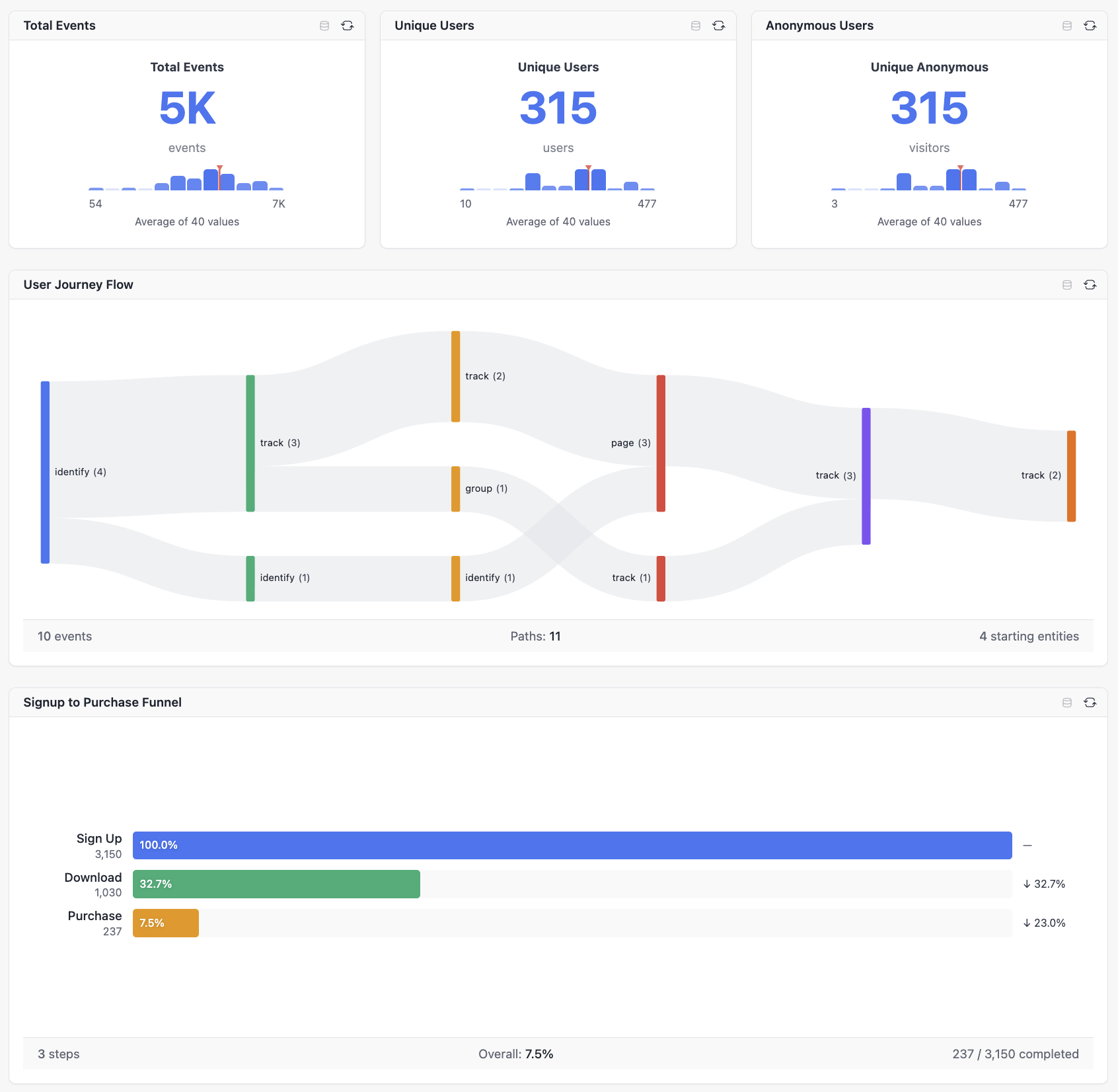
Build a semantic layer on top of your existing Drizzle ORM schema. Define cubes with measures, dimensions, joins, and security filters in TypeScript, then query them through Cube.js-compatible HTTP APIs, React analytics components, framework adapters, or MCP-enabled AI tools. SQL is generated through Drizzle ORM and parameterized query primitives; your application remains responsible for authentication, authorization, and tenant scoping.




What is a Semantic Layer?
A semantic layer sits between your database and your applications. It provides:
- Business-friendly abstractions - define "Revenue" once and use it everywhere.
- Consistent metrics - every dashboard, API caller, and AI agent uses the same calculation for "Active Users".
- Security hooks - route verified identity into
securityContextand apply tenant filters or database RLS consistently. - Self-service analytics - users explore data without writing SQL.
- Decoupling - reports and AI agents continue to work when you change the underlying data model.
Drizzle Cube brings this to the Drizzle ORM ecosystem with full TypeScript inference, Cube.js-compatible APIs, React components, framework adapters, and MCP integration.
Why Drizzle Cube?
| Feature | Drizzle Cube | Raw SQL | Other BI Tools |
|---------|--------------|---------|----------------|
| Type safety | TypeScript cube definitions and inferred schema types | Manual types | Varies |
| SQL generation | Drizzle ORM query builder and parameterized SQL | Manual, error-prone | Tool-specific |
| Multi-tenant isolation | Application-provided securityContext, cube filters, and RLS hooks | Manual | Tool-specific |
| AI integration | MCP endpoint included in adapters | Build yourself | Varies |
| Setup | Add cubes to your existing Drizzle app | Build API and UI yourself | Often separate infrastructure |
Quick Start
This example uses Hono, PostgreSQL, and postgres as one concrete path. Substitute your Drizzle driver and preferred adapter as needed.
1. Install
npm install drizzle-cube drizzle-orm hono postgresReact client usage also requires the optional React/client peers used by your app and the shipped stylesheet import shown below.
2. Define Cubes on Your Schema
Drizzle Cube does not infer or generate cube models from your database schema today. Define cubes in TypeScript, using your existing Drizzle tables. The CLI commands npx drizzle-cube charts list and npx drizzle-cube charts init scaffold custom chart plugins, not cube definitions.
import { defineCube } from 'drizzle-cube/server'
import { eq } from 'drizzle-orm'
import { departments, employees } from './schema'

export const departmentsCube = defineCube('Departments', {
  sql: (ctx) => ({
    from: departments,
    where: eq(departments.organisationId, ctx.securityContext.organisationId)
  }),

  measures: {
    count: {
      name: 'count',
      type: 'count',
      sql: departments.id
    }
  },

  dimensions: {
    id: {
      name: 'id',
      type: 'number',
      sql: departments.id,
      primaryKey: true
    },
    name: {
      name: 'name',
      type: 'string',
      sql: departments.name
    }
  }
})

export const employeesCube = defineCube('Employees', {
  sql: (ctx) => ({
    from: employees,
    where: eq(employees.organisationId, ctx.securityContext.organisationId)
  }),

  joins: {
    Departments: {
      targetCube: () => departmentsCube,
      relationship: 'belongsTo',
      on: [{ source: employees.departmentId, target: departments.id }]
    }
  },

  measures: {
    count: {
      name: 'count',
      type: 'count',
      sql: employees.id
    },
    avgSalary: {
      name: 'avgSalary',
      type: 'avg',
      sql: employees.salary
    },
    totalSalary: {
      name: 'totalSalary',
      type: 'sum',
      sql: employees.salary
    }
  },

  dimensions: {
    id: {
      name: 'id',
      type: 'number',
      sql: employees.id,
      primaryKey: true
    },
    name: {
      name: 'name',
      type: 'string',
      sql: employees.name
    },
    email: {
      name: 'email',
      type: 'string',
      sql: employees.email
    },
    hiredAt: {
      name: 'hiredAt',
      type: 'time',
      sql: employees.hiredAt
    }
  }
})
3. Create an API Server
import { createCubeApp } from 'drizzle-cube/adapters/hono'
import { drizzle } from 'drizzle-orm/postgres-js'
import postgres from 'postgres'
import { departmentsCube, employeesCube } from './cubes'
import * as schema from './schema'

const client = postgres(process.env.DATABASE_URL!)
const db = drizzle(client, { schema })

const app = createCubeApp({
  cubes: [departmentsCube, employeesCube],
  drizzle: db,
  schema,
  extractSecurityContext: async (c) => {
    const organisationId = c.req.header('x-organisation-id')

    if (!organisationId) {
      throw new Error('Missing organisation context')
    }

    return { organisationId }
  }
})

export default app
Security note:
x-organisation-idis a local demonstration shortcut. In production, derive tenant and user identity from verified authentication, then return it fromextractSecurityContext. Treat this function as your authentication and authorization boundary.
Adapter defaults expose Cube.js-compatible REST routes at /cubejs-api/v1 and the MCP endpoint at /mcp with MCP enabled by default. See the adapter documentation for Express, Fastify, Hono, and Next.js variants.
4. Query from Your App
const response = await fetch('/cubejs-api/v1/load', {
  method: 'POST',
  headers: {
    'Content-Type': 'application/json',
    'x-organisation-id': 'demo-org'
  },
  body: JSON.stringify({
    query: {
      measures: ['Employees.count', 'Employees.avgSalary'],
      dimensions: ['Departments.name']
    }
  })
})

if (!response.ok) {
  throw new Error(`Cube query failed: ${response.status}`)
}

const result = await response.json()
5. Add React Analytics Components
import { AnalysisBuilder, CubeProvider } from 'drizzle-cube/client'
import 'drizzle-cube/client/styles.css'

export function AnalyticsPage() {
  return (
    <CubeProvider
      apiOptions={{
        apiUrl: '/cubejs-api/v1',
        headers: { 'x-organisation-id': 'demo-org' }
      }}
    >
      <AnalysisBuilder />
    </CubeProvider>
  )
}
Use AnalyticsDashboard when you want to compose and persist dashboard layouts in your own application storage. AI agents can connect to /mcp; those requests use the same adapter security context as the REST API.
Generate schema and cubes from dbt artifacts
Generate Drizzle pg-core schema and one Drizzle Cube definition per supported dbt model from local dbt artifacts:
npx drizzle-cube dbt generate --manifest target/manifest.json --catalog target/catalog.json --dialect postgres --out ./src/cubes/generated --security-column organisation_id --security-context organisationIdSee docs/dbt-generate.md for all options, security modes, drift checking, and v1 limitations. The v1 generator is local artifact-only and Postgres-only; it does not clone GitHub repositories, run dbt, or parse raw dbt project YAML/Jinja.
Analysis Modes
Drizzle Cube supports multiple analysis modes at the semantic-layer level:
Query Builder (Analysis Builder)
Build ad-hoc queries with measures, dimensions, filters, and time ranges. The React Analysis Builder includes a search-first field picker, chart configuration, and multiple visualization options.
Funnel Analysis
Track conversion through ordered steps, drop-off rates, and time-to-convert metrics. Funnels require a binding key, an event time dimension, and ordered step filters. A canonical request nests the funnel configuration under funnel:
{
  funnel: {
    bindingKey: 'Users.id',
    timeDimension: 'Events.timestamp',
    includeTimeMetrics: true,
    steps: [
      {
        name: 'Signed Up',
        filter: { member: 'Events.type', operator: 'equals', values: ['signed_up'] }
      },
      {
        name: 'Activated',
        filter: { member: 'Events.type', operator: 'equals', values: ['activated'] }
      },
      {
        name: 'Subscribed',
        filter: { member: 'Events.type', operator: 'equals', values: ['subscribed'] }
      }
    ]
  }
}
Flow Analysis
Visualize user journeys and navigation paths through states, pages, or events. Flow analysis needs event-style dimensions that identify the actor, timestamp, and step value.
Retention Analysis
Measure cohort retention over days, weeks, or months. Retention analysis requires suitable cohort, return-event, and time dimensions.
Dashboards
Compose multiple charts into dashboards with grid layouts, filters, themes, and custom chart plugins. Applications own dashboard persistence and sharing workflows.
Validation surfaces missing mode prerequisites and engine capability differences before execution. See the analysis documentation for detailed mode configuration.
AI & MCP Integration
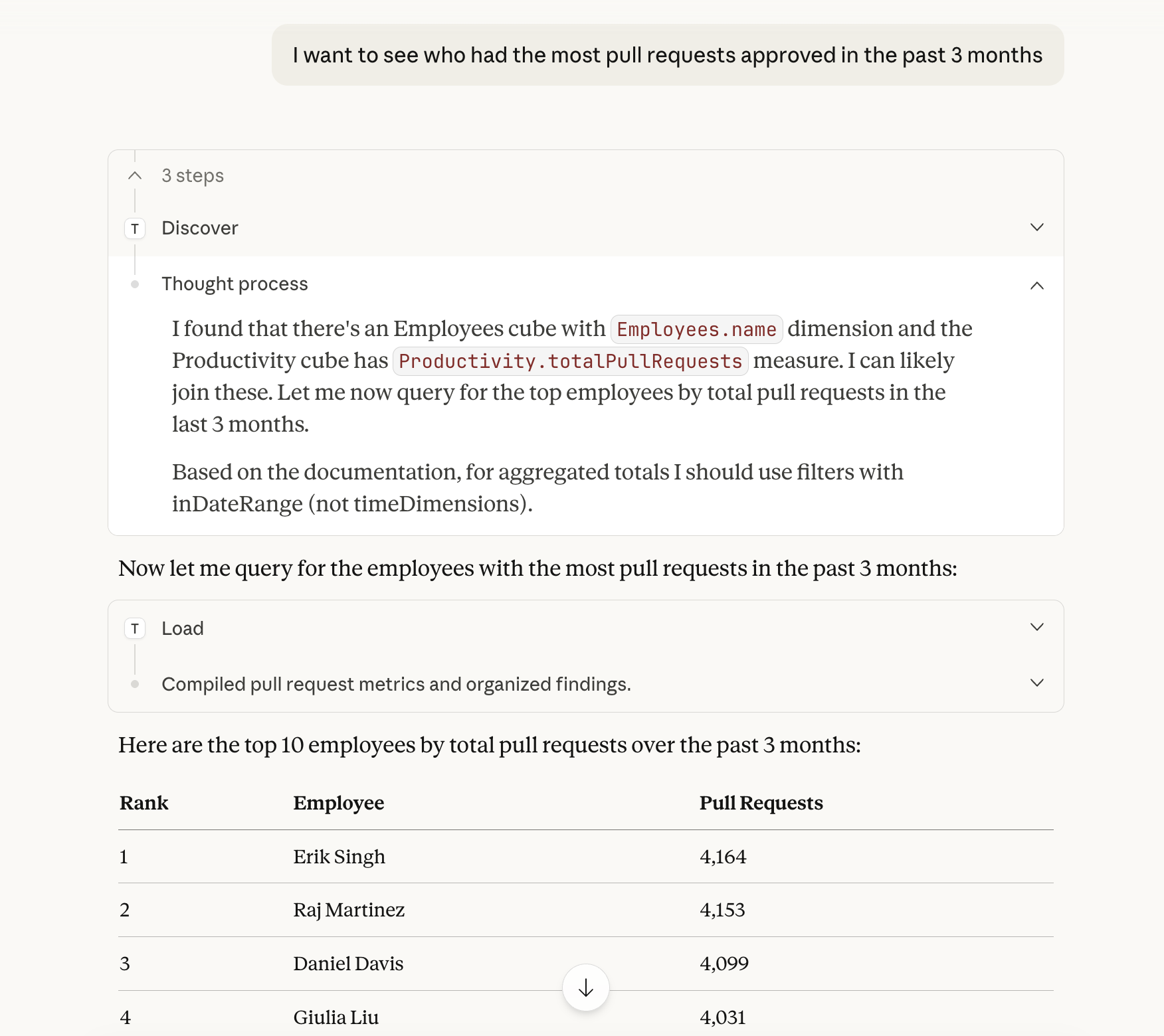
Drizzle Cube adapters include a default-enabled MCP endpoint at /mcp, allowing AI agents to discover metadata, validate queries, and load results through the same security boundary as other API calls.
Available MCP Tools
| Tool | Availability | Purpose |
|------|--------------|---------|
| discover | Always available | Find relevant cubes and members by topic. |
| validate | Always available | Validate queries and return corrections before execution. |
| load | Always available | Execute validated queries and return data. |
| chart | Conditional | Available only when MCP App support is enabled with mcp.app; returns interactive chart visualizations. |
For public deployments, configure verified bearer-token handling, resource metadata, and explicit browser origins as appropriate for your MCP clients. extractSecurityContext remains the application authentication boundary.
Connect AI Tools
Connector setup varies by client and transport. For example, Claude Desktop can use mcp-remote:
{
  "mcpServers": {
    "analytics": {
      "command": "npx",
      "args": ["-y", "@anthropic/mcp-remote", "https://your-app.com/mcp"]
    }
  }
}
See the MCP endpoint documentation for transport, authentication, and client-specific guidance.
Claude Code Plugin
Query your semantic layer with natural language directly from Claude Code. In Claude Code, add the plugin marketplace and install the plugin:
/plugin marketplace add cliftonc/drizzle-cube-plugin
/plugin install drizzle-cube@drizzle-cube-marketplace
The plugin repository is the source of truth for installation and configuration: cliftonc/drizzle-cube-plugin. For custom servers, configure Claude's .mcp.json plus the plugin's .drizzle-cube.json endpoint settings.
Features
Semantic Layer
- Cubes - define measures, dimensions, hierarchies, calculated measures, and member metadata.
- Joins - model
belongsTo,hasOne,hasMany, andbelongsToManyrelationships. - Query planning - resolve cross-cube paths, validate queries, dry-run generated SQL, and explain plans.
- Security hooks - pass application-authenticated context into cube SQL and optional database RLS patterns.
- Performance hooks - configure query caching and execution options where appropriate.
Modeling Limitation: Multi-Fact Queries
- For
FactA -> Dimension <- FactBstar or snowflake patterns, define reversehasManyjoins on the center dimension back to each fact. - Example: if
SalesandInventorybothbelongsTo Products,Productsshould definehasMany SalesandhasMany Inventory. - Join-path traversal is directional. Without reverse joins, the planner may not be able to pick the center dimension as the primary cube, which can lead to fan-out-prone execution plans.
- If you cannot add reverse joins immediately, include the center join key dimension, such as
Products.id, in the query grain to reduce aggregation ambiguity.
Client Components
- AnalysisBuilder - interactive query builder for ad-hoc exploration.
- AnalyticsDashboard - dashboard composition with application-owned persistence.
- Data browser - metadata-driven field exploration.
- Analysis modes - query, funnel, flow, and retention.
- Charts - 26 built-in chart types, including Cartesian, pie, KPI, funnel, Sankey, sunburst, heatmap, retention, statistical, financial, profile, and gauge visualizations.
- Customization - theming, i18n, and custom chart plugins.
Framework and Database Support
- Framework adapters - Express, Fastify, Hono, and Next.js.
- Database engines - PostgreSQL, MySQL, SQLite, DuckDB, Snowflake, Databend, and SingleStore.
- Client runtime - React components with TanStack Query integration and optional feature-specific peer dependencies.
Responsibilities and Limitations
- Provide a connected Drizzle instance and schema for the selected driver.
- Install optional peer dependencies for selected adapters, chart types, and client features.
- Authenticate every request before returning
securityContext. - Apply tenant filters in cube SQL or configure database RLS for the same isolation goal.
- Persist dashboard configurations, sharing permissions, and user preferences in your application.
Documentation
- Getting Started - installation and setup.
- Semantic Layer - cubes, measures, dimensions, joins, and security context.
- Client Components - React components, dashboards, charts, and analysis modes.
- AI Integration - MCP endpoints and Claude Code plugin.
- API Reference - detailed API documentation.
Examples
- Hono Example - Hono server integration.
- Express Example - Express server integration.
- Fastify Example - Fastify server integration.
- Next.js Example - full-stack Next.js integration.
Contributing
We welcome contributions. Please see our Contributing Guide.
Query performance is benchmarked on every push to main — browse the historical trends at the Performance Dashboard.
Roadmap
View and contribute to the roadmap on GitHub Projects.
License
MIT © Clifton Cunningham
Built for the Drizzle ORM community.
This repository is maintained with the assistance of Last Light, an automated GitHub maintenance bot that handles issue triage, pull request reviews, and routine repository upkeep.