
droidlane
v1.4.0
Published
A futuristic terminal-style Android project dashboard — file editor, build console, and git branch switcher in one local web app.
Downloads
11

Maintainers
 zendeveloper
Readme
◈ DroidLane
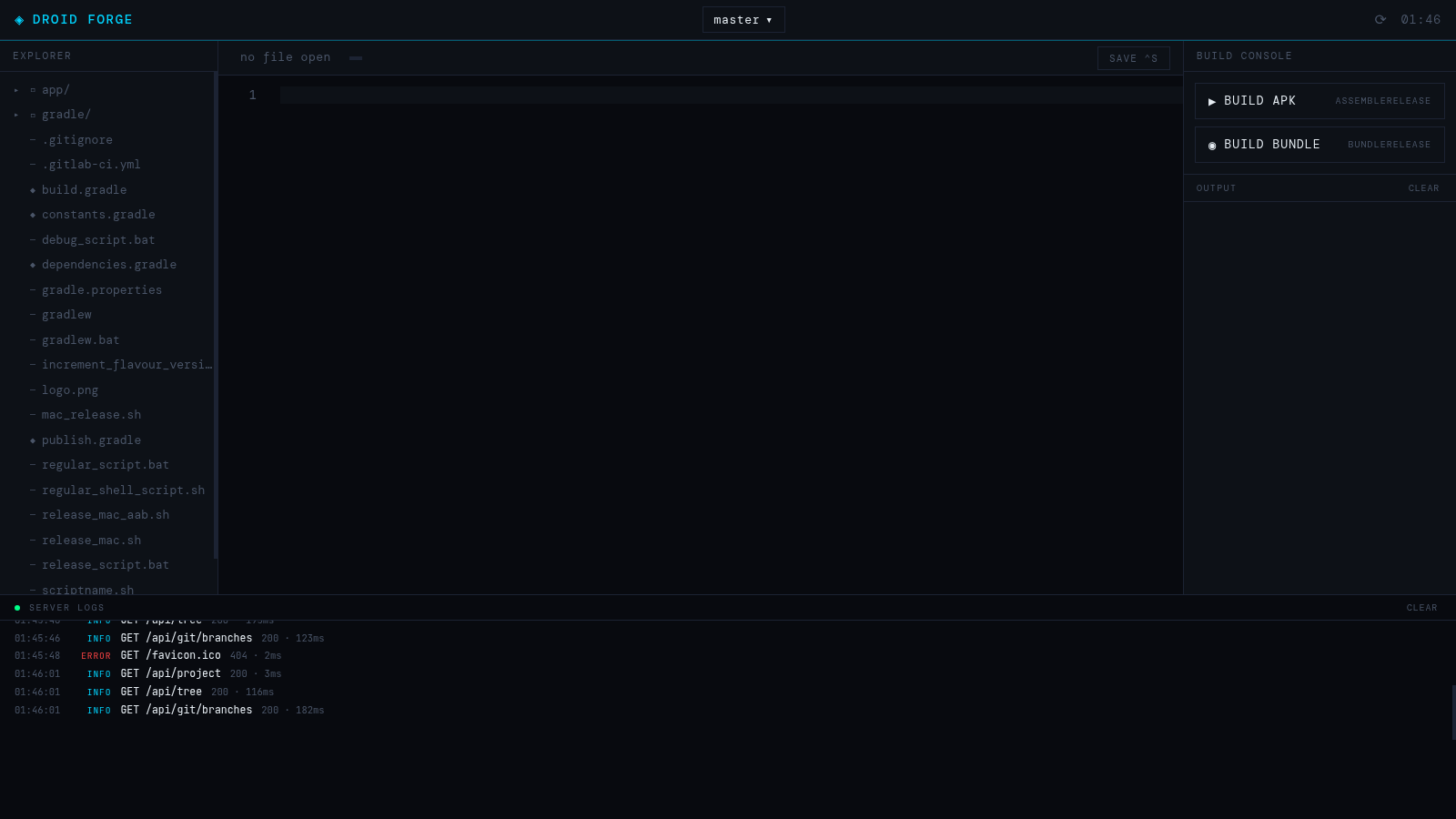
A futuristic terminal-style dashboard for Android projects — file editor, Gradle build console, and git branch switcher in one local web app. No cloud, no accounts, no build step.
Install
Via npm (recommended)
npm install -g droidlane
droidlane /path/to/your/android/project
Without installing (npx, runs latest version every time)
npx droidlane /path/to/your/android/projectDirectly from GitHub (no npm account needed)
npm install -g github:ZenDeveloper7/droidlane
droidlane /path/to/your/android/project
From a release tarball (offline/air-gapped)
# Download droidlane-x.x.x.tgz from GitHub Releases, then:
npm install -g ./droidlane-x.x.x.tgz
droidlane /path/to/your/android/project
Features
| Panel / Feature | What it does |
|---|---|
| Explorer | File tree with collapsible dirs, file search (filters by name and path), active-file highlight |
| Editor | Monaco Editor (same engine as VS Code) with a custom dark theme, Ctrl+S save, unsaved indicator |
| Build Console | One-click assembleRelease, bundleRelease, or Build Both; live Gradle output streamed line-by-line; cancel button; copy errors |
| Build Both | Chains bundleRelease → assembleRelease in sequence using a single button click |
| Expand panel | The ⟺ button in the Build Console header widens the panel to 600 px for easier reading of long output lines |
| Copy errors | "Copy Errors" button collects all red error lines from the current build log and copies them to the clipboard |
| Output files | After a successful build, .aab and .apk artefacts are automatically copied to droidlane-output/ in the project root and listed below the success banner |
| Server Logs | Real-time strip at the bottom — every API call, file save, git op, and build event; drag the resize handle to adjust height |
| Branch Switcher | Searchable dropdown in the header, type-to-filter across all local + remote branches |
| Flavour Build | Open any .gradle file inside a flavours/ directory → "Add to Build List" updates app/release.gradle with the selected flavour in one click |
| Default file / pin | Hover any file in the explorer and click ⊙ to pin it as the file that opens automatically on startup; preference is saved to .droidlane-config.json |
| JDK detection | Automatically finds and uses the JDK bundled with Android Studio; shown as a badge in the Build Console |
| Tailscale / LAN | Binds to 0.0.0.0, prints your Tailnet URL on start so you can open it from any device |
Usage
droidlane <project-path>

  project-path   Absolute or relative path to the root of an Android project
                 (the directory that contains gradlew)
On launch you'll see:
  ◈ DROIDLANE
  Project : /home/you/projects/MyApp
  Local   : http://localhost:3131
  Tailnet : http://100.x.x.x:3131
Android Studio JDK (automatic)
Droidlane automatically finds and uses the JDK bundled with Android Studio for all Gradle builds. This prevents the common error:
Unsupported class file major version 69which occurs when the system Java is newer than what the Android Gradle Plugin supports.
How it works: At startup droidlane searches the standard Android Studio install paths for the bundled JBR and sets JAVA_HOME before spawning Gradle. The detected JDK path is shown in the Build Console panel's JDK badge.
If the JDK is not detected automatically, set it manually:
# One-time for the current shell session:
ANDROID_STUDIO_JDK=/path/to/android-studio/jbr droidlane /path/to/project

# Permanently (add to ~/.bashrc or ~/.zshrc):
export ANDROID_STUDIO_JDK=/path/to/android-studio/jbr
Common paths by platform:
| Platform | Path |
|---|---|
| Linux | /opt/android-studio/jbr |
| macOS | /Applications/Android Studio.app/Contents/jbr/Contents/Home |
| Windows | C:\Program Files\Android Studio\jbr |
CLI commands
# Launch the dashboard
droidlane /path/to/project

# Add one or more names to .droidlane-ignore (hide from file explorer)
droidlane ignore <name1> [name2 ...]
droidlane ignore <name1> [name2 ...] --project /path/to/project
The ignore sub-command appends entries to .droidlane-ignore in the project directory (defaults to the current working directory). Already-present entries are skipped silently.
Keyboard shortcuts
| Shortcut | Action |
|---|---|
| Ctrl+S / Cmd+S | Save current file |
| Escape | Close branch dropdown |
| Enter (in branch search) | Checkout first filtered branch |
Excluding folders from the file tree
By default droidlane shows all directories. To hide folders, create a .droidlane-ignore file in your project root:
# .droidlane-ignore

# Bare name → hides any dir with that name anywhere in the tree
build
.gradle
node_modules
.git
.idea

# Path with slash → hides that exact relative path and everything under it
app/src- Lines starting with
#are comments - Use
droidlane ignore <folder>to add entries from the terminal - Delete the file (or leave it empty) to show everything
Default file (auto-open on startup)
Droidlane auto-opens release.gradle on startup if it exists in the project.
For other projects, hover any file in the explorer and click the ⊙ pin icon to set it as the default.
The preference is saved to .droidlane-config.json in the project root.
Output files
After every successful build, droidlane collects all .aab and .apk files produced under app/build/outputs/ and copies them to a droidlane-output/ directory in the project root. The directory is created automatically if it does not exist. The copied filenames are listed in the Build Console below the success banner.
Build Both
The Build Both button in the Build Console runs bundleRelease first, then automatically chains assembleRelease once the bundle succeeds. Both tasks share the same output log. If either task fails the chain stops. Cancelling during the first task also cancels the pending second task.
Architecture
droidlane/
├── bin/
│   └── launch.js      # CLI entry point — validates path, starts server, detects Tailscale IP, opens browser
├── public/
│   ├── index.html     # Shell layout, all CSS, font imports
│   └── app.js         # Vanilla JS frontend — no framework, no bundler
├── server.js          # Express backend — file I/O, git, Gradle SSE, JDK detection, log bus
└── package.json
Backend — Express on port 3131, bound to 0.0.0.0. Handles file read/write, git branch listing and checkout, Gradle build streaming over SSE, JDK detection, and post-build artefact copying.
Frontend — Pure ES modules in the browser. Monaco Editor served locally (no CDN, instant load).
Build output — Streamed over Server-Sent Events so you see output as Gradle produces it. On success, .aab/.apk files are copied to droidlane-output/.
Server logs — An in-process event bus fans structured log entries to the bottom strip via SSE.
Requirements
- Node.js ≥ 18
- An Android project with a
gradlewwrapper (orgradleon PATH) - Android Studio installed (for automatic JDK detection — optional but recommended)
- Git (optional — branch switcher gracefully degrades if not a repo)
- Tailscale (optional — remote access feature only)
Releases
Latest release and all tarballs: github.com/ZenDeveloper7/droidlane/releases
Local development
git clone https://github.com/ZenDeveloper7/droidlane
cd droidlane
npm install
node bin/launch.js /path/to/android/project
License
MIT