
dronahq-cli
v1.0.1
Published
DronaHQ-Cli to create MicroApp
Downloads
206


Readme
What is it good for?
The library allows you to:
- Create vanilla project of microapp.
- Package the project in a format which can be uploaded on DronaHQ Admin Console.
- Keep dronahq.js version upto date.
- Test created microapp in DronaHQ simulator.
Toolset
- npm 5 is required.
- Node 8 LTS is required.
Installing
Switch to dev CLI:
$ dhqExamples
Basic usage
Executing CLI
Create a new Project :
- Run the script with the command
$ dhq- Select 'create a new Project.' ( It will download the dronahq package which has the vanilla version of the project ).
- Enter the path where the project needs to be created.
- Modify as required inside the project.
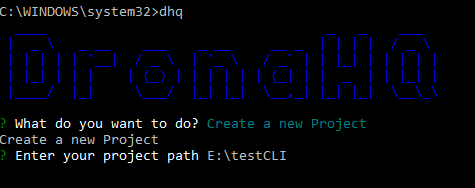
If you already have created project you dont need to follow this step
Package the Project :
- Run the script with the command
$ dhq- Select Build a Zip of the Project.
- It will request for path, enter the path till folder which has index.html present inside.
- If all the files that are required are present then a zip file will be created by the name of the zippedProject.zip
- This file then can be uploaded directly into the website.
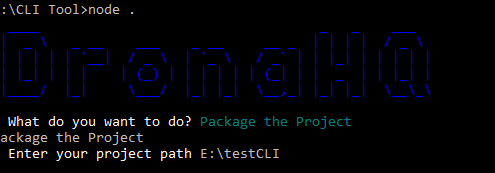
Check if dronahq.js is upto date (outdated as now this is done during packaging the project):
- Run the script with the command
$ dhq- Select 'Check if DronaHQ.js is upto date'.
- The CLI tool will request for the path where dronahq.js is present (Enter the path till the javascript folder which has dronahq.js).
- The dronahq.js will be compared with the online dronahq.js and if it is a previous version it will ask if you want to update the js if answered with a Y then the dronahq.js will get updated or the same dronahq.js will be present inside the project.
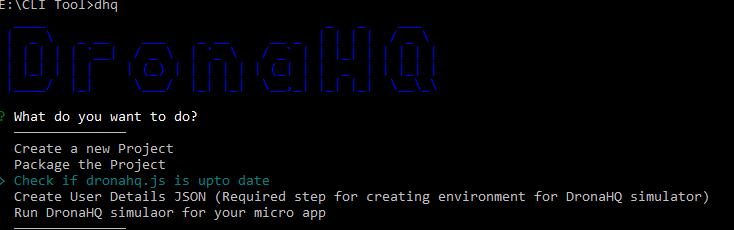
Setting up user environment for DronaHQ simulator :
- Run the script with the command
$ dhq- Select 'Setup user environment for DronaHQ simulator'.
- Fill the details as requested by the tool.
- Your environment will be ready.
Run DronaHQ simulator for your micro app:
- Run the script with the command
$ dhq- Select 'Run DronaHQ simulator'.
- It will request for path, enter the path till folder which has index.html present inside.
- Happy debugging your App.
Note: Currently simulator is not supported on MAC.
If the simulator does not run execute the following command in command prompt
npm install -g electronPublish package to DronaHQ console:
- Run the script with the command
$ dhq- Select 'Upload package to Dronahq console'.
- Provide the details as requested.
- Your app is successfully available on DronaHQ.
Publish package to DronaHQ Console - Via CLI (new)
You can directly upload and publish a package to an existing app you've already created, using command-line options to provide details you'd have to provide through the interactive interface otherwise.
SYNOPSIS
dhq -a=[APIKEY] -e=[ENVIRONMENT] -u=[UPDATETYPE] -d=[DESCRIPTION] -p=[PATH]
dhq -a=[APIKEY] -e=[ENVIRONMENT] -u=[UPDATETYPE] -d=[DESCRIPTION] -p=[PATH] -o=[OUTPUTFILE]
dhq -f=[INPUTFILE] -o=[OUTPUTFILE]


dhq --apikey=[APIKEY] --environment=[ENVIRONMENT] --updateType=[UPDATETYPE] --description=[DESCRIPTION] --path=[PATH]
dhq --apikey=[APIKEY] --environment=[ENVIRONMENT] --updateType=[UPDATETYPE] --description=[DESCRIPTION] --path=[PATH] --outfile=[OUTPUTFILE]
dhq --file=[INPUTFILE] --outfile=[OUTPUTFILE]
EXAMPLE
dhq -a=xxxxxxxxxxxxx-xxxx-xxxx-xxxx-xxxxxxxxxxxxxxxxxxxxxxxxxxxxxxxxxx -e=prod -u=patch -d=Description -p=path/to/file
dhq -a=xxxxxxxxxxxxx-xxxx-xxxx-xxxx-xxxxxxxxxxxxxxxxxxxxxxxxxxxxxxxxxx -e=prod -u=patch -d=Description -p=path/to/package.zip -o=path/to/output.csv
dhq -f=path/to/inputFile.zip -o=path/to/output.csv

dhq --apikey=xxxxxxxxxxxxx-xxxx-xxxx-xxxx-xxxxxxxxxxxxxxxxxxxxxxxxxxxxxxxxxx --environment=prod --updateType=patch -d=Description -p=path/to/file
dhq --apikey=xxxxxxxxxxxxx-xxxx-xxxx-xxxx-xxxxxxxxxxxxxxxxxxxxxxxxxxxxxxxxxx --environment=prod --updateType=patch --description==Description --path=path/to/package.zip --outfile=path/to/output.csv
dhq --file==path/to/inputFile.zip --outfile=path/to/output.csv
OPTIONS
-a, --apikey- -> [Required] The active license key for your created app.
-e, --environment- -> [Required] The app environment for your app's new version.
Options: dev, beta, prod
-u, --updateType- -> The update type of your new version as per semantic versioning syntax.
Options: major, minor, patch (default: patch)
-d, --description- -> [Required] The release notes for your app's new version.
-p, --path- -> [Required] The path for your package's zip file for your app's new version.
-o, --outfile- -> The path for an output file for publish statuses. The output will be provided in CSV format. If the file doesn't exist, one will be created with a CSV string in the first line to signify headers.
-f, --file- -> The path for a JSON file containing values for the above arguments - use the full names of the above arguments as keys and string values. Keys provided here do not need to be provided again as separate CLI arguments. Sample JSON input:-
  {
    "apikey": "<APIKEY>",
    "environment": "<ENVIRONMENT>",
    "updateType": "<UPDATETYPE>",
    "description": "<DESCRIPTION>",
    "path": "<PATH>",
    "outfile": "<OUTFILE>"
  }
Dependencies
adm-zip, chalk,clui, co, co-prompt, commander, compare-versions, electron, figlet, folder-zip-sync, github, inquirer, lodash, minimist, node-storage, preferences, q, rimraf, simple-git, superagent,sync-request, touch, unzip, validator, zip-folder.